# 2.6. Roles

<span lang="EN-GB" style="font-family: 'Arial',sans-serif; mso-ansi-language: EN-GB;">The researchers at PMU have been assigned a personal user role. The PURE-editors of organisational units of PMU receive additional roles. Please contact the Research Management (<pure@pmu.ac.at>) if you encounter a problem with your role.</span>

<span lang="EN-GB" style="font-family: 'Arial',sans-serif; mso-ansi-language: EN-GB;"> </span>

<u><span lang="EN-GB" style="font-family: 'Arial',sans-serif; mso-ansi-language: EN-GB;">To check on your role(s):</span></u>

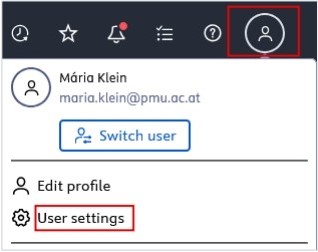
1. <span lang="EN-GB" style="font-family: 'Arial',sans-serif; mso-ansi-language: EN-GB;"> Click on *Profile menu* in the header and select *User settings*:</span>

[![Bild 1.jpeg](https://wiki.pmu.ac.at/uploads/images/gallery/2025-09/scaled-1680-/i9Tbild-1.jpeg)](https://wiki.pmu.ac.at/uploads/images/gallery/2025-09/i9Tbild-1.jpeg)

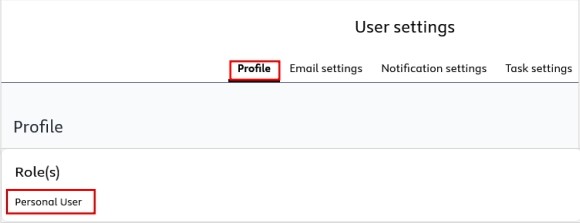
2\. In the *Profile* tab under *Roles*, you can see all your roles:

[![Bild 13.jpeg](https://wiki.pmu.ac.at/uploads/images/gallery/2025-09/scaled-1680-/bild-13.jpeg)](https://wiki.pmu.ac.at/uploads/images/gallery/2025-09/bild-13.jpeg)