# 3.2.1. Import From Online Source

<span lang="EN-GB" style="mso-bidi-font-family: Arial; mso-ansi-language: EN-GB;">This option **is most preferable** because this method can save you time, minimize effort, and reduce data-entry errors. It can be used for any kind of research output that is **published in PubMed or Web of Science**.</span>

<span lang="EN-GB" style="mso-bidi-font-family: Arial; color: #002060; mso-ansi-language: EN-GB;"> </span>

<u><span lang="EN-GB" style="mso-bidi-font-family: Arial; color: black; mso-themecolor: text1; mso-ansi-language: EN-GB;">To import a research output from online source:</span></u>

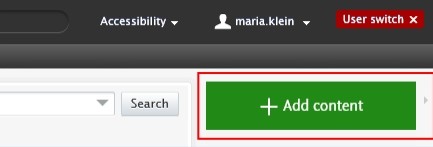
1. <span lang="EN-GB" style="mso-bidi-font-family: Arial; color: black; mso-themecolor: text1; mso-ansi-language: EN-GB;"> Click on the</span><span lang="EN-GB" style="mso-bidi-font-family: Arial; color: black; mso-themecolor: text1; mso-ansi-language: EN-GB;"> Add </span><span lang="EN-GB" style="mso-bidi-font-family: Arial; color: black; mso-themecolor: text1; mso-ansi-language: EN-GB;"><span lang="EN-GB" style="mso-bidi-font-family: Arial; color: black; mso-themecolor: text1; mso-ansi-language: EN-GB;">content button:</span></span>[![Bild 20.jpeg](https://wiki.pmu.ac.at/uploads/images/gallery/2025-09/scaled-1680-/bild-20.jpeg)](https://wiki.pmu.ac.at/uploads/images/gallery/2025-09/bild-20.jpeg)

<span lang="EN-GB" style="mso-bidi-font-family: Arial; mso-ansi-language: EN-GB;">Or click on *Editor* in the header, select *Research outputs*, and then click on the </span><span style="mso-bidi-font-family: Arial; mso-fareast-language: DE-AT; mso-no-proof: yes;">![](https://wiki.pmu.ac.at/uploads/images/gallery/2025-09/embedded-image-jutgbecu.png)</span><span lang="EN-GB" style="mso-bidi-font-family: Arial; mso-ansi-language: EN-GB;">button:</span>

[![Bild 21.jpeg](https://wiki.pmu.ac.at/uploads/images/gallery/2025-09/scaled-1680-/bild-21.jpeg)](https://wiki.pmu.ac.at/uploads/images/gallery/2025-09/bild-21.jpeg)

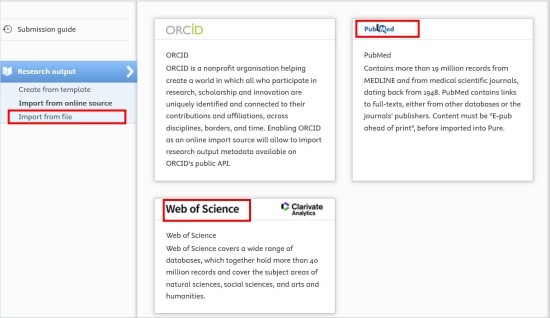
<span lang="EN-GB" style="mso-bidi-font-family: Arial; color: black; mso-themecolor: text1; mso-ansi-language: EN-GB;"> 2. Select *Import from online source*. As an Editor of a teaching hospital, you can import you data from **PubMed** or **Web of Science**.</span>

[![Bild 22.jpeg](https://wiki.pmu.ac.at/uploads/images/gallery/2025-09/scaled-1680-/bild-22.jpeg)](https://wiki.pmu.ac.at/uploads/images/gallery/2025-09/bild-22.jpeg)

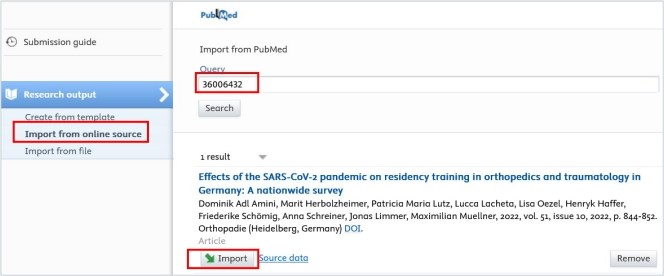
<span lang="EN-GB" style="mso-bidi-font-family: Arial; color: black; mso-themecolor: text1; mso-ansi-language: EN-GB;"> 3. Select the online source you want import from.  
 4. Enter the information you want to search for, such as PubMed ID or your name.  
Please ensure you always review the guidelines for the correct format of the information you intend to look for.  
 5. Click on the *Import* button located at the bottom of the article you wish to import into Pure.</span>

[![Bild 23.jpeg](https://wiki.pmu.ac.at/uploads/images/gallery/2025-09/scaled-1680-/bild-23.jpeg)](https://wiki.pmu.ac.at/uploads/images/gallery/2025-09/bild-23.jpeg)

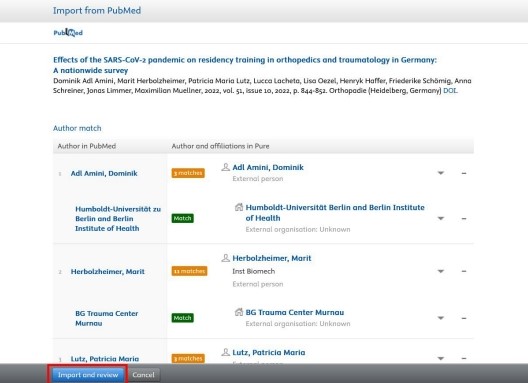
<span lang="EN-GB" style="mso-bidi-font-family: Arial; color: black; mso-themecolor: text1; mso-ansi-language: EN-GB;"> 6. Now, you can view the publication details. Do not modify the information displayed here; simply click on Import and review at the bottom of the window:</span>

[![Bild 24.jpeg](https://wiki.pmu.ac.at/uploads/images/gallery/2025-09/scaled-1680-/bild-24.jpeg)](https://wiki.pmu.ac.at/uploads/images/gallery/2025-09/bild-24.jpeg)

<span lang="EN-GB" style="mso-fareast-font-family: Arial; mso-bidi-font-family: Arial; mso-ansi-language: EN-GB;"><span style="mso-list: Ignore;">1 </span></span><span lang="EN-GB" style="mso-bidi-font-family: Arial; color: black; mso-themecolor: text1; mso-ansi-language: EN-GB;">7. In the Research output editor window, you need to manage these fields:</span>

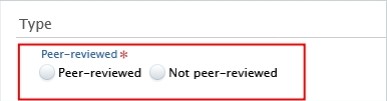
**<span lang="EN-GB" style="mso-fareast-font-family: Arial; mso-bidi-font-family: Arial; color: #232e64; mso-ansi-language: EN-GB;"><span style="mso-list: Ignore;">1.<span style="font: 7.0pt 'Times New Roman';"> </span></span></span>****<span lang="EN-GB" style="mso-bidi-font-family: Arial; color: #232e64; mso-ansi-language: EN-GB;">Peer-reviewed</span>**<span lang="EN-GB" style="mso-bidi-font-family: Arial; mso-ansi-language: EN-GB;">:</span>

<span lang="EN-GB" style="mso-bidi-font-family: Arial; color: black; mso-themecolor: text1; mso-ansi-language: EN-GB;">Whether the publication underwent a **peer-reviewed process** or not (peer-reviewed or not peer-reviewed):</span>

[![Bild 25.jpeg](https://wiki.pmu.ac.at/uploads/images/gallery/2025-09/scaled-1680-/bild-25.jpeg)](https://wiki.pmu.ac.at/uploads/images/gallery/2025-09/bild-25.jpeg)

<p class="callout info"><span lang="EN-GB" style="mso-bidi-font-family: Arial; color: black; mso-themecolor: text1; mso-style-textoutline-type: none; mso-style-textoutline-outlinestyle-dpiwidth: .75pt; mso-style-textoutline-outlinestyle-linecap: round; mso-style-textoutline-outlinestyle-join: bevel; mso-style-textoutline-outlinestyle-pctmiterlimit: 0%; mso-style-textoutline-outlinestyle-dash: solid; mso-style-textoutline-outlinestyle-align: center; mso-style-textoutline-outlinestyle-compound: simple; mso-ansi-language: EN-GB;">Click on *Change template* if you realise that the **subtype** of the Research output is **incorrect**. For example, if you have selected *Original article* but need to add a *Review article*, you can easily switch between template types without losing any of the data you have already filled in:</span></p>

[![Bild 26.jpeg](https://wiki.pmu.ac.at/uploads/images/gallery/2025-09/scaled-1680-/bild-26.jpeg)](https://wiki.pmu.ac.at/uploads/images/gallery/2025-09/bild-26.jpeg)

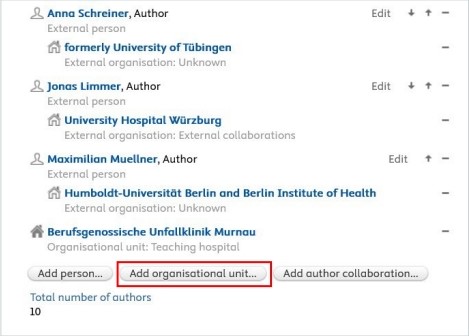
**<span lang="EN-GB" style="mso-fareast-font-family: Arial; mso-bidi-font-family: Arial; color: #232e64; mso-ansi-language: EN-GB;"><span style="mso-list: Ignore;">2.<span style="font: 7.0pt 'Times New Roman';"> </span></span></span>****<span lang="EN-GB" style="mso-bidi-font-family: Arial; color: #232e64; mso-ansi-language: EN-GB;">Contributors and affiliations</span>**<span lang="EN-GB" style="mso-bidi-font-family: Arial; color: black; mso-themecolor: text1; mso-ansi-language: EN-GB;">:</span>

<span lang="EN-GB" style="mso-bidi-font-family: Arial; color: black; mso-themecolor: text1; mso-ansi-language: EN-GB;">Pure automatically adds contributors with their affiliations to these fields. Here, you only need to add your teaching hospital by clicking on the *Add organization unit* button:</span>

[![Bild 28.jpeg](https://wiki.pmu.ac.at/uploads/images/gallery/2025-09/scaled-1680-/bild-28.jpeg)](https://wiki.pmu.ac.at/uploads/images/gallery/2025-09/bild-28.jpeg)

**<span lang="EN-GB" style="mso-fareast-font-family: Arial; mso-bidi-font-family: Arial; color: #232e64; mso-ansi-language: EN-GB;"><span style="mso-list: Ignore;">3.<span style="font: 7.0pt 'Times New Roman';"> </span></span></span>****<span lang="EN-GB" style="mso-bidi-font-family: Arial; color: #232e64; mso-ansi-language: EN-GB;">Managing organisational unit</span>**<span lang="EN-GB" style="mso-bidi-font-family: Arial; mso-ansi-language: EN-GB;">: </span>

<span lang="EN-GB" style="mso-bidi-font-family: Arial; color: black; mso-themecolor: text1; mso-ansi-language: EN-GB;">Select *your teaching hospital* to this field by clicking on the "house with a plus" b</span><span style="mso-fareast-language: DE-AT; mso-no-proof: yes;"></span><span lang="EN-GB" style="mso-bidi-font-family: Arial; color: black; mso-themecolor: text1; mso-ansi-language: EN-GB;">utton:</span>

[![Bild 27.jpeg](https://wiki.pmu.ac.at/uploads/images/gallery/2025-09/scaled-1680-/bild-27.jpeg)](https://wiki.pmu.ac.at/uploads/images/gallery/2025-09/bild-27.jpeg)

<span lang="EN-GB" style="mso-bidi-font-family: Arial; color: black; mso-themecolor: text1; mso-ansi-language: EN-GB;"> 8. Set the workflow status *For validation* and then click on *Save*. </span>

[![Bild 29.jpeg](https://wiki.pmu.ac.at/uploads/images/gallery/2025-09/scaled-1680-/bild-29.jpeg)](https://wiki.pmu.ac.at/uploads/images/gallery/2025-09/bild-29.jpeg)

<span lang="EN-GB" style="mso-bidi-font-family: Arial; mso-ansi-language: EN-GB;">In the next step, the imported research output undergoes **validation** by the Research Management of PMU.</span>