# 3.2. Persons

<span lang="EN-GB">When a new employee starts to work at your organisation, they need to be registered in PURE. </span>

**<u><span lang="EN-GB">To create a new Person:</span></u>**

<span lang="EN-GB" style="mso-fareast-font-family: Arial;"><span style="mso-list: Ignore;">1.<span style="font: 7.0pt 'Times New Roman';"> </span></span></span><span lang="EN-GB">Click on *Master data* in the header:</span>

[![Bild 12.jpeg](https://wiki.pmu.ac.at/uploads/images/gallery/2025-09/scaled-1680-/bild-12.jpeg)](https://wiki.pmu.ac.at/uploads/images/gallery/2025-09/bild-12.jpeg)

<span style="mso-ignore: vglayout; position: absolute; z-index: 251674624; left: 0px; margin-left: 101px; margin-top: 44px; width: 125px; height: 27px;">  
</span><span style="mso-ansi-language: DE-AT; mso-fareast-language: DE-AT; mso-no-proof: yes;"></span>

<span lang="EN-GB" style="mso-fareast-font-family: Arial;"><span style="mso-list: Ignore;">2.<span style="font: 7.0pt 'Times New Roman';"> </span></span></span><span lang="EN-GB">Select *Persons,* and then click on the </span><span style="mso-ansi-language: DE-AT; mso-fareast-language: DE-AT; mso-no-proof: yes;">![](https://wiki.pmu.ac.at/uploads/images/gallery/2025-09/embedded-image-odxdcyf0.png)</span><span lang="EN-GB"><span style="mso-spacerun: yes;"> </span>button:</span>

[![Bild 13.jpeg](https://wiki.pmu.ac.at/uploads/images/gallery/2025-09/scaled-1680-/HUnbild-13.jpeg)](https://wiki.pmu.ac.at/uploads/images/gallery/2025-09/HUnbild-13.jpeg)

<span lang="EN-GB" style="mso-fareast-font-family: Arial;"><span style="mso-list: Ignore;">3.<span style="font: 7.0pt 'Times New Roman';"> </span></span></span><span lang="EN-GB">In the Person *editor* window, you need to enter the relevant information about the Person:</span>

**<span lang="EN-GB" style="mso-fareast-font-family: Arial; color: #262e61;"><span style="mso-list: Ignore;">1.<span style="font: 7.0pt 'Times New Roman';"> </span></span></span>****<span lang="EN-GB" style="color: #262e61;">First name(s) and Last Name:</span>**

<span lang="EN-GB">Fill in the first name(s) and the last name.</span>

**<span lang="EN-GB" style="mso-fareast-font-family: Arial; color: #262e61;"><span style="mso-list: Ignore;">2.<span style="font: 7.0pt 'Times New Roman';"> </span></span></span>****<span lang="EN-GB" style="color: #262e61;">Gender:</span>**

<span lang="EN-GB">Select the gender from the list.</span>

**<span lang="EN-GB" style="mso-fareast-font-family: Arial; color: #262e61;"><span style="mso-list: Ignore;">3.<span style="font: 7.0pt 'Times New Roman';"> </span></span></span>****<span lang="EN-GB" style="color: #262e61;">Organisations:</span>**

<span lang="EN-GB">Click on the *Add organisational affiliations* to register to internal organisational affiliation(s) of the person. Fill in the **<span style="color: #262e61;">start date</span>** at the institution and register the **<span style="color: #262e61;">e-mail address</span>** of the new employee.</span>

[![Bild 14.jpeg](https://wiki.pmu.ac.at/uploads/images/gallery/2025-09/scaled-1680-/bFebild-14.jpeg)](https://wiki.pmu.ac.at/uploads/images/gallery/2025-09/bFebild-14.jpeg)

<span lang="EN-GB" style="mso-fareast-font-family: Arial;"><span style="mso-list: Ignore;">4.<span style="font: 7.0pt 'Times New Roman';"> </span></span></span><span lang="EN-GB">Click on *Save*.</span>

<p class="callout warning">In the next step, please notify RM by writing a short [**comment** ](https://wiki.pmu.ac.at/books/manual-for-researchers/page/95-comments-and-history)on the record **or** via **e-mail** <pure@pmu.ac.at> with a request to create a user for the person.</p>

<span lang="EN-GB">Here is an example of writing a comment:</span>

[![Bild 15.jpeg](https://wiki.pmu.ac.at/uploads/images/gallery/2025-09/scaled-1680-/3oMbild-15.jpeg)](https://wiki.pmu.ac.at/uploads/images/gallery/2025-09/3oMbild-15.jpeg)

<span style="mso-ignore: vglayout; position: absolute; z-index: 251765760; left: 0px; margin-left: 17px; margin-top: 82px; width: 231px; height: 32px;">  
</span><span style="mso-ignore: vglayout; position: absolute; z-index: 251764736; left: 0px; margin-left: 381px; margin-top: 160px; width: 116px; height: 29px;">  
</span><span style="mso-ignore: vglayout; position: absolute; z-index: 251737088; left: 0px; margin-left: 157px; margin-top: 157px; width: 128px; height: 33px;">  
</span><span style="mso-ansi-language: DE-AT; mso-no-proof: yes;"></span>

<p class="callout danger"><span lang="EN-GB">Please make sure to **check the boxes next to the names of the admins**, and don't forget to click ***Save*** at the bottom of the window.</span></p>

<span lang="EN-GB" style="mso-bidi-font-size: 11.0pt;">Once the user account has been created, a new employee with a **@pmu.ac.at** email address registered in their personal profile can log in to PURE via </span><span lang="EN-GB">[<span style="mso-bidi-font-size: 11.0pt;">https://my.pmu.ac.at/</span>](https://my.pmu.ac.at/)</span><span lang="EN-GB" style="mso-bidi-font-size: 11.0pt;"> by clicking on the PURE icon.</span>

<span lang="EN-GB" style="mso-bidi-font-size: 11.0pt;">Employees with **@salk.at, @klinikum-nuernberg.de e-mail addresses** receive their username and password via email and can log in via the following link: </span><span lang="EN-GB">[<span style="mso-bidi-font-size: 11.0pt;">https://PURE.pmu.ac.at/admin/login.xhtml</span>](https://pure.pmu.ac.at/admin/login.xhtml)</span><span lang="EN-GB" style="mso-bidi-font-size: 11.0pt;">.</span>

<span lang="EN-GB">After that, the person can edit their profile—for example, by adding education/qualification details, positions outside the institution, and more.</span>

**<span style="text-decoration: underline;"><span lang="EN-GB" style="color: rgb(0, 0, 0); text-decoration: underline;">Active vs not active persons:</span></span>**

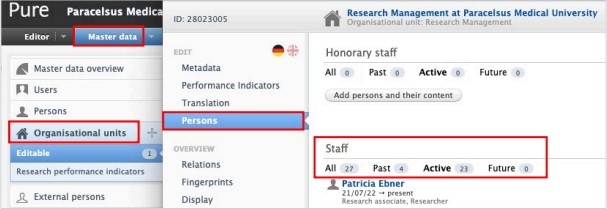
<span lang="EN-GB" style="color: black; mso-themecolor: text1; mso-style-textoutline-type: none; mso-style-textoutline-outlinestyle-dpiwidth: .75pt; mso-style-textoutline-outlinestyle-linecap: round; mso-style-textoutline-outlinestyle-join: bevel; mso-style-textoutline-outlinestyle-pctmiterlimit: 0%; mso-style-textoutline-outlinestyle-dash: solid; mso-style-textoutline-outlinestyle-align: center; mso-style-textoutline-outlinestyle-compound: simple;">To <span style="mso-bidi-font-weight: bold;">directly check the </span>**active** <span style="mso-bidi-font-weight: bold;">versus</span> **not active persons**<span style="mso-bidi-font-weight: bold;"> of your organisational unit, please refer to “Persons” tab:</span></span>

[![Bild 16.jpeg](https://wiki.pmu.ac.at/uploads/images/gallery/2025-09/scaled-1680-/sN7bild-16.jpeg)](https://wiki.pmu.ac.at/uploads/images/gallery/2025-09/sN7bild-16.jpeg)

<span lang="EN-GB"> </span>

**<u><span lang="EN-GB">To update data (such as the end date at the organisational unit) to a Person’s profile:</span></u>**

<span lang="EN-GB" style="mso-fareast-font-family: Arial;"><span style="mso-list: Ignore;">1.<span style="font: 7.0pt 'Times New Roman';"> </span></span></span><span lang="EN-GB">Search for the Person.</span>

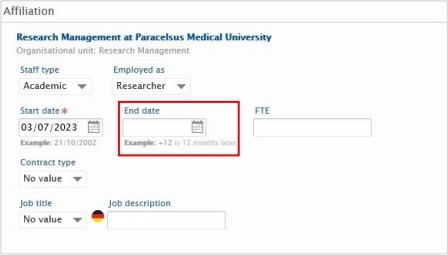
<span lang="EN-GB" style="mso-fareast-font-family: Arial;"><span style="mso-list: Ignore;">2.<span style="font: 7.0pt 'Times New Roman';"> </span></span></span><span lang="EN-GB">Modify their data in the Editor window. For example, fill in the End date at the organisation unit:</span>

[![Bild 17.jpeg](https://wiki.pmu.ac.at/uploads/images/gallery/2025-09/scaled-1680-/Wadbild-17.jpeg)](https://wiki.pmu.ac.at/uploads/images/gallery/2025-09/Wadbild-17.jpeg)

<p class="callout warning"><span lang="EN-GB" style="mso-bidi-font-size: 11.0pt; line-height: 107%; mso-bidi-font-family: 'Times New Roman'; mso-bidi-theme-font: minor-bidi;">To **change the** **e-mail address of a Person** **required for PURE login** or to **add another internal organisation unit affiliation** to the Person</span><span lang="EN-GB">'</span><span lang="EN-GB" style="mso-bidi-font-size: 11.0pt; line-height: 107%; mso-bidi-font-family: 'Times New Roman'; mso-bidi-theme-font: minor-bidi;">s profile, please contact **RM** at </span><span lang="EN-GB"><pure@pmu.ac.at></span><span lang="EN-GB" style="mso-bidi-font-size: 11.0pt; line-height: 107%; mso-bidi-font-family: 'Times New Roman'; mso-bidi-theme-font: minor-bidi;">.</span></p>