# 2. Create Your Content - Research Outputs (Publications)

# 2.1. Before Creating a Research Output

<span lang="EN-GB" style="mso-bidi-font-family: Arial; mso-ansi-language: EN-GB;">First, you always need to **check if the content already exists in PURE**:</span>

<span lang="EN-GB" style="mso-fareast-font-family: Arial; mso-bidi-font-family: Arial; mso-ansi-language: EN-GB;"><span style="mso-list: Ignore;">1.<span style="font: 7.0pt 'Times New Roman';"> </span></span></span><span lang="EN-GB" style="mso-bidi-font-family: Arial; mso-ansi-language: EN-GB;">Remove the my content filter by on the “x”</span>

[![Bild 17.jpeg](https://wiki.pmu.ac.at/uploads/images/gallery/2025-09/scaled-1680-/bild-17.jpeg)](https://wiki.pmu.ac.at/uploads/images/gallery/2025-09/bild-17.jpeg)

<span style="mso-ignore: vglayout; position: absolute; z-index: 251740160; left: 0px; margin-left: 69px; margin-top: 21px; width: 26px; height: 27px;">  
</span>

<span lang="EN-GB" style="mso-fareast-font-family: Arial; mso-bidi-font-family: Arial; mso-ansi-language: EN-GB;"><span style="mso-list: Ignore;">2.<span style="font: 7.0pt 'Times New Roman';"> </span></span></span><span lang="EN-GB" style="mso-bidi-font-family: Arial; mso-ansi-language: EN-GB;">Now you have access to *every* publication not just those related to your profile: </span>

[![Bild 18.jpeg](https://wiki.pmu.ac.at/uploads/images/gallery/2025-09/scaled-1680-/bild-18.jpeg)](https://wiki.pmu.ac.at/uploads/images/gallery/2025-09/bild-18.jpeg)

<span lang="EN-GB" style="mso-bidi-font-family: Arial; mso-ansi-language: EN-GB;"><span lang="EN-GB" style="mso-fareast-font-family: Arial; mso-bidi-font-family: Arial; mso-ansi-language: EN-GB;"><span style="mso-list: Ignore;">3.<span style="font: 7.0pt 'Times New Roman';"> </span></span></span>S<span lang="EN-GB" style="mso-fareast-font-family: 'Times New Roman'; mso-bidi-font-family: Arial; mso-ansi-language: EN-GB; mso-fareast-language: DE-AT;">earch for the publication by title, PubMed ID, or other identifiers.</span></span>

- <span lang="EN-GB" style="mso-fareast-font-family: 'Times New Roman'; mso-bidi-font-family: Arial; mso-ansi-language: EN-GB; mso-fareast-language: DE-AT;">If the publication you wish to import into PURE **appears in the list** but is not linked to your profile, please use the [Claim a publication](https://wiki.pmu.ac.at/books/manual-for-researchers/page/211-claim-a-publication) method.</span>
- <span lang="EN-GB" style="mso-fareast-font-family: 'Times New Roman'; mso-bidi-font-family: Arial; mso-ansi-language: EN-GB; mso-fareast-language: DE-AT;">If the publication you wish to import **does not appear in the list**, you can import the publication without creating duplicates. For the details please refer to chapter [Ways Importing and Creating Research Outputs.](https://wiki.pmu.ac.at/books/manual-for-pure-editors-at-the-teaching-hospitals-of-pmu/page/32-ways-importing-and-creating-research-outputs)</span>

# 2.2. Ways Importing and Creating Research Outputs

<span lang="EN-GB" style="mso-bidi-font-family: Arial; mso-ansi-language: EN-GB;">After checking your Research output and ensuring that the publication does not exist in Pure, you have **three options** to import a publication **immediately:**</span>

 **1.** [ **Import from online source**](https://wiki.pmu.ac.at/books/manual-for-researchers/page/23-import-from-online-source)

Publications published in PubMed, Web of Science or ORCID.

  
**2.** [ **Import from file**](https://wiki.pmu.ac.at/books/manual-for-researchers/page/24-import-from-file)

Import from RIS, BibTex, and CERIF files.

  
**3.** [ **Create from template**](https://wiki.pmu.ac.at/books/manual-for-researchers/page/25-create-from-template)

For publications that have not been published in PubMed or Web of Science, as well as for books and book chapters.

<p class="callout warning"><span lang="EN-GB" style="mso-bidi-font-family: Arial; color: black; mso-themecolor: text1; mso-style-textoutline-type: none; mso-style-textoutline-outlinestyle-dpiwidth: .75pt; mso-style-textoutline-outlinestyle-linecap: round; mso-style-textoutline-outlinestyle-join: bevel; mso-style-textoutline-outlinestyle-pctmiterlimit: 0%; mso-style-textoutline-outlinestyle-dash: solid; mso-style-textoutline-outlinestyle-align: center; mso-style-textoutline-outlinestyle-compound: simple; mso-ansi-language: EN-GB;">Please **refrain from uploading original publications** in PURE, as our system is designed to store information about publications. Uploading original content may potentially violate Open Access guidelines; therefore, it is not recommended. Alternatively, you can **register a DOI or other link** to your publication in the editor window.</span></p>

# 2.3. Import From Online Source

<p class="callout info"><span lang="EN-GB" style="mso-bidi-font-family: Arial; mso-ansi-language: EN-GB;">This option **is most preferable** because this method can save you time, minimize effort, and reduce data-entry errors. It can be used for any kind of research output that is **published in PubMed, Web of Science or ORCID.**</span></p>

<span lang="EN-GB" style="mso-bidi-font-family: Arial; color: #002060; mso-ansi-language: EN-GB;"> </span>

<u><span lang="EN-GB" style="mso-bidi-font-family: Arial; color: black; mso-themecolor: text1; mso-ansi-language: EN-GB;">To import a research output from online source:</span></u>

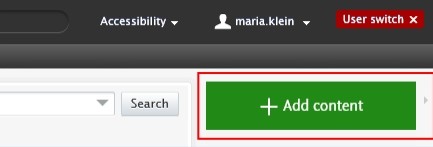
1. <span lang="EN-GB" style="mso-bidi-font-family: Arial; color: black; mso-themecolor: text1; mso-ansi-language: EN-GB;"> Click on the</span><span lang="EN-GB" style="mso-bidi-font-family: Arial; color: black; mso-themecolor: text1; mso-ansi-language: EN-GB;"> Add </span><span lang="EN-GB" style="mso-bidi-font-family: Arial; color: black; mso-themecolor: text1; mso-ansi-language: EN-GB;">content button:</span>[![Bild 20.jpeg](https://wiki.pmu.ac.at/uploads/images/gallery/2025-09/scaled-1680-/bild-20.jpeg)](https://wiki.pmu.ac.at/uploads/images/gallery/2025-09/bild-20.jpeg)

<span lang="EN-GB" style="mso-bidi-font-family: Arial; mso-ansi-language: EN-GB;">Or click on the triangle next to *Personal* in the header, select *Research outputs*, and then click on the </span><span style="mso-bidi-font-family: Arial; mso-fareast-language: DE-AT; mso-no-proof: yes;">![](https://wiki.pmu.ac.at/uploads/images/gallery/2025-09/embedded-image-jutgbecu.png)</span><span lang="EN-GB" style="mso-bidi-font-family: Arial; mso-ansi-language: EN-GB;">button:</span>

[![Bild 2.png](https://wiki.pmu.ac.at/uploads/images/gallery/2025-10/scaled-1680-/bild-2.png)](https://wiki.pmu.ac.at/uploads/images/gallery/2025-10/bild-2.png)

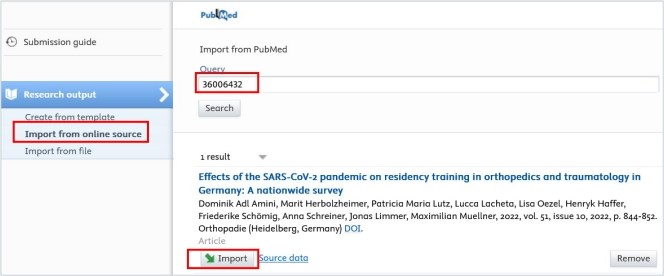
<span lang="EN-GB" style="mso-bidi-font-family: Arial; color: black; mso-themecolor: text1; mso-ansi-language: EN-GB;"> 2. Select *Import from online source*. At PMU you can import your data from PubMed, Web of Science and ORCID.</span>

<span lang="EN-GB" style="mso-bidi-font-family: Arial; color: black; mso-themecolor: text1; mso-ansi-language: EN-GB;"> 3. Select the online source you want to import from. In this example, we selected PubMed.</span>

<span lang="EN-GB" style="mso-bidi-font-family: Arial; color: black; mso-themecolor: text1; mso-ansi-language: EN-GB;"> 4. Enter the information you want to search for, such as PubMed ID or your name. Please ensure you always review the guidelines for the correct format of the information you intend to look for.</span>

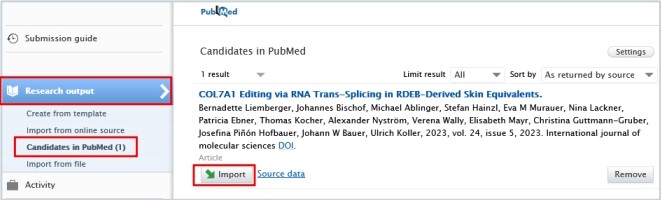
<span lang="EN-GB" style="mso-bidi-font-family: Arial; color: black; mso-themecolor: text1; mso-ansi-language: EN-GB;"> 5. Click on the *Import* button located at the bottom of the article you wish to import into Pure.</span>

[![Bild 23.jpeg](https://wiki.pmu.ac.at/uploads/images/gallery/2025-09/scaled-1680-/bild-23.jpeg)](https://wiki.pmu.ac.at/uploads/images/gallery/2025-09/bild-23.jpeg)

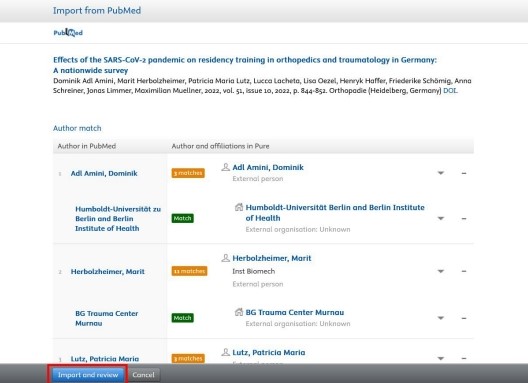
<span lang="EN-GB" style="mso-bidi-font-family: Arial; color: black; mso-themecolor: text1; mso-ansi-language: EN-GB;"> 6. Now, you can view the publication details. Do not modify the information displayed here; simply click on Import and review at the bottom of the window:</span>

[![Bild 24.jpeg](https://wiki.pmu.ac.at/uploads/images/gallery/2025-09/scaled-1680-/bild-24.jpeg)](https://wiki.pmu.ac.at/uploads/images/gallery/2025-09/bild-24.jpeg)

<span lang="EN-GB" style="mso-fareast-font-family: Arial; mso-bidi-font-family: Arial; mso-ansi-language: EN-GB;"><span style="mso-list: Ignore;">1 </span></span><span lang="EN-GB" style="mso-bidi-font-family: Arial; color: black; mso-themecolor: text1; mso-ansi-language: EN-GB;">7. In the Research output editor window, you need to manage these fields:</span>

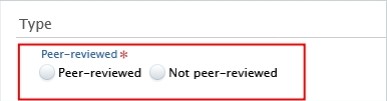
**<span lang="EN-GB" style="mso-fareast-font-family: Arial; mso-bidi-font-family: Arial; color: #232e64; mso-ansi-language: EN-GB;"><span style="mso-list: Ignore;">1.<span style="font: 7.0pt 'Times New Roman';"> </span></span></span><span lang="EN-GB" style="mso-bidi-font-family: Arial; color: #232e64; mso-ansi-language: EN-GB;">Peer-reviewed</span>**<span lang="EN-GB" style="mso-bidi-font-family: Arial; mso-ansi-language: EN-GB;">:</span>

<span lang="EN-GB" style="mso-bidi-font-family: Arial; color: black; mso-themecolor: text1; mso-ansi-language: EN-GB;">Whether the publication underwent a **peer-reviewed process** or not (peer-reviewed or not peer-reviewed):</span>

[![Bild 25.jpeg](https://wiki.pmu.ac.at/uploads/images/gallery/2025-09/scaled-1680-/bild-25.jpeg)](https://wiki.pmu.ac.at/uploads/images/gallery/2025-09/bild-25.jpeg)

<p class="callout info"><span lang="EN-GB" style="mso-bidi-font-family: Arial; color: black; mso-themecolor: text1; mso-style-textoutline-type: none; mso-style-textoutline-outlinestyle-dpiwidth: .75pt; mso-style-textoutline-outlinestyle-linecap: round; mso-style-textoutline-outlinestyle-join: bevel; mso-style-textoutline-outlinestyle-pctmiterlimit: 0%; mso-style-textoutline-outlinestyle-dash: solid; mso-style-textoutline-outlinestyle-align: center; mso-style-textoutline-outlinestyle-compound: simple; mso-ansi-language: EN-GB;">Click on *Change template* if you realise that the **subtype** of the Research output is **incorrect**. For example, if you have selected *Original article* but need to add a *Review article*, you can easily switch between template types without losing any of the data you have already filled in:</span></p>

[![Bild 26.jpeg](https://wiki.pmu.ac.at/uploads/images/gallery/2025-09/scaled-1680-/bild-26.jpeg)](https://wiki.pmu.ac.at/uploads/images/gallery/2025-09/bild-26.jpeg)

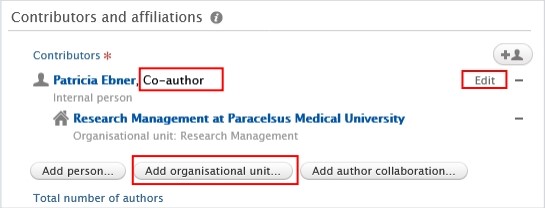
**<span lang="EN-GB" style="mso-fareast-font-family: Arial; mso-bidi-font-family: Arial; color: #232e64; mso-ansi-language: EN-GB;"><span style="mso-list: Ignore;">2.<span style="font: 7.0pt 'Times New Roman';"> </span></span></span><span lang="EN-GB" style="mso-bidi-font-family: Arial; color: #232e64; mso-ansi-language: EN-GB;">Contributors and affiliations</span>**<span lang="EN-GB" style="mso-bidi-font-family: Arial; color: black; mso-themecolor: text1; mso-ansi-language: EN-GB;">:</span>

<span lang="EN-GB" style="mso-bidi-font-family: Arial; color: black; mso-themecolor: text1; mso-ansi-language: EN-GB;">Pure automatically adds every contributor with their affiliations to these fields.  
Here, you only need to manage **your author role and affiliation(s)**.  
Click on *Edit* on the right side to select the role (type of authorship) you contributed to the publication. In the affiliations field, include only those affiliations associated with the publication. You can delete them by clicking on the minus button, and you can add internal and external organizations by clicking on the *Add organizational unit* button:</span>

[![Bild 9.jpeg](https://wiki.pmu.ac.at/uploads/images/gallery/2025-10/scaled-1680-/bild-9.jpeg)](https://wiki.pmu.ac.at/uploads/images/gallery/2025-10/bild-9.jpeg)

**<span lang="EN-GB" style="mso-fareast-font-family: Arial; mso-bidi-font-family: Arial; color: #232e64; mso-ansi-language: EN-GB;"><span style="mso-list: Ignore;">3.<span style="font: 7.0pt 'Times New Roman';"> </span></span></span><span lang="EN-GB" style="mso-bidi-font-family: Arial; color: #232e64; mso-ansi-language: EN-GB;">Managing organisational unit</span>**<span lang="EN-GB" style="mso-bidi-font-family: Arial; mso-ansi-language: EN-GB;">: </span>

<span lang="EN-GB" style="mso-bidi-font-family: Arial; color: black; mso-themecolor: text1; mso-ansi-language: EN-GB;">Select *your internal organisational unit* to this field by clicking on the "house with a plus" b</span><span lang="EN-GB" style="mso-bidi-font-family: Arial; color: black; mso-themecolor: text1; mso-ansi-language: EN-GB;">utton. External organisations cannot be added in this field. (In some cases, RM may assign a different internal organisation during the  
validation process).</span>

[![Bild 27.jpeg](https://wiki.pmu.ac.at/uploads/images/gallery/2025-09/scaled-1680-/bild-27.jpeg)](https://wiki.pmu.ac.at/uploads/images/gallery/2025-09/bild-27.jpeg)

**<span lang="EN-GB" style="mso-fareast-font-family: Arial; mso-bidi-font-family: Arial; color: #232e64; mso-ansi-language: EN-GB;"><span style="mso-list: Ignore;">4.<span style="font: 7.0pt 'Times New Roman';"> </span></span></span><span lang="EN-GB" style="mso-bidi-font-family: Arial; color: #232e64; mso-ansi-language: EN-GB;">Research topic:</span>**

Assign on or more research topics for the following publication from publication year **2025 onwards: Original article, review article, case report, letter to the editor, editorial, short comment/notes, book, book chapter**. For **other categories**, such as abstracts, corrections or publications in which **only PMU teaching hospitals** are involved as internal organizations, **no** topic **assignment** is required.

<span lang="EN-GB" style="mso-bidi-font-family: Arial; color: black; mso-themecolor: text1; mso-ansi-language: EN-GB;"> 8. Set the workflow status *For validation* and then click on *Save*. </span>

[![Bild 29.jpeg](https://wiki.pmu.ac.at/uploads/images/gallery/2025-09/scaled-1680-/bild-29.jpeg)](https://wiki.pmu.ac.at/uploads/images/gallery/2025-09/bild-29.jpeg)

<span lang="EN-GB" style="mso-bidi-font-family: Arial; mso-ansi-language: EN-GB;">In the next step, the imported research output undergoes **validation** by the RM.</span>

<p class="callout info"><span lang="EN-GB" style="mso-bidi-font-family: Arial; mso-ansi-language: EN-GB;">Are you interested in an automated publication search from online sources? See section Automated search (without immediate effect).</span></p>

# 2.4. Import From File

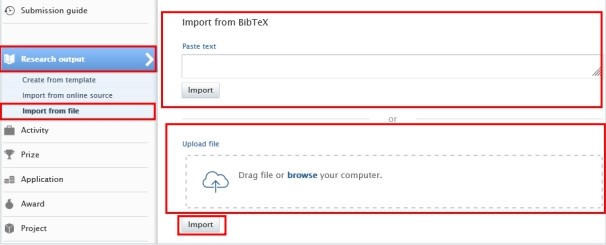
<span lang="EN-GB" style="mso-bidi-font-family: Arial; color: black; mso-themecolor: text1; mso-ansi-language: EN-GB;">This option is to be chosen **if importing** **from online sources is not possible**. Here, you can add any kind of research outputs from BibTex, RIS and CERIF files.</span>

<u><span lang="EN-GB" style="mso-bidi-font-family: Arial; color: black; mso-themecolor: text1; mso-ansi-language: EN-GB;">To import a research output from file:</span></u>

1. <span lang="EN-GB" style="mso-bidi-font-family: Arial; color: black; mso-themecolor: text1; mso-ansi-language: EN-GB;"> Click on the</span><span lang="EN-GB" style="mso-bidi-font-family: Arial; color: black; mso-themecolor: text1; mso-ansi-language: EN-GB;"> Add </span><span lang="EN-GB" style="mso-bidi-font-family: Arial; color: black; mso-themecolor: text1; mso-ansi-language: EN-GB;">content button:</span>[![Bild 20.jpeg](https://wiki.pmu.ac.at/uploads/images/gallery/2025-09/scaled-1680-/bild-20.jpeg)](https://wiki.pmu.ac.at/uploads/images/gallery/2025-09/bild-20.jpeg)

<span lang="EN-GB" style="mso-bidi-font-family: Arial; mso-ansi-language: EN-GB;">Or click on the *triangle* next to Personal in the header, select *Research outputs*, and then click on the </span><span style="mso-bidi-font-family: Arial; mso-fareast-language: DE-AT; mso-no-proof: yes;">![](https://wiki.pmu.ac.at/uploads/images/gallery/2025-09/embedded-image-jutgbecu.png)</span><span lang="EN-GB" style="mso-bidi-font-family: Arial; mso-ansi-language: EN-GB;">button:</span>

[![bild-2.png](https://wiki.pmu.ac.at/uploads/images/gallery/2025-10/scaled-1680-/MiYbild-2.png)](https://wiki.pmu.ac.at/uploads/images/gallery/2025-10/MiYbild-2.png)

<span lang="EN-GB" style="mso-bidi-font-family: Arial; color: black; mso-themecolor: text1; mso-ansi-language: EN-GB;"> 2. Select *Import from file*.</span>

<span lang="EN-GB" style="mso-bidi-font-family: Arial; color: black; mso-themecolor: text1; mso-ansi-language: EN-GB;"> 3. Click on the file type you want to import from. BibTex, RIS and CERIF file types are available.</span>

<span lang="EN-GB" style="mso-bidi-font-family: Arial; color: black; mso-themecolor: text1; mso-ansi-language: EN-GB;"> 4. You can directly paste your data into to *Paste text* field if you have already copied it to the clipboard or you can upload a file by clicking on the field *Drag file and browse your computer:* </span>

<span lang="EN-GB" style="mso-bidi-font-family: Arial; color: black; mso-themecolor: text1; mso-ansi-language: EN-GB;">*[![Bild 33.jpeg](https://wiki.pmu.ac.at/uploads/images/gallery/2025-09/scaled-1680-/bild-33.jpeg)](https://wiki.pmu.ac.at/uploads/images/gallery/2025-09/bild-33.jpeg)* </span>

<span lang="EN-GB" style="mso-bidi-font-family: Arial; color: black; mso-themecolor: text1; mso-ansi-language: EN-GB;"> 5. Click on the *Import* button located at the bottom of the article you wish to import into Pure.</span>

<span lang="EN-GB" style="mso-bidi-font-family: Arial; color: black; mso-themecolor: text1; mso-ansi-language: EN-GB;"> 6. The next steps are the same as those outlined in the [previous chapter](https://wiki.pmu.ac.at/books/manual-for-researchers/page/23-import-from-online-source).</span>

<p class="callout info"><span lang="EN-GB" style="mso-bidi-font-family: Arial; color: black; mso-themecolor: text1; mso-ansi-language: EN-GB;"><span lang="EN-GB" style="mso-bidi-font-family: Arial; mso-ansi-language: EN-GB;">Are you interested in an **automated publication search** from online sources? See section Automated search (without immediate effect).</span></span></p>

# 2.5. Create From Template

<span lang="EN-GB" style="mso-bidi-font-family: Arial; mso-ansi-language: EN-GB;">Please use this method only **if the two other methods** mentioned above are **not possible**. For instance, if you wish to add a book(chapter), or import a publication that is published in a scientific journal, but the journal is not listed in Web of Science or PubMed. </span>

<span lang="EN-GB" style="mso-bidi-font-family: Arial; mso-ansi-language: EN-GB;"> </span>

<u><span lang="EN-GB" style="mso-bidi-font-family: Arial; mso-ansi-language: EN-GB;">To create a new research output from template:</span></u>

1. <span lang="EN-GB" style="mso-bidi-font-family: Arial; color: black; mso-themecolor: text1; mso-ansi-language: EN-GB;"> Click on the</span><span lang="EN-GB" style="mso-bidi-font-family: Arial; color: black; mso-themecolor: text1; mso-ansi-language: EN-GB;"> Add </span><span lang="EN-GB" style="mso-bidi-font-family: Arial; color: black; mso-themecolor: text1; mso-ansi-language: EN-GB;">content button:</span>[![Bild 20.jpeg](https://wiki.pmu.ac.at/uploads/images/gallery/2025-09/scaled-1680-/bild-20.jpeg)](https://wiki.pmu.ac.at/uploads/images/gallery/2025-09/bild-20.jpeg)

<span lang="EN-GB" style="mso-bidi-font-family: Arial; mso-ansi-language: EN-GB;">Or click on the *triangle* next to Personal in the header, select *Research outputs*, and then click on the </span><span style="mso-bidi-font-family: Arial; mso-fareast-language: DE-AT; mso-no-proof: yes;">![](https://wiki.pmu.ac.at/uploads/images/gallery/2025-09/embedded-image-jutgbecu.png)</span><span lang="EN-GB" style="mso-bidi-font-family: Arial; mso-ansi-language: EN-GB;">button:</span>

[![bild-2.png](https://wiki.pmu.ac.at/uploads/images/gallery/2025-10/scaled-1680-/MiYbild-2.png)](https://wiki.pmu.ac.at/uploads/images/gallery/2025-10/MiYbild-2.png)

<span lang="EN-GB" style="mso-bidi-font-family: Arial; color: black; mso-themecolor: text1; mso-ansi-language: EN-GB;"> 2. Select *Create from template*. </span>

<span lang="EN-GB" style="mso-bidi-font-family: Arial; color: black; mso-themecolor: text1; mso-ansi-language: EN-GB;"> 3. Scroll down until you locate the precise type of the item you want to add. In most cases it is a *Contribution to a journal/Original article*.</span>

<span lang="EN-GB" style="mso-bidi-font-family: Arial; color: black; mso-themecolor: text1; mso-ansi-language: EN-GB;"> 4. In the Research output editor window, you need to manage these fields:  
</span>

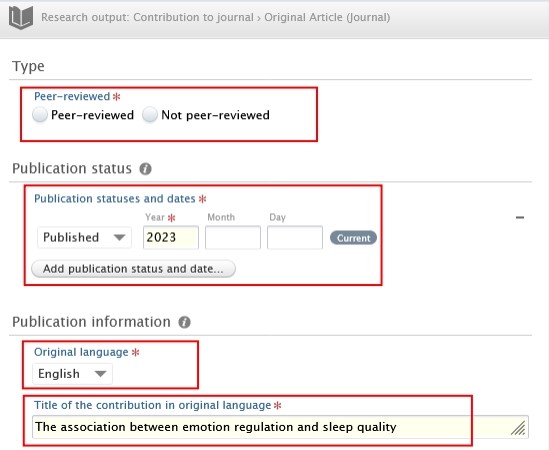
**<span lang="EN-GB" style="mso-fareast-font-family: Arial; mso-bidi-font-family: Arial; color: #232e64; mso-ansi-language: EN-GB;"><span style="mso-list: Ignore;">1.<span style="font: 7.0pt 'Times New Roman';"> </span></span></span><span lang="EN-GB" style="mso-bidi-font-family: Arial; color: #232e64; mso-ansi-language: EN-GB;">Peer-reviewed</span>**<span lang="EN-GB" style="mso-bidi-font-family: Arial; mso-ansi-language: EN-GB;">:</span>

<span lang="EN-GB" style="mso-bidi-font-family: Arial; color: black; mso-themecolor: text1; mso-ansi-language: EN-GB;">Whether the publication underwent a **peer-reviewed process** or not (peer-reviewed or not peer-reviewed):</span>

[![Bild 25.jpeg](https://wiki.pmu.ac.at/uploads/images/gallery/2025-09/scaled-1680-/bild-25.jpeg)](https://wiki.pmu.ac.at/uploads/images/gallery/2025-09/bild-25.jpeg)

<p class="callout info"><span lang="EN-GB" style="mso-bidi-font-family: Arial; color: black; mso-themecolor: text1; mso-style-textoutline-type: none; mso-style-textoutline-outlinestyle-dpiwidth: .75pt; mso-style-textoutline-outlinestyle-linecap: round; mso-style-textoutline-outlinestyle-join: bevel; mso-style-textoutline-outlinestyle-pctmiterlimit: 0%; mso-style-textoutline-outlinestyle-dash: solid; mso-style-textoutline-outlinestyle-align: center; mso-style-textoutline-outlinestyle-compound: simple; mso-ansi-language: EN-GB;">Click on *Change template* if you realise that the **subtype** of the Research output is **incorrect**. For example, if you have selected *Original article* but need to add a *Review article*, you can easily switch between template types without losing any of the data you have already filled in:</span></p>

[![Bild 26.jpeg](https://wiki.pmu.ac.at/uploads/images/gallery/2025-09/scaled-1680-/bild-26.jpeg)](https://wiki.pmu.ac.at/uploads/images/gallery/2025-09/bild-26.jpeg)

**<span lang="EN-GB" style="mso-fareast-font-family: Arial; mso-bidi-font-family: Arial; color: #232e64; mso-ansi-language: EN-GB;"><span style="mso-list: Ignore;">2.<span style="font: 7.0pt 'Times New Roman';"> </span></span></span><span lang="EN-GB" style="mso-bidi-font-family: Arial; color: #232e64; mso-ansi-language: EN-GB;">Publication statuses and dates:</span>**

<span lang="EN-GB" style="mso-bidi-font-family: Arial; mso-ansi-language: EN-GB;">Fill in the information of the publication status and dates.</span>

**<span lang="EN-GB" style="mso-fareast-font-family: Arial; mso-bidi-font-family: Arial; color: #232e64; mso-ansi-language: EN-GB;"><span style="mso-list: Ignore;">3.<span style="font: 7.0pt 'Times New Roman';"> </span></span></span><span lang="EN-GB" style="mso-bidi-font-family: Arial; color: #232e64; mso-ansi-language: EN-GB;">Original language</span>**<span lang="EN-GB" style="mso-bidi-font-family: Arial; mso-ansi-language: EN-GB;">:</span>

<span lang="EN-GB" style="mso-bidi-font-family: Arial; mso-ansi-language: EN-GB;">Choose the original language of the publication.</span>

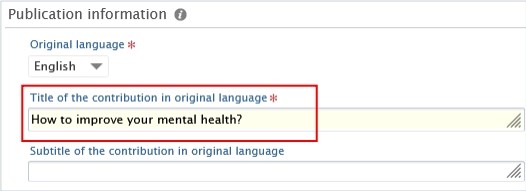
**<span lang="EN-GB" style="mso-fareast-font-family: Arial; mso-bidi-font-family: Arial; color: #232e64; mso-ansi-language: EN-GB;"><span style="mso-list: Ignore;">4.<span style="font: 7.0pt 'Times New Roman';"> </span></span></span><span lang="EN-GB" style="mso-bidi-font-family: Arial; color: #232e64; mso-ansi-language: EN-GB;">Title of the contribution in original language</span>**<span lang="EN-GB" style="mso-bidi-font-family: Arial; mso-ansi-language: EN-GB;">:</span>

<span lang="EN-GB" style="mso-bidi-font-family: Arial; mso-ansi-language: EN-GB;">Fill in the title of the contribution in the original language.</span>

[![Bild 38.jpeg](https://wiki.pmu.ac.at/uploads/images/gallery/2025-09/scaled-1680-/bild-38.jpeg)](https://wiki.pmu.ac.at/uploads/images/gallery/2025-09/bild-38.jpeg)

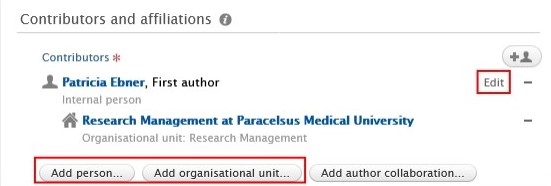
**<span lang="EN-GB" style="mso-fareast-font-family: Arial; mso-bidi-font-family: Arial; color: #232e64; mso-ansi-language: EN-GB;"><span style="mso-list: Ignore;"><span style="font: 7.0pt 'Times New Roman';"> </span></span></span><span lang="EN-GB" style="mso-bidi-font-family: Arial; color: #232e64; mso-ansi-language: EN-GB;">5. Contributors and affiliations</span>**<span lang="EN-GB" style="mso-bidi-font-family: Arial; color: black; mso-themecolor: text1; mso-ansi-language: EN-GB;">:</span>

<span lang="EN-GB" style="mso-bidi-font-family: Arial; mso-ansi-language: EN-GB;">You need to add **every contributor with their affiliations** to these fields. The **order** of the **authors** in Pure should **match** the order in the publication. You can change the order by clicking on the arrows. You can add additional contributors by clicking on the *Add person* button, and you can add internal and external organisations by clicking on the *Add Organization Unit* button. Don’t forget to add your teaching hospital to the organisations units. </span>

[![Bild 39.jpeg](https://wiki.pmu.ac.at/uploads/images/gallery/2025-09/scaled-1680-/bild-39.jpeg)](https://wiki.pmu.ac.at/uploads/images/gallery/2025-09/bild-39.jpeg)

**<span lang="EN-GB" style="mso-fareast-font-family: Arial; mso-bidi-font-family: Arial; color: #232e64; mso-ansi-language: EN-GB;"><span style="mso-list: Ignore;">6.<span style="font: 7.0pt 'Times New Roman';"> </span></span></span><span lang="EN-GB" style="mso-bidi-font-family: Arial; color: #232e64; mso-ansi-language: EN-GB;">Managing organisational unit</span>**<span lang="EN-GB" style="mso-bidi-font-family: Arial; mso-ansi-language: EN-GB;">:</span>

<span lang="EN-GB" style="mso-bidi-font-family: Arial; mso-ansi-language: EN-GB;">Select **your internal organisational unit** by clicking on the Managing organisational unit button. </span>External organisations cannot be added in this field. (In some cases, RM may assign a different internal organisation during the validation process).

**<span lang="EN-GB" style="mso-bidi-font-family: Arial; mso-ansi-language: EN-GB;"> </span>**

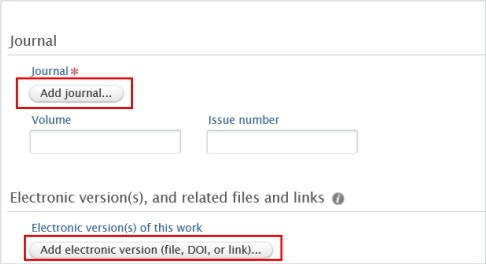
**<span lang="EN-GB" style="mso-fareast-font-family: Arial; mso-bidi-font-family: Arial; color: #232e64; mso-ansi-language: EN-GB;"><span style="mso-list: Ignore;">7.<span style="font: 7.0pt 'Times New Roman';"> </span></span></span><span lang="EN-GB" style="mso-bidi-font-family: Arial; color: #232e64; mso-ansi-language: EN-GB;">Journal</span>**<span lang="EN-GB" style="mso-bidi-font-family: Arial; mso-ansi-language: EN-GB;">:</span>

<span lang="EN-GB" style="mso-bidi-font-family: Arial; mso-ansi-language: EN-GB;">Click on *Add journal* then search for the name or the ISSN number of the journal.</span>

<span lang="EN-GB" style="mso-bidi-font-family: Arial; mso-ansi-language: EN-GB;">If you do not find the journal in the list, click on *Create new* and fill in the required information.</span>

**<span lang="EN-GB" style="mso-fareast-font-family: Arial; mso-bidi-font-family: Arial; color: #232e64; mso-ansi-language: EN-GB;"><span style="mso-list: Ignore;">8.<span style="font: 7.0pt 'Times New Roman';"> </span></span></span><span lang="EN-GB" style="mso-bidi-font-family: Arial; color: #232e64; mso-ansi-language: EN-GB;">Electronic versions of this work:</span>**

<span lang="EN-GB" style="mso-bidi-font-family: Arial; color: black; mso-themecolor: text1; mso-style-textoutline-type: none; mso-style-textoutline-outlinestyle-dpiwidth: .75pt; mso-style-textoutline-outlinestyle-linecap: round; mso-style-textoutline-outlinestyle-join: bevel; mso-style-textoutline-outlinestyle-pctmiterlimit: 0%; mso-style-textoutline-outlinestyle-dash: solid; mso-style-textoutline-outlinestyle-align: center; mso-style-textoutline-outlinestyle-compound: simple; mso-ansi-language: EN-GB;">You can register a DOI or other links to your publication, but please **refrain from uploading the original publication** into Pure. </span>

[![Bild 40.jpeg](https://wiki.pmu.ac.at/uploads/images/gallery/2025-09/scaled-1680-/bild-40.jpeg)](https://wiki.pmu.ac.at/uploads/images/gallery/2025-09/bild-40.jpeg)

**<span lang="EN-GB" style="mso-fareast-font-family: Arial; mso-bidi-font-family: Arial; color: #232e64; mso-ansi-language: EN-GB;"><span style="mso-list: Ignore;">9.<span style="font: 7.0pt 'Times New Roman';"> </span></span></span><span lang="EN-GB" style="mso-bidi-font-family: Arial; color: #232e64; mso-ansi-language: EN-GB;">Research topic:</span>**

Assign on or more research topics for the following publication from publication year **2025 onwards: Original article, review article, case report, letter to the editor, editorial, short comment/notes, book, book chapter**. For **other categories**, such as abstracts, corrections or publications in which **only PMU teaching hospitals** are involved as internal organizations, **no** topic **assignment** is required.

<span lang="EN-GB" style="mso-bidi-font-family: Arial; color: black; mso-themecolor: text1; mso-ansi-language: EN-GB;"> 5. Set the workflow status *For validation* and then click on *Save*. </span>

[![Bild 29.jpeg](https://wiki.pmu.ac.at/uploads/images/gallery/2025-09/scaled-1680-/bild-29.jpeg)](https://wiki.pmu.ac.at/uploads/images/gallery/2025-09/bild-29.jpeg)

<span lang="EN-GB" style="mso-bidi-font-family: Arial; mso-ansi-language: EN-GB;">In the next step, the imported research output undergoes **validation** by the RM.</span>

<p class="callout info"><span lang="EN-GB" style="mso-bidi-font-family: Arial; mso-ansi-language: EN-GB;"><span lang="EN-GB" style="mso-bidi-font-family: Arial; color: black; mso-themecolor: text1; mso-ansi-language: EN-GB;">Are you interested in an **automated publication search** from online sources? See section Automated search (without immediate effect).</span></span></p>

# 2.6. Assignment of Research Topics to a Publication – NEW!

For details on assigning research topics to a publication, please refer to [FAQ6.](https://wiki.pmu.ac.at/books/pure-faqs-english/page/question-6-how-can-i-assign-research-topics-to-a-publication)

# 2.7. Assignment of a RIC (FIZ) to a recorded publication – NEW!

For details on assigning a RIC (FIZ) to a publication, please refer to [FAQ7](https://wiki.pmu.ac.at/books/pure-faqs-english/page/question-7-how-can-i-assign-a-publication-to-a-fiz-ric).

# 2.8. Chapter(s) in a Book

<span lang="EN-GB" style="mso-bidi-font-family: Arial; color: black; mso-themecolor: text1; mso-ansi-language: EN-GB;">To register a *Chapter* in a book, you will need to fill in some extra fields additionally to the ‘traditional’ fields.</span>

<span lang="EN-GB" style="font-family: Symbol; mso-fareast-font-family: Symbol; mso-bidi-font-family: Symbol; color: black; mso-themecolor: text1; mso-ansi-language: EN-GB;"><span style="mso-list: Ignore;">·<span style="font: 7.0pt 'Times New Roman';"> </span></span></span><span lang="EN-GB" style="mso-bidi-font-family: Arial; color: black; mso-themecolor: text1; mso-ansi-language: EN-GB;">To fill in the **title of the chapter** please use the *Title of the contribution in original language* field:</span>

[![Bild 42.jpeg](https://wiki.pmu.ac.at/uploads/images/gallery/2025-09/scaled-1680-/bild-42.jpeg)](https://wiki.pmu.ac.at/uploads/images/gallery/2025-09/bild-42.jpeg)

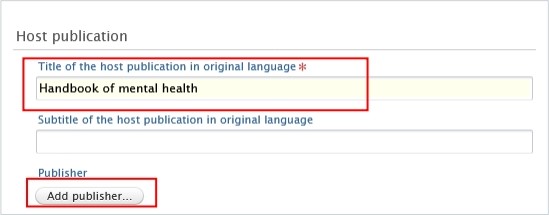
<span lang="EN-GB" style="font-family: Symbol; mso-fareast-font-family: Symbol; mso-bidi-font-family: Symbol; color: black; mso-themecolor: text1; mso-ansi-language: EN-GB;"><span style="mso-list: Ignore;">·<span style="font: 7.0pt 'Times New Roman';"> </span></span></span><span lang="EN-GB" style="mso-bidi-font-family: Arial; color: black; mso-themecolor: text1; mso-ansi-language: EN-GB;">To fill in the **title of the book** please use the *Title of the host publication in original language* field, and to add the Publisher, click on the *Add publisher* button: </span>

[![Bild 43.jpeg](https://wiki.pmu.ac.at/uploads/images/gallery/2025-09/scaled-1680-/bild-43.jpeg)](https://wiki.pmu.ac.at/uploads/images/gallery/2025-09/bild-43.jpeg)

<span style="mso-ignore: vglayout; position: absolute; z-index: 251698176; left: 0px; margin-left: 40px; margin-top: 246px; width: 166px; height: 38px;">  
</span><span style="mso-ignore: vglayout; position: absolute; z-index: 251695104; left: 0px; margin-left: 36px; margin-top: 95px; width: 434px; height: 69px;">  
</span>

<span lang="EN-GB" style="font-family: Symbol; mso-fareast-font-family: Symbol; mso-bidi-font-family: Symbol; color: black; mso-themecolor: text1; mso-ansi-language: EN-GB;"><span style="mso-list: Ignore;">·<span style="font: 7.0pt 'Times New Roman';"> </span></span></span><span lang="EN-GB" style="mso-bidi-font-family: Arial; color: black; mso-themecolor: text1; mso-ansi-language: EN-GB;">You can register the **Editors** of the book (if it has any) by clicking on the *Add editor* button: </span>

[![Bild 44.jpeg](https://wiki.pmu.ac.at/uploads/images/gallery/2025-09/scaled-1680-/bild-44.jpeg)](https://wiki.pmu.ac.at/uploads/images/gallery/2025-09/bild-44.jpeg)

# 2.9. Automated Search (Without Immediate Effect)

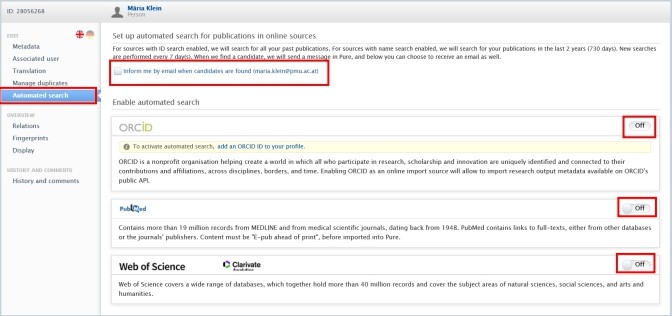
<span lang="EN-GB" style="mso-bidi-font-family: Arial; mso-ansi-language: EN-GB;">You can set up automated search for your publications in **PubMed**, **Web of Science**, and **ORCID**. When choosing this option, new searches are performed every 7 days. When PURE finds a candidate, you will get a message in Pure, and you can choose to turn on email notifications as well.</span>

<span lang="EN-GB" style="mso-bidi-font-family: Arial; mso-ansi-language: EN-GB;"> </span>

<u><span lang="EN-GB" style="mso-bidi-font-family: Arial; mso-ansi-language: EN-GB;">To set up an automated search:</span></u>

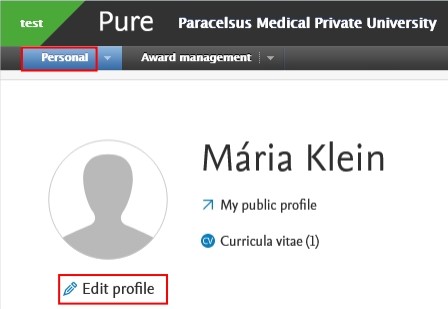
<span lang="EN-GB" style="mso-fareast-font-family: Arial; mso-bidi-font-family: Arial; mso-ansi-language: EN-GB;"><span style="mso-list: Ignore;">1.<span style="font: 7.0pt 'Times New Roman';"> </span></span></span><span lang="EN-GB" style="mso-bidi-font-family: Arial; mso-ansi-language: EN-GB;">Click on *Personal* in the header.</span>

<span lang="EN-GB" style="mso-fareast-font-family: Arial; mso-bidi-font-family: Arial; mso-ansi-language: EN-GB;"><span style="mso-list: Ignore;">2.<span style="font: 7.0pt 'Times New Roman';"> </span></span></span><span lang="EN-GB" style="mso-bidi-font-family: Arial; mso-ansi-language: EN-GB;">Go on *Edit profile* (located under the picture):</span>

[![Bild 35.jpeg](https://wiki.pmu.ac.at/uploads/images/gallery/2025-10/scaled-1680-/bild-35.jpeg)](https://wiki.pmu.ac.at/uploads/images/gallery/2025-10/bild-35.jpeg)

<span style="mso-ignore: vglayout; position: absolute; z-index: 251956224; margin-left: 22px; margin-top: 47px; width: 78px; height: 26px;">  
</span>

<span lang="EN-GB" style="mso-fareast-font-family: Arial; mso-bidi-font-family: Arial; mso-ansi-language: EN-GB;"><span style="mso-list: Ignore;">3.<span style="font: 7.0pt 'Times New Roman';"> </span></span></span><span lang="EN-GB" style="mso-bidi-font-family: Arial; mso-ansi-language: EN-GB;">Click on the *Automated search* tab on the left navigation:</span>

<span lang="EN-GB" style="mso-bidi-font-family: Arial; mso-ansi-language: EN-GB;"> [![Bild 36.jpeg](https://wiki.pmu.ac.at/uploads/images/gallery/2025-10/scaled-1680-/bild-36.jpeg)](https://wiki.pmu.ac.at/uploads/images/gallery/2025-10/bild-36.jpeg)</span>

<span style="mso-ignore: vglayout; position: absolute; z-index: 251968512; margin-left: 617px; margin-top: 253px; width: 40px; height: 21px;">  
</span><span style="mso-ignore: vglayout; position: absolute; z-index: 251873280; margin-left: 19px; margin-top: 115px; width: 34px; height: 24px;">  
</span><span style="mso-ignore: vglayout; position: absolute; z-index: 251875328; margin-left: 618px; margin-top: 197px; width: 41px; height: 21px;">  
</span><span style="mso-ignore: vglayout; position: absolute; z-index: 251872256; margin-left: 109px; margin-top: 59px; width: 222px; height: 28px;">  
</span><span style="mso-ignore: vglayout; position: absolute; z-index: 251739136; margin-left: 0px; margin-top: 87px; width: 99px; height: 18px;">  
</span>

<span lang="EN-GB" style="mso-fareast-font-family: Arial; mso-bidi-font-family: Arial; mso-ansi-language: EN-GB;"><span style="mso-list: Ignore;">4. </span></span><span lang="EN-GB" style="mso-bidi-font-family: Arial; mso-ansi-language: EN-GB;">Toggle the switch to *On* for each online source for which you want to enable the automated search. </span>

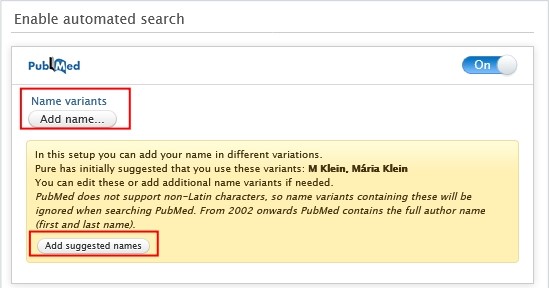
<span lang="EN-GB" style="mso-bidi-font-family: Arial; mso-ansi-language: EN-GB;">5. Automated search is based on the authors' names on publications or ORCHIDs.</span><span lang="EN-GB" style="mso-ansi-language: EN-GB;"> </span><span lang="EN-GB" style="mso-bidi-font-family: Arial; mso-ansi-language: EN-GB;">To add standard name suggestions provided by Pure, click on *Add suggested names*. If you want to manually add an additional name variant to search for, click on the *Add name* button and enter the additional name variant. </span>

[![Bild 37.jpeg](https://wiki.pmu.ac.at/uploads/images/gallery/2025-10/scaled-1680-/bild-37.jpeg)](https://wiki.pmu.ac.at/uploads/images/gallery/2025-10/bild-37.jpeg)

<span style="mso-ignore: vglayout; position: absolute; z-index: 251741184; margin-left: 29px; margin-top: 231px; width: 131px; height: 27px;">  
</span><span style="mso-ignore: vglayout; position: absolute; z-index: 251740160; margin-left: 20px; margin-top: 88px; width: 112px; height: 43px;">  
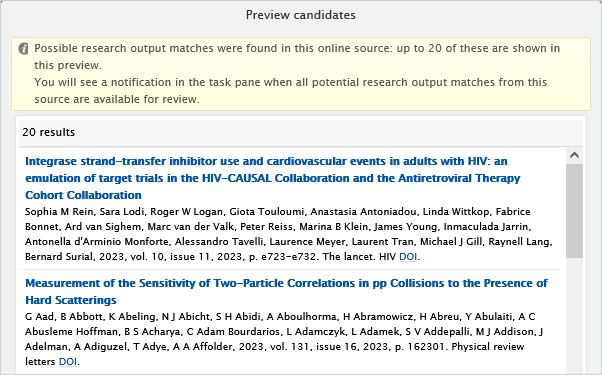
</span><span style="mso-bidi-font-family: Arial; mso-fareast-language: DE-AT; mso-no-proof: yes;"></span><span lang="EN-GB" style="mso-fareast-font-family: Arial; mso-bidi-font-family: Arial; mso-ansi-language: EN-GB;"><span style="mso-list: Ignore;">6. </span></span><span lang="EN-GB" style="mso-bidi-font-family: Arial; mso-ansi-language: EN-GB;">Once </span><span lang="EN-GB" style="mso-bidi-font-family: Arial; mso-ansi-language: EN-GB;">you have at least one name variant, you can click on *Preview candidates* to check that the search criteria are able to locate some results:</span>

<span style="mso-bidi-font-family: Arial; mso-fareast-language: DE-AT; mso-no-proof: yes;">![](https://wiki.pmu.ac.at/uploads/images/gallery/2025-10/embedded-image-wr1vxdds.png)</span>

<span lang="EN-GB" style="mso-bidi-font-family: Arial; mso-ansi-language: EN-GB;"> </span>

<p class="callout info"><span lang="EN-GB" style="mso-bidi-font-family: Arial; mso-style-textoutline-type: none; mso-style-textoutline-outlinestyle-dpiwidth: .75pt; mso-style-textoutline-outlinestyle-linecap: round; mso-style-textoutline-outlinestyle-join: bevel; mso-style-textoutline-outlinestyle-pctmiterlimit: 0%; mso-style-textoutline-outlinestyle-dash: solid; mso-style-textoutline-outlinestyle-align: center; mso-style-textoutline-outlinestyle-compound: simple; mso-ansi-language: EN-GB;">The number of previewed candidates is not indicative of the actual number of publications related to you, but rather **how well** your **search criteria** will work. It is not possible to import publications from the *Preview candidates* dialog. If you want to import publications from online sources, please visit the </span>[<span lang="EN-GB" style="mso-bidi-font-family: Arial; mso-style-textoutline-type: none; mso-style-textoutline-outlinestyle-dpiwidth: .75pt; mso-style-textoutline-outlinestyle-linecap: round; mso-style-textoutline-outlinestyle-join: bevel; mso-style-textoutline-outlinestyle-pctmiterlimit: 0%; mso-style-textoutline-outlinestyle-dash: solid; mso-style-textoutline-outlinestyle-align: center; mso-style-textoutline-outlinestyle-compound: simple; mso-ansi-language: EN-GB;">Import from online source</span>](https://wiki.pmu.ac.at/books/manual-for-researchers/page/23-import-from-online-source)<span lang="EN-GB" style="mso-bidi-font-family: Arial; mso-style-textoutline-type: none; mso-style-textoutline-outlinestyle-dpiwidth: .75pt; mso-style-textoutline-outlinestyle-linecap: round; mso-style-textoutline-outlinestyle-join: bevel; mso-style-textoutline-outlinestyle-pctmiterlimit: 0%; mso-style-textoutline-outlinestyle-dash: solid; mso-style-textoutline-outlinestyle-align: center; mso-style-textoutline-outlinestyle-compound: simple; mso-ansi-language: EN-GB;"> chapter.</span></p>

<span lang="EN-GB" style="mso-bidi-font-family: Arial; mso-ansi-language: EN-GB;"> </span>

<span lang="EN-GB" style="mso-fareast-font-family: Arial; mso-bidi-font-family: Arial; mso-ansi-language: EN-GB;"><span style="mso-list: Ignore;">7.<span style="font: 7.0pt 'Times New Roman';"> </span></span></span><span lang="EN-GB" style="mso-bidi-font-family: Arial; mso-ansi-language: EN-GB;">Click on *Save*. When the automated search has finished you will be **informed** about any publication candidates.</span>

<span lang="EN-GB" style="mso-bidi-font-family: Arial; mso-ansi-language: EN-GB;"> </span>

<span lang="EN-GB" style="mso-bidi-font-family: Arial; mso-ansi-language: EN-GB;"> </span>

<span lang="EN-GB" style="mso-bidi-font-family: Arial; mso-ansi-language: EN-GB;">Once the search is completed you can easily import your publication(s) by clicking on the *Import* button and following the steps described in the [<span lang="EN-GB" style="mso-bidi-font-family: Arial; mso-style-textoutline-type: none; mso-style-textoutline-outlinestyle-dpiwidth: .75pt; mso-style-textoutline-outlinestyle-linecap: round; mso-style-textoutline-outlinestyle-join: bevel; mso-style-textoutline-outlinestyle-pctmiterlimit: 0%; mso-style-textoutline-outlinestyle-dash: solid; mso-style-textoutline-outlinestyle-align: center; mso-style-textoutline-outlinestyle-compound: simple; mso-ansi-language: EN-GB;">Import from online source</span>](https://wiki.pmu.ac.at/books/manual-for-researchers/page/23-import-from-online-source)<span lang="EN-GB" style="mso-bidi-font-family: Arial; mso-style-textoutline-type: none; mso-style-textoutline-outlinestyle-dpiwidth: .75pt; mso-style-textoutline-outlinestyle-linecap: round; mso-style-textoutline-outlinestyle-join: bevel; mso-style-textoutline-outlinestyle-pctmiterlimit: 0%; mso-style-textoutline-outlinestyle-dash: solid; mso-style-textoutline-outlinestyle-align: center; mso-style-textoutline-outlinestyle-compound: simple; mso-ansi-language: EN-GB;"> chapter.</span></span>

[![Bild 38.jpeg](https://wiki.pmu.ac.at/uploads/images/gallery/2025-10/scaled-1680-/bild-38.jpeg)](https://wiki.pmu.ac.at/uploads/images/gallery/2025-10/bild-38.jpeg)

<span style="mso-ignore: vglayout; position: absolute; z-index: 251864064; left: 0px; margin-left: 0px; margin-top: 76px; width: 173px; height: 30px;">  
</span><span style="mso-ignore: vglayout; position: absolute; z-index: 251831296; left: 0px; margin-left: 13px; margin-top: 136px; width: 125px; height: 22px;">  
</span><span style="mso-ignore: vglayout; position: absolute; z-index: 251832320; left: 0px; margin-left: 192px; margin-top: 164px; width: 64px; height: 23px;">  
</span><span style="mso-bidi-font-family: Arial; mso-fareast-language: DE-AT; mso-no-proof: yes;"></span>

# 2.10. Potential Duplicates

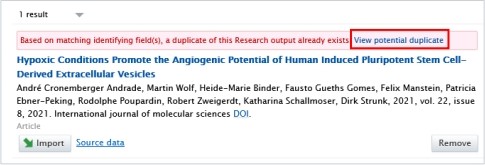
<p class="callout danger"><span lang="EN-GB" style="mso-bidi-font-family: Arial; mso-ansi-language: EN-GB;">Please, always pay attention to duplicate warnings (here is an example of it):</span></p>

[![Bild 45.jpeg](https://wiki.pmu.ac.at/uploads/images/gallery/2025-09/scaled-1680-/bild-45.jpeg)](https://wiki.pmu.ac.at/uploads/images/gallery/2025-09/bild-45.jpeg)

<span style="mso-ignore: vglayout; position: absolute; z-index: 251756544; margin-left: 446px; margin-top: 49px; width: 125px; height: 26px;">  
</span><span style="mso-bidi-font-family: Arial; color: #002060; mso-fareast-language: DE-AT; mso-no-proof: yes;"></span>

<span lang="EN-GB" style="mso-bidi-font-family: Arial; mso-ansi-language: EN-GB;">When clicking on the option **“View potential duplicate”**, you can check the details of the publication that already exists in Pure.</span>

<p class="callout warning"><span lang="EN-GB" style="mso-bidi-font-family: Arial; mso-ansi-language: EN-GB;">If you realise that the publication you want to import/create already exists in Pure, please **refrain** from importing/creating it again. </span></p>

<p class="callout info"><span lang="EN-GB" style="mso-bidi-font-family: Arial; mso-ansi-language: EN-GB;">If the types of the publications are **different**, for example, if you want to import/create a journal publication and a book up as potential duplicate, then it is not a real duplicate, and you can import/create your journal publication without creating a duplicate.</span></p>

# 2.11. Claim a Publication

<span lang="EN-GB" style="mso-bidi-font-family: Arial; mso-ansi-language: EN-GB;">If you find a Research output in Pure where **you are not listed as an author**, you can request to be included as a contributor to the content. </span>

<span lang="EN-GB" style="mso-bidi-font-family: Arial; mso-ansi-language: EN-GB;"> </span>

<u><span lang="EN-GB" style="mso-bidi-font-family: Arial; mso-ansi-language: EN-GB;">To claim a publication:</span></u>

<span lang="EN-GB" style="mso-fareast-font-family: Arial; mso-bidi-font-family: Arial; mso-ansi-language: EN-GB;"><span style="mso-list: Ignore;">1.<span style="font: 7.0pt 'Times New Roman';"> </span></span></span><span lang="EN-GB" style="mso-bidi-font-family: Arial; mso-ansi-language: EN-GB;">Click on the triangle icon next to *Personal* in the header:</span>

[![Bild 2.png](https://wiki.pmu.ac.at/uploads/images/gallery/2025-10/scaled-1680-/M6gbild-2.png)](https://wiki.pmu.ac.at/uploads/images/gallery/2025-10/M6gbild-2.png)

<span style="mso-ignore: vglayout; position: absolute; z-index: 251704320; margin-left: 93px; margin-top: 45px; width: 29px; height: 26px;">  
</span>

<span lang="EN-GB" style="mso-fareast-font-family: Arial; mso-bidi-font-family: Arial; mso-ansi-language: EN-GB;"><span style="mso-list: Ignore;">2.<span style="font: 7.0pt 'Times New Roman';"> </span></span></span><span lang="EN-GB" style="mso-bidi-font-family: Arial; mso-ansi-language: EN-GB;">Navigate to *Research outputs,* remove the *My content* filter, and search for the publication that is not (yet) associated to you.</span>

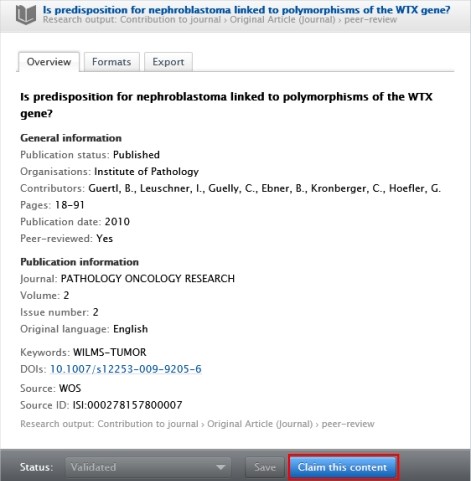
<span lang="EN-GB" style="mso-fareast-font-family: Arial; mso-bidi-font-family: Arial; mso-ansi-language: EN-GB;"><span style="mso-list: Ignore;">3.<span style="font: 7.0pt 'Times New Roman';"> </span></span></span><span lang="EN-GB" style="mso-bidi-font-family: Arial; mso-ansi-language: EN-GB;">After finding the research output you want to claim, click on it and the click on *Claim* *this content* in the footer of the editor window:</span>

[![Bild 39.jpeg](https://wiki.pmu.ac.at/uploads/images/gallery/2025-10/scaled-1680-/bild-39.jpeg)](https://wiki.pmu.ac.at/uploads/images/gallery/2025-10/bild-39.jpeg)

<span style="mso-ignore: vglayout; position: absolute; z-index: 251703296; margin-left: 290px; margin-top: 455px; width: 112px; height: 28px;">  
</span>

<span lang="EN-GB" style="mso-bidi-font-family: Arial; mso-ansi-language: EN-GB;"> 4. Write a brief message about your claim, and then click on *Claim this content*.</span>

<span lang="EN-GB" style="font-size: 11.0pt; line-height: 107%; font-family: 'Arial',sans-serif; mso-fareast-font-family: Calibri; mso-fareast-theme-font: minor-latin; mso-ansi-language: EN-GB; mso-fareast-language: EN-US; mso-bidi-language: AR-SA;">In the next step, your request will be processed by the RM</span>

# 2.12. Disclaim a Publication

<span lang="EN-GB" style="mso-bidi-font-family: Arial; mso-ansi-language: EN-GB;">If you find a Research output in your publication list that **does not belong to you**, you can disclaim it.</span>

<span lang="EN-GB" style="mso-bidi-font-family: Arial; mso-ansi-language: EN-GB;"> </span>

<u><span lang="EN-GB" style="mso-bidi-font-family: Arial; mso-ansi-language: EN-GB;">To disclaim a publication:</span></u>

<span lang="EN-GB" style="mso-bidi-font-family: Arial; mso-ansi-language: EN-GB;">1. Click on the triangle icon next to *Personal* in the header:</span>

[![Bild 2.png](https://wiki.pmu.ac.at/uploads/images/gallery/2025-10/scaled-1680-/JU6bild-2.png)](https://wiki.pmu.ac.at/uploads/images/gallery/2025-10/JU6bild-2.png)

<span lang="EN-GB" style="mso-fareast-font-family: Arial; mso-bidi-font-family: Arial; mso-ansi-language: EN-GB;"><span style="mso-list: Ignore;">2.<span style="font: 7.0pt 'Times New Roman';"> </span></span></span><span lang="EN-GB" style="mso-bidi-font-family: Arial; mso-ansi-language: EN-GB;">Navigate to *Research outputs*, and search for a publication you want to disclaim.</span>

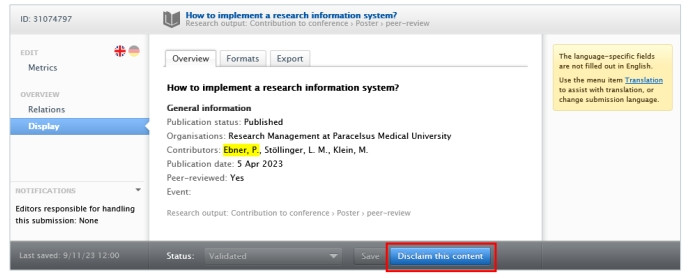
<span lang="EN-GB" style="mso-fareast-font-family: Arial; mso-bidi-font-family: Arial; mso-ansi-language: EN-GB;"><span style="mso-list: Ignore;">3.<span style="font: 7.0pt 'Times New Roman';"> </span></span></span><span lang="EN-GB" style="mso-bidi-font-family: Arial; mso-ansi-language: EN-GB;">After finding the research output you want to claim, click on it and the click on *Disclaim this content* in the footer of the editor window:</span>

<span style="mso-ignore: vglayout; position: absolute; z-index: 251706368; margin-left: 377px; margin-top: 239px; width: 112px; height: 31px;">  
</span><span style="mso-bidi-font-family: Arial; mso-fareast-language: DE-AT; mso-no-proof: yes;"></span>

[![Bild 40.jpeg](https://wiki.pmu.ac.at/uploads/images/gallery/2025-10/scaled-1680-/bild-40.jpeg)](https://wiki.pmu.ac.at/uploads/images/gallery/2025-10/bild-40.jpeg)

<span lang="EN-GB" style="mso-bidi-font-family: Arial; mso-ansi-language: EN-GB;"> 4. Write a brief message about your request, and then click on *Claim this content*.</span>

<span lang="EN-GB" style="mso-bidi-font-family: Arial; mso-ansi-language: EN-GB;">In the next step, your request will be processed by the RM.</span>

# 2.13. Habil-List (in German: Habilauszug)

If you need a habil-list, please refer to [FAQ 2.](https://wiki.pmu.ac.at/books/pure-faqs-english/page/question-2-how-can-i-download-a-habilitation-list-in-german-habilauszug-with-pmu-score-points-and-impact-factor-from-pure)