# 9. General Features of Content Types

# 9.1. Create a Copy

<span lang="EN-GB" style="mso-bidi-font-family: Arial; mso-ansi-language: EN-GB;">This function is useful when you need to use the same or similar data multiple times. For example, if you want to enter multiple chapters of the same book:</span>

[![Bild 74.jpeg](https://wiki.pmu.ac.at/uploads/images/gallery/2025-10/scaled-1680-/bild-74.jpeg)](https://wiki.pmu.ac.at/uploads/images/gallery/2025-10/bild-74.jpeg)

<span style="mso-ignore: vglayout; position: absolute; z-index: 251796480; margin-left: 447px; margin-top: 280px; width: 26px; height: 27px;">  
</span><span style="mso-bidi-font-family: Arial; mso-fareast-language: DE-AT; mso-no-proof: yes;"></span>

# 9.2. Delete an Item

<span lang="EN-GB" style="mso-bidi-font-family: Arial; mso-ansi-language: EN-GB;">You can **completely delete** an item by clicking on the red 'x' icon. By doing so, you will receive an automated message from Pure, which you can either confirm or cancel, with the message: *'Are you sure you want to delete this content? The content will be deleted immediately, and this action cannot be undone´.*</span>

<span style="mso-ignore: vglayout; position: absolute; z-index: 251797504; left: 0px; margin-left: 466px; margin-top: 288px; width: 30px; height: 23px;">  
</span><span style="mso-bidi-font-family: Arial; mso-fareast-language: DE-AT; mso-no-proof: yes;"></span>

[![Bild 75.jpeg](https://wiki.pmu.ac.at/uploads/images/gallery/2025-10/scaled-1680-/bild-75.jpeg)](https://wiki.pmu.ac.at/uploads/images/gallery/2025-10/bild-75.jpeg)

<span lang="EN-GB" style="mso-bidi-font-family: Arial; mso-ansi-language: EN-GB;"> </span>**<span lang="EN-GB" style="mso-bidi-font-family: Arial; color: black; mso-themecolor: text1; mso-style-textoutline-type: none; mso-style-textoutline-outlinestyle-dpiwidth: .75pt; mso-style-textoutline-outlinestyle-linecap: round; mso-style-textoutline-outlinestyle-join: bevel; mso-style-textoutline-outlinestyle-pctmiterlimit: 0%; mso-style-textoutline-outlinestyle-dash: solid; mso-style-textoutline-outlinestyle-align: center; mso-style-textoutline-outlinestyle-compound: simple; mso-ansi-language: EN-GB;"><span style="mso-tab-count: 1;"> </span><span style="mso-tab-count: 8;"> </span></span>**

<p class="callout warning"><span lang="EN-GB" style="mso-bidi-font-family: Arial; mso-ansi-language: EN-GB;">Be careful deleting a record in Pure. It is **not possible to restore** the deleted record.</span></p>

<span lang="EN-GB" style="font-size: 11.0pt; line-height: 107%; font-family: 'Arial',sans-serif; mso-fareast-font-family: Calibri; mso-fareast-theme-font: minor-latin; mso-ansi-language: EN-GB; mso-fareast-language: EN-US; mso-bidi-language: AR-SA;">  
</span>

<span lang="EN-GB" style="mso-bidi-font-family: Arial; mso-ansi-language: EN-GB;"></span>

# 9.3. Relations

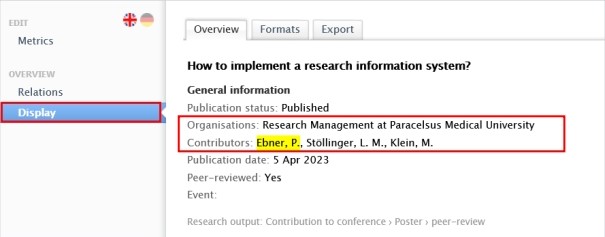
<span lang="EN-GB" style="mso-bidi-font-family: Arial; mso-ansi-language: EN-GB;">One of the most important advantages of Pure is, that it **connects** content types with each other. Using relations can help to improve our data quality. For example, a Research output is always related to a person and the person’s organisation. These connections are shown under *Display* tab.</span>

[![Bild 76.jpeg](https://wiki.pmu.ac.at/uploads/images/gallery/2025-10/scaled-1680-/bild-76.jpeg)](https://wiki.pmu.ac.at/uploads/images/gallery/2025-10/bild-76.jpeg)

<span style="mso-ignore: vglayout; position: absolute; z-index: 251839488; left: 0px; margin-left: 2px; margin-top: 103px; width: 162px; height: 22px;">  
</span>

<u><span lang="EN-GB" style="mso-bidi-font-family: Arial; mso-ansi-language: EN-GB;">To manually add relations to a record:</span></u>

<span lang="EN-GB" style="mso-fareast-font-family: Arial; mso-bidi-font-family: Arial; mso-ansi-language: EN-GB;"><span style="mso-list: Ignore;">1.<span style="font: 7.0pt 'Times New Roman';"> </span></span></span><span lang="EN-GB" style="mso-bidi-font-family: Arial; mso-ansi-language: EN-GB;">Search for the exact record, you want to link with another (in Pure already existing) record.</span>

<span lang="EN-GB" style="mso-fareast-font-family: Arial; mso-bidi-font-family: Arial; mso-ansi-language: EN-GB;"><span style="mso-list: Ignore;">2.<span style="font: 7.0pt 'Times New Roman';"> </span></span></span><span lang="EN-GB" style="mso-bidi-font-family: Arial; mso-ansi-language: EN-GB;">Go the *Relations* or *Related* …. section, and choose the type of the content. Begin to search for the record you want to add to this record.</span>

<span lang="EN-GB" style="mso-fareast-font-family: Arial; mso-bidi-font-family: Arial; mso-ansi-language: EN-GB;"><span style="mso-list: Ignore;">3.<span style="font: 7.0pt 'Times New Roman';"> </span></span></span><span lang="EN-GB" style="mso-bidi-font-family: Arial; mso-ansi-language: EN-GB;">Click on *Save*. </span>

<span lang="EN-GB" style="mso-bidi-font-family: Arial; mso-ansi-language: EN-GB;"> </span>

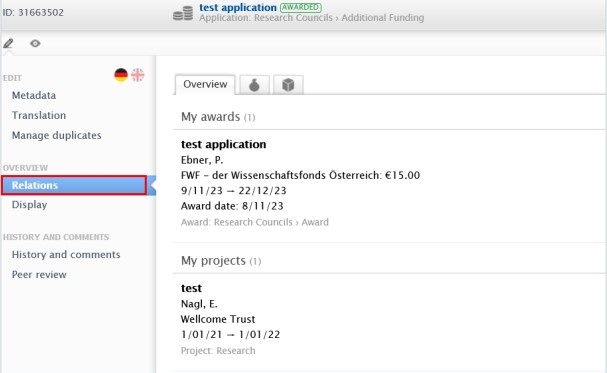
<span lang="EN-GB" style="mso-bidi-font-family: Arial; mso-ansi-language: EN-GB;">These relations are shown in the *Relations* tab of the record:</span>

[![Bild 77.jpeg](https://wiki.pmu.ac.at/uploads/images/gallery/2025-10/scaled-1680-/bild-77.jpeg)](https://wiki.pmu.ac.at/uploads/images/gallery/2025-10/bild-77.jpeg)

<span lang="EN-GB" style="mso-bidi-font-family: Arial; mso-ansi-language: EN-GB;"> </span>**<span lang="EN-GB" style="mso-bidi-font-family: Arial; color: black; mso-themecolor: text1; mso-style-textoutline-type: none; mso-style-textoutline-outlinestyle-dpiwidth: .75pt; mso-style-textoutline-outlinestyle-linecap: round; mso-style-textoutline-outlinestyle-join: bevel; mso-style-textoutline-outlinestyle-pctmiterlimit: 0%; mso-style-textoutline-outlinestyle-dash: solid; mso-style-textoutline-outlinestyle-align: center; mso-style-textoutline-outlinestyle-compound: simple; mso-ansi-language: EN-GB;"><span style="mso-tab-count: 1;"> </span><span style="mso-tab-count: 8;"> </span></span>**

<p class="callout info"><span lang="EN-GB" style="mso-bidi-font-family: Arial; mso-ansi-language: EN-GB;">To manually add relations to a record **depends on the workflow state**. For example, if a Research output has gone through the validation process, adding a relation is no longer possible for Researchers.</span></p>

<span lang="EN-GB" style="mso-bidi-font-family: Arial; mso-ansi-language: EN-GB;"> </span>

<span lang="EN-GB" style="font-size: 11.0pt; line-height: 107%; font-family: 'Arial',sans-serif; mso-fareast-font-family: Calibri; mso-fareast-theme-font: minor-latin; mso-ansi-language: EN-GB; mso-fareast-language: EN-US; mso-bidi-language: AR-SA;">  
</span>

<span lang="EN-GB" style="mso-bidi-font-family: Arial; mso-ansi-language: EN-GB;"></span>

# 9.4. Visibility

<span lang="EN-GB" style="mso-bidi-font-family: Arial; mso-ansi-language: EN-GB;">Visibility controls the **internal and the external** **access** of the records in Pure. You can control the visibility of your records by setting the visibility state from the dropdown list. </span>

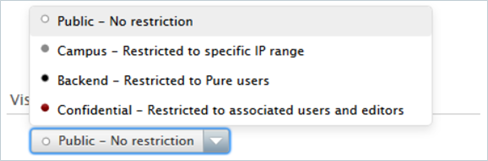
<span style="text-decoration: underline;"><span lang="EN-GB" style="color: rgb(0, 0, 0); text-decoration: underline;">The following 4 visibility types are available in Pure:</span></span>

*<span style="mso-bidi-font-family: Arial; mso-fareast-language: DE-AT; mso-no-proof: yes;">![](https://wiki.pmu.ac.at/uploads/images/gallery/2025-10/embedded-image-dztjzqmn.png)</span>*

<span lang="EN-GB" style="mso-bidi-font-family: Arial; mso-ansi-language: EN-GB;"> </span>

<span lang="EN-GB" style="mso-bidi-font-family: Arial; mso-ansi-language: EN-GB;"> </span>

<table border="1" cellpadding="0" cellspacing="0" class="MsoTableGrid" id="bkmrk-visibility-state-des" style="margin-left: 18.0pt; border-collapse: collapse; border: none; mso-border-alt: solid windowtext .5pt; mso-yfti-tbllook: 1184; mso-padding-alt: 0cm 5.4pt 0cm 5.4pt;"><tbody><tr style="mso-yfti-irow: 0; mso-yfti-firstrow: yes;"><td style="width: 95.15pt; border: solid windowtext 1.0pt; mso-border-alt: solid windowtext .5pt; padding: 0cm 5.4pt 0cm 5.4pt;" valign="top" width="127">**<span lang="EN-GB" style="mso-bidi-font-family: Arial; mso-ansi-language: EN-GB;">Visibility state</span>**

</td><td style="width: 339.95pt; border: solid windowtext 1.0pt; border-left: none; mso-border-left-alt: solid windowtext .5pt; mso-border-alt: solid windowtext .5pt; padding: 0cm 5.4pt 0cm 5.4pt;" valign="top" width="453">**<span lang="EN-GB" style="mso-bidi-font-family: Arial; mso-ansi-language: EN-GB;">Description</span>**

</td></tr><tr style="mso-yfti-irow: 1;"><td style="width: 95.15pt; border: solid windowtext 1.0pt; border-top: none; mso-border-top-alt: solid windowtext .5pt; mso-border-alt: solid windowtext .5pt; padding: 0cm 5.4pt 0cm 5.4pt;" valign="top" width="127"><span lang="EN-GB" style="mso-bidi-font-family: Arial; mso-ansi-language: EN-GB;">Public</span>

</td><td style="width: 339.95pt; border-top: none; border-left: none; border-bottom: solid windowtext 1.0pt; border-right: solid windowtext 1.0pt; mso-border-top-alt: solid windowtext .5pt; mso-border-left-alt: solid windowtext .5pt; mso-border-alt: solid windowtext .5pt; padding: 0cm 5.4pt 0cm 5.4pt;" valign="top" width="453"><span lang="EN-GB" style="mso-bidi-font-family: Arial; mso-ansi-language: EN-GB;">No restriction on visibility. All users of Pure can see this content and it is displayed on Pure Portal.</span>

</td></tr><tr style="mso-yfti-irow: 2;"><td style="width: 95.15pt; border: solid windowtext 1.0pt; border-top: none; mso-border-top-alt: solid windowtext .5pt; mso-border-alt: solid windowtext .5pt; padding: 0cm 5.4pt 0cm 5.4pt;" valign="top" width="127"><span lang="EN-GB" style="mso-bidi-font-family: Arial; mso-ansi-language: EN-GB;">Campus</span>

</td><td style="width: 339.95pt; border-top: none; border-left: none; border-bottom: solid windowtext 1.0pt; border-right: solid windowtext 1.0pt; mso-border-top-alt: solid windowtext .5pt; mso-border-left-alt: solid windowtext .5pt; mso-border-alt: solid windowtext .5pt; padding: 0cm 5.4pt 0cm 5.4pt;" valign="top" width="453"><span lang="EN-GB" style="mso-bidi-font-family: Arial; mso-ansi-language: EN-GB;">When viewed on the Pure Portal, visibility is restricted to viewers with a specific IP range set to reflect being on-campus at your institution. All users of Pure at your institution can see this content from within Pure.</span>

</td></tr><tr style="mso-yfti-irow: 3;"><td style="width: 95.15pt; border: solid windowtext 1.0pt; border-top: none; mso-border-top-alt: solid windowtext .5pt; mso-border-alt: solid windowtext .5pt; padding: 0cm 5.4pt 0cm 5.4pt;" valign="top" width="127"><span lang="EN-GB" style="mso-bidi-font-family: Arial; mso-ansi-language: EN-GB;">Backend</span>

</td><td style="width: 339.95pt; border-top: none; border-left: none; border-bottom: solid windowtext 1.0pt; border-right: solid windowtext 1.0pt; mso-border-top-alt: solid windowtext .5pt; mso-border-left-alt: solid windowtext .5pt; mso-border-alt: solid windowtext .5pt; padding: 0cm 5.4pt 0cm 5.4pt;" valign="top" width="453"><span lang="EN-GB" style="mso-bidi-font-family: Arial; mso-ansi-language: EN-GB;">Restricted to Pure users. This content is only visible within Pure.</span>

</td></tr><tr style="mso-yfti-irow: 4; mso-yfti-lastrow: yes;"><td style="width: 95.15pt; border: solid windowtext 1.0pt; border-top: none; mso-border-top-alt: solid windowtext .5pt; mso-border-alt: solid windowtext .5pt; padding: 0cm 5.4pt 0cm 5.4pt;" valign="top" width="127"><span lang="EN-GB" style="mso-bidi-font-family: Arial; mso-ansi-language: EN-GB;">Confidential</span>

</td><td style="width: 339.95pt; border-top: none; border-left: none; border-bottom: solid windowtext 1.0pt; border-right: solid windowtext 1.0pt; mso-border-top-alt: solid windowtext .5pt; mso-border-left-alt: solid windowtext .5pt; mso-border-alt: solid windowtext .5pt; padding: 0cm 5.4pt 0cm 5.4pt;" valign="top" width="453"><span lang="EN-GB" style="mso-bidi-font-family: Arial; mso-ansi-language: EN-GB;">Highly-restricted visibility. Only visible from within Pure to general administrators and (those acting on behalf of) users that have been explicitly added to the record or have a role approving/validating the record.</span>

</td></tr></tbody></table>

<span lang="EN-GB" style="font-size: 11.0pt; line-height: 107%; font-family: 'Arial',sans-serif; mso-fareast-font-family: Calibri; mso-fareast-theme-font: minor-latin; mso-ansi-language: EN-GB; mso-fareast-language: EN-US; mso-bidi-language: AR-SA;">  
</span>

<span lang="EN-GB" style="mso-bidi-font-family: Arial; mso-ansi-language: EN-GB;"></span>

# 9.5. Comments and History

<span lang="EN-GB" style="mso-bidi-font-family: Arial; mso-ansi-language: EN-GB;">If you want to contact someone about a record in Pure, you can send them a message from that record. This method helps to avoid of the use of print screens, and long correspondence. Writing a comment on a record **depends on the workflow state**. For example, if a publication has gone through the validation process, writing a comment is no longer possible. In this case, please feel free to contact the RM at </span>[<span lang="EN-GB" style="mso-bidi-font-family: Arial; mso-ansi-language: EN-GB;">pure@pmu.ac.at</span>](mailto:pure@pmu.ac.at)<span lang="EN-GB" style="mso-bidi-font-family: Arial; mso-ansi-language: EN-GB;">. </span>

<span lang="EN-GB" style="mso-bidi-font-family: Arial; mso-ansi-language: EN-GB;"> </span>

<u><span lang="EN-GB" style="mso-bidi-font-family: Arial; mso-ansi-language: EN-GB;">To write a comment about a record:</span></u>

<span lang="EN-GB" style="mso-fareast-font-family: Arial; mso-bidi-font-family: Arial; mso-ansi-language: EN-GB;"><span style="mso-list: Ignore;">1.<span style="font: 7.0pt 'Times New Roman';"> </span></span></span><span lang="EN-GB" style="mso-bidi-font-family: Arial; mso-ansi-language: EN-GB;">Search for the record.</span>

<span lang="EN-GB" style="mso-fareast-font-family: Arial; mso-bidi-font-family: Arial; mso-ansi-language: EN-GB;"><span style="mso-list: Ignore;">2.<span style="font: 7.0pt 'Times New Roman';"> </span></span></span><span lang="EN-GB" style="mso-bidi-font-family: Arial; mso-ansi-language: EN-GB;">Go on *Comments and History.*</span>

<span lang="EN-GB" style="mso-fareast-font-family: Arial; mso-bidi-font-family: Arial; mso-ansi-language: EN-GB;"><span style="mso-list: Ignore;">3.<span style="font: 7.0pt 'Times New Roman';"> </span></span></span><span lang="EN-GB" style="mso-bidi-font-family: Arial; mso-ansi-language: EN-GB;">Click on *Write a comment about the content:*</span>

[![comments.png](https://wiki.pmu.ac.at/uploads/images/gallery/2025-10/scaled-1680-/comments.png)](https://wiki.pmu.ac.at/uploads/images/gallery/2025-10/comments.png)

<span lang="EN-GB" style="mso-bidi-font-family: Arial; mso-ansi-language: EN-GB;"> 4. </span><span lang="EN-GB" style="mso-bidi-font-family: Arial; mso-ansi-language: EN-GB;">Write a comment in the text box and select the names/roles of the Pure users who you want to see the comment. </span>

<span lang="EN-GB" style="mso-bidi-font-family: Arial; mso-ansi-language: EN-GB;"> </span>

<p class="callout danger"><span lang="EN-GB" style="mso-bidi-font-family: Arial; mso-ansi-language: EN-GB;">Make sure, that you select the checkboxes next to the names, otherwise no message is sent<span style="color: black; mso-themecolor: text1; mso-style-textoutline-type: none; mso-style-textoutline-outlinestyle-dpiwidth: .75pt; mso-style-textoutline-outlinestyle-linecap: round; mso-style-textoutline-outlinestyle-join: bevel; mso-style-textoutline-outlinestyle-pctmiterlimit: 0%; mso-style-textoutline-outlinestyle-dash: solid; mso-style-textoutline-outlinestyle-align: center; mso-style-textoutline-outlinestyle-compound: simple;">. If **admins** are also affected, please only select **Mária Klein** and **Konstantin Thiel**:</span></span></p>

<span lang="EN-GB" style="mso-bidi-font-family: Arial; mso-ansi-language: EN-GB;"> </span>

<span style="mso-ignore: vglayout; position: absolute; z-index: 251964416; margin-left: 12px; margin-top: 25px; width: 443px; height: 52px;">  
</span><span style="font-size: 12.0pt; line-height: 107%; font-family: 'Times New Roman',serif; mso-fareast-font-family: 'Times New Roman'; mso-ansi-language: EN-GB; mso-fareast-language: DE-AT;"><span style="mso-spacerun: yes;"> </span></span>*<span style="mso-bidi-font-family: Arial; mso-no-proof: yes;">![Ein Bild, das Text, Schrift, Screenshot, weiß enthält.

KI-generierte Inhalte können fehlerhaft sein.](https://wiki.pmu.ac.at/uploads/images/gallery/2025-10/embedded-image-ebfecypo.png)</span>*

<span lang="EN-GB" style="mso-bidi-font-family: Arial; mso-ansi-language: EN-GB;"> 5. Click on *Save.*</span>*<span lang="EN-GB" style="mso-bidi-font-family: Arial; mso-ansi-language: EN-GB;"> </span>*

<span lang="EN-GB" style="mso-bidi-font-family: Arial; mso-ansi-language: EN-GB;"> </span>

<span lang="EN-GB" style="mso-bidi-font-family: Arial; mso-ansi-language: EN-GB;">In the next step, users are alerted, and they will see your comment alongside a link to the content.</span>

<span lang="EN-GB" style="font-size: 11.0pt; line-height: 107%; font-family: 'Arial',sans-serif; mso-fareast-font-family: Calibri; mso-fareast-theme-font: minor-latin; mso-ansi-language: EN-GB; mso-fareast-language: EN-US; mso-bidi-language: AR-SA;">  
</span>

<span lang="EN-GB" style="mso-bidi-font-family: Arial; mso-ansi-language: EN-GB;"></span>

# 9.6. Information Icons

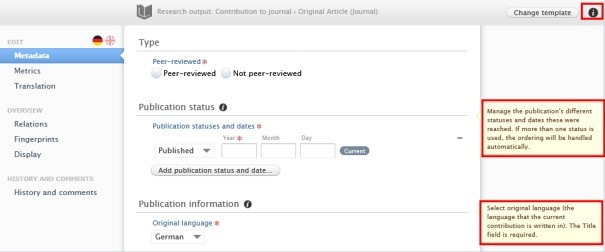
<span lang="EN-GB" style="mso-bidi-font-family: Arial; mso-ansi-language: EN-GB;">Information icons are valuable tools that assist in correctly filling out fields. We highly **recommend** using them, especially if you are new to Pure. </span>

<span style="text-decoration: underline;"><span lang="EN-GB" style="color: rgb(0, 0, 0); text-decoration: underline;">To check in one information icon:</span></span>

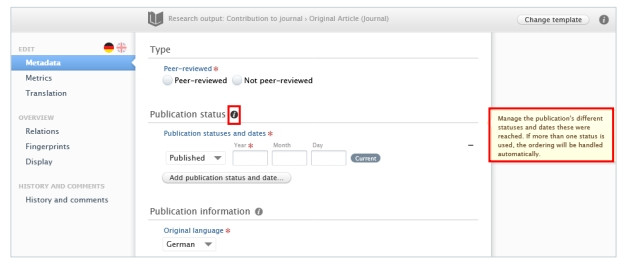
<span lang="EN-GB" style="font-family: Symbol; mso-fareast-font-family: Symbol; mso-bidi-font-family: Symbol; mso-ansi-language: EN-GB;"><span style="mso-list: Ignore;">·<span style="font: 7.0pt 'Times New Roman';"> </span></span></span><span lang="EN-GB" style="mso-bidi-font-family: Arial; mso-ansi-language: EN-GB;">Navigate your mouse to the information icon next to the fields. Now, you can see the information belongs to the submission on the right panel:</span>

[![Bild 80.jpeg](https://wiki.pmu.ac.at/uploads/images/gallery/2025-10/scaled-1680-/bild-80.jpeg)](https://wiki.pmu.ac.at/uploads/images/gallery/2025-10/bild-80.jpeg)

<span style="text-decoration: underline;"><span lang="EN-GB" style="color: rgb(0, 0, 0); text-decoration: underline;">To check in all the information icons:</span></span>

<span lang="EN-GB" style="font-family: Symbol; mso-fareast-font-family: Symbol; mso-bidi-font-family: Symbol; mso-ansi-language: EN-GB;"><span style="mso-list: Ignore;">·<span style="font: 7.0pt 'Times New Roman';"> </span></span></span><span lang="EN-GB" style="mso-bidi-font-family: Arial; mso-ansi-language: EN-GB;">Click on the information icon in the upper right corner. Now, you can see all the information boxes that belong to the content:</span>

[![Bild 81.jpeg](https://wiki.pmu.ac.at/uploads/images/gallery/2025-10/scaled-1680-/bild-81.jpeg)](https://wiki.pmu.ac.at/uploads/images/gallery/2025-10/bild-81.jpeg)

<span style="mso-ignore: vglayout; position: absolute; z-index: 251692032; margin-left: 584px; margin-top: 5px; width: 23px; height: 17px;">![](file:///C:/Users/MARIA~1.KLE/AppData/Local/Temp/msohtmlclip1/01/clip_image001.png)</span><span style="mso-ignore: vglayout; position: absolute; z-index: 251693056; margin-left: 482px; margin-top: 202px; width: 125px; height: 46px;">  
</span><span style="mso-ignore: vglayout; position: absolute; z-index: 251694080; margin-left: 484px; margin-top: 101px; width: 125px; height: 59px;">  
</span><span style="mso-bidi-font-family: Arial; mso-fareast-language: DE-AT; mso-no-proof: yes;"></span>

<span lang="EN-GB" style="mso-bidi-font-family: Arial; mso-ansi-language: EN-GB;"> </span>

<span lang="EN-GB" style="font-size: 11.0pt; line-height: 107%; font-family: 'Arial',sans-serif; mso-fareast-font-family: Calibri; mso-fareast-theme-font: minor-latin; mso-ansi-language: EN-GB; mso-fareast-language: EN-US; mso-bidi-language: AR-SA;">  
</span>

<span lang="EN-GB" style="mso-bidi-font-family: Arial; mso-ansi-language: EN-GB;"></span>