# Manual for Researchers

This handbook is intended for researcher and PURE-editors of the organisational units of the PMU, SALK and Klinikum Nuremberg. This handbook covers essential PURE knowledge, including how to search in PURE, import research outputs, and enter information about applications, among other core functionalities.

# 1. Check Your Content

# 1.1. Global Search

<span lang="EN-GB" style="mso-bidi-font-family: Arial; mso-ansi-language: EN-GB;">This searches through **metadata** of all records and content types available in PURE:</span>

[![Bild 8.jpeg](https://wiki.pmu.ac.at/uploads/images/gallery/2025-09/scaled-1680-/bild-8.jpeg)](https://wiki.pmu.ac.at/uploads/images/gallery/2025-09/bild-8.jpeg)

# 1.2. Search Within a Content Type

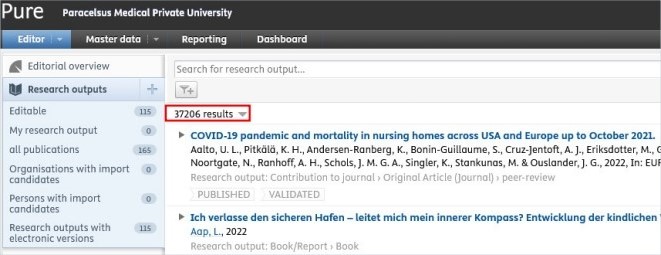
<span lang="EN-GB" style="mso-bidi-font-family: Arial; mso-ansi-language: EN-GB;">Click on, for example, *Research outputs* on the left navigation to open the content list view with search functionality:</span>

[![Bild 10.jpeg](https://wiki.pmu.ac.at/uploads/images/gallery/2025-09/scaled-1680-/bild-10.jpeg)](https://wiki.pmu.ac.at/uploads/images/gallery/2025-09/bild-10.jpeg)

# 1.3. Filter Within a Content Type

<span lang="EN-GB" style="mso-bidi-font-family: Arial; mso-ansi-language: EN-GB;">After choosing, for example, Research outputs*, navigate, for example to the category 'all publications</span><span lang="EN-GB" style="mso-ansi-language: EN-GB;"> </span><span lang="EN-GB" style="mso-bidi-font-family: Arial; mso-ansi-language: EN-GB;">', click on the *Add filter* icon and select from the available **filter options** (e.g. 'Author collaborations'):</span>

[![Bild 11.jpeg](https://wiki.pmu.ac.at/uploads/images/gallery/2025-09/scaled-1680-/Zvobild-11.jpeg)](https://wiki.pmu.ac.at/uploads/images/gallery/2025-09/Zvobild-11.jpeg)

<span lang="EN-GB" style="mso-bidi-font-family: Arial; mso-ansi-language: EN-GB;">You can add multiple filters if you need to.</span>

<span lang="EN-GB" style="mso-bidi-font-family: Arial; mso-ansi-language: EN-GB;"> </span>

<span lang="EN-GB" style="mso-bidi-font-family: Arial; mso-ansi-language: EN-GB;">If you wish to use specific filters regularly, you can click on the **pin icon** </span>**<span style="mso-bidi-font-family: Arial; mso-no-proof: yes;">![](https://wiki.pmu.ac.at/uploads/images/gallery/2025-09/embedded-image-d001wa1g.png)</span>**

<span lang="EN-GB" style="mso-bidi-font-family: Arial; mso-ansi-language: EN-GB;"><span style="mso-spacerun: yes;"> </span>to save the filter. By doing so, you can save time and easily filter content you need:</span>

[![Bild 13.jpeg](https://wiki.pmu.ac.at/uploads/images/gallery/2025-09/scaled-1680-/ZDCbild-13.jpeg)](https://wiki.pmu.ac.at/uploads/images/gallery/2025-09/ZDCbild-13.jpeg)

# 1.4. Sort by Within a Content Type

<span lang="EN-GB" style="mso-bidi-font-family: Arial; mso-ansi-language: EN-GB;">After obtaining a list of records within, for example, *Research outputs*, there is the possibility to **sort the records** by several options (e.g. title, type, etc.):</span>

[![Bild 14.jpeg](https://wiki.pmu.ac.at/uploads/images/gallery/2025-09/scaled-1680-/5fSbild-14.jpeg)](https://wiki.pmu.ac.at/uploads/images/gallery/2025-09/5fSbild-14.jpeg)

# 1.5. View Types Within a Content Type

<span lang="EN-GB" style="mso-bidi-font-family: Arial; mso-ansi-language: EN-GB;">For exampe, for *Research outputs*, you can choose from the list **view** or the matrix view to visualise your data: </span>

[![Bild 15.jpeg](https://wiki.pmu.ac.at/uploads/images/gallery/2025-09/scaled-1680-/teIbild-15.jpeg)](https://wiki.pmu.ac.at/uploads/images/gallery/2025-09/teIbild-15.jpeg)

# 1.6. Export a List Within a Content Type

<span lang="EN-GB" style="mso-bidi-font-family: Arial; mso-ansi-language: EN-GB;">For example, for Research outputs, on the bottom of the page, you can select your preferred file type for export:</span>

[![Bild 16.jpeg](https://wiki.pmu.ac.at/uploads/images/gallery/2025-09/scaled-1680-/pmubild-16.jpeg)](https://wiki.pmu.ac.at/uploads/images/gallery/2025-09/pmubild-16.jpeg)

<p class="callout info">If you need a habil list (in Geman: "Habilationsauszug") including impact factor and PMU score points, please refer to [FAQ 2](https://wiki.pmu.ac.at/books/pure-faqs-english/page/question-2-how-can-i-download-a-habilitation-list-in-german-habilauszug-with-pmu-score-points-and-impact-factor-from-pure).</p>

# 2. Create Your Content - Research Outputs (Publications)

# 2.1. Before Creating a Research Output

<span lang="EN-GB" style="mso-bidi-font-family: Arial; mso-ansi-language: EN-GB;">First, you always need to **check if the content already exists in PURE**:</span>

<span lang="EN-GB" style="mso-fareast-font-family: Arial; mso-bidi-font-family: Arial; mso-ansi-language: EN-GB;"><span style="mso-list: Ignore;">1.<span style="font: 7.0pt 'Times New Roman';"> </span></span></span><span lang="EN-GB" style="mso-bidi-font-family: Arial; mso-ansi-language: EN-GB;">Remove the my content filter by on the “x”</span>

[![Bild 17.jpeg](https://wiki.pmu.ac.at/uploads/images/gallery/2025-09/scaled-1680-/bild-17.jpeg)](https://wiki.pmu.ac.at/uploads/images/gallery/2025-09/bild-17.jpeg)

<span style="mso-ignore: vglayout; position: absolute; z-index: 251740160; left: 0px; margin-left: 69px; margin-top: 21px; width: 26px; height: 27px;">  
</span>

<span lang="EN-GB" style="mso-fareast-font-family: Arial; mso-bidi-font-family: Arial; mso-ansi-language: EN-GB;"><span style="mso-list: Ignore;">2.<span style="font: 7.0pt 'Times New Roman';"> </span></span></span><span lang="EN-GB" style="mso-bidi-font-family: Arial; mso-ansi-language: EN-GB;">Now you have access to *every* publication not just those related to your profile: </span>

[![Bild 18.jpeg](https://wiki.pmu.ac.at/uploads/images/gallery/2025-09/scaled-1680-/bild-18.jpeg)](https://wiki.pmu.ac.at/uploads/images/gallery/2025-09/bild-18.jpeg)

<span lang="EN-GB" style="mso-bidi-font-family: Arial; mso-ansi-language: EN-GB;"><span lang="EN-GB" style="mso-fareast-font-family: Arial; mso-bidi-font-family: Arial; mso-ansi-language: EN-GB;"><span style="mso-list: Ignore;">3.<span style="font: 7.0pt 'Times New Roman';"> </span></span></span>S<span lang="EN-GB" style="mso-fareast-font-family: 'Times New Roman'; mso-bidi-font-family: Arial; mso-ansi-language: EN-GB; mso-fareast-language: DE-AT;">earch for the publication by title, PubMed ID, or other identifiers.</span></span>

- <span lang="EN-GB" style="mso-fareast-font-family: 'Times New Roman'; mso-bidi-font-family: Arial; mso-ansi-language: EN-GB; mso-fareast-language: DE-AT;">If the publication you wish to import into PURE **appears in the list** but is not linked to your profile, please use the [Claim a publication](https://wiki.pmu.ac.at/books/manual-for-researchers/page/211-claim-a-publication) method.</span>
- <span lang="EN-GB" style="mso-fareast-font-family: 'Times New Roman'; mso-bidi-font-family: Arial; mso-ansi-language: EN-GB; mso-fareast-language: DE-AT;">If the publication you wish to import **does not appear in the list**, you can import the publication without creating duplicates. For the details please refer to chapter [Ways Importing and Creating Research Outputs.](https://wiki.pmu.ac.at/books/manual-for-pure-editors-at-the-teaching-hospitals-of-pmu/page/32-ways-importing-and-creating-research-outputs)</span>

# 2.2. Ways Importing and Creating Research Outputs

<span lang="EN-GB" style="mso-bidi-font-family: Arial; mso-ansi-language: EN-GB;">After checking your Research output and ensuring that the publication does not exist in Pure, you have **three options** to import a publication **immediately:**</span>

 **1.** [ **Import from online source**](https://wiki.pmu.ac.at/books/manual-for-researchers/page/23-import-from-online-source)

Publications published in PubMed, Web of Science or ORCID.

  
**2.** [ **Import from file**](https://wiki.pmu.ac.at/books/manual-for-researchers/page/24-import-from-file)

Import from RIS, BibTex, and CERIF files.

  
**3.** [ **Create from template**](https://wiki.pmu.ac.at/books/manual-for-researchers/page/25-create-from-template)

For publications that have not been published in PubMed or Web of Science, as well as for books and book chapters.

<p class="callout warning"><span lang="EN-GB" style="mso-bidi-font-family: Arial; color: black; mso-themecolor: text1; mso-style-textoutline-type: none; mso-style-textoutline-outlinestyle-dpiwidth: .75pt; mso-style-textoutline-outlinestyle-linecap: round; mso-style-textoutline-outlinestyle-join: bevel; mso-style-textoutline-outlinestyle-pctmiterlimit: 0%; mso-style-textoutline-outlinestyle-dash: solid; mso-style-textoutline-outlinestyle-align: center; mso-style-textoutline-outlinestyle-compound: simple; mso-ansi-language: EN-GB;">Please **refrain from uploading original publications** in PURE, as our system is designed to store information about publications. Uploading original content may potentially violate Open Access guidelines; therefore, it is not recommended. Alternatively, you can **register a DOI or other link** to your publication in the editor window.</span></p>

# 2.3. Import From Online Source

<p class="callout info"><span lang="EN-GB" style="mso-bidi-font-family: Arial; mso-ansi-language: EN-GB;">This option **is most preferable** because this method can save you time, minimize effort, and reduce data-entry errors. It can be used for any kind of research output that is **published in PubMed, Web of Science or ORCID.**</span></p>

<span lang="EN-GB" style="mso-bidi-font-family: Arial; color: #002060; mso-ansi-language: EN-GB;"> </span>

<u><span lang="EN-GB" style="mso-bidi-font-family: Arial; color: black; mso-themecolor: text1; mso-ansi-language: EN-GB;">To import a research output from online source:</span></u>

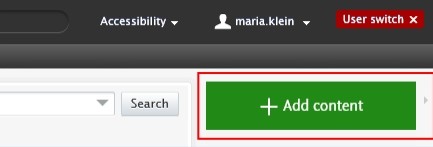
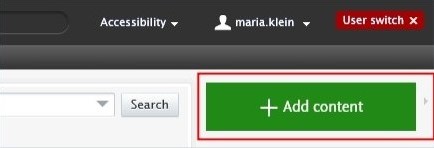
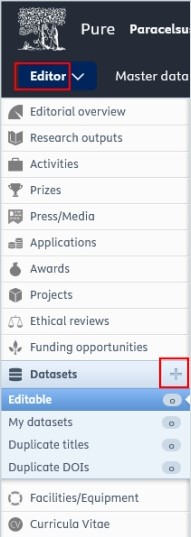
1. <span lang="EN-GB" style="mso-bidi-font-family: Arial; color: black; mso-themecolor: text1; mso-ansi-language: EN-GB;"> Click on the</span><span lang="EN-GB" style="mso-bidi-font-family: Arial; color: black; mso-themecolor: text1; mso-ansi-language: EN-GB;"> Add </span><span lang="EN-GB" style="mso-bidi-font-family: Arial; color: black; mso-themecolor: text1; mso-ansi-language: EN-GB;">content button:</span>[![Bild 20.jpeg](https://wiki.pmu.ac.at/uploads/images/gallery/2025-09/scaled-1680-/bild-20.jpeg)](https://wiki.pmu.ac.at/uploads/images/gallery/2025-09/bild-20.jpeg)

<span lang="EN-GB" style="mso-bidi-font-family: Arial; mso-ansi-language: EN-GB;">Or click on the triangle next to *Personal* in the header, select *Research outputs*, and then click on the </span><span style="mso-bidi-font-family: Arial; mso-fareast-language: DE-AT; mso-no-proof: yes;">![](https://wiki.pmu.ac.at/uploads/images/gallery/2025-09/embedded-image-jutgbecu.png)</span><span lang="EN-GB" style="mso-bidi-font-family: Arial; mso-ansi-language: EN-GB;">button:</span>

[![Bild 2.png](https://wiki.pmu.ac.at/uploads/images/gallery/2025-10/scaled-1680-/bild-2.png)](https://wiki.pmu.ac.at/uploads/images/gallery/2025-10/bild-2.png)

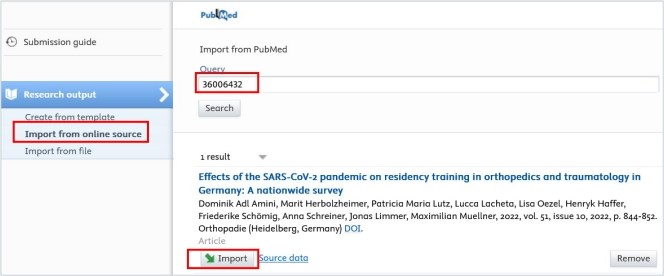
<span lang="EN-GB" style="mso-bidi-font-family: Arial; color: black; mso-themecolor: text1; mso-ansi-language: EN-GB;"> 2. Select *Import from online source*. At PMU you can import your data from PubMed, Web of Science and ORCID.</span>

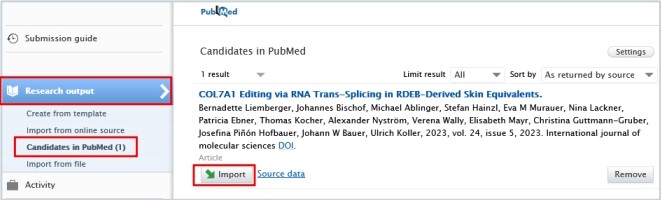
<span lang="EN-GB" style="mso-bidi-font-family: Arial; color: black; mso-themecolor: text1; mso-ansi-language: EN-GB;"> 3. Select the online source you want to import from. In this example, we selected PubMed.</span>

<span lang="EN-GB" style="mso-bidi-font-family: Arial; color: black; mso-themecolor: text1; mso-ansi-language: EN-GB;"> 4. Enter the information you want to search for, such as PubMed ID or your name. Please ensure you always review the guidelines for the correct format of the information you intend to look for.</span>

<span lang="EN-GB" style="mso-bidi-font-family: Arial; color: black; mso-themecolor: text1; mso-ansi-language: EN-GB;"> 5. Click on the *Import* button located at the bottom of the article you wish to import into Pure.</span>

[![Bild 23.jpeg](https://wiki.pmu.ac.at/uploads/images/gallery/2025-09/scaled-1680-/bild-23.jpeg)](https://wiki.pmu.ac.at/uploads/images/gallery/2025-09/bild-23.jpeg)

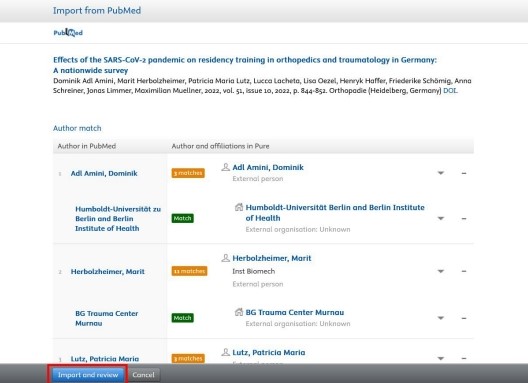
<span lang="EN-GB" style="mso-bidi-font-family: Arial; color: black; mso-themecolor: text1; mso-ansi-language: EN-GB;"> 6. Now, you can view the publication details. Do not modify the information displayed here; simply click on Import and review at the bottom of the window:</span>

[![Bild 24.jpeg](https://wiki.pmu.ac.at/uploads/images/gallery/2025-09/scaled-1680-/bild-24.jpeg)](https://wiki.pmu.ac.at/uploads/images/gallery/2025-09/bild-24.jpeg)

<span lang="EN-GB" style="mso-fareast-font-family: Arial; mso-bidi-font-family: Arial; mso-ansi-language: EN-GB;"><span style="mso-list: Ignore;">1 </span></span><span lang="EN-GB" style="mso-bidi-font-family: Arial; color: black; mso-themecolor: text1; mso-ansi-language: EN-GB;">7. In the Research output editor window, you need to manage these fields:</span>

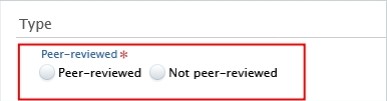
**<span lang="EN-GB" style="mso-fareast-font-family: Arial; mso-bidi-font-family: Arial; color: #232e64; mso-ansi-language: EN-GB;"><span style="mso-list: Ignore;">1.<span style="font: 7.0pt 'Times New Roman';"> </span></span></span><span lang="EN-GB" style="mso-bidi-font-family: Arial; color: #232e64; mso-ansi-language: EN-GB;">Peer-reviewed</span>**<span lang="EN-GB" style="mso-bidi-font-family: Arial; mso-ansi-language: EN-GB;">:</span>

<span lang="EN-GB" style="mso-bidi-font-family: Arial; color: black; mso-themecolor: text1; mso-ansi-language: EN-GB;">Whether the publication underwent a **peer-reviewed process** or not (peer-reviewed or not peer-reviewed):</span>

[![Bild 25.jpeg](https://wiki.pmu.ac.at/uploads/images/gallery/2025-09/scaled-1680-/bild-25.jpeg)](https://wiki.pmu.ac.at/uploads/images/gallery/2025-09/bild-25.jpeg)

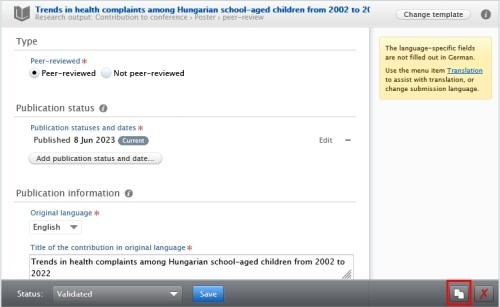
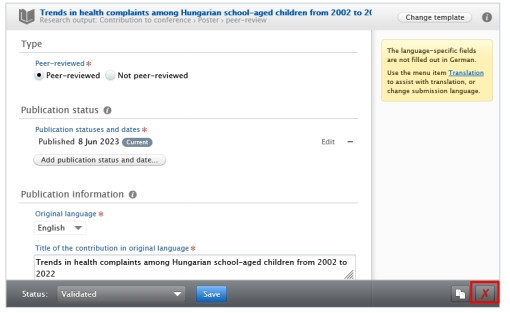
<p class="callout info"><span lang="EN-GB" style="mso-bidi-font-family: Arial; color: black; mso-themecolor: text1; mso-style-textoutline-type: none; mso-style-textoutline-outlinestyle-dpiwidth: .75pt; mso-style-textoutline-outlinestyle-linecap: round; mso-style-textoutline-outlinestyle-join: bevel; mso-style-textoutline-outlinestyle-pctmiterlimit: 0%; mso-style-textoutline-outlinestyle-dash: solid; mso-style-textoutline-outlinestyle-align: center; mso-style-textoutline-outlinestyle-compound: simple; mso-ansi-language: EN-GB;">Click on *Change template* if you realise that the **subtype** of the Research output is **incorrect**. For example, if you have selected *Original article* but need to add a *Review article*, you can easily switch between template types without losing any of the data you have already filled in:</span></p>

[![Bild 26.jpeg](https://wiki.pmu.ac.at/uploads/images/gallery/2025-09/scaled-1680-/bild-26.jpeg)](https://wiki.pmu.ac.at/uploads/images/gallery/2025-09/bild-26.jpeg)

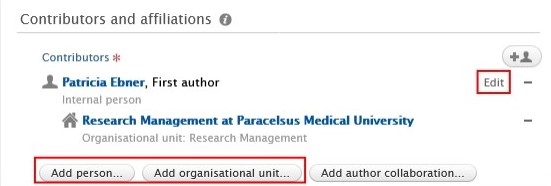
**<span lang="EN-GB" style="mso-fareast-font-family: Arial; mso-bidi-font-family: Arial; color: #232e64; mso-ansi-language: EN-GB;"><span style="mso-list: Ignore;">2.<span style="font: 7.0pt 'Times New Roman';"> </span></span></span><span lang="EN-GB" style="mso-bidi-font-family: Arial; color: #232e64; mso-ansi-language: EN-GB;">Contributors and affiliations</span>**<span lang="EN-GB" style="mso-bidi-font-family: Arial; color: black; mso-themecolor: text1; mso-ansi-language: EN-GB;">:</span>

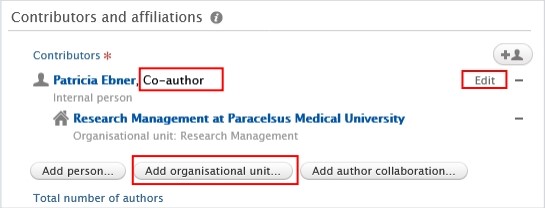
<span lang="EN-GB" style="mso-bidi-font-family: Arial; color: black; mso-themecolor: text1; mso-ansi-language: EN-GB;">Pure automatically adds every contributor with their affiliations to these fields.  
Here, you only need to manage **your author role and affiliation(s)**.  
Click on *Edit* on the right side to select the role (type of authorship) you contributed to the publication. In the affiliations field, include only those affiliations associated with the publication. You can delete them by clicking on the minus button, and you can add internal and external organizations by clicking on the *Add organizational unit* button:</span>

[![Bild 9.jpeg](https://wiki.pmu.ac.at/uploads/images/gallery/2025-10/scaled-1680-/bild-9.jpeg)](https://wiki.pmu.ac.at/uploads/images/gallery/2025-10/bild-9.jpeg)

**<span lang="EN-GB" style="mso-fareast-font-family: Arial; mso-bidi-font-family: Arial; color: #232e64; mso-ansi-language: EN-GB;"><span style="mso-list: Ignore;">3.<span style="font: 7.0pt 'Times New Roman';"> </span></span></span><span lang="EN-GB" style="mso-bidi-font-family: Arial; color: #232e64; mso-ansi-language: EN-GB;">Managing organisational unit</span>**<span lang="EN-GB" style="mso-bidi-font-family: Arial; mso-ansi-language: EN-GB;">: </span>

<span lang="EN-GB" style="mso-bidi-font-family: Arial; color: black; mso-themecolor: text1; mso-ansi-language: EN-GB;">Select *your internal organisational unit* to this field by clicking on the "house with a plus" b</span><span lang="EN-GB" style="mso-bidi-font-family: Arial; color: black; mso-themecolor: text1; mso-ansi-language: EN-GB;">utton. External organisations cannot be added in this field. (In some cases, RM may assign a different internal organisation during the  
validation process).</span>

[![Bild 27.jpeg](https://wiki.pmu.ac.at/uploads/images/gallery/2025-09/scaled-1680-/bild-27.jpeg)](https://wiki.pmu.ac.at/uploads/images/gallery/2025-09/bild-27.jpeg)

**<span lang="EN-GB" style="mso-fareast-font-family: Arial; mso-bidi-font-family: Arial; color: #232e64; mso-ansi-language: EN-GB;"><span style="mso-list: Ignore;">4.<span style="font: 7.0pt 'Times New Roman';"> </span></span></span><span lang="EN-GB" style="mso-bidi-font-family: Arial; color: #232e64; mso-ansi-language: EN-GB;">Research topic:</span>**

Assign on or more research topics for the following publication from publication year **2025 onwards: Original article, review article, case report, letter to the editor, editorial, short comment/notes, book, book chapter**. For **other categories**, such as abstracts, corrections or publications in which **only PMU teaching hospitals** are involved as internal organizations, **no** topic **assignment** is required.

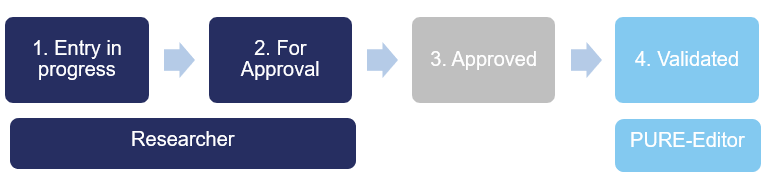
<span lang="EN-GB" style="mso-bidi-font-family: Arial; color: black; mso-themecolor: text1; mso-ansi-language: EN-GB;"> 8. Set the workflow status *For validation* and then click on *Save*. </span>

[![Bild 29.jpeg](https://wiki.pmu.ac.at/uploads/images/gallery/2025-09/scaled-1680-/bild-29.jpeg)](https://wiki.pmu.ac.at/uploads/images/gallery/2025-09/bild-29.jpeg)

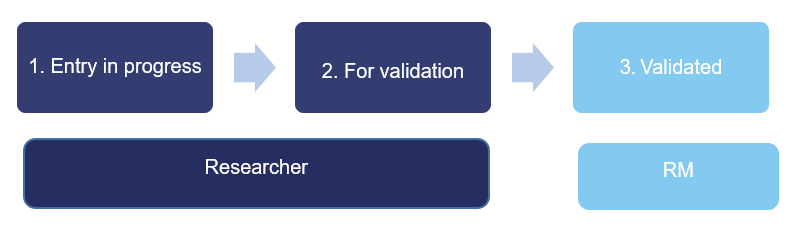
<span lang="EN-GB" style="mso-bidi-font-family: Arial; mso-ansi-language: EN-GB;">In the next step, the imported research output undergoes **validation** by the RM.</span>

<p class="callout info"><span lang="EN-GB" style="mso-bidi-font-family: Arial; mso-ansi-language: EN-GB;">Are you interested in an automated publication search from online sources? See section Automated search (without immediate effect).</span></p>

# 2.4. Import From File

<span lang="EN-GB" style="mso-bidi-font-family: Arial; color: black; mso-themecolor: text1; mso-ansi-language: EN-GB;">This option is to be chosen **if importing** **from online sources is not possible**. Here, you can add any kind of research outputs from BibTex, RIS and CERIF files.</span>

<u><span lang="EN-GB" style="mso-bidi-font-family: Arial; color: black; mso-themecolor: text1; mso-ansi-language: EN-GB;">To import a research output from file:</span></u>

1. <span lang="EN-GB" style="mso-bidi-font-family: Arial; color: black; mso-themecolor: text1; mso-ansi-language: EN-GB;"> Click on the</span><span lang="EN-GB" style="mso-bidi-font-family: Arial; color: black; mso-themecolor: text1; mso-ansi-language: EN-GB;"> Add </span><span lang="EN-GB" style="mso-bidi-font-family: Arial; color: black; mso-themecolor: text1; mso-ansi-language: EN-GB;">content button:</span>[![Bild 20.jpeg](https://wiki.pmu.ac.at/uploads/images/gallery/2025-09/scaled-1680-/bild-20.jpeg)](https://wiki.pmu.ac.at/uploads/images/gallery/2025-09/bild-20.jpeg)

<span lang="EN-GB" style="mso-bidi-font-family: Arial; mso-ansi-language: EN-GB;">Or click on the *triangle* next to Personal in the header, select *Research outputs*, and then click on the </span><span style="mso-bidi-font-family: Arial; mso-fareast-language: DE-AT; mso-no-proof: yes;">![](https://wiki.pmu.ac.at/uploads/images/gallery/2025-09/embedded-image-jutgbecu.png)</span><span lang="EN-GB" style="mso-bidi-font-family: Arial; mso-ansi-language: EN-GB;">button:</span>

[![bild-2.png](https://wiki.pmu.ac.at/uploads/images/gallery/2025-10/scaled-1680-/MiYbild-2.png)](https://wiki.pmu.ac.at/uploads/images/gallery/2025-10/MiYbild-2.png)

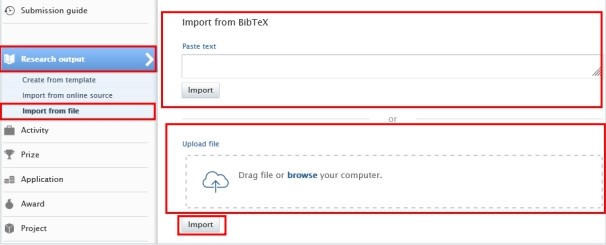
<span lang="EN-GB" style="mso-bidi-font-family: Arial; color: black; mso-themecolor: text1; mso-ansi-language: EN-GB;"> 2. Select *Import from file*.</span>

<span lang="EN-GB" style="mso-bidi-font-family: Arial; color: black; mso-themecolor: text1; mso-ansi-language: EN-GB;"> 3. Click on the file type you want to import from. BibTex, RIS and CERIF file types are available.</span>

<span lang="EN-GB" style="mso-bidi-font-family: Arial; color: black; mso-themecolor: text1; mso-ansi-language: EN-GB;"> 4. You can directly paste your data into to *Paste text* field if you have already copied it to the clipboard or you can upload a file by clicking on the field *Drag file and browse your computer:* </span>

<span lang="EN-GB" style="mso-bidi-font-family: Arial; color: black; mso-themecolor: text1; mso-ansi-language: EN-GB;">*[![Bild 33.jpeg](https://wiki.pmu.ac.at/uploads/images/gallery/2025-09/scaled-1680-/bild-33.jpeg)](https://wiki.pmu.ac.at/uploads/images/gallery/2025-09/bild-33.jpeg)* </span>

<span lang="EN-GB" style="mso-bidi-font-family: Arial; color: black; mso-themecolor: text1; mso-ansi-language: EN-GB;"> 5. Click on the *Import* button located at the bottom of the article you wish to import into Pure.</span>

<span lang="EN-GB" style="mso-bidi-font-family: Arial; color: black; mso-themecolor: text1; mso-ansi-language: EN-GB;"> 6. The next steps are the same as those outlined in the [previous chapter](https://wiki.pmu.ac.at/books/manual-for-researchers/page/23-import-from-online-source).</span>

<p class="callout info"><span lang="EN-GB" style="mso-bidi-font-family: Arial; color: black; mso-themecolor: text1; mso-ansi-language: EN-GB;"><span lang="EN-GB" style="mso-bidi-font-family: Arial; mso-ansi-language: EN-GB;">Are you interested in an **automated publication search** from online sources? See section Automated search (without immediate effect).</span></span></p>

# 2.5. Create From Template

<span lang="EN-GB" style="mso-bidi-font-family: Arial; mso-ansi-language: EN-GB;">Please use this method only **if the two other methods** mentioned above are **not possible**. For instance, if you wish to add a book(chapter), or import a publication that is published in a scientific journal, but the journal is not listed in Web of Science or PubMed. </span>

<span lang="EN-GB" style="mso-bidi-font-family: Arial; mso-ansi-language: EN-GB;"> </span>

<u><span lang="EN-GB" style="mso-bidi-font-family: Arial; mso-ansi-language: EN-GB;">To create a new research output from template:</span></u>

1. <span lang="EN-GB" style="mso-bidi-font-family: Arial; color: black; mso-themecolor: text1; mso-ansi-language: EN-GB;"> Click on the</span><span lang="EN-GB" style="mso-bidi-font-family: Arial; color: black; mso-themecolor: text1; mso-ansi-language: EN-GB;"> Add </span><span lang="EN-GB" style="mso-bidi-font-family: Arial; color: black; mso-themecolor: text1; mso-ansi-language: EN-GB;">content button:</span>[![Bild 20.jpeg](https://wiki.pmu.ac.at/uploads/images/gallery/2025-09/scaled-1680-/bild-20.jpeg)](https://wiki.pmu.ac.at/uploads/images/gallery/2025-09/bild-20.jpeg)

<span lang="EN-GB" style="mso-bidi-font-family: Arial; mso-ansi-language: EN-GB;">Or click on the *triangle* next to Personal in the header, select *Research outputs*, and then click on the </span><span style="mso-bidi-font-family: Arial; mso-fareast-language: DE-AT; mso-no-proof: yes;">![](https://wiki.pmu.ac.at/uploads/images/gallery/2025-09/embedded-image-jutgbecu.png)</span><span lang="EN-GB" style="mso-bidi-font-family: Arial; mso-ansi-language: EN-GB;">button:</span>

[![bild-2.png](https://wiki.pmu.ac.at/uploads/images/gallery/2025-10/scaled-1680-/MiYbild-2.png)](https://wiki.pmu.ac.at/uploads/images/gallery/2025-10/MiYbild-2.png)

<span lang="EN-GB" style="mso-bidi-font-family: Arial; color: black; mso-themecolor: text1; mso-ansi-language: EN-GB;"> 2. Select *Create from template*. </span>

<span lang="EN-GB" style="mso-bidi-font-family: Arial; color: black; mso-themecolor: text1; mso-ansi-language: EN-GB;"> 3. Scroll down until you locate the precise type of the item you want to add. In most cases it is a *Contribution to a journal/Original article*.</span>

<span lang="EN-GB" style="mso-bidi-font-family: Arial; color: black; mso-themecolor: text1; mso-ansi-language: EN-GB;"> 4. In the Research output editor window, you need to manage these fields:  
</span>

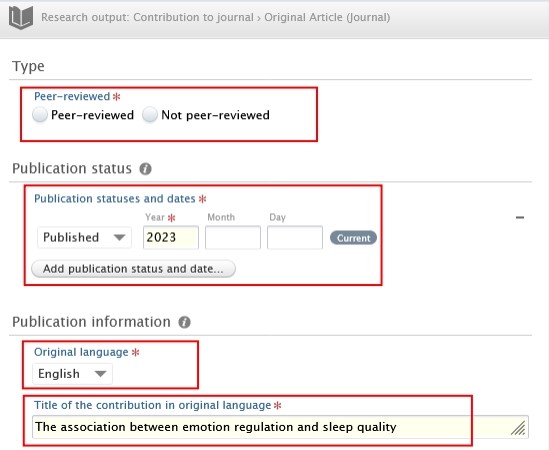
**<span lang="EN-GB" style="mso-fareast-font-family: Arial; mso-bidi-font-family: Arial; color: #232e64; mso-ansi-language: EN-GB;"><span style="mso-list: Ignore;">1.<span style="font: 7.0pt 'Times New Roman';"> </span></span></span><span lang="EN-GB" style="mso-bidi-font-family: Arial; color: #232e64; mso-ansi-language: EN-GB;">Peer-reviewed</span>**<span lang="EN-GB" style="mso-bidi-font-family: Arial; mso-ansi-language: EN-GB;">:</span>

<span lang="EN-GB" style="mso-bidi-font-family: Arial; color: black; mso-themecolor: text1; mso-ansi-language: EN-GB;">Whether the publication underwent a **peer-reviewed process** or not (peer-reviewed or not peer-reviewed):</span>

[![Bild 25.jpeg](https://wiki.pmu.ac.at/uploads/images/gallery/2025-09/scaled-1680-/bild-25.jpeg)](https://wiki.pmu.ac.at/uploads/images/gallery/2025-09/bild-25.jpeg)

<p class="callout info"><span lang="EN-GB" style="mso-bidi-font-family: Arial; color: black; mso-themecolor: text1; mso-style-textoutline-type: none; mso-style-textoutline-outlinestyle-dpiwidth: .75pt; mso-style-textoutline-outlinestyle-linecap: round; mso-style-textoutline-outlinestyle-join: bevel; mso-style-textoutline-outlinestyle-pctmiterlimit: 0%; mso-style-textoutline-outlinestyle-dash: solid; mso-style-textoutline-outlinestyle-align: center; mso-style-textoutline-outlinestyle-compound: simple; mso-ansi-language: EN-GB;">Click on *Change template* if you realise that the **subtype** of the Research output is **incorrect**. For example, if you have selected *Original article* but need to add a *Review article*, you can easily switch between template types without losing any of the data you have already filled in:</span></p>

[![Bild 26.jpeg](https://wiki.pmu.ac.at/uploads/images/gallery/2025-09/scaled-1680-/bild-26.jpeg)](https://wiki.pmu.ac.at/uploads/images/gallery/2025-09/bild-26.jpeg)

**<span lang="EN-GB" style="mso-fareast-font-family: Arial; mso-bidi-font-family: Arial; color: #232e64; mso-ansi-language: EN-GB;"><span style="mso-list: Ignore;">2.<span style="font: 7.0pt 'Times New Roman';"> </span></span></span><span lang="EN-GB" style="mso-bidi-font-family: Arial; color: #232e64; mso-ansi-language: EN-GB;">Publication statuses and dates:</span>**

<span lang="EN-GB" style="mso-bidi-font-family: Arial; mso-ansi-language: EN-GB;">Fill in the information of the publication status and dates.</span>

**<span lang="EN-GB" style="mso-fareast-font-family: Arial; mso-bidi-font-family: Arial; color: #232e64; mso-ansi-language: EN-GB;"><span style="mso-list: Ignore;">3.<span style="font: 7.0pt 'Times New Roman';"> </span></span></span><span lang="EN-GB" style="mso-bidi-font-family: Arial; color: #232e64; mso-ansi-language: EN-GB;">Original language</span>**<span lang="EN-GB" style="mso-bidi-font-family: Arial; mso-ansi-language: EN-GB;">:</span>

<span lang="EN-GB" style="mso-bidi-font-family: Arial; mso-ansi-language: EN-GB;">Choose the original language of the publication.</span>

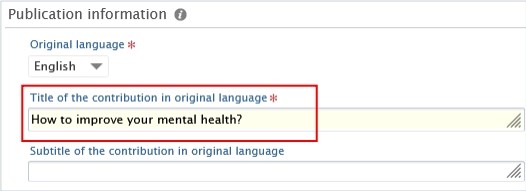
**<span lang="EN-GB" style="mso-fareast-font-family: Arial; mso-bidi-font-family: Arial; color: #232e64; mso-ansi-language: EN-GB;"><span style="mso-list: Ignore;">4.<span style="font: 7.0pt 'Times New Roman';"> </span></span></span><span lang="EN-GB" style="mso-bidi-font-family: Arial; color: #232e64; mso-ansi-language: EN-GB;">Title of the contribution in original language</span>**<span lang="EN-GB" style="mso-bidi-font-family: Arial; mso-ansi-language: EN-GB;">:</span>

<span lang="EN-GB" style="mso-bidi-font-family: Arial; mso-ansi-language: EN-GB;">Fill in the title of the contribution in the original language.</span>

[![Bild 38.jpeg](https://wiki.pmu.ac.at/uploads/images/gallery/2025-09/scaled-1680-/bild-38.jpeg)](https://wiki.pmu.ac.at/uploads/images/gallery/2025-09/bild-38.jpeg)

**<span lang="EN-GB" style="mso-fareast-font-family: Arial; mso-bidi-font-family: Arial; color: #232e64; mso-ansi-language: EN-GB;"><span style="mso-list: Ignore;"><span style="font: 7.0pt 'Times New Roman';"> </span></span></span><span lang="EN-GB" style="mso-bidi-font-family: Arial; color: #232e64; mso-ansi-language: EN-GB;">5. Contributors and affiliations</span>**<span lang="EN-GB" style="mso-bidi-font-family: Arial; color: black; mso-themecolor: text1; mso-ansi-language: EN-GB;">:</span>

<span lang="EN-GB" style="mso-bidi-font-family: Arial; mso-ansi-language: EN-GB;">You need to add **every contributor with their affiliations** to these fields. The **order** of the **authors** in Pure should **match** the order in the publication. You can change the order by clicking on the arrows. You can add additional contributors by clicking on the *Add person* button, and you can add internal and external organisations by clicking on the *Add Organization Unit* button. Don’t forget to add your teaching hospital to the organisations units. </span>

[![Bild 39.jpeg](https://wiki.pmu.ac.at/uploads/images/gallery/2025-09/scaled-1680-/bild-39.jpeg)](https://wiki.pmu.ac.at/uploads/images/gallery/2025-09/bild-39.jpeg)

**<span lang="EN-GB" style="mso-fareast-font-family: Arial; mso-bidi-font-family: Arial; color: #232e64; mso-ansi-language: EN-GB;"><span style="mso-list: Ignore;">6.<span style="font: 7.0pt 'Times New Roman';"> </span></span></span><span lang="EN-GB" style="mso-bidi-font-family: Arial; color: #232e64; mso-ansi-language: EN-GB;">Managing organisational unit</span>**<span lang="EN-GB" style="mso-bidi-font-family: Arial; mso-ansi-language: EN-GB;">:</span>

<span lang="EN-GB" style="mso-bidi-font-family: Arial; mso-ansi-language: EN-GB;">Select **your internal organisational unit** by clicking on the Managing organisational unit button. </span>External organisations cannot be added in this field. (In some cases, RM may assign a different internal organisation during the validation process).

**<span lang="EN-GB" style="mso-bidi-font-family: Arial; mso-ansi-language: EN-GB;"> </span>**

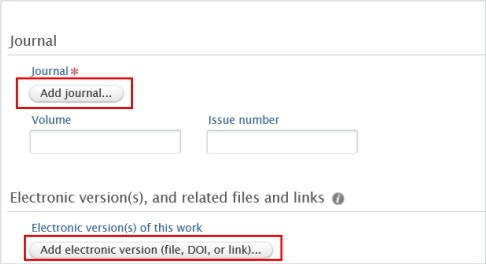
**<span lang="EN-GB" style="mso-fareast-font-family: Arial; mso-bidi-font-family: Arial; color: #232e64; mso-ansi-language: EN-GB;"><span style="mso-list: Ignore;">7.<span style="font: 7.0pt 'Times New Roman';"> </span></span></span><span lang="EN-GB" style="mso-bidi-font-family: Arial; color: #232e64; mso-ansi-language: EN-GB;">Journal</span>**<span lang="EN-GB" style="mso-bidi-font-family: Arial; mso-ansi-language: EN-GB;">:</span>

<span lang="EN-GB" style="mso-bidi-font-family: Arial; mso-ansi-language: EN-GB;">Click on *Add journal* then search for the name or the ISSN number of the journal.</span>

<span lang="EN-GB" style="mso-bidi-font-family: Arial; mso-ansi-language: EN-GB;">If you do not find the journal in the list, click on *Create new* and fill in the required information.</span>

**<span lang="EN-GB" style="mso-fareast-font-family: Arial; mso-bidi-font-family: Arial; color: #232e64; mso-ansi-language: EN-GB;"><span style="mso-list: Ignore;">8.<span style="font: 7.0pt 'Times New Roman';"> </span></span></span><span lang="EN-GB" style="mso-bidi-font-family: Arial; color: #232e64; mso-ansi-language: EN-GB;">Electronic versions of this work:</span>**

<span lang="EN-GB" style="mso-bidi-font-family: Arial; color: black; mso-themecolor: text1; mso-style-textoutline-type: none; mso-style-textoutline-outlinestyle-dpiwidth: .75pt; mso-style-textoutline-outlinestyle-linecap: round; mso-style-textoutline-outlinestyle-join: bevel; mso-style-textoutline-outlinestyle-pctmiterlimit: 0%; mso-style-textoutline-outlinestyle-dash: solid; mso-style-textoutline-outlinestyle-align: center; mso-style-textoutline-outlinestyle-compound: simple; mso-ansi-language: EN-GB;">You can register a DOI or other links to your publication, but please **refrain from uploading the original publication** into Pure. </span>

[![Bild 40.jpeg](https://wiki.pmu.ac.at/uploads/images/gallery/2025-09/scaled-1680-/bild-40.jpeg)](https://wiki.pmu.ac.at/uploads/images/gallery/2025-09/bild-40.jpeg)

**<span lang="EN-GB" style="mso-fareast-font-family: Arial; mso-bidi-font-family: Arial; color: #232e64; mso-ansi-language: EN-GB;"><span style="mso-list: Ignore;">9.<span style="font: 7.0pt 'Times New Roman';"> </span></span></span><span lang="EN-GB" style="mso-bidi-font-family: Arial; color: #232e64; mso-ansi-language: EN-GB;">Research topic:</span>**

Assign on or more research topics for the following publication from publication year **2025 onwards: Original article, review article, case report, letter to the editor, editorial, short comment/notes, book, book chapter**. For **other categories**, such as abstracts, corrections or publications in which **only PMU teaching hospitals** are involved as internal organizations, **no** topic **assignment** is required.

<span lang="EN-GB" style="mso-bidi-font-family: Arial; color: black; mso-themecolor: text1; mso-ansi-language: EN-GB;"> 5. Set the workflow status *For validation* and then click on *Save*. </span>

[![Bild 29.jpeg](https://wiki.pmu.ac.at/uploads/images/gallery/2025-09/scaled-1680-/bild-29.jpeg)](https://wiki.pmu.ac.at/uploads/images/gallery/2025-09/bild-29.jpeg)

<span lang="EN-GB" style="mso-bidi-font-family: Arial; mso-ansi-language: EN-GB;">In the next step, the imported research output undergoes **validation** by the RM.</span>

<p class="callout info"><span lang="EN-GB" style="mso-bidi-font-family: Arial; mso-ansi-language: EN-GB;"><span lang="EN-GB" style="mso-bidi-font-family: Arial; color: black; mso-themecolor: text1; mso-ansi-language: EN-GB;">Are you interested in an **automated publication search** from online sources? See section Automated search (without immediate effect).</span></span></p>

# 2.6. Assignment of Research Topics to a Publication – NEW!

For details on assigning research topics to a publication, please refer to [FAQ6.](https://wiki.pmu.ac.at/books/pure-faqs-english/page/question-6-how-can-i-assign-research-topics-to-a-publication)

# 2.7. Assignment of a RIC (FIZ) to a recorded publication – NEW!

For details on assigning a RIC (FIZ) to a publication, please refer to [FAQ7](https://wiki.pmu.ac.at/books/pure-faqs-english/page/question-7-how-can-i-assign-a-publication-to-a-fiz-ric).

# 2.8. Chapter(s) in a Book

<span lang="EN-GB" style="mso-bidi-font-family: Arial; color: black; mso-themecolor: text1; mso-ansi-language: EN-GB;">To register a *Chapter* in a book, you will need to fill in some extra fields additionally to the ‘traditional’ fields.</span>

<span lang="EN-GB" style="font-family: Symbol; mso-fareast-font-family: Symbol; mso-bidi-font-family: Symbol; color: black; mso-themecolor: text1; mso-ansi-language: EN-GB;"><span style="mso-list: Ignore;">·<span style="font: 7.0pt 'Times New Roman';"> </span></span></span><span lang="EN-GB" style="mso-bidi-font-family: Arial; color: black; mso-themecolor: text1; mso-ansi-language: EN-GB;">To fill in the **title of the chapter** please use the *Title of the contribution in original language* field:</span>

[![Bild 42.jpeg](https://wiki.pmu.ac.at/uploads/images/gallery/2025-09/scaled-1680-/bild-42.jpeg)](https://wiki.pmu.ac.at/uploads/images/gallery/2025-09/bild-42.jpeg)

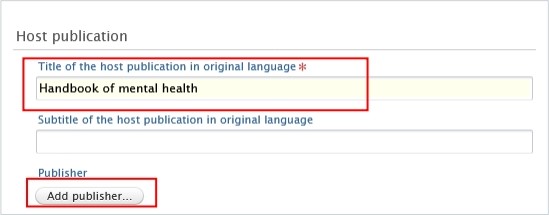
<span lang="EN-GB" style="font-family: Symbol; mso-fareast-font-family: Symbol; mso-bidi-font-family: Symbol; color: black; mso-themecolor: text1; mso-ansi-language: EN-GB;"><span style="mso-list: Ignore;">·<span style="font: 7.0pt 'Times New Roman';"> </span></span></span><span lang="EN-GB" style="mso-bidi-font-family: Arial; color: black; mso-themecolor: text1; mso-ansi-language: EN-GB;">To fill in the **title of the book** please use the *Title of the host publication in original language* field, and to add the Publisher, click on the *Add publisher* button: </span>

[![Bild 43.jpeg](https://wiki.pmu.ac.at/uploads/images/gallery/2025-09/scaled-1680-/bild-43.jpeg)](https://wiki.pmu.ac.at/uploads/images/gallery/2025-09/bild-43.jpeg)

<span style="mso-ignore: vglayout; position: absolute; z-index: 251698176; left: 0px; margin-left: 40px; margin-top: 246px; width: 166px; height: 38px;">  
</span><span style="mso-ignore: vglayout; position: absolute; z-index: 251695104; left: 0px; margin-left: 36px; margin-top: 95px; width: 434px; height: 69px;">  
</span>

<span lang="EN-GB" style="font-family: Symbol; mso-fareast-font-family: Symbol; mso-bidi-font-family: Symbol; color: black; mso-themecolor: text1; mso-ansi-language: EN-GB;"><span style="mso-list: Ignore;">·<span style="font: 7.0pt 'Times New Roman';"> </span></span></span><span lang="EN-GB" style="mso-bidi-font-family: Arial; color: black; mso-themecolor: text1; mso-ansi-language: EN-GB;">You can register the **Editors** of the book (if it has any) by clicking on the *Add editor* button: </span>

[![Bild 44.jpeg](https://wiki.pmu.ac.at/uploads/images/gallery/2025-09/scaled-1680-/bild-44.jpeg)](https://wiki.pmu.ac.at/uploads/images/gallery/2025-09/bild-44.jpeg)

# 2.9. Automated Search (Without Immediate Effect)

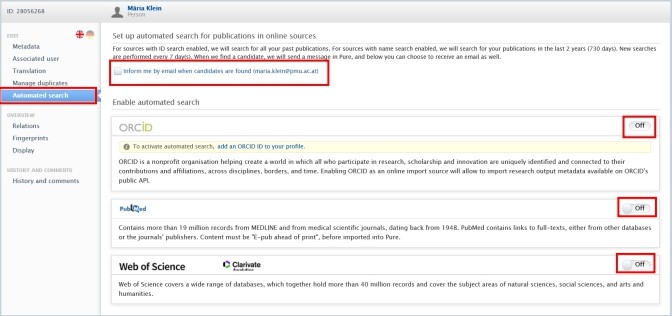
<span lang="EN-GB" style="mso-bidi-font-family: Arial; mso-ansi-language: EN-GB;">You can set up automated search for your publications in **PubMed**, **Web of Science**, and **ORCID**. When choosing this option, new searches are performed every 7 days. When PURE finds a candidate, you will get a message in Pure, and you can choose to turn on email notifications as well.</span>

<span lang="EN-GB" style="mso-bidi-font-family: Arial; mso-ansi-language: EN-GB;"> </span>

<u><span lang="EN-GB" style="mso-bidi-font-family: Arial; mso-ansi-language: EN-GB;">To set up an automated search:</span></u>

<span lang="EN-GB" style="mso-fareast-font-family: Arial; mso-bidi-font-family: Arial; mso-ansi-language: EN-GB;"><span style="mso-list: Ignore;">1.<span style="font: 7.0pt 'Times New Roman';"> </span></span></span><span lang="EN-GB" style="mso-bidi-font-family: Arial; mso-ansi-language: EN-GB;">Click on *Personal* in the header.</span>

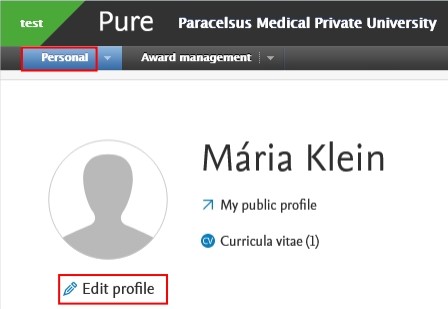
<span lang="EN-GB" style="mso-fareast-font-family: Arial; mso-bidi-font-family: Arial; mso-ansi-language: EN-GB;"><span style="mso-list: Ignore;">2.<span style="font: 7.0pt 'Times New Roman';"> </span></span></span><span lang="EN-GB" style="mso-bidi-font-family: Arial; mso-ansi-language: EN-GB;">Go on *Edit profile* (located under the picture):</span>

[![Bild 35.jpeg](https://wiki.pmu.ac.at/uploads/images/gallery/2025-10/scaled-1680-/bild-35.jpeg)](https://wiki.pmu.ac.at/uploads/images/gallery/2025-10/bild-35.jpeg)

<span style="mso-ignore: vglayout; position: absolute; z-index: 251956224; margin-left: 22px; margin-top: 47px; width: 78px; height: 26px;">  
</span>

<span lang="EN-GB" style="mso-fareast-font-family: Arial; mso-bidi-font-family: Arial; mso-ansi-language: EN-GB;"><span style="mso-list: Ignore;">3.<span style="font: 7.0pt 'Times New Roman';"> </span></span></span><span lang="EN-GB" style="mso-bidi-font-family: Arial; mso-ansi-language: EN-GB;">Click on the *Automated search* tab on the left navigation:</span>

<span lang="EN-GB" style="mso-bidi-font-family: Arial; mso-ansi-language: EN-GB;"> [![Bild 36.jpeg](https://wiki.pmu.ac.at/uploads/images/gallery/2025-10/scaled-1680-/bild-36.jpeg)](https://wiki.pmu.ac.at/uploads/images/gallery/2025-10/bild-36.jpeg)</span>

<span style="mso-ignore: vglayout; position: absolute; z-index: 251968512; margin-left: 617px; margin-top: 253px; width: 40px; height: 21px;">  
</span><span style="mso-ignore: vglayout; position: absolute; z-index: 251873280; margin-left: 19px; margin-top: 115px; width: 34px; height: 24px;">  
</span><span style="mso-ignore: vglayout; position: absolute; z-index: 251875328; margin-left: 618px; margin-top: 197px; width: 41px; height: 21px;">  
</span><span style="mso-ignore: vglayout; position: absolute; z-index: 251872256; margin-left: 109px; margin-top: 59px; width: 222px; height: 28px;">  
</span><span style="mso-ignore: vglayout; position: absolute; z-index: 251739136; margin-left: 0px; margin-top: 87px; width: 99px; height: 18px;">  
</span>

<span lang="EN-GB" style="mso-fareast-font-family: Arial; mso-bidi-font-family: Arial; mso-ansi-language: EN-GB;"><span style="mso-list: Ignore;">4. </span></span><span lang="EN-GB" style="mso-bidi-font-family: Arial; mso-ansi-language: EN-GB;">Toggle the switch to *On* for each online source for which you want to enable the automated search. </span>

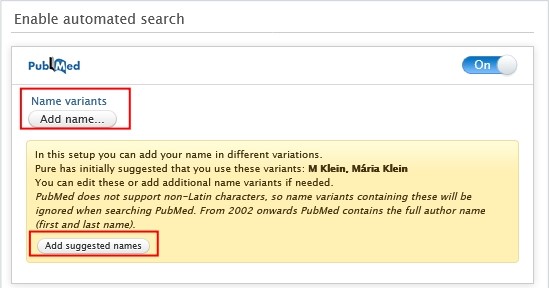
<span lang="EN-GB" style="mso-bidi-font-family: Arial; mso-ansi-language: EN-GB;">5. Automated search is based on the authors' names on publications or ORCHIDs.</span><span lang="EN-GB" style="mso-ansi-language: EN-GB;"> </span><span lang="EN-GB" style="mso-bidi-font-family: Arial; mso-ansi-language: EN-GB;">To add standard name suggestions provided by Pure, click on *Add suggested names*. If you want to manually add an additional name variant to search for, click on the *Add name* button and enter the additional name variant. </span>

[![Bild 37.jpeg](https://wiki.pmu.ac.at/uploads/images/gallery/2025-10/scaled-1680-/bild-37.jpeg)](https://wiki.pmu.ac.at/uploads/images/gallery/2025-10/bild-37.jpeg)

<span style="mso-ignore: vglayout; position: absolute; z-index: 251741184; margin-left: 29px; margin-top: 231px; width: 131px; height: 27px;">  
</span><span style="mso-ignore: vglayout; position: absolute; z-index: 251740160; margin-left: 20px; margin-top: 88px; width: 112px; height: 43px;">  
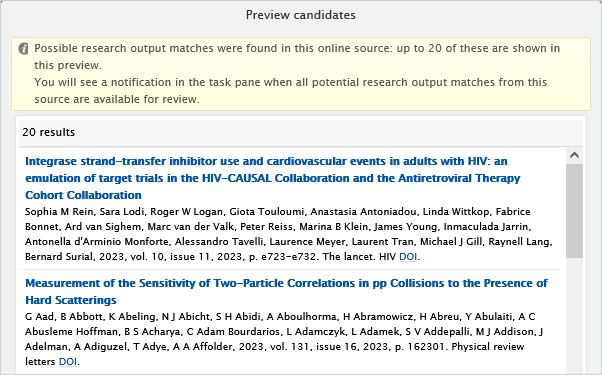
</span><span style="mso-bidi-font-family: Arial; mso-fareast-language: DE-AT; mso-no-proof: yes;"></span><span lang="EN-GB" style="mso-fareast-font-family: Arial; mso-bidi-font-family: Arial; mso-ansi-language: EN-GB;"><span style="mso-list: Ignore;">6. </span></span><span lang="EN-GB" style="mso-bidi-font-family: Arial; mso-ansi-language: EN-GB;">Once </span><span lang="EN-GB" style="mso-bidi-font-family: Arial; mso-ansi-language: EN-GB;">you have at least one name variant, you can click on *Preview candidates* to check that the search criteria are able to locate some results:</span>

<span style="mso-bidi-font-family: Arial; mso-fareast-language: DE-AT; mso-no-proof: yes;">![](https://wiki.pmu.ac.at/uploads/images/gallery/2025-10/embedded-image-wr1vxdds.png)</span>

<span lang="EN-GB" style="mso-bidi-font-family: Arial; mso-ansi-language: EN-GB;"> </span>

<p class="callout info"><span lang="EN-GB" style="mso-bidi-font-family: Arial; mso-style-textoutline-type: none; mso-style-textoutline-outlinestyle-dpiwidth: .75pt; mso-style-textoutline-outlinestyle-linecap: round; mso-style-textoutline-outlinestyle-join: bevel; mso-style-textoutline-outlinestyle-pctmiterlimit: 0%; mso-style-textoutline-outlinestyle-dash: solid; mso-style-textoutline-outlinestyle-align: center; mso-style-textoutline-outlinestyle-compound: simple; mso-ansi-language: EN-GB;">The number of previewed candidates is not indicative of the actual number of publications related to you, but rather **how well** your **search criteria** will work. It is not possible to import publications from the *Preview candidates* dialog. If you want to import publications from online sources, please visit the </span>[<span lang="EN-GB" style="mso-bidi-font-family: Arial; mso-style-textoutline-type: none; mso-style-textoutline-outlinestyle-dpiwidth: .75pt; mso-style-textoutline-outlinestyle-linecap: round; mso-style-textoutline-outlinestyle-join: bevel; mso-style-textoutline-outlinestyle-pctmiterlimit: 0%; mso-style-textoutline-outlinestyle-dash: solid; mso-style-textoutline-outlinestyle-align: center; mso-style-textoutline-outlinestyle-compound: simple; mso-ansi-language: EN-GB;">Import from online source</span>](https://wiki.pmu.ac.at/books/manual-for-researchers/page/23-import-from-online-source)<span lang="EN-GB" style="mso-bidi-font-family: Arial; mso-style-textoutline-type: none; mso-style-textoutline-outlinestyle-dpiwidth: .75pt; mso-style-textoutline-outlinestyle-linecap: round; mso-style-textoutline-outlinestyle-join: bevel; mso-style-textoutline-outlinestyle-pctmiterlimit: 0%; mso-style-textoutline-outlinestyle-dash: solid; mso-style-textoutline-outlinestyle-align: center; mso-style-textoutline-outlinestyle-compound: simple; mso-ansi-language: EN-GB;"> chapter.</span></p>

<span lang="EN-GB" style="mso-bidi-font-family: Arial; mso-ansi-language: EN-GB;"> </span>

<span lang="EN-GB" style="mso-fareast-font-family: Arial; mso-bidi-font-family: Arial; mso-ansi-language: EN-GB;"><span style="mso-list: Ignore;">7.<span style="font: 7.0pt 'Times New Roman';"> </span></span></span><span lang="EN-GB" style="mso-bidi-font-family: Arial; mso-ansi-language: EN-GB;">Click on *Save*. When the automated search has finished you will be **informed** about any publication candidates.</span>

<span lang="EN-GB" style="mso-bidi-font-family: Arial; mso-ansi-language: EN-GB;"> </span>

<span lang="EN-GB" style="mso-bidi-font-family: Arial; mso-ansi-language: EN-GB;"> </span>

<span lang="EN-GB" style="mso-bidi-font-family: Arial; mso-ansi-language: EN-GB;">Once the search is completed you can easily import your publication(s) by clicking on the *Import* button and following the steps described in the [<span lang="EN-GB" style="mso-bidi-font-family: Arial; mso-style-textoutline-type: none; mso-style-textoutline-outlinestyle-dpiwidth: .75pt; mso-style-textoutline-outlinestyle-linecap: round; mso-style-textoutline-outlinestyle-join: bevel; mso-style-textoutline-outlinestyle-pctmiterlimit: 0%; mso-style-textoutline-outlinestyle-dash: solid; mso-style-textoutline-outlinestyle-align: center; mso-style-textoutline-outlinestyle-compound: simple; mso-ansi-language: EN-GB;">Import from online source</span>](https://wiki.pmu.ac.at/books/manual-for-researchers/page/23-import-from-online-source)<span lang="EN-GB" style="mso-bidi-font-family: Arial; mso-style-textoutline-type: none; mso-style-textoutline-outlinestyle-dpiwidth: .75pt; mso-style-textoutline-outlinestyle-linecap: round; mso-style-textoutline-outlinestyle-join: bevel; mso-style-textoutline-outlinestyle-pctmiterlimit: 0%; mso-style-textoutline-outlinestyle-dash: solid; mso-style-textoutline-outlinestyle-align: center; mso-style-textoutline-outlinestyle-compound: simple; mso-ansi-language: EN-GB;"> chapter.</span></span>

[![Bild 38.jpeg](https://wiki.pmu.ac.at/uploads/images/gallery/2025-10/scaled-1680-/bild-38.jpeg)](https://wiki.pmu.ac.at/uploads/images/gallery/2025-10/bild-38.jpeg)

<span style="mso-ignore: vglayout; position: absolute; z-index: 251864064; left: 0px; margin-left: 0px; margin-top: 76px; width: 173px; height: 30px;">  
</span><span style="mso-ignore: vglayout; position: absolute; z-index: 251831296; left: 0px; margin-left: 13px; margin-top: 136px; width: 125px; height: 22px;">  
</span><span style="mso-ignore: vglayout; position: absolute; z-index: 251832320; left: 0px; margin-left: 192px; margin-top: 164px; width: 64px; height: 23px;">  
</span><span style="mso-bidi-font-family: Arial; mso-fareast-language: DE-AT; mso-no-proof: yes;"></span>

# 2.10. Potential Duplicates

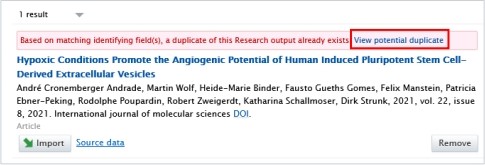
<p class="callout danger"><span lang="EN-GB" style="mso-bidi-font-family: Arial; mso-ansi-language: EN-GB;">Please, always pay attention to duplicate warnings (here is an example of it):</span></p>

[![Bild 45.jpeg](https://wiki.pmu.ac.at/uploads/images/gallery/2025-09/scaled-1680-/bild-45.jpeg)](https://wiki.pmu.ac.at/uploads/images/gallery/2025-09/bild-45.jpeg)

<span style="mso-ignore: vglayout; position: absolute; z-index: 251756544; margin-left: 446px; margin-top: 49px; width: 125px; height: 26px;">  
</span><span style="mso-bidi-font-family: Arial; color: #002060; mso-fareast-language: DE-AT; mso-no-proof: yes;"></span>

<span lang="EN-GB" style="mso-bidi-font-family: Arial; mso-ansi-language: EN-GB;">When clicking on the option **“View potential duplicate”**, you can check the details of the publication that already exists in Pure.</span>

<p class="callout warning"><span lang="EN-GB" style="mso-bidi-font-family: Arial; mso-ansi-language: EN-GB;">If you realise that the publication you want to import/create already exists in Pure, please **refrain** from importing/creating it again. </span></p>

<p class="callout info"><span lang="EN-GB" style="mso-bidi-font-family: Arial; mso-ansi-language: EN-GB;">If the types of the publications are **different**, for example, if you want to import/create a journal publication and a book up as potential duplicate, then it is not a real duplicate, and you can import/create your journal publication without creating a duplicate.</span></p>

# 2.11. Claim a Publication

<span lang="EN-GB" style="mso-bidi-font-family: Arial; mso-ansi-language: EN-GB;">If you find a Research output in Pure where **you are not listed as an author**, you can request to be included as a contributor to the content. </span>

<span lang="EN-GB" style="mso-bidi-font-family: Arial; mso-ansi-language: EN-GB;"> </span>

<u><span lang="EN-GB" style="mso-bidi-font-family: Arial; mso-ansi-language: EN-GB;">To claim a publication:</span></u>

<span lang="EN-GB" style="mso-fareast-font-family: Arial; mso-bidi-font-family: Arial; mso-ansi-language: EN-GB;"><span style="mso-list: Ignore;">1.<span style="font: 7.0pt 'Times New Roman';"> </span></span></span><span lang="EN-GB" style="mso-bidi-font-family: Arial; mso-ansi-language: EN-GB;">Click on the triangle icon next to *Personal* in the header:</span>

[![Bild 2.png](https://wiki.pmu.ac.at/uploads/images/gallery/2025-10/scaled-1680-/M6gbild-2.png)](https://wiki.pmu.ac.at/uploads/images/gallery/2025-10/M6gbild-2.png)

<span style="mso-ignore: vglayout; position: absolute; z-index: 251704320; margin-left: 93px; margin-top: 45px; width: 29px; height: 26px;">  
</span>

<span lang="EN-GB" style="mso-fareast-font-family: Arial; mso-bidi-font-family: Arial; mso-ansi-language: EN-GB;"><span style="mso-list: Ignore;">2.<span style="font: 7.0pt 'Times New Roman';"> </span></span></span><span lang="EN-GB" style="mso-bidi-font-family: Arial; mso-ansi-language: EN-GB;">Navigate to *Research outputs,* remove the *My content* filter, and search for the publication that is not (yet) associated to you.</span>

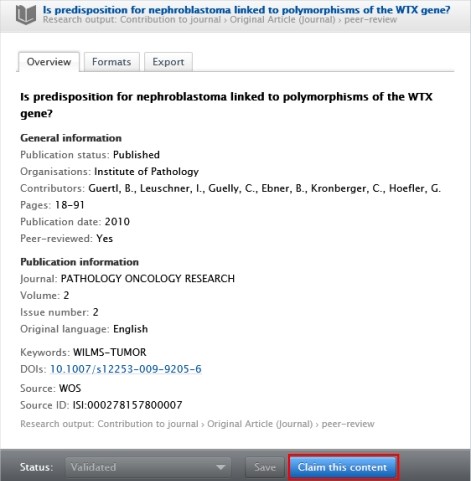
<span lang="EN-GB" style="mso-fareast-font-family: Arial; mso-bidi-font-family: Arial; mso-ansi-language: EN-GB;"><span style="mso-list: Ignore;">3.<span style="font: 7.0pt 'Times New Roman';"> </span></span></span><span lang="EN-GB" style="mso-bidi-font-family: Arial; mso-ansi-language: EN-GB;">After finding the research output you want to claim, click on it and the click on *Claim* *this content* in the footer of the editor window:</span>

[![Bild 39.jpeg](https://wiki.pmu.ac.at/uploads/images/gallery/2025-10/scaled-1680-/bild-39.jpeg)](https://wiki.pmu.ac.at/uploads/images/gallery/2025-10/bild-39.jpeg)

<span style="mso-ignore: vglayout; position: absolute; z-index: 251703296; margin-left: 290px; margin-top: 455px; width: 112px; height: 28px;">  
</span>

<span lang="EN-GB" style="mso-bidi-font-family: Arial; mso-ansi-language: EN-GB;"> 4. Write a brief message about your claim, and then click on *Claim this content*.</span>

<span lang="EN-GB" style="font-size: 11.0pt; line-height: 107%; font-family: 'Arial',sans-serif; mso-fareast-font-family: Calibri; mso-fareast-theme-font: minor-latin; mso-ansi-language: EN-GB; mso-fareast-language: EN-US; mso-bidi-language: AR-SA;">In the next step, your request will be processed by the RM</span>

# 2.12. Disclaim a Publication

<span lang="EN-GB" style="mso-bidi-font-family: Arial; mso-ansi-language: EN-GB;">If you find a Research output in your publication list that **does not belong to you**, you can disclaim it.</span>

<span lang="EN-GB" style="mso-bidi-font-family: Arial; mso-ansi-language: EN-GB;"> </span>

<u><span lang="EN-GB" style="mso-bidi-font-family: Arial; mso-ansi-language: EN-GB;">To disclaim a publication:</span></u>

<span lang="EN-GB" style="mso-bidi-font-family: Arial; mso-ansi-language: EN-GB;">1. Click on the triangle icon next to *Personal* in the header:</span>

[![Bild 2.png](https://wiki.pmu.ac.at/uploads/images/gallery/2025-10/scaled-1680-/JU6bild-2.png)](https://wiki.pmu.ac.at/uploads/images/gallery/2025-10/JU6bild-2.png)

<span lang="EN-GB" style="mso-fareast-font-family: Arial; mso-bidi-font-family: Arial; mso-ansi-language: EN-GB;"><span style="mso-list: Ignore;">2.<span style="font: 7.0pt 'Times New Roman';"> </span></span></span><span lang="EN-GB" style="mso-bidi-font-family: Arial; mso-ansi-language: EN-GB;">Navigate to *Research outputs*, and search for a publication you want to disclaim.</span>

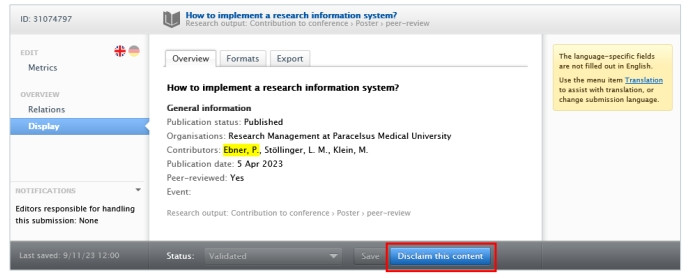
<span lang="EN-GB" style="mso-fareast-font-family: Arial; mso-bidi-font-family: Arial; mso-ansi-language: EN-GB;"><span style="mso-list: Ignore;">3.<span style="font: 7.0pt 'Times New Roman';"> </span></span></span><span lang="EN-GB" style="mso-bidi-font-family: Arial; mso-ansi-language: EN-GB;">After finding the research output you want to claim, click on it and the click on *Disclaim this content* in the footer of the editor window:</span>

<span style="mso-ignore: vglayout; position: absolute; z-index: 251706368; margin-left: 377px; margin-top: 239px; width: 112px; height: 31px;">  
</span><span style="mso-bidi-font-family: Arial; mso-fareast-language: DE-AT; mso-no-proof: yes;"></span>

[![Bild 40.jpeg](https://wiki.pmu.ac.at/uploads/images/gallery/2025-10/scaled-1680-/bild-40.jpeg)](https://wiki.pmu.ac.at/uploads/images/gallery/2025-10/bild-40.jpeg)

<span lang="EN-GB" style="mso-bidi-font-family: Arial; mso-ansi-language: EN-GB;"> 4. Write a brief message about your request, and then click on *Claim this content*.</span>

<span lang="EN-GB" style="mso-bidi-font-family: Arial; mso-ansi-language: EN-GB;">In the next step, your request will be processed by the RM.</span>

# 2.13. Habil-List (in German: Habilauszug)

If you need a habil-list, please refer to [FAQ 2.](https://wiki.pmu.ac.at/books/pure-faqs-english/page/question-2-how-can-i-download-a-habilitation-list-in-german-habilauszug-with-pmu-score-points-and-impact-factor-from-pure)

# 3. Create Your Content - Applications, Awards, and Projects

# 3.1. Introduction

<span lang="EN-GB" style="mso-ansi-language: EN-GB;">Award Management module utilizes the following content types:</span>

- <span lang="EN-GB" style="mso-ansi-language: EN-GB;">Applications</span>
- <span lang="EN-GB" style="font-family: Symbol; mso-fareast-font-family: Symbol; mso-bidi-font-family: Symbol; mso-ansi-language: EN-GB;"><span style="mso-list: Ignore;"><span style="font: 7.0pt 'Times New Roman';"> </span></span></span><span lang="EN-GB" style="mso-ansi-language: EN-GB;">Awards</span>
- <span lang="EN-GB" style="mso-ansi-language: EN-GB;">Projects</span>

<span lang="EN-GB" style="mso-bidi-font-family: Arial; mso-ansi-language: EN-GB;"> </span>

<span lang="EN-GB" style="mso-bidi-font-family: Arial; mso-ansi-language: EN-GB;">At PMU, we distinguish between two types of Projects:</span>

- <span lang="EN-GB" style="mso-bidi-font-family: Arial; mso-ansi-language: EN-GB;">competitive Projects</span>
- <span lang="EN-GB" style="mso-bidi-font-family: Arial; mso-ansi-language: EN-GB;">non-competitive Projects</span>

<span lang="EN-GB" style="mso-bidi-font-family: Arial; mso-ansi-language: EN-GB;">For a **competitive Project**, such as FWF Project, you need to **create** three datatypes: an **Application, an Award, and a Project**. This is necessary so that you can register **the start and end dates of the Project** in the **Project** content type. To enter the **applied and awarded amounts,** you need to create an **Application and an Award**. For the exact steps in PURE, please refer to the section on </span>[<span lang="EN-GB" style="mso-bidi-font-family: Arial; mso-ansi-language: EN-GB;">Competitive Projects</span>](#_Competitive_Projects,_such_1)<span lang="EN-GB" style="mso-bidi-font-family: Arial; mso-ansi-language: EN-GB;">. </span>

<span lang="EN-GB" style="mso-bidi-font-family: Arial; mso-ansi-language: EN-GB;">For a **non-competitive Project**, such as a clinical project, you need to **create** two datatypes: an **Award, and a Project**. This is necessary so that you can register the **start and end dates of the Project** in the **Project** content type. To enter the **awarded amount**, you need to create an **Award**. For the exact steps in PURE, please refer to the section on </span>[<span lang="EN-GB" style="mso-bidi-font-family: Arial; mso-ansi-language: EN-GB;">Non-competitive Projects</span>](#_Non-competitive_Projects,_such)<span lang="EN-GB" style="mso-bidi-font-family: Arial; mso-ansi-language: EN-GB;">.</span>

# 3.2. Competitive Projects, such as PMU-RIF, FWF or EU Projects (Awarded Applications)

<p class="callout success"><span lang="EN-GB" style="mso-bidi-font-family: Arial; mso-ansi-language: EN-GB;">If your Application is awarded, you need to create both an Award and a Project as well. This method can be used for **competitive Projects**, **such as PMU-RIF, FWF or EU Projects**, etc.</span></p>

<span lang="EN-GB" style="mso-bidi-font-family: Arial; mso-ansi-language: EN-GB;"> </span>

<u><span lang="EN-GB" style="mso-bidi-font-family: Arial; mso-ansi-language: EN-GB;">To create a competitive Project:</span></u>

<span lang="EN-GB" style="mso-fareast-font-family: Arial; mso-bidi-font-family: Arial; mso-ansi-language: EN-GB;"><span style="mso-list: Ignore;">1.<span style="font: 7.0pt 'Times New Roman';"> </span></span></span>**<span lang="EN-GB" style="mso-bidi-font-family: Arial; mso-ansi-language: EN-GB;">Create</span>**<span lang="EN-GB" style="mso-bidi-font-family: Arial; mso-ansi-language: EN-GB;"> an **Application**. For the details, please refer to the section </span>[Applications - Details](https://wiki.pmu.ac.at/books/manual-for-researchers/page/34-applications-details)<span lang="EN-GB" style="mso-bidi-font-family: Arial; mso-ansi-language: EN-GB;">.</span>

<span lang="EN-GB" style="mso-fareast-font-family: Arial; mso-bidi-font-family: Arial; mso-ansi-language: EN-GB;"><span style="mso-list: Ignore;">2.<span style="font: 7.0pt 'Times New Roman';"> </span></span></span>**<span lang="EN-GB" style="mso-bidi-font-family: Arial; mso-ansi-language: EN-GB;">Inform the Editor</span>**<span lang="EN-GB" style="mso-bidi-font-family: Arial; mso-ansi-language: EN-GB;"> of your organisational unit **or RM** (</span>[<span lang="EN-GB" style="mso-bidi-font-family: Arial; mso-ansi-language: EN-GB;">pure@pmu.ac.at</span>](mailto:pure@pmu.ac.at)<span lang="EN-GB" style="mso-bidi-font-family: Arial; mso-ansi-language: EN-GB;">) about the **date of submission** and later the **reply of the funder**. They need to carry out certain work-flow steps in PURE. </span>

<span lang="EN-GB" style="mso-fareast-font-family: Arial; mso-bidi-font-family: Arial; mso-ansi-language: EN-GB;"><span style="mso-list: Ignore;">3.<span style="font: 7.0pt 'Times New Roman';"> </span></span></span><span lang="EN-GB" style="mso-bidi-font-family: Arial; mso-ansi-language: EN-GB;">Now you can **create an award based on the awarded application** by clicking on the button “Save and create award”:</span>

[![Bild 46.jpeg](https://wiki.pmu.ac.at/uploads/images/gallery/2025-10/scaled-1680-/bild-46.jpeg)](https://wiki.pmu.ac.at/uploads/images/gallery/2025-10/bild-46.jpeg)

<span style="mso-ignore: vglayout; position: absolute; z-index: 251997184; left: 0px; margin-left: 10px; margin-top: 32px; width: 133px; height: 17px;">  
</span>

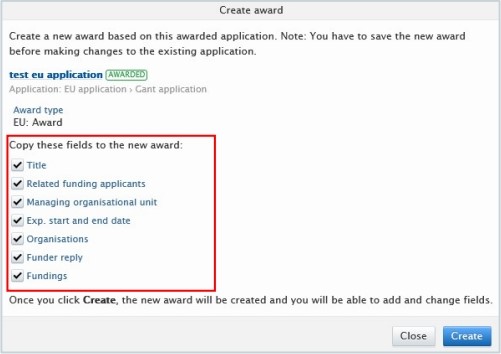
<span lang="EN-GB" style="mso-fareast-font-family: Arial; mso-bidi-font-family: Arial; mso-ansi-language: EN-GB;"><span style="mso-list: Ignore;">4.<span style="font: 7.0pt 'Times New Roman';"> </span></span></span><span lang="EN-GB" style="mso-bidi-font-family: Arial; mso-ansi-language: EN-GB;">The data of the Application is copied, click on *Create*:</span>

[![Bild 47.jpeg](https://wiki.pmu.ac.at/uploads/images/gallery/2025-10/scaled-1680-/bild-47.jpeg)](https://wiki.pmu.ac.at/uploads/images/gallery/2025-10/bild-47.jpeg)

<p class="callout danger"><span style="mso-bookmark: _Hlk203726649;">**<span lang="EN-GB" style="mso-bidi-font-family: Arial; color: black; mso-themecolor: text1; mso-style-textoutline-type: none; mso-style-textoutline-outlinestyle-dpiwidth: .75pt; mso-style-textoutline-outlinestyle-linecap: round; mso-style-textoutline-outlinestyle-join: bevel; mso-style-textoutline-outlinestyle-pctmiterlimit: 0%; mso-style-textoutline-outlinestyle-dash: solid; mso-style-textoutline-outlinestyle-align: center; mso-style-textoutline-outlinestyle-compound: simple; mso-ansi-language: EN-GB;">Popu</span>**</span><span style="mso-bookmark: _Hlk203726649;">**<span lang="EN-GB" style="mso-bidi-font-family: Arial; mso-style-textoutline-type: none; mso-style-textoutline-outlinestyle-dpiwidth: .75pt; mso-style-textoutline-outlinestyle-linecap: round; mso-style-textoutline-outlinestyle-join: bevel; mso-style-textoutline-outlinestyle-pctmiterlimit: 0%; mso-style-textoutline-outlinestyle-dash: solid; mso-style-textoutline-outlinestyle-align: center; mso-style-textoutline-outlinestyle-compound: simple; mso-ansi-language: EN-GB;">p blockers</span>**</span><span style="mso-bookmark: _Hlk203726649;"><span lang="EN-GB" style="mso-bidi-font-family: Arial; mso-style-textoutline-type: none; mso-style-textoutline-outlinestyle-dpiwidth: .75pt; mso-style-textoutline-outlinestyle-linecap: round; mso-style-textoutline-outlinestyle-join: bevel; mso-style-textoutline-outlinestyle-pctmiterlimit: 0%; mso-style-textoutline-outlinestyle-dash: solid; mso-style-textoutline-outlinestyle-align: center; mso-style-textoutline-outlinestyle-compound: simple; mso-ansi-language: EN-GB;"> can block this new editor window; therefore, it is recommended to (temporarily) **disable** your pop-up blocker.</span></span></p>

<span style="mso-bookmark: _Hlk203726649;"><span lang="EN-GB" style="mso-bidi-font-family: Arial; mso-ansi-language: EN-GB;"> </span></span>

<span lang="EN-GB" style="mso-fareast-font-family: Arial; mso-bidi-font-family: Arial; mso-ansi-language: EN-GB;"><span style="mso-list: Ignore;">5.<span style="font: 7.0pt 'Times New Roman';"> </span></span></span><span lang="EN-GB" style="mso-bidi-font-family: Arial; mso-ansi-language: EN-GB;">Modify the data, such as Award holders, etc., in the editor window if necessary.</span>

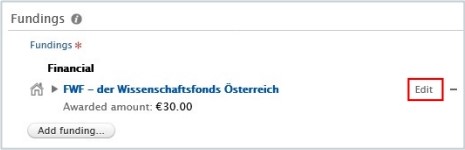
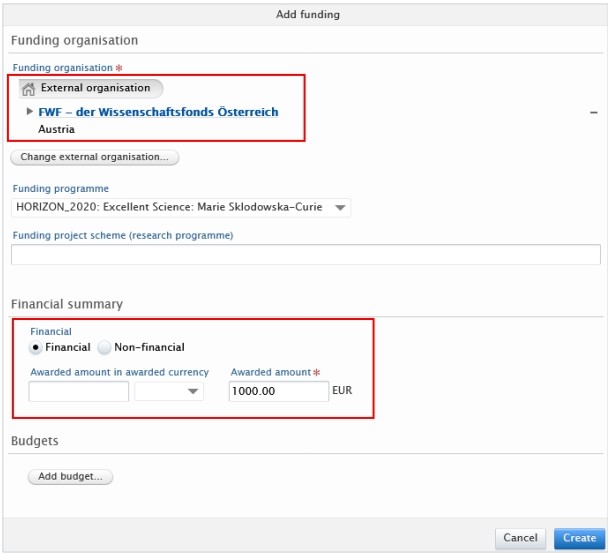
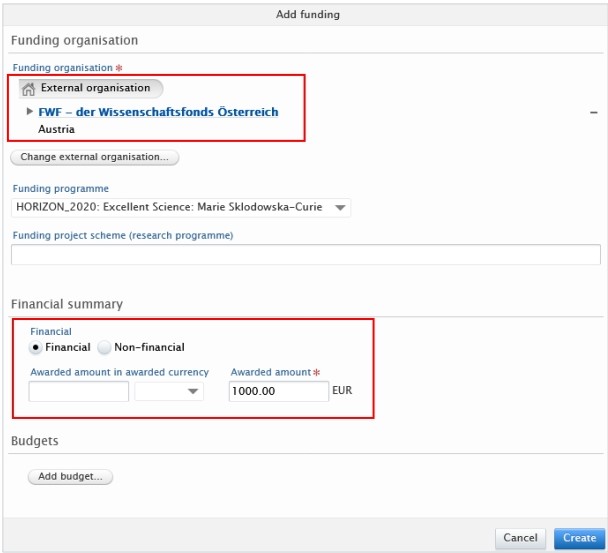
<span lang="EN-GB" style="mso-bidi-font-family: Arial; mso-ansi-language: EN-GB;">Fundings: Click on Edit next to the financial information if you need to update to **awarded amount**:</span>

[![Bild 48.jpeg](https://wiki.pmu.ac.at/uploads/images/gallery/2025-10/scaled-1680-/bild-48.jpeg)](https://wiki.pmu.ac.at/uploads/images/gallery/2025-10/bild-48.jpeg)

<span style="mso-ignore: vglayout; position: absolute; z-index: 251998208; left: 0px; margin-left: 407px; margin-top: 77px; width: 37px; height: 25px;">  
</span>

<span lang="EN-GB" style="mso-fareast-font-family: Arial; mso-bidi-font-family: Arial; mso-ansi-language: EN-GB;"><span style="mso-list: Ignore;">6.<span style="font: 7.0pt 'Times New Roman';"> </span></span></span><span lang="EN-GB" style="mso-bidi-font-family: Arial; mso-ansi-language: EN-GB;">Click on *Save*.</span>

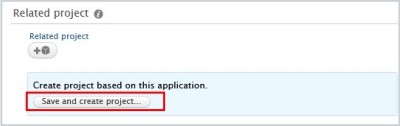
<span lang="EN-GB" style="mso-fareast-font-family: Arial; mso-bidi-font-family: Arial; mso-ansi-language: EN-GB;"><span style="mso-list: Ignore;">7.<span style="font: 7.0pt 'Times New Roman';"> </span></span></span>**<span lang="EN-GB" style="mso-bidi-font-family: Arial; mso-ansi-language: EN-GB;">Create</span>**<span lang="EN-GB" style="mso-bidi-font-family: Arial; mso-ansi-language: EN-GB;"> a **Project** **based on the awarded application** by opening the Application and clicking on the “*Save and create project*” button. For the details of Projects, refer to the section </span>[Projects - Details](https://wiki.pmu.ac.at/books/manual-for-researchers/page/36-projects-details)<span lang="EN-GB" style="mso-bidi-font-family: Arial; mso-ansi-language: EN-GB;">).</span>

[![Bild 49.jpeg](https://wiki.pmu.ac.at/uploads/images/gallery/2025-10/scaled-1680-/bild-49.jpeg)](https://wiki.pmu.ac.at/uploads/images/gallery/2025-10/bild-49.jpeg)

<span lang="EN-GB" style="mso-fareast-font-family: Arial; mso-bidi-font-family: Arial; mso-ansi-language: EN-GB;"><span style="mso-list: Ignore;">8.<span style="font: 7.0pt 'Times New Roman';"> </span></span></span><span lang="EN-GB" style="mso-bidi-font-family: Arial; mso-ansi-language: EN-GB;">Click on *Save*.</span>

<span lang="EN-GB" style="mso-bidi-font-family: Arial; mso-ansi-language: EN-GB;"> </span>

<span lang="EN-GB" style="mso-bidi-font-size: 12.0pt; mso-bidi-font-family: Arial; color: black; mso-themecolor: text1; mso-ansi-language: EN-GB;">In summary, in case of a **competitive project**, you need to create three data types: an **Application**, an **Award,** and a **Project**. These data types need to be linked to each other:</span>

[![Bild 50.jpeg](https://wiki.pmu.ac.at/uploads/images/gallery/2025-10/scaled-1680-/bild-50.jpeg)](https://wiki.pmu.ac.at/uploads/images/gallery/2025-10/bild-50.jpeg)

<p class="callout info"><span lang="EN-GB" style="mso-bidi-font-size: 12.0pt; mso-bidi-font-family: Arial; color: black; mso-themecolor: text1; mso-ansi-language: EN-GB;">In case of **rejection from the funder**, the **process ends**, and you don’t need to create either an Award or a Project.</span></p>

# 3.3. Non-competitive Projects, Such as Clinical or Privately Funded Projects (Awards with Projects)

<p class="callout success"><span lang="EN-GB" style="mso-bidi-font-family: Arial; mso-ansi-language: EN-GB;">In case of a **not competitive project**, **such as privately funded projects (corporate funding)** etc., you don’t need to create an Application, but an **Award and a Project**.</span></p>

<u><span lang="EN-GB" style="mso-bidi-font-family: Arial; mso-ansi-language: EN-GB;">To create a non-competitive project in Pure:</span></u>

<span lang="EN-GB" style="mso-fareast-font-family: Arial; mso-bidi-font-family: Arial; mso-ansi-language: EN-GB;"><span style="mso-list: Ignore;">1.<span style="font: 7.0pt 'Times New Roman';"> </span></span></span>**<span lang="EN-GB" style="mso-bidi-font-family: Arial; mso-ansi-language: EN-GB;">Create</span>**<span lang="EN-GB" style="mso-bidi-font-family: Arial; mso-ansi-language: EN-GB;"> a **Project**. For the details of Projects, refer to the section </span>[Projects - Details](https://wiki.pmu.ac.at/books/manual-for-researchers/page/36-projects-details)<span lang="EN-GB" style="mso-bidi-font-family: Arial; mso-ansi-language: EN-GB;">.</span>

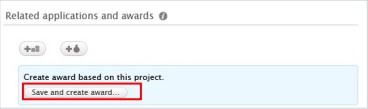
<span lang="EN-GB" style="mso-fareast-font-family: Arial; mso-bidi-font-family: Arial; mso-ansi-language: EN-GB;"><span style="mso-list: Ignore;">2.<span style="font: 7.0pt 'Times New Roman';"> </span></span></span>**<span lang="EN-GB" style="mso-bidi-font-family: Arial; mso-ansi-language: EN-GB;">Create</span>**<span lang="EN-GB" style="mso-bidi-font-family: Arial; mso-ansi-language: EN-GB;"> **an Award based on the Project** by opening the Project and clicking on the “*Save and create award*” button. For the details of Award, refer to the section </span>[Awards - Details](https://wiki.pmu.ac.at/books/manual-for-researchers/page/35-awards-details)<span lang="EN-GB" style="mso-bidi-font-family: Arial; mso-ansi-language: EN-GB;">.</span>

[![Bild 51.jpeg](https://wiki.pmu.ac.at/uploads/images/gallery/2025-10/scaled-1680-/bild-51.jpeg)](https://wiki.pmu.ac.at/uploads/images/gallery/2025-10/bild-51.jpeg)

<span lang="EN-GB" style="mso-fareast-font-family: Arial; mso-bidi-font-family: Arial; mso-ansi-language: EN-GB;"><span style="mso-list: Ignore;">3.<span style="font: 7.0pt 'Times New Roman';"> </span></span></span><span lang="EN-GB" style="mso-bidi-font-family: Arial; mso-ansi-language: EN-GB;">Click on “*Save”*.</span>

<span lang="EN-GB" style="mso-bidi-font-size: 12.0pt; mso-bidi-font-family: Arial; color: black; mso-themecolor: text1; mso-ansi-language: EN-GB;">In summary, in case of a **non**-**competitive project**, you need to create two data types: an **Award,** and a **Project**. These data types need to be linked to each other:</span>

<span style="mso-ignore: vglayout; position: absolute; z-index: 252005376; margin-left: 391px; margin-top: 15px; width: 124px; height: 78px;">  
</span>

[![Bild 52.jpeg](https://wiki.pmu.ac.at/uploads/images/gallery/2025-10/scaled-1680-/bild-52.jpeg)](https://wiki.pmu.ac.at/uploads/images/gallery/2025-10/bild-52.jpeg)

<span style="mso-ignore: vglayout; position: absolute; z-index: 252004352; margin-left: 4px; margin-top: 23px; width: 89px; height: 73px;">  
</span><span style="mso-fareast-language: DE-AT; mso-no-proof: yes;"></span>

# 3.4. Applications - Details

<p class="callout info"><span lang="EN-GB" style="mso-bidi-font-family: Arial; mso-ansi-language: EN-GB;">An application in Pure is a record with **information about** <span style="mso-bidi-font-weight: bold;">a</span> Researchers' Application for funding. The application process should be carried out according to the current rules and guidelines. Pure doesn’t replace any parts of the application process, including the approval of your superior. The entry should be in Pure **before** the planned submission.</span></p>

<span lang="EN-GB" style="mso-bidi-font-family: Arial; mso-ansi-language: EN-GB;"> </span>

<u><span lang="EN-GB" style="mso-bidi-font-family: Arial; mso-ansi-language: EN-GB;">To create a new Application:</span></u>

<span lang="EN-GB" style="mso-fareast-font-family: Arial; mso-bidi-font-family: Arial; mso-ansi-language: EN-GB;"><span style="mso-list: Ignore;">1.<span style="font: 7.0pt 'Times New Roman';"> </span></span></span><span lang="EN-GB" style="mso-bidi-font-family: Arial; mso-ansi-language: EN-GB;">Click on *Add content* button:</span>

[![Bild 1.jpeg](https://wiki.pmu.ac.at/uploads/images/gallery/2025-10/scaled-1680-/bild-1.jpeg)](https://wiki.pmu.ac.at/uploads/images/gallery/2025-10/bild-1.jpeg)

<span lang="EN-GB" style="mso-bidi-font-family: Arial; mso-ansi-language: EN-GB;">Or click on the triangle next to *Personal* in the header, select *Applications*, and click on the </span><span style="mso-bidi-font-family: Arial; mso-fareast-language: DE-AT; mso-no-proof: yes;">![](https://wiki.pmu.ac.at/uploads/images/gallery/2025-10/embedded-image-jhnxujrw.png)</span><span style="mso-bidi-font-family: Arial; mso-ansi-language: EN-GB;"><span style="mso-spacerun: yes;"> </span><span lang="EN-GB">button:</span></span>

[![Bild 2.png](https://wiki.pmu.ac.at/uploads/images/gallery/2025-10/scaled-1680-/qZmbild-2.png)](https://wiki.pmu.ac.at/uploads/images/gallery/2025-10/qZmbild-2.png)

<span lang="EN-GB" style="mso-bidi-font-family: Arial; mso-ansi-language: EN-GB;"> 2. Scroll down until you locate the precise type of the item you want to add. </span>

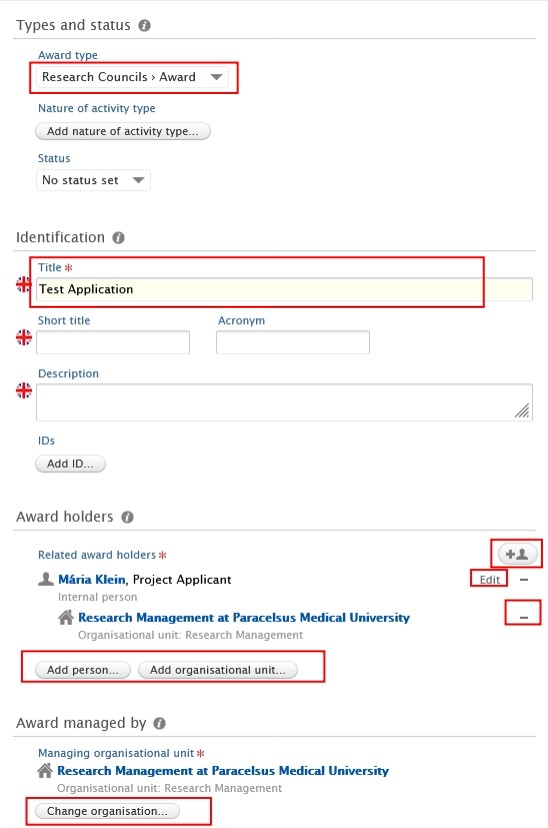
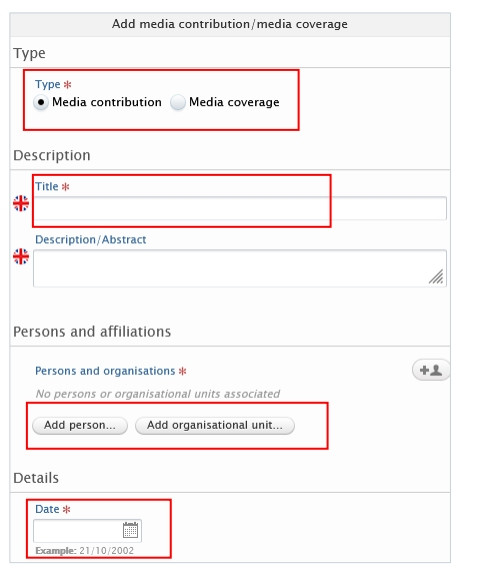
<span lang="EN-GB" style="mso-fareast-font-family: Arial; mso-bidi-font-family: Arial; mso-ansi-language: EN-GB;"><span style="mso-list: Ignore;">3.<span style="font: 7.0pt 'Times New Roman';"> </span></span></span><span lang="EN-GB" style="mso-bidi-font-family: Arial; mso-ansi-language: EN-GB;">In the *Application* editor window, you need to enter all available information about the item. The required fields are marked with a red star, and filling them in is mandatory. To maintain data quality, we recommend providing information for some of the optional fields as well. The following steps include all the fields you suggested to fill in:</span>

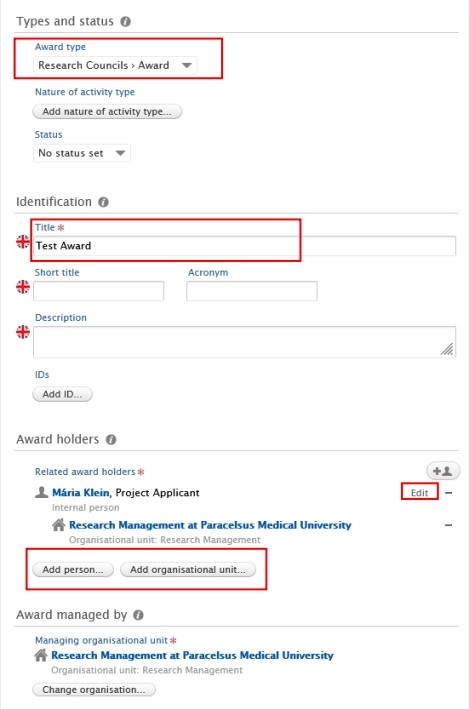
**<span lang="EN-GB" style="mso-fareast-font-family: Arial; mso-bidi-font-family: Arial; color: #232e64; mso-ansi-language: EN-GB;"><span style="mso-list: Ignore;">1.<span style="font: 7.0pt 'Times New Roman';"> </span></span></span>****<span lang="EN-GB" style="mso-bidi-font-family: Arial; color: #232e64; mso-ansi-language: EN-GB;">Application type</span>**<span lang="EN-GB" style="mso-bidi-font-family: Arial; color: #262e61; mso-ansi-language: EN-GB;">:</span>

<span lang="EN-GB" style="mso-bidi-font-family: Arial; mso-ansi-language: EN-GB;">The default type is *Research Councils – Additional funding*. Use the dropdown menu if you want to select another type.</span>

**<span lang="EN-GB" style="mso-fareast-font-family: Arial; mso-bidi-font-family: Arial; color: #232e64; mso-ansi-language: EN-GB;"><span style="mso-list: Ignore;">2.<span style="font: 7.0pt 'Times New Roman';"> </span></span></span>****<span lang="EN-GB" style="mso-bidi-font-family: Arial; color: #232e64; mso-ansi-language: EN-GB;">Title</span>**<span lang="EN-GB" style="mso-bidi-font-family: Arial; color: #262e61; mso-ansi-language: EN-GB;">:</span>

<span lang="EN-GB" style="mso-bidi-font-family: Arial; mso-ansi-language: EN-GB;">Fill in the title of the application.</span>

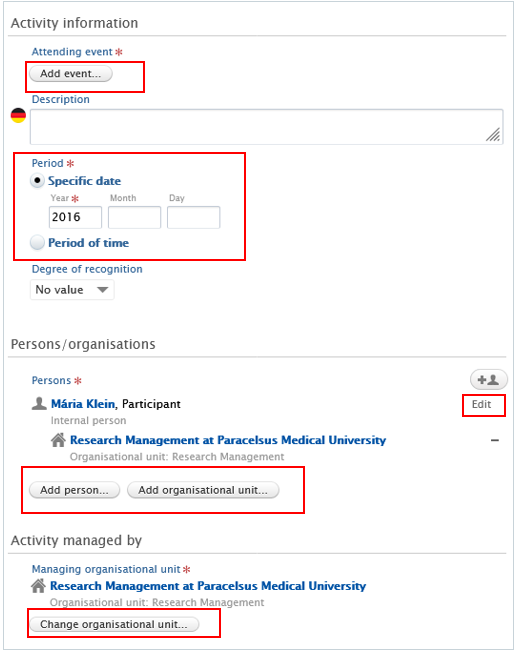
**<span lang="EN-GB" style="mso-fareast-font-family: Arial; mso-bidi-font-family: Arial; color: #232e64; mso-ansi-language: EN-GB;"><span style="mso-list: Ignore;">3.<span style="font: 7.0pt 'Times New Roman';"> </span></span></span>****<span lang="EN-GB" style="mso-bidi-font-family: Arial; color: #232e64; mso-ansi-language: EN-GB;">Related funding applicants</span>**<span lang="EN-GB" style="mso-bidi-font-family: Arial; color: #262e61; mso-ansi-language: EN-GB;">:</span>

<span lang="EN-GB" style="mso-bidi-font-family: Arial; mso-ansi-language: EN-GB;">Pure automatically adds the content creator with the *Project Applicant* role, along with their organisational unit, to this field.</span>

<span lang="EN-GB" style="mso-bidi-font-family: Arial; mso-ansi-language: EN-GB;">Click on *Edit* on the right side if you wish to change your role or your organisational unit. By clicking on the *Add person* button (left corner) or the add person icon </span><span style="mso-fareast-language: DE-AT; mso-no-proof: yes;">![](https://wiki.pmu.ac.at/uploads/images/gallery/2025-10/embedded-image-16woixxb.png)</span><span lang="EN-GB" style="mso-bidi-font-family: Arial; mso-ansi-language: EN-GB;"><span style="mso-spacerun: yes;"> </span>(right corner) you can add other persons who are related to this application. Click on *Add organisational unit* if you wish to register additional organisations.</span>

**<span lang="EN-GB" style="mso-fareast-font-family: Arial; mso-bidi-font-family: Arial; color: #232e64; mso-ansi-language: EN-GB;"><span style="mso-list: Ignore;">4.<span style="font: 7.0pt 'Times New Roman';"> </span></span></span>****<span lang="EN-GB" style="mso-bidi-font-family: Arial; color: #232e64; mso-ansi-language: EN-GB;">Managing organisational unit:</span>**

<span lang="EN-GB" style="mso-bidi-font-family: Arial; mso-ansi-language: EN-GB;">Pure automatically adds the internal organisational unit of the content creator to this field. Change the organisational if you need to by clicking on the *Change organisation* button.</span>

[![Bild 53.jpeg](https://wiki.pmu.ac.at/uploads/images/gallery/2025-10/scaled-1680-/bild-53.jpeg)](https://wiki.pmu.ac.at/uploads/images/gallery/2025-10/bild-53.jpeg)

<span style="mso-ignore: vglayout; position: absolute; z-index: 251909120; left: 0px; margin-left: 28px; margin-top: 798px; width: 187px; height: 30px;">  
</span><span style="mso-ignore: vglayout; position: absolute; z-index: 251908096; left: 0px; margin-left: 23px; margin-top: 651px; width: 306px; height: 34px;">  
</span><span style="mso-ignore: vglayout; position: absolute; z-index: 251746304; left: 0px; margin-left: 507px; margin-top: 601px; width: 38px; height: 26px;">  
</span><span style="mso-ignore: vglayout; position: absolute; z-index: 251748352; left: 0px; margin-left: 473px; margin-top: 570px; width: 39px; height: 19px;">  
</span><span style="mso-ignore: vglayout; position: absolute; z-index: 251747328; left: 0px; margin-left: 587px; margin-top: 540px; width: 54px; height: 30px;">  
</span><span style="mso-ignore: vglayout; position: absolute; z-index: 251821056; left: 0px; margin-left: 31px; margin-top: 62px; width: 211px; height: 34px;">  
</span><span style="mso-ignore: vglayout; position: absolute; z-index: 251702272; left: 0px; margin-left: 31px; margin-top: 257px; width: 457px; height: 53px;">  
</span>

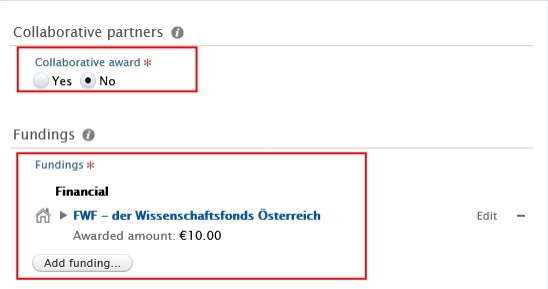
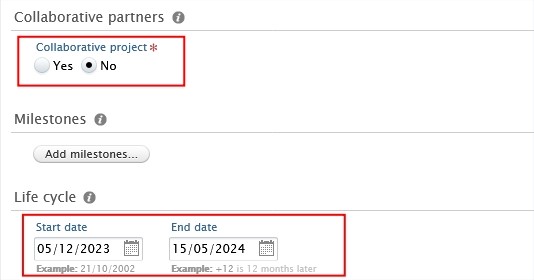
**<span lang="EN-GB" style="mso-fareast-font-family: Arial; mso-bidi-font-family: Arial; color: #232e64; mso-ansi-language: EN-GB;"><span style="mso-list: Ignore;">5.<span style="font: 7.0pt 'Times New Roman';"> </span></span></span>****<span lang="EN-GB" style="mso-bidi-font-family: Arial; color: #232e64; mso-ansi-language: EN-GB;">Collaborative application:</span>**

<span lang="EN-GB" style="font-family: Symbol; mso-fareast-font-family: Symbol; mso-bidi-font-family: Symbol; mso-ansi-language: EN-GB;"><span style="mso-list: Ignore;">·<span style="font: 7.0pt 'Times New Roman';"> </span></span></span><span lang="EN-GB" style="mso-bidi-font-family: Arial; mso-ansi-language: EN-GB;">Select ***No*** if the application is not a collaboration between partners (= only involves internal partners).</span>

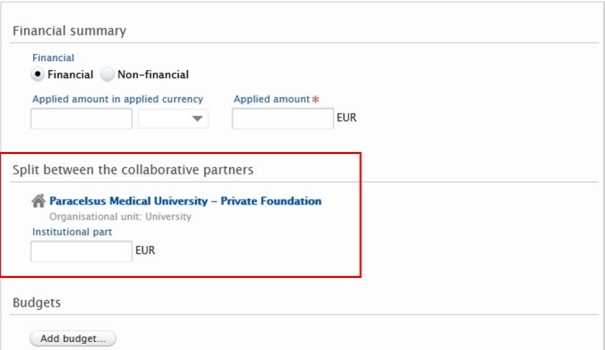
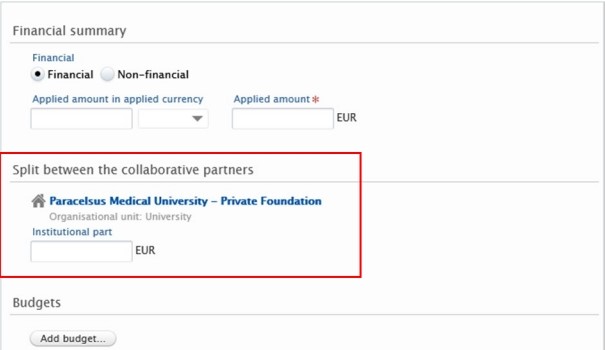
<span lang="EN-GB" style="font-family: Symbol; mso-fareast-font-family: Symbol; mso-bidi-font-family: Symbol; mso-ansi-language: EN-GB;"><span style="mso-list: Ignore;">·<span style="font: 7.0pt 'Times New Roman';"> </span></span></span><span lang="EN-GB" style="mso-bidi-font-family: Arial; mso-ansi-language: EN-GB;">Select ***Yes*** if the application **involves internal and** **external** partners. By clicking on *Add collaborator* you can add further collaborators.</span><span lang="EN-GB" style="mso-ansi-language: EN-GB;"> </span><span lang="EN-GB" style="mso-bidi-font-family: Arial; mso-ansi-language: EN-GB;">Choosing *Yes* allows you to register the **split** between collaborative partners, which can be done in the *Fundings`* field (see the next point).</span>

**<span lang="EN-GB" style="mso-fareast-font-family: Arial; mso-bidi-font-family: Arial; color: #232e64; mso-ansi-language: EN-GB;"><span style="mso-list: Ignore;">6.<span style="font: 7.0pt 'Times New Roman';"> </span></span></span>****<span lang="EN-GB" style="mso-bidi-font-family: Arial; color: #232e64; mso-ansi-language: EN-GB;">Fundings</span>**<span lang="EN-GB" style="mso-bidi-font-family: Arial; mso-ansi-language: EN-GB;">:**<span style="color: #83c9f0;"> </span>**</span>

<span lang="EN-GB" style="mso-bidi-font-family: Arial; mso-ansi-language: EN-GB;">Here you can provide your content with information about the funding organisation, financial summary (applied or estimated amount), etc:</span>

[![Bild 54.jpeg](https://wiki.pmu.ac.at/uploads/images/gallery/2025-10/scaled-1680-/bild-54.jpeg)](https://wiki.pmu.ac.at/uploads/images/gallery/2025-10/bild-54.jpeg)

<span style="mso-ignore: vglayout; position: absolute; z-index: 251910144; left: 0px; margin-left: 19px; margin-top: 153px; width: 351px; height: 129px;">  
</span>

<span lang="EN-GB" style="font-family: Symbol; mso-fareast-font-family: Symbol; mso-bidi-font-family: Symbol; mso-ansi-language: EN-GB;"><span style="mso-list: Ignore;">·<span style="font: 7.0pt 'Times New Roman';"> </span></span></span><span lang="EN-GB" style="mso-bidi-font-family: Arial; mso-ansi-language: EN-GB;">If you selected ***No*** in the *Collaborative partners* field (see point 5), you can manage the funding organisation, funding program, financial summary and add budgets as needed.</span>

[![Bild 55.jpeg](https://wiki.pmu.ac.at/uploads/images/gallery/2025-10/scaled-1680-/bild-55.jpeg)](https://wiki.pmu.ac.at/uploads/images/gallery/2025-10/bild-55.jpeg)

<span lang="EN-GB" style="mso-bidi-font-family: Arial; mso-ansi-language: EN-GB;"> </span>

<span lang="EN-GB" style="font-family: Symbol; mso-fareast-font-family: Symbol; mso-bidi-font-family: Symbol; mso-ansi-language: EN-GB;"><span style="mso-list: Ignore;">·<span style="font: 7.0pt 'Times New Roman';"> </span></span></span><span lang="EN-GB" style="mso-bidi-font-family: Arial; mso-ansi-language: EN-GB;">If you selected ***Yes*** in the *Collaborative partners* field (see point 5), you can also manage **split** funding among project partners in addition to the fields mentioned above.</span>

[![Bild 56.jpeg](https://wiki.pmu.ac.at/uploads/images/gallery/2025-10/scaled-1680-/bild-56.jpeg)](https://wiki.pmu.ac.at/uploads/images/gallery/2025-10/bild-56.jpeg)

<span lang="EN-GB" style="mso-bidi-font-family: Arial; mso-ansi-language: EN-GB;"> </span>

<p class="callout info">*<span lang="EN-GB" style="mso-bidi-font-family: Arial; mso-ansi-language: EN-GB;">Optional</span>*<span lang="EN-GB" style="mso-bidi-font-family: Arial; mso-ansi-language: EN-GB;">: Click on “*Add budget*” in the dialog window if you need to register a **split between internal organisational units**:</span></p>

[![Bild 59.jpeg](https://wiki.pmu.ac.at/uploads/images/gallery/2025-10/scaled-1680-/bild-59.jpeg)](https://wiki.pmu.ac.at/uploads/images/gallery/2025-10/bild-59.jpeg)
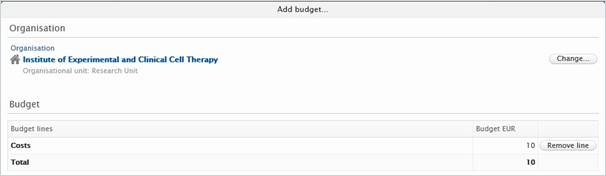
<span style="mso-fareast-language: DE-AT; mso-no-proof: yes;">![](https://wiki.pmu.ac.at/uploads/images/gallery/2025-10/embedded-image-ymi6leyo.png)</span>

<span lang="EN-GB" style="mso-bidi-font-family: Arial; mso-ansi-language: EN-GB;"> </span>

<span lang="EN-GB" style="mso-bidi-font-family: Arial; mso-ansi-language: EN-GB;"> </span>

**<span lang="EN-GB" style="mso-fareast-font-family: Arial; mso-bidi-font-family: Arial; color: #232e64; mso-ansi-language: EN-GB;"><span style="mso-list: Ignore;">7.<span style="font: 7.0pt 'Times New Roman';"> </span></span></span>****<span lang="EN-GB" style="mso-bidi-font-family: Arial; color: #232e64; mso-ansi-language: EN-GB;">Submission deadline:</span>**

<span lang="EN-GB" style="mso-bidi-font-family: Arial; mso-ansi-language: EN-GB;">The entry should be in Pure **before** the planned submission.</span>

[![Bild 60.jpeg](https://wiki.pmu.ac.at/uploads/images/gallery/2025-10/scaled-1680-/bild-60.jpeg)](https://wiki.pmu.ac.at/uploads/images/gallery/2025-10/bild-60.jpeg)

**<span lang="EN-GB" style="mso-fareast-font-family: Arial; mso-bidi-font-family: Arial; color: #232e64; mso-ansi-language: EN-GB;"><span style="mso-list: Ignore;">8.<span style="font: 7.0pt 'Times New Roman';"> </span></span></span>*****<span lang="EN-GB" style="mso-bidi-font-family: Arial; color: #232e64; mso-ansi-language: EN-GB;">Optional</span>*<span lang="EN-GB" style="mso-bidi-font-family: Arial; color: #232e64; mso-ansi-language: EN-GB;">: Relations:</span>**

<span lang="EN-GB" style="mso-bidi-font-family: Arial; mso-ansi-language: EN-GB;">You can link your Applications with other Pure content, such as Projects.</span>

<span lang="EN-GB" style="mso-fareast-font-family: Arial; mso-bidi-font-family: Arial; mso-ansi-language: EN-GB;"><span style="mso-list: Ignore;">4.<span style="font: 7.0pt 'Times New Roman';"> </span></span></span><span lang="EN-GB" style="mso-bidi-font-family: Arial; mso-ansi-language: EN-GB;">Click on *Send to internal approval*.</span>

[![Bild 61.jpeg](https://wiki.pmu.ac.at/uploads/images/gallery/2025-10/scaled-1680-/bild-61.jpeg)](https://wiki.pmu.ac.at/uploads/images/gallery/2025-10/bild-61.jpeg)

**<span lang="EN-GB" style="mso-bidi-font-family: Arial; color: black; mso-themecolor: text1; mso-style-textoutline-type: none; mso-style-textoutline-outlinestyle-dpiwidth: .75pt; mso-style-textoutline-outlinestyle-linecap: round; mso-style-textoutline-outlinestyle-join: bevel; mso-style-textoutline-outlinestyle-pctmiterlimit: 0%; mso-style-textoutline-outlinestyle-dash: solid; mso-style-textoutline-outlinestyle-align: center; mso-style-textoutline-outlinestyle-compound: simple; mso-ansi-language: EN-GB;"><span style="mso-tab-count: 8;"> </span></span>**

<p class="callout warning"><span lang="EN-GB" style="mso-bidi-font-family: Arial; color: black; mso-themecolor: text1; mso-style-textoutline-type: none; mso-style-textoutline-outlinestyle-dpiwidth: .75pt; mso-style-textoutline-outlinestyle-linecap: round; mso-style-textoutline-outlinestyle-join: bevel; mso-style-textoutline-outlinestyle-pctmiterlimit: 0%; mso-style-textoutline-outlinestyle-dash: solid; mso-style-textoutline-outlinestyle-align: center; mso-style-textoutline-outlinestyle-compound: simple; mso-ansi-language: EN-GB;">By default, the **visibility type** of applications is *Confidential*:</span></p>

[![Bild 62.jpeg](https://wiki.pmu.ac.at/uploads/images/gallery/2025-10/scaled-1680-/bild-62.jpeg)](https://wiki.pmu.ac.at/uploads/images/gallery/2025-10/bild-62.jpeg)

<span style="mso-ignore: vglayout; position: absolute; z-index: 251963392; margin-left: 2px; margin-top: 8px; width: 394px; height: 31px;">  
</span>

<span lang="EN-GB" style="mso-bidi-font-family: Arial; mso-ansi-language: EN-GB;"> </span>

<span lang="EN-GB" style="mso-bidi-font-family: Arial; mso-ansi-language: EN-GB;">In the next step, the Application undergoes scrutiny by the RM. This involves a thorough review of the content to ensure accuracy and completeness. It's important to note that while the RM verifies the **overall correctness and adequacy** of the information, they don't delve into the specifics, such as scrutinizing funding details.</span>

<span lang="EN-GB" style="mso-bidi-font-family: Arial; color: #002060; mso-ansi-language: EN-GB;"> </span>**<span lang="EN-GB" style="mso-bidi-font-family: Arial; color: black; mso-themecolor: text1; mso-style-textoutline-type: none; mso-style-textoutline-outlinestyle-dpiwidth: .75pt; mso-style-textoutline-outlinestyle-linecap: round; mso-style-textoutline-outlinestyle-join: bevel; mso-style-textoutline-outlinestyle-pctmiterlimit: 0%; mso-style-textoutline-outlinestyle-dash: solid; mso-style-textoutline-outlinestyle-align: center; mso-style-textoutline-outlinestyle-compound: simple; mso-ansi-language: EN-GB;"><span style="mso-tab-count: 1;"> </span><span style="mso-tab-count: 8;"> </span></span>**

<p class="callout danger"><span lang="EN-GB" style="mso-bidi-font-family: Arial; mso-style-textoutline-type: none; mso-style-textoutline-outlinestyle-dpiwidth: .75pt; mso-style-textoutline-outlinestyle-linecap: round; mso-style-textoutline-outlinestyle-join: bevel; mso-style-textoutline-outlinestyle-pctmiterlimit: 0%; mso-style-textoutline-outlinestyle-dash: solid; mso-style-textoutline-outlinestyle-align: center; mso-style-textoutline-outlinestyle-compound: simple; mso-ansi-language: EN-GB;">Please **get in touch** immediately with the **Editor of your organisational unit or** with **RM** at </span>[<span lang="EN-GB" style="mso-bidi-font-family: Arial; mso-style-textoutline-type: none; mso-style-textoutline-outlinestyle-dpiwidth: .75pt; mso-style-textoutline-outlinestyle-linecap: round; mso-style-textoutline-outlinestyle-join: bevel; mso-style-textoutline-outlinestyle-pctmiterlimit: 0%; mso-style-textoutline-outlinestyle-dash: solid; mso-style-textoutline-outlinestyle-align: center; mso-style-textoutline-outlinestyle-compound: simple; mso-ansi-language: EN-GB;">pure@pmu.ac.at</span>](mailto:pure@pmu.ac.at)<span lang="EN-GB" style="mso-bidi-font-family: Arial; mso-style-textoutline-type: none; mso-style-textoutline-outlinestyle-dpiwidth: .75pt; mso-style-textoutline-outlinestyle-linecap: round; mso-style-textoutline-outlinestyle-join: bevel; mso-style-textoutline-outlinestyle-pctmiterlimit: 0%; mso-style-textoutline-outlinestyle-dash: solid; mso-style-textoutline-outlinestyle-align: center; mso-style-textoutline-outlinestyle-compound: simple; mso-ansi-language: EN-GB;"> once you have: **1.** **submitted the application to the funder**, and **2.** **received a reply from the funder** regarding the result of your Application. For the next step, please refer to the section </span>[<span lang="EN-GB" style="mso-bidi-font-family: Arial; mso-style-textoutline-type: none; mso-style-textoutline-outlinestyle-dpiwidth: .75pt; mso-style-textoutline-outlinestyle-linecap: round; mso-style-textoutline-outlinestyle-join: bevel; mso-style-textoutline-outlinestyle-pctmiterlimit: 0%; mso-style-textoutline-outlinestyle-dash: solid; mso-style-textoutline-outlinestyle-align: center; mso-style-textoutline-outlinestyle-compound: simple; mso-ansi-language: EN-GB;">Competitive Projects</span>](https://wiki.pmu.ac.at/books/manual-for-researchers/page/32-competitive-projects-such-as-pmu-rif-fwf-or-eu-projects-awarded-applications)<span lang="EN-GB" style="mso-bidi-font-family: Arial; mso-style-textoutline-type: none; mso-style-textoutline-outlinestyle-dpiwidth: .75pt; mso-style-textoutline-outlinestyle-linecap: round; mso-style-textoutline-outlinestyle-join: bevel; mso-style-textoutline-outlinestyle-pctmiterlimit: 0%; mso-style-textoutline-outlinestyle-dash: solid; mso-style-textoutline-outlinestyle-align: center; mso-style-textoutline-outlinestyle-compound: simple; mso-ansi-language: EN-GB;">.</span></p>

<span lang="EN-GB" style="mso-bidi-font-family: Arial; mso-ansi-language: EN-GB;"></span>

# 3.5. Awards - Details

<p class="callout info"><span lang="EN-GB" style="mso-bidi-font-family: Arial; mso-ansi-language: EN-GB;">An award in Pure is a record with **information** about research funding **granted by a funder**. **If you would like the enter information about an Awarded application, please refer to the section** </span>[Competitive Projects](https://wiki.pmu.ac.at/books/manual-for-researchers/page/32-competitive-projects-such-as-pmu-rif-fwf-or-eu-projects-awarded-applications)<span lang="EN-GB" style="mso-bidi-font-family: Arial; mso-ansi-language: EN-GB;">.</span></p>

<span lang="EN-GB" style="mso-bidi-font-family: Arial; mso-ansi-language: EN-GB;">However, in certain cases, it may be necessary to create **an Award without an Application.**</span>

<u><span lang="EN-GB" style="mso-bidi-font-family: Arial; mso-ansi-language: EN-GB;">To create a new Award:</span></u>

<span lang="EN-GB" style="mso-fareast-font-family: Arial; mso-bidi-font-family: Arial; mso-ansi-language: EN-GB;"><span style="mso-list: Ignore;">1.<span style="font: 7.0pt 'Times New Roman';"> </span></span></span><span lang="EN-GB" style="mso-bidi-font-family: Arial; mso-ansi-language: EN-GB;">Click on *Add content* button:</span>

[![bild-1.jpeg](https://wiki.pmu.ac.at/uploads/images/gallery/2025-10/scaled-1680-/r81bild-1.jpeg)](https://wiki.pmu.ac.at/uploads/images/gallery/2025-10/r81bild-1.jpeg)

<span lang="EN-GB" style="mso-bidi-font-family: Arial; mso-ansi-language: EN-GB;">Or click on the triangle next to *Personal* in the header, select *Awards*, and click on the </span><span style="mso-bidi-font-family: Arial; mso-fareast-language: DE-AT; mso-no-proof: yes;">![](https://wiki.pmu.ac.at/uploads/images/gallery/2025-10/embedded-image-oiywxzxk.png)</span><span lang="EN-GB" style="mso-bidi-font-family: Arial; mso-ansi-language: EN-GB;"><span style="mso-spacerun: yes;"> </span>button:</span>

[![qZmbild-2.png](https://wiki.pmu.ac.at/uploads/images/gallery/2025-10/scaled-1680-/qzmbild-2.png)](https://wiki.pmu.ac.at/uploads/images/gallery/2025-10/qzmbild-2.png)

<span lang="EN-GB" style="mso-fareast-font-family: Arial; mso-bidi-font-family: Arial; mso-ansi-language: EN-GB;"><span style="mso-list: Ignore;">2.<span style="font: 7.0pt 'Times New Roman';"> </span></span></span><span lang="EN-GB" style="mso-bidi-font-family: Arial; mso-ansi-language: EN-GB;">Scroll down until you locate the precise type of the item you want to add. </span>

<span lang="EN-GB" style="mso-fareast-font-family: Arial; mso-bidi-font-family: Arial; mso-ansi-language: EN-GB;"><span style="mso-list: Ignore;">3.<span style="font: 7.0pt 'Times New Roman';"> </span></span></span><span lang="EN-GB" style="mso-bidi-font-family: Arial; mso-ansi-language: EN-GB;">In the *Application* editor window, you need to enter all available information about the item. The required fields are marked with a red star and filling them in is mandatory. To maintain data quality, we recommend providing information for some of the optional fields as well. The following steps include all the fields you suggested filling in.</span>

**<span lang="EN-GB" style="mso-fareast-font-family: Arial; mso-bidi-font-family: Arial; color: #232e64; mso-ansi-language: EN-GB;"><span style="mso-list: Ignore;">1.<span style="font: 7.0pt 'Times New Roman';"> </span></span></span>****<span lang="EN-GB" style="mso-bidi-font-family: Arial; color: #232e64; mso-ansi-language: EN-GB;">Award type</span>**<span lang="EN-GB" style="mso-bidi-font-family: Arial; mso-ansi-language: EN-GB;">:</span>

<span lang="EN-GB" style="mso-bidi-font-family: Arial; mso-ansi-language: EN-GB;">The default type is *Research Councils – Award*. Use the dropdown menu if you want to select another type.</span>

**<span lang="EN-GB" style="mso-fareast-font-family: Arial; mso-bidi-font-family: Arial; color: #232e64; mso-ansi-language: EN-GB;"><span style="mso-list: Ignore;">2.<span style="font: 7.0pt 'Times New Roman';"> </span></span></span>****<span lang="EN-GB" style="mso-bidi-font-family: Arial; color: #232e64; mso-ansi-language: EN-GB;">Title:</span>**

<span lang="EN-GB" style="mso-bidi-font-family: Arial; mso-ansi-language: EN-GB;">Fill in the title of the award.</span>

**<span lang="EN-GB" style="mso-fareast-font-family: Arial; mso-bidi-font-family: Arial; color: #232e64; mso-ansi-language: EN-GB;"><span style="mso-list: Ignore;">3.<span style="font: 7.0pt 'Times New Roman';"> </span></span></span>****<span lang="EN-GB" style="mso-bidi-font-family: Arial; color: #232e64; mso-ansi-language: EN-GB;">Related award holders:</span>**

<span lang="EN-GB" style="mso-bidi-font-family: Arial; mso-ansi-language: EN-GB;">Pure automatically adds the content creator with the *PI* role, along with their organisational unit, to this field. Click on *Edit* on the right side if you wish to change your role or your organisational unit. By clicking on the *Add person* button (left corner) or the add person icon </span><span style="mso-fareast-language: DE-AT; mso-no-proof: yes;">![](https://wiki.pmu.ac.at/uploads/images/gallery/2025-10/embedded-image-dijj1hui.png)</span><span style="mso-bidi-font-family: Arial; mso-ansi-language: EN-GB;"><span style="mso-spacerun: yes;"> </span><span lang="EN-GB">(right corner) you can add other persons who are related to this application. Click on *Add organisational unit* if you wish to register additional organisations.</span></span>

**<span lang="EN-GB" style="mso-fareast-font-family: Arial; mso-bidi-font-family: Arial; color: #232e64; mso-ansi-language: EN-GB;"><span style="mso-list: Ignore;">4.<span style="font: 7.0pt 'Times New Roman';"> </span></span></span>****<span lang="EN-GB" style="mso-bidi-font-family: Arial; color: #232e64; mso-ansi-language: EN-GB;">Managing organisational unit:</span>**

<span lang="EN-GB" style="mso-bidi-font-family: Arial; mso-ansi-language: EN-GB;">Pure automatically adds the internal organisational unit of the content creator to this field. Change the organisational if you need to by clicking on the *Change organisation* button.</span>

[![Bild 64.jpeg](https://wiki.pmu.ac.at/uploads/images/gallery/2025-10/scaled-1680-/bild-64.jpeg)](https://wiki.pmu.ac.at/uploads/images/gallery/2025-10/bild-64.jpeg)

<span style="mso-ignore: vglayout; position: absolute; z-index: 251914240; margin-left: 403px; margin-top: 484px; width: 38px; height: 19px;">  
</span><span style="mso-ignore: vglayout; position: absolute; z-index: 251913216; margin-left: 27px; margin-top: 550px; width: 243px; height: 43px;">  
</span><span style="mso-ignore: vglayout; position: absolute; z-index: 251912192; margin-left: 31px; margin-top: 220px; width: 273px; height: 45px;">  
</span>

<span lang="EN-GB" style="mso-bidi-font-family: Arial; mso-ansi-language: EN-GB;"> </span>

**<span lang="EN-GB" style="mso-fareast-font-family: Arial; mso-bidi-font-family: Arial; color: #232e64; mso-ansi-language: EN-GB;"><span style="mso-list: Ignore;">5.<span style="font: 7.0pt 'Times New Roman';"> </span></span></span>****<span lang="EN-GB" style="mso-bidi-font-family: Arial; color: #232e64; mso-ansi-language: EN-GB;">Collaborative award:</span>**

<span lang="EN-GB" style="font-family: Symbol; mso-fareast-font-family: Symbol; mso-bidi-font-family: Symbol; mso-ansi-language: EN-GB;"><span style="mso-list: Ignore;">·<span style="font: 7.0pt 'Times New Roman';"> </span></span></span><span lang="EN-GB" style="mso-bidi-font-family: Arial; mso-ansi-language: EN-GB;">Select ***No*** if the award is not a collaboration between partners.</span>

<span lang="EN-GB" style="font-family: Symbol; mso-fareast-font-family: Symbol; mso-bidi-font-family: Symbol; mso-ansi-language: EN-GB;"><span style="mso-list: Ignore;">·<span style="font: 7.0pt 'Times New Roman';"> </span></span></span><span lang="EN-GB" style="mso-bidi-font-family: Arial; mso-ansi-language: EN-GB;">Select ***Yes*** if the application involves collaboration **involving** **internal and** **external** partners. By clicking on *Add collaborator* you can add further collaborators.</span><span lang="EN-GB" style="mso-ansi-language: EN-GB;"> </span><span lang="EN-GB" style="mso-bidi-font-family: Arial; mso-ansi-language: EN-GB;">Choosing *Yes* allows you to register the **split** between collaborative partners, which can be done in the *Fundings* field (see the next point).</span>

**<span lang="EN-GB" style="mso-fareast-font-family: Arial; mso-bidi-font-family: Arial; color: #232e64; mso-ansi-language: EN-GB;"><span style="mso-list: Ignore;">6.<span style="font: 7.0pt 'Times New Roman';"> </span></span></span>****<span lang="EN-GB" style="mso-bidi-font-family: Arial; color: #232e64; mso-ansi-language: EN-GB;">Fundings:</span>**

<span lang="EN-GB" style="mso-bidi-font-family: Arial; mso-ansi-language: EN-GB;">Here you can provide your content with information about funding organisation, financial summary (applied or estimated amount), etc.</span>

[![Bild 66.jpeg](https://wiki.pmu.ac.at/uploads/images/gallery/2025-10/scaled-1680-/bild-66.jpeg)](https://wiki.pmu.ac.at/uploads/images/gallery/2025-10/bild-66.jpeg)

<span style="mso-ignore: vglayout; position: absolute; z-index: 251916288; margin-left: 24px; margin-top: 153px; width: 343px; height: 130px;">  
</span><span style="mso-ignore: vglayout; position: absolute; z-index: 251915264; margin-left: 22px; margin-top: 53px; width: 168px; height: 43px;">  
</span>

<span lang="EN-GB" style="font-family: Symbol; mso-fareast-font-family: Symbol; mso-bidi-font-family: Symbol; mso-ansi-language: EN-GB;"><span style="mso-list: Ignore;">·<span style="font: 7.0pt 'Times New Roman';"> </span></span></span><span lang="EN-GB" style="mso-bidi-font-family: Arial; mso-ansi-language: EN-GB;">If you selected ***No*** in the *Collaborative partners* field (see point 5), you can manage the funding organisation, funding program, financial summary and add budgets as needed: </span>

[![Bild 55.jpeg](https://wiki.pmu.ac.at/uploads/images/gallery/2025-10/scaled-1680-/jcsbild-55.jpeg)](https://wiki.pmu.ac.at/uploads/images/gallery/2025-10/jcsbild-55.jpeg)

<span style="mso-ignore: vglayout; position: absolute; z-index: 251771904; left: 0px; margin-left: 5px; margin-top: 72px; width: 299px; height: 68px;">  
</span><span style="mso-ignore: vglayout; position: absolute; z-index: 251772928; left: 0px; margin-left: 10px; margin-top: 316px; width: 364px; height: 101px;">  
</span>

<span lang="EN-GB" style="mso-bidi-font-family: Arial; mso-ansi-language: EN-GB;"> </span>

<span lang="EN-GB" style="font-family: Symbol; mso-fareast-font-family: Symbol; mso-bidi-font-family: Symbol; mso-ansi-language: EN-GB;"><span style="mso-list: Ignore;">·<span style="font: 7.0pt 'Times New Roman';"> </span></span></span><span lang="EN-GB" style="mso-bidi-font-family: Arial; mso-ansi-language: EN-GB;">If you selected ***Yes*** in the *Collaborative partners* field (see point 5), you can also manage **split** funding among project partners in addition to the fields mentioned above:</span>

[![Bild 56.jpeg](https://wiki.pmu.ac.at/uploads/images/gallery/2025-10/scaled-1680-/Sskbild-56.jpeg)](https://wiki.pmu.ac.at/uploads/images/gallery/2025-10/Sskbild-56.jpeg)

<span lang="EN-GB" style="mso-bidi-font-family: Arial; mso-ansi-language: EN-GB;"> </span>

<p class="callout info">*<span lang="EN-GB" style="mso-bidi-font-family: Arial; mso-ansi-language: EN-GB;">Optional</span>*<span lang="EN-GB" style="mso-bidi-font-family: Arial; mso-ansi-language: EN-GB;">: Click on “*Add budget*” in the dialog window if you need to register a **split between internal organisational units**:</span></p>

[![Bild 59.jpeg](https://wiki.pmu.ac.at/uploads/images/gallery/2025-10/scaled-1680-/5oFbild-59.jpeg)](https://wiki.pmu.ac.at/uploads/images/gallery/2025-10/5oFbild-59.jpeg)<span style="mso-ignore: vglayout; position: absolute; z-index: 251980800; left: 0px; margin-left: 18px; margin-top: 46px; width: 107px; height: 28px;">  
</span>

<span style="mso-fareast-language: DE-AT; mso-no-proof: yes;">![](https://wiki.pmu.ac.at/uploads/images/gallery/2025-10/embedded-image-dumsk2ts.png)</span>

<span lang="EN-GB" style="mso-bidi-font-family: Arial; mso-ansi-language: EN-GB;"> </span>

**<span lang="EN-GB" style="mso-fareast-font-family: Arial; mso-bidi-font-family: Arial; color: #232e64; mso-ansi-language: EN-GB;"><span style="mso-list: Ignore;">7.<span style="font: 7.0pt 'Times New Roman';"> </span></span></span>****<span lang="EN-GB" style="mso-bidi-font-family: Arial; color: #232e64; mso-ansi-language: EN-GB;">Actual start and end date and Award date:</span>**

<span lang="EN-GB" style="mso-bidi-font-family: Arial; mso-ansi-language: EN-GB;">Fill in the information about dates:</span>

[![Bild 65.jpeg](https://wiki.pmu.ac.at/uploads/images/gallery/2025-10/scaled-1680-/bild-65.jpeg)](https://wiki.pmu.ac.at/uploads/images/gallery/2025-10/bild-65.jpeg)

<span style="mso-ignore: vglayout; position: absolute; z-index: 251829248; left: 0px; margin-left: 15px; margin-top: 42px; width: 315px; height: 62px;">  
</span><span style="mso-ignore: vglayout; position: absolute; z-index: 251828224; left: 0px; margin-left: 14px; margin-top: 174px; width: 131px; height: 60px;">  
</span><span style="mso-fareast-language: DE-AT; mso-no-proof: yes;"></span>

**<span lang="EN-GB" style="mso-fareast-font-family: Arial; mso-bidi-font-family: Arial; color: #232e64; mso-ansi-language: EN-GB;"><span style="mso-list: Ignore;">8.<span style="font: 7.0pt 'Times New Roman';"> </span></span></span>*****<span lang="EN-GB" style="mso-bidi-font-family: Arial; color: #232e64; mso-ansi-language: EN-GB;">Optional</span>*<span lang="EN-GB" style="mso-bidi-font-family: Arial; color: #232e64; mso-ansi-language: EN-GB;">: Relations:</span>**

<span lang="EN-GB" style="mso-bidi-font-family: Arial; mso-ansi-language: EN-GB;">You can link your applications with other Pure content, such as Projects.</span>

<span lang="EN-GB" style="mso-bidi-font-family: Arial; mso-ansi-language: EN-GB;">4. Set the workflow status *For Approval* and click on *Save*:</span>

<span style="mso-fareast-language: DE-AT; mso-no-proof: yes;">![](https://wiki.pmu.ac.at/uploads/images/gallery/2025-10/embedded-image-ijcaft2n.png)</span><span style="mso-ignore: vglayout; position: absolute; z-index: 251947008; left: 0px; margin-left: 76px; margin-top: 5px; width: 286px; height: 32px;">  
</span>

<p class="callout info"><span lang="EN-GB" style="mso-bidi-font-family: Arial; mso-ansi-language: EN-GB;">In the next step, the application undergoes scrutiny by the RM. This involves a thorough review of the content to ensure accuracy and completeness. It's important to note that while we verify the **overall correctness and adequacy** of the information, **we don't delve into the specifics**, such as scrutinizing funding details.</span></p>

<span lang="EN-GB" style="mso-bidi-font-family: Arial; mso-ansi-language: EN-GB;"></span>

# 3.6. Projects - Details

<span lang="EN-GB" style="mso-bidi-font-family: Arial; mso-ansi-language: EN-GB;">A project in Pure is a record of **information** about a research Project, such as the participants and collaborators</span><span lang="EN-GB" style="mso-ansi-language: EN-GB;">. </span>

<p class="callout info">**<span lang="EN-GB" style="mso-bidi-font-family: Arial; mso-ansi-language: EN-GB;">If you would like the enter information about a competitive Project, such as a FFF, FWF, etc., Project, please refer to the section </span>**[<span lang="EN-GB" style="mso-bidi-font-family: Arial; mso-ansi-language: EN-GB;">Awarded application (competitive Project)</span>](#_Awarded_application_(competitive)</p>

<p class="callout info">**<span lang="EN-GB" style="mso-bidi-font-family: Arial; mso-ansi-language: EN-GB;">If you would like the enter information about a non-competitive Project, as privately funded projects (corporate funding) etc., please refer to the section </span>**[<span lang="EN-GB" style="mso-bidi-font-family: Arial; mso-ansi-language: EN-GB;">Awards with projects (non-competitive Projects</span>](#_Awards_with_projects)</p>

<span lang="EN-GB" style="mso-bidi-font-family: Arial; mso-ansi-language: EN-GB;"> </span>

<u><span lang="EN-GB" style="mso-bidi-font-family: Arial; mso-ansi-language: EN-GB;">To create a new Project:</span></u>

<span lang="EN-GB" style="mso-bidi-font-family: Arial; mso-ansi-language: EN-GB;">1. Click on *Add content* button: </span>

[![bild-1.jpeg](https://wiki.pmu.ac.at/uploads/images/gallery/2025-10/scaled-1680-/fInbild-1.jpeg)](https://wiki.pmu.ac.at/uploads/images/gallery/2025-10/fInbild-1.jpeg)*<span lang="EN-GB" style="mso-bidi-font-family: Arial; mso-ansi-language: EN-GB;"> </span>*

<span lang="EN-GB" style="mso-bidi-font-family: Arial; mso-ansi-language: EN-GB;">Or click on the triangle next to *Personal* in the header, select *Projects*, and click on the </span><span style="mso-bidi-font-family: Arial; mso-fareast-language: DE-AT; mso-no-proof: yes;">![](https://wiki.pmu.ac.at/uploads/images/gallery/2025-10/embedded-image-winuav14.png)</span><span lang="EN-GB" style="mso-bidi-font-family: Arial; mso-ansi-language: EN-GB;"><span style="mso-spacerun: yes;"> </span>button:</span>

[![qZmbild-2.png](https://wiki.pmu.ac.at/uploads/images/gallery/2025-10/scaled-1680-/jw7qzmbild-2.png)](https://wiki.pmu.ac.at/uploads/images/gallery/2025-10/jw7qzmbild-2.png)

<span style="mso-ignore: vglayout; position: absolute; z-index: 251779072; margin-left: 256px; margin-top: 44px; width: 28px; height: 26px;">  
</span>

<span lang="EN-GB" style="mso-bidi-font-family: Arial; mso-ansi-language: EN-GB;">2. Scroll down until you locate the precise type of the item you want to add.</span>

<span lang="EN-GB" style="mso-bidi-font-family: Arial; mso-ansi-language: EN-GB;">3. In the Project editor window, you need to enter all available information about the item. The required fields are marked with a red star, and filling them in is mandatory. To maintain data quality, we recommend providing information for some of the optional fields as well. The following steps include all the fields you suggested filling in:</span>

**<span lang="EN-GB" style="mso-fareast-font-family: Arial; mso-bidi-font-family: Arial; color: #232e64; mso-ansi-language: EN-GB;"><span style="mso-list: Ignore;">1.<span style="font: 7.0pt 'Times New Roman';"> </span></span></span>****<span lang="EN-GB" style="mso-bidi-font-family: Arial; color: #232e64; mso-ansi-language: EN-GB;">Project type:</span>**

<span lang="EN-GB" style="mso-bidi-font-family: Arial; mso-ansi-language: EN-GB;">The default type is *Research* project. Use the dropdown menu if you want to select another type.</span>

**<span lang="EN-GB" style="mso-fareast-font-family: Arial; mso-bidi-font-family: Arial; color: #232e64; mso-ansi-language: EN-GB;"><span style="mso-list: Ignore;">2.<span style="font: 7.0pt 'Times New Roman';"> </span></span></span>****<span lang="EN-GB" style="mso-bidi-font-family: Arial; color: #232e64; mso-ansi-language: EN-GB;">Identification: </span>**

<span lang="EN-GB" style="mso-bidi-font-family: Arial; mso-ansi-language: EN-GB;">Fill in the title of the project.</span>

**<span lang="EN-GB" style="mso-fareast-font-family: Arial; mso-bidi-font-family: Arial; color: #232e64; mso-ansi-language: EN-GB;"><span style="mso-list: Ignore;">3.<span style="font: 7.0pt 'Times New Roman';"> </span></span></span>****<span lang="EN-GB" style="mso-bidi-font-family: Arial; color: #232e64; mso-ansi-language: EN-GB;">Related project participants:</span>**

<span lang="EN-GB" style="mso-bidi-font-family: Arial; mso-ansi-language: EN-GB;">Pure automatically adds the content creator with the *Project Applicant* role, along with their organisational unit, to this field. Click on *Edit* on the right side if you wish to change your role or your organisational unit. By clicking on the *Add person* button (left corner) or the add person icon </span><span style="mso-fareast-language: DE-AT; mso-no-proof: yes;">![](https://wiki.pmu.ac.at/uploads/images/gallery/2025-10/embedded-image-jmz3gehj.png)</span><span lang="EN-GB" style="mso-bidi-font-family: Arial; mso-ansi-language: EN-GB;"><span style="mso-spacerun: yes;"> </span>(right corner) you can add other persons who are related to this application. Click *on Add organisational unit* if you wish to register additional organisations.</span>

<span lang="EN-GB" style="mso-bidi-font-family: Arial; mso-ansi-language: EN-GB;"> </span>

<span lang="EN-GB" style="mso-bidi-font-family: Arial; mso-ansi-language: EN-GB;">The key participants of the project should be listed **by role in the following order**:</span>

<span lang="EN-GB" style="mso-fareast-font-family: Arial; mso-bidi-font-family: Arial; mso-ansi-language: EN-GB;"><span style="mso-list: Ignore;">1.<span style="font: 7.0pt 'Times New Roman';"> </span></span></span><span lang="EN-GB" style="mso-bidi-font-family: Arial; mso-ansi-language: EN-GB;">PI</span>

<span lang="EN-GB" style="mso-fareast-font-family: Arial; mso-bidi-font-family: Arial; mso-ansi-language: EN-GB;"><span style="mso-list: Ignore;">2.<span style="font: 7.0pt 'Times New Roman';"> </span></span></span><span lang="EN-GB" style="mso-bidi-font-family: Arial; mso-ansi-language: EN-GB;">Co-PI(s) (in alphabetical order)</span>

<span lang="EN-GB" style="mso-fareast-font-family: Arial; mso-bidi-font-family: Arial; mso-ansi-language: EN-GB;"><span style="mso-list: Ignore;">3.<span style="font: 7.0pt 'Times New Roman';"> </span></span></span><span lang="EN-GB" style="mso-bidi-font-family: Arial; mso-ansi-language: EN-GB;">Further contributor(s) (in alphabetical order)</span>

<span lang="EN-GB" style="mso-bidi-font-family: Arial; mso-ansi-language: EN-GB;"> </span>

**<span lang="EN-GB" style="mso-fareast-font-family: Arial; mso-bidi-font-family: Arial; color: #232e64; mso-ansi-language: EN-GB;"><span style="mso-list: Ignore;">4.<span style="font: 7.0pt 'Times New Roman';"> </span></span></span>****<span lang="EN-GB" style="mso-bidi-font-family: Arial; color: #232e64; mso-ansi-language: EN-GB;">Managing organisational unit:</span>**

<span lang="EN-GB" style="mso-bidi-font-family: Arial; mso-ansi-language: EN-GB;">Pure automatically adds the **internal** organisational unit of the content creator to this field. Change the organisational if you need to by clicking on the *Change organisation* button.</span>

[![project.png](https://wiki.pmu.ac.at/uploads/images/gallery/2025-10/scaled-1680-/project.png)](https://wiki.pmu.ac.at/uploads/images/gallery/2025-10/project.png)

<span style="mso-ignore: vglayout; position: absolute; z-index: 251920384; margin-left: 24px; margin-top: 726px; width: 287px; height: 41px;">  
</span><span style="mso-ignore: vglayout; position: absolute; z-index: 251921408; margin-left: 28px; margin-top: 876px; width: 171px; height: 26px;">  
</span><span style="mso-ignore: vglayout; position: absolute; z-index: 251919360; margin-left: 489px; margin-top: 617px; width: 56px; height: 29px;">  
</span><span style="mso-ignore: vglayout; position: absolute; z-index: 251918336; margin-left: 31px; margin-top: 200px; width: 270px; height: 58px;">  
</span>

**<span lang="EN-GB" style="mso-fareast-font-family: Arial; mso-bidi-font-family: Arial; color: #232e64; mso-ansi-language: EN-GB;"><span style="mso-list: Ignore;">5. </span></span>****<span lang="EN-GB" style="mso-bidi-font-family: Arial; color: #232e64; mso-ansi-language: EN-GB;">Collaborative project:</span>**

<span lang="EN-GB" style="font-family: Symbol; mso-fareast-font-family: Symbol; mso-bidi-font-family: Symbol; mso-ansi-language: EN-GB;"><span style="mso-list: Ignore;">·<span style="font: 7.0pt 'Times New Roman';"> </span></span></span><span lang="EN-GB" style="mso-bidi-font-family: Arial; mso-ansi-language: EN-GB;">Select ***No*** if the project is not a collaboration between partners.</span>

<span lang="EN-GB" style="font-family: Symbol; mso-fareast-font-family: Symbol; mso-bidi-font-family: Symbol; mso-ansi-language: EN-GB;"><span style="mso-list: Ignore;">·<span style="font: 7.0pt 'Times New Roman';"> </span></span></span><span lang="EN-GB" style="mso-bidi-font-family: Arial; mso-ansi-language: EN-GB;">Select ***Yes*** if the project involves collaboration with two or more partners. By clicking on *Add collaborator* you can add add further collaborators. </span><span style="mso-bidi-font-family: Arial;">One collaborator must be marked as lead.</span>

<span lang="EN-GB" style="mso-bidi-font-family: Arial; mso-ansi-language: EN-GB;"> </span>

**<span lang="EN-GB" style="mso-fareast-font-family: Arial; mso-bidi-font-family: Arial; color: #232e64; mso-ansi-language: EN-GB;"><span style="mso-list: Ignore;">6.<span style="font: 7.0pt 'Times New Roman';"> </span></span></span>****<span lang="EN-GB" style="mso-bidi-font-family: Arial; color: #232e64; mso-ansi-language: EN-GB;">Start and End date:</span>**

<span lang="EN-GB" style="mso-bidi-font-family: Arial; mso-ansi-language: EN-GB;">Fill in the start and the end date of the project.</span>

[![Bild 66.jpeg](https://wiki.pmu.ac.at/uploads/images/gallery/2025-10/scaled-1680-/UPGbild-66.jpeg)](https://wiki.pmu.ac.at/uploads/images/gallery/2025-10/UPGbild-66.jpeg)

<span style="mso-ignore: vglayout; position: absolute; z-index: 251923456; left: 0px; margin-left: 23px; margin-top: 215px; width: 325px; height: 64px;">  
</span><span style="mso-ignore: vglayout; position: absolute; z-index: 251922432; left: 0px; margin-left: 19px; margin-top: 37px; width: 169px; height: 52px;">  
</span>**<span style="mso-bidi-font-family: Arial; mso-fareast-language: DE-AT; mso-no-proof: yes;"></span>**

**<span lang="EN-GB" style="mso-fareast-font-family: Arial; mso-bidi-font-family: Arial; color: #232e64; mso-ansi-language: EN-GB;"><span style="mso-list: Ignore;">7.<span style="font: 7.0pt 'Times New Roman';"> </span></span></span>*****<span lang="EN-GB" style="mso-bidi-font-family: Arial; color: #232e64; mso-ansi-language: EN-GB;">Optional</span>*<span lang="EN-GB" style="mso-bidi-font-family: Arial; color: #232e64; mso-ansi-language: EN-GB;">: Relations:</span>**

<span lang="EN-GB" style="mso-bidi-font-family: Arial; mso-ansi-language: EN-GB;">You can link your project with other Pure content, such as research outputs.</span>

**<span lang="EN-GB" style="mso-fareast-font-family: Arial; mso-bidi-font-family: Arial; color: #232e64; mso-ansi-language: EN-GB;"><span style="mso-list: Ignore;">8.<span style="font: 7.0pt 'Times New Roman';"> </span></span></span>****<span lang="EN-GB" style="mso-bidi-font-family: Arial; color: #232e64; mso-ansi-language: EN-GB;">Visibility:</span>**

<span lang="EN-GB" style="mso-bidi-font-family: Arial; mso-ansi-language: EN-GB; mso-bidi-font-weight: bold;">If you wish to display the project on the PURE Portal, please set the visibility to public:</span>

<span style="mso-no-proof: yes;">![Ein Bild, das Text, Screenshot, Schrift enthält.

KI-generierte Inhalte können fehlerhaft sein.](https://wiki.pmu.ac.at/uploads/images/gallery/2025-10/embedded-image-rqge5fci.png)</span>

<span lang="EN-GB" style="mso-bidi-font-family: Arial; mso-ansi-language: EN-GB;">4. Set the workflow status *For Approval* and click on *Save*.</span>

<span style="mso-ignore: vglayout; position: absolute; z-index: 251942912; left: 0px; margin-left: 76px; margin-top: 5px; width: 286px; height: 32px;">  
</span><span style="mso-bidi-font-family: Arial; mso-fareast-language: DE-AT; mso-no-proof: yes;">![](https://wiki.pmu.ac.at/uploads/images/gallery/2025-10/embedded-image-ovbkxdu1.png)</span>

<span lang="EN-GB" style="mso-bidi-font-family: Arial; mso-ansi-language: EN-GB;"> </span>

<span lang="EN-GB" style="mso-bidi-font-family: Arial; mso-ansi-language: EN-GB;">In the next step, the project will be validated by the responsible PURE-editor. </span>

**<span lang="EN-GB" style="mso-bidi-font-family: Arial; color: black; mso-themecolor: text1; mso-style-textoutline-type: none; mso-style-textoutline-outlinestyle-dpiwidth: .75pt; mso-style-textoutline-outlinestyle-linecap: round; mso-style-textoutline-outlinestyle-join: bevel; mso-style-textoutline-outlinestyle-pctmiterlimit: 0%; mso-style-textoutline-outlinestyle-dash: solid; mso-style-textoutline-outlinestyle-align: center; mso-style-textoutline-outlinestyle-compound: simple; mso-ansi-language: EN-GB;"><span style="mso-tab-count: 8;"> </span></span>**

<p class="callout warning"><span lang="EN-GB" style="mso-bidi-font-family: Arial; mso-style-textoutline-type: none; mso-style-textoutline-outlinestyle-dpiwidth: .75pt; mso-style-textoutline-outlinestyle-linecap: round; mso-style-textoutline-outlinestyle-join: bevel; mso-style-textoutline-outlinestyle-pctmiterlimit: 0%; mso-style-textoutline-outlinestyle-dash: solid; mso-style-textoutline-outlinestyle-align: center; mso-style-textoutline-outlinestyle-compound: simple; mso-ansi-language: EN-GB;">Only projects that are both **publicly visible and validated** appear on the [PURE Portal](https://pure.pmu.ac.at/en/projects/). For the details, please refer to [FAQ3](https://wiki.pmu.ac.at/books/pure-faqs-english/page/question-3-i-have-entered-a-research-project-in-pure-but-it-does-not-appear-in-the-pure-portal-what-should-i-do).</span></p>

# Changes from 1.1.2026 - No Shortcuts Anymore

<span lang="EN-GB" style="font-size: 10.0pt; font-family: 'Arial',sans-serif; mso-ansi-language: EN-GB;">Due to technical changes, the recording of applications, awards, and projects in PURE will need to be carried out differently from 2026 onward.</span>

<p class="callout info"><span lang="EN-GB" style="font-size: 10.0pt; font-family: 'Arial',sans-serif; mso-ansi-language: EN-GB;">The existing **shortcuts** (e.g., “*Create an award based on this awarded application*”) will **no longer** be available from 2026 onward. </span></p>

<p class="callout warning"><span lang="EN-GB" style="font-size: 10.0pt; font-family: 'Arial',sans-serif; mso-ansi-language: EN-GB;">This means, for example, that in the case of an approved funding application, the corresponding award and project must be entered entirely **manually**. All relevant fields have to be completed by hand, as no automatic transfer of data from the application will occur. </span></p>

The exact steps, including screenshots, are displayed in the Chapter 3.1-3.6.

<p class="callout success">Do you still have questions? Don’t hesitate to contact us at <pure@pmu.ac.at>. </p>

# 4. Create Your Content - Activities

# Creating an Acitivity

<span lang="EN-GB" style="mso-bidi-font-family: Arial; mso-ansi-language: EN-GB;">In this section you can add following activities connected to your scientific work:</span>

- <span lang="EN-GB" style="mso-bidi-font-family: Arial; mso-ansi-language: EN-GB;">hosting an academic visitor</span>
- <span lang="EN-GB" style="mso-bidi-font-family: Arial; mso-ansi-language: EN-GB;">membership</span>
- <span lang="EN-GB" style="mso-bidi-font-family: Arial; mso-ansi-language: EN-GB;">consultancy</span>
- <span lang="EN-GB" style="mso-bidi-font-family: Arial; mso-ansi-language: EN-GB;">visiting an external academic institution</span>
- <span lang="EN-GB" style="mso-bidi-font-family: Arial; mso-ansi-language: EN-GB;">participating in an academic event, e.g. conference, workshop</span>
- <span lang="EN-GB" style="mso-bidi-font-family: Arial; mso-ansi-language: EN-GB;">organising an academic event</span><span lang="EN-GB" style="mso-bidi-font-family: Arial; mso-ansi-language: EN-GB;">, e.g. conference, workshop</span>
- <span lang="EN-GB" style="mso-bidi-font-family: Arial; mso-ansi-language: EN-GB;">publication peer-review and editorial work</span>
- <span lang="EN-GB" style="mso-bidi-font-family: Arial; mso-ansi-language: EN-GB;">examination, supervision or reviewing of graduation work</span>
- <span lang="EN-GB" style="mso-bidi-font-family: Arial; mso-ansi-language: EN-GB;">talk or presentation</span>
- <span lang="EN-GB" style="mso-bidi-font-family: Arial; mso-ansi-language: EN-GB;">other scientific activities such as teaching activity</span>

<p class="callout info"><span lang="EN-GB" style="mso-bidi-font-family: Arial; mso-ansi-language: EN-GB;">Here is an example how to add record about *Participating in an academic event*.</span></p>

<span lang="EN-GB" style="mso-bidi-font-family: Arial; mso-ansi-language: EN-GB;">If you wish to add other types of activities, you can easily do so by following the same process used for adding participating in or organising an academic event. </span>

<span lang="EN-GB" style="mso-bidi-font-family: Arial; mso-ansi-language: EN-GB;"> </span>

<u><span lang="EN-GB" style="mso-bidi-font-family: Arial; mso-ansi-language: EN-GB;">To add an academic event that you participated in:</span></u>

<span lang="EN-GB" style="mso-fareast-font-family: Arial; mso-bidi-font-family: Arial; mso-ansi-language: EN-GB;"><span style="mso-list: Ignore;">1.<span style="font: 7.0pt 'Times New Roman';"> </span></span></span><span lang="EN-GB" style="mso-bidi-font-family: Arial; mso-ansi-language: EN-GB;">Click on *Add content* button:</span>

[![bild-1.jpeg](https://wiki.pmu.ac.at/uploads/images/gallery/2025-10/scaled-1680-/WO6bild-1.jpeg)](https://wiki.pmu.ac.at/uploads/images/gallery/2025-10/WO6bild-1.jpeg)

<span lang="EN-GB" style="mso-bidi-font-family: Arial; mso-ansi-language: EN-GB;">Or click on the triangle next to *Personal* in the header, select *Activities,* and then click on the </span><span style="mso-bidi-font-family: Arial; mso-fareast-language: DE-AT; mso-no-proof: yes;">![](https://wiki.pmu.ac.at/uploads/images/gallery/2025-10/embedded-image-mwpu4gcy.png)</span><span lang="EN-GB" style="mso-bidi-font-family: Arial; mso-ansi-language: EN-GB;"><span style="mso-spacerun: yes;"> </span>button:</span>

[![qZmbild-2.png](https://wiki.pmu.ac.at/uploads/images/gallery/2025-10/scaled-1680-/5Xzqzmbild-2.png)](https://wiki.pmu.ac.at/uploads/images/gallery/2025-10/5Xzqzmbild-2.png)

<span lang="EN-GB" style="mso-bidi-font-family: Arial; mso-ansi-language: EN-GB;"> 2. Select *Participating in or organising an event*, then select *Participating in a conference*, *workshop*. </span>

<span lang="EN-GB" style="mso-fareast-font-family: Arial; mso-bidi-font-family: Arial; mso-ansi-language: EN-GB;"><span style="mso-list: Ignore;">3.<span style="font: 7.0pt 'Times New Roman';"> </span></span></span><span lang="EN-GB" style="mso-bidi-font-family: Arial; mso-ansi-language: EN-GB;">In the *Activities* editor window, you need to enter all available information about the item. The required fields (listed above) are marked with a red star and filling them in is mandatory. Filling in the other fields is optional.</span>

**<span lang="EN-GB" style="mso-fareast-font-family: Arial; mso-bidi-font-family: Arial; color: #262e61; mso-ansi-language: EN-GB;"><span style="mso-list: Ignore;">1.<span style="font: 7.0pt 'Times New Roman';"> </span></span></span>****<span lang="EN-GB" style="mso-bidi-font-family: Arial; color: #262e61; mso-ansi-language: EN-GB;">Attending event:</span>**

<span lang="EN-GB" style="mso-bidi-font-family: Arial; mso-ansi-language: EN-GB;">Search for/or add the title of the event.</span>

**<span lang="EN-GB" style="mso-fareast-font-family: Arial; mso-bidi-font-family: Arial; color: #262e61; mso-ansi-language: EN-GB;"><span style="mso-list: Ignore;">2.<span style="font: 7.0pt 'Times New Roman';"> </span></span></span>****<span lang="EN-GB" style="mso-bidi-font-family: Arial; color: #262e61; mso-ansi-language: EN-GB;">Period:</span>**

<span lang="EN-GB" style="mso-bidi-font-family: Arial; mso-ansi-language: EN-GB;">Select if the event will take place on a specific date (for example 2024/03/15) or a period of time (for example 2024/03/15-2024/04/10). Fill the information about the exact date(s) in. </span>

**<span lang="EN-GB" style="mso-fareast-font-family: Arial; mso-bidi-font-family: Arial; color: #262e61; mso-ansi-language: EN-GB;"><span style="mso-list: Ignore;">3.<span style="font: 7.0pt 'Times New Roman';"> </span></span></span>****<span lang="EN-GB" style="mso-bidi-font-family: Arial; color: #262e61; mso-ansi-language: EN-GB;">Persons:</span>**

<span lang="EN-GB" style="mso-bidi-font-family: Arial; mso-ansi-language: EN-GB;">Pure automatically adds the content creator with the *Organiser* role, along with their organisational unit, to this field. Click on *Edit* on the right side if you wish to change your role or your organisational unit. By clicking on the *Add person* button (left corner) or the add person icon </span><span style="mso-fareast-language: DE-AT; mso-no-proof: yes;">![](https://wiki.pmu.ac.at/uploads/images/gallery/2025-10/embedded-image-zokyo476.png)</span><span lang="EN-GB" style="mso-bidi-font-family: Arial; mso-ansi-language: EN-GB;">(right corner) you can add other persons who are related to this activity. Click on *Add organisational unit* if you wish to register additional organisations.</span>

**<span lang="EN-GB" style="mso-fareast-font-family: Arial; mso-bidi-font-family: Arial; color: #262e61; mso-ansi-language: EN-GB;"><span style="mso-list: Ignore;">4.<span style="font: 7.0pt 'Times New Roman';"> </span></span></span>****<span lang="EN-GB" style="mso-bidi-font-family: Arial; color: #262e61; mso-ansi-language: EN-GB;">Managing organisational unit:</span>**

<span lang="EN-GB" style="mso-bidi-font-family: Arial; mso-ansi-language: EN-GB;">Pure automatically adds the **internal organisational unit** of the content creator to this field. Click on *Change organisational unit* if you want to change the current organisational unit for another intern organisation.</span>

[![activity.png](https://wiki.pmu.ac.at/uploads/images/gallery/2025-10/scaled-1680-/activity.png)](https://wiki.pmu.ac.at/uploads/images/gallery/2025-10/activity.png)

<span style="mso-ignore: vglayout; position: absolute; z-index: 251935744; margin-left: 10px; margin-top: 151px; width: 233px; height: 110px;">  
</span><span style="mso-ignore: vglayout; position: absolute; z-index: 251938816; margin-left: 459px; margin-top: 394px; width: 46px; height: 23px;">  
</span><span style="mso-ignore: vglayout; position: absolute; z-index: 251937792; margin-left: 18px; margin-top: 465px; width: 285px; height: 49px;">  
</span><span style="mso-ignore: vglayout; position: absolute; z-index: 251936768; margin-left: 24px; margin-top: 607px; width: 195px; height: 31px;">  
</span><span style="mso-ignore: vglayout; position: absolute; z-index: 251934720; margin-left: 22px; margin-top: 60px; width: 121px; height: 33px;">  
</span><span style="mso-bidi-font-family: Arial; mso-fareast-language: DE-AT; mso-no-proof: yes;"></span>

<span lang="EN-GB" style="mso-fareast-font-family: Arial; mso-bidi-font-family: Arial; mso-ansi-language: EN-GB;"><span style="mso-list: Ignore;"> 4</span></span><span lang="EN-GB" style="mso-bidi-font-family: Arial; mso-ansi-language: EN-GB;">. Click on *Save*.   
</span>

# 5. Create Your Content - Prizes

# Creating Prizes

<span lang="EN-GB" style="mso-bidi-font-family: Arial; mso-ansi-language: EN-GB;">You can add a prize (honour) to your Pure profile.</span>

<span lang="EN-GB" style="mso-bidi-font-family: Arial; mso-ansi-language: EN-GB;"> </span>

<u><span lang="EN-GB" style="mso-bidi-font-family: Arial; mso-ansi-language: EN-GB;">To add a new prize, you will be provided with:</span></u>

<span lang="EN-GB" style="mso-fareast-font-family: Arial; mso-bidi-font-family: Arial; mso-ansi-language: EN-GB;"><span style="mso-list: Ignore;">1.<span style="font: 7.0pt 'Times New Roman';"> </span></span></span><span lang="EN-GB" style="mso-bidi-font-family: Arial; mso-ansi-language: EN-GB;">Click on *Add content* button:</span>

[![bild-1.jpeg](https://wiki.pmu.ac.at/uploads/images/gallery/2025-10/scaled-1680-/Fn3bild-1.jpeg)](https://wiki.pmu.ac.at/uploads/images/gallery/2025-10/Fn3bild-1.jpeg)

<span lang="EN-GB" style="mso-bidi-font-family: Arial; mso-ansi-language: EN-GB;">Or click on the triangle next to *Personal* in the header, select *Activities,* and then click on the </span><span style="mso-bidi-font-family: Arial; mso-fareast-language: DE-AT; mso-no-proof: yes;">![](https://wiki.pmu.ac.at/uploads/images/gallery/2025-10/embedded-image-gieuggka.png)</span><span lang="EN-GB" style="mso-bidi-font-family: Arial; mso-ansi-language: EN-GB;"><span style="mso-spacerun: yes;"> </span>button:</span>

[![qZmbild-2.png](https://wiki.pmu.ac.at/uploads/images/gallery/2025-10/scaled-1680-/yPnqzmbild-2.png)](https://wiki.pmu.ac.at/uploads/images/gallery/2025-10/yPnqzmbild-2.png)

<span style="mso-ignore: vglayout; position: absolute; z-index: 251795456; margin-left: 92px; margin-top: 46px; width: 28px; height: 23px;">  
</span>

<span lang="EN-GB" style="mso-fareast-font-family: Arial; mso-bidi-font-family: Arial; mso-ansi-language: EN-GB;"><span style="mso-list: Ignore;">2.<span style="font: 7.0pt 'Times New Roman';"> </span></span></span><span lang="EN-GB" style="mso-bidi-font-family: Arial; mso-ansi-language: EN-GB;">Click on *Prizes* in the left pane, then select the type of Prize.</span>

<span lang="EN-GB" style="mso-fareast-font-family: Arial; mso-bidi-font-family: Arial; mso-ansi-language: EN-GB;"><span style="mso-list: Ignore;">3.<span style="font: 7.0pt 'Times New Roman';"> </span></span></span><span lang="EN-GB" style="mso-bidi-font-family: Arial; mso-ansi-language: EN-GB;">In the Prize *editor* window, you need to enter all available information about the item. The required fields (listed above) are marked with a red star and filling them in is mandatory. Filling in the other fields is optional.</span>

**<span lang="EN-GB" style="mso-fareast-font-family: Arial; mso-bidi-font-family: Arial; color: #232e64; mso-ansi-language: EN-GB;"><span style="mso-list: Ignore;">1.<span style="font: 7.0pt 'Times New Roman';"> </span></span></span>****<span lang="EN-GB" style="mso-bidi-font-family: Arial; color: #232e64; mso-ansi-language: EN-GB;">Type:</span>**

<span lang="EN-GB" style="mso-bidi-font-family: Arial; mso-ansi-language: EN-GB;">The default type is prize, use to dropdown menu if you need to choose another type.</span>

**<span lang="EN-GB" style="mso-fareast-font-family: Arial; mso-bidi-font-family: Arial; color: #232e64; mso-ansi-language: EN-GB;"><span style="mso-list: Ignore;">2.<span style="font: 7.0pt 'Times New Roman';"> </span></span></span>****<span lang="EN-GB" style="mso-bidi-font-family: Arial; color: #232e64; mso-ansi-language: EN-GB;">Title:</span>**

<span lang="EN-GB" style="mso-bidi-font-family: Arial; mso-ansi-language: EN-GB;">Fill in the title of the prize.</span>

**<span lang="EN-GB" style="mso-fareast-font-family: Arial; mso-bidi-font-family: Arial; color: #232e64; mso-ansi-language: EN-GB;"><span style="mso-list: Ignore;">3.<span style="font: 7.0pt 'Times New Roman';"> </span></span></span>****<span lang="EN-GB" style="mso-bidi-font-family: Arial; color: #232e64; mso-ansi-language: EN-GB;">Awarded date:</span>**

<span lang="EN-GB" style="mso-bidi-font-family: Arial; mso-ansi-language: EN-GB;">Fill in the title and awarded date of the prize.</span>

**<span lang="EN-GB" style="mso-fareast-font-family: Arial; mso-bidi-font-family: Arial; color: #232e64; mso-ansi-language: EN-GB;"><span style="mso-list: Ignore;">4.<span style="font: 7.0pt 'Times New Roman';"> </span></span></span>****<span lang="EN-GB" style="mso-bidi-font-family: Arial; color: #232e64; mso-ansi-language: EN-GB;">Recipients:</span>**

<span lang="EN-GB" style="mso-bidi-font-family: Arial; mso-ansi-language: EN-GB;">Pure automatically adds the content creator with the *Recipient* role, along with their organisational unit, to this field. Click on Edit on the right side if you wish to change your role or your organisational unit. By clicking on the *Add person* button (left corner) or the add person icon </span><span style="mso-fareast-language: DE-AT; mso-no-proof: yes;">![](https://wiki.pmu.ac.at/uploads/images/gallery/2025-10/embedded-image-1brnhq8q.png)</span><span lang="EN-GB" style="mso-bidi-font-family: Arial; mso-ansi-language: EN-GB;">(right corner) you can add other persons who are related to this activity. Click on *Add organisational unit* if you wish to register additional organisations.</span>

**<span lang="EN-GB" style="mso-fareast-font-family: Arial; mso-bidi-font-family: Arial; color: #232e64; mso-ansi-language: EN-GB;"><span style="mso-list: Ignore;">5.<span style="font: 7.0pt 'Times New Roman';"> </span></span></span>****<span lang="EN-GB" style="mso-bidi-font-family: Arial; color: #232e64; mso-ansi-language: EN-GB;">Managing organisational unit:</span>**

<span lang="EN-GB" style="mso-bidi-font-family: Arial; mso-ansi-language: EN-GB;">Pure automatically adds the internal organisational unit of the content creator to this field. Click on *Change organisational* *unit* if you want to change the current organisational unit for another intern organisation.</span>

<span style="mso-ignore: vglayout; position: absolute; z-index: 251933696; margin-left: 485px; margin-top: 578px; width: 52px; height: 18px;">  
</span><span style="mso-ignore: vglayout; position: absolute; z-index: 251932672; margin-left: 486px; margin-top: 547px; width: 57px; height: 32px;">  
</span><span style="mso-ignore: vglayout; position: absolute; z-index: 251931648; margin-left: 25px; margin-top: 653px; width: 309px; height: 49px;">  
</span><span style="mso-ignore: vglayout; position: absolute; z-index: 251930624; margin-left: 21px; margin-top: 808px; width: 218px; height: 29px;">  
</span><span style="mso-ignore: vglayout; position: absolute; z-index: 251929600; margin-left: 26px; margin-top: 271px; width: 243px; height: 62px;">  
</span><span style="mso-ignore: vglayout; position: absolute; z-index: 251928576; margin-left: 34px; margin-top: 146px; width: 270px; height: 57px;">  
</span>

[![prize.png](https://wiki.pmu.ac.at/uploads/images/gallery/2025-10/scaled-1680-/prize.png)](https://wiki.pmu.ac.at/uploads/images/gallery/2025-10/prize.png)

**<span lang="EN-GB" style="mso-fareast-font-family: Arial; mso-bidi-font-family: Arial; color: #232e64; mso-ansi-language: EN-GB;"><span style="mso-list: Ignore;">6.<span style="font: 7.0pt 'Times New Roman';"> </span></span></span>*****<span lang="EN-GB" style="mso-bidi-font-family: Arial; color: #232e64; mso-ansi-language: EN-GB;">Optional</span>*<span lang="EN-GB" style="mso-bidi-font-family: Arial; color: #232e64; mso-ansi-language: EN-GB;">: Relations:</span>**

<span lang="EN-GB" style="mso-bidi-font-family: Arial; mso-ansi-language: EN-GB;">Other content from Pure can be linked to the content you want to submit. Add relations, for example Research outputs to content that is relevant here.</span>

<span lang="EN-GB" style="mso-fareast-font-family: Arial; mso-bidi-font-family: Arial; mso-ansi-language: EN-GB;"><span style="mso-list: Ignore;">4. </span></span><span lang="EN-GB" style="mso-bidi-font-family: Arial; mso-ansi-language: EN-GB;">Click on *Save*.</span>

# 6. Create Your Content - Press/Media

# Creating Press/Media

<p class="callout info"><span lang="EN-GB" style="mso-bidi-font-size: 12.0pt; mso-bidi-font-family: Arial; mso-ansi-language: EN-GB;">Press/Media contents include articles in daily newspapers, tv-reports, radio-talks, etc.</span></p>

<u><span lang="EN-GB" style="mso-bidi-font-size: 12.0pt; mso-bidi-font-family: Arial; mso-ansi-language: EN-GB;">To create a Press/Media content:</span></u>

<span lang="EN-GB" style="mso-fareast-font-family: Arial; mso-bidi-font-family: Arial; mso-ansi-language: EN-GB;"><span style="mso-list: Ignore;">1.<span style="font: 7.0pt 'Times New Roman';"> </span></span></span><span lang="EN-GB" style="mso-bidi-font-family: Arial; mso-ansi-language: EN-GB;">Click on *Add content* button:</span>

[![bild-1.jpeg](https://wiki.pmu.ac.at/uploads/images/gallery/2025-10/scaled-1680-/TMrbild-1.jpeg)](https://wiki.pmu.ac.at/uploads/images/gallery/2025-10/TMrbild-1.jpeg)

<span lang="EN-GB" style="mso-bidi-font-family: Arial; mso-ansi-language: EN-GB;">Or click on the triangle next to *Personal* in the header, select *Press/Media,* and then click on the </span><span style="mso-bidi-font-family: Arial; mso-fareast-language: DE-AT; mso-no-proof: yes;">![](https://wiki.pmu.ac.at/uploads/images/gallery/2025-10/embedded-image-n6c2fkch.png)</span><span lang="EN-GB" style="mso-bidi-font-family: Arial; mso-ansi-language: EN-GB;"><span style="mso-spacerun: yes;"> </span>button:</span>

[![qZmbild-2.png](https://wiki.pmu.ac.at/uploads/images/gallery/2025-10/scaled-1680-/r3aqzmbild-2.png)](https://wiki.pmu.ac.at/uploads/images/gallery/2025-10/r3aqzmbild-2.png)

<span lang="EN-GB" style="mso-bidi-font-size: 12.0pt; mso-fareast-font-family: Arial; mso-bidi-font-family: Arial; mso-ansi-language: EN-GB;"><span style="mso-list: Ignore;">2.<span style="font: 7.0pt 'Times New Roman';"> </span></span></span><span lang="EN-GB" style="mso-bidi-font-size: 12.0pt; mso-bidi-font-family: Arial; mso-ansi-language: EN-GB;">In the Press/Media editor window, you need to enter the relevant information about the content. The required fields are marked with a red star and filling them in is mandatory. Filling in the other fields is optional.</span>

**<span lang="EN-GB" style="mso-bidi-font-size: 12.0pt; mso-fareast-font-family: Arial; mso-bidi-font-family: Arial; color: #262e61; mso-ansi-language: EN-GB;"><span style="mso-list: Ignore;">1.<span style="font: 7.0pt 'Times New Roman';"> </span></span></span>****<span lang="EN-GB" style="mso-bidi-font-size: 12.0pt; mso-bidi-font-family: Arial; color: #262e61; mso-ansi-language: EN-GB;">Title of theme/story:</span>**

<span lang="EN-GB" style="mso-bidi-font-size: 12.0pt; mso-bidi-font-family: Arial; mso-ansi-language: EN-GB;">Fill in the title of the record.</span>

[![media1.png](https://wiki.pmu.ac.at/uploads/images/gallery/2025-10/scaled-1680-/media1.png)](https://wiki.pmu.ac.at/uploads/images/gallery/2025-10/media1.png)

**<span lang="EN-GB" style="mso-bidi-font-size: 12.0pt; mso-fareast-font-family: Arial; mso-bidi-font-family: Arial; color: #262e61; mso-ansi-language: EN-GB;"><span style="mso-list: Ignore;">2.<span style="font: 7.0pt 'Times New Roman';"> </span></span></span>****<span lang="EN-GB" style="mso-bidi-font-size: 12.0pt; mso-bidi-font-family: Arial; color: #262e61; mso-ansi-language: EN-GB;">Media contribution/media coverage:</span>**

[![media2.png](https://wiki.pmu.ac.at/uploads/images/gallery/2025-10/scaled-1680-/media2.png)](https://wiki.pmu.ac.at/uploads/images/gallery/2025-10/media2.png)

<span lang="EN-GB" style="mso-bidi-font-size: 12.0pt; mso-bidi-font-family: Arial; mso-ansi-language: EN-GB;">By clicking on the *Add media contribution or media coverage* button, an editor window will appear. In this window, you need to fill in information regarding:</span>

**<span lang="EN-GB" style="mso-bidi-font-size: 12.0pt; mso-fareast-font-family: Arial; mso-bidi-font-family: Arial; color: #262e61; mso-ansi-language: EN-GB;"><span style="mso-list: Ignore;">1.<span style="font: 7.0pt 'Times New Roman';"> </span></span></span>****<span lang="EN-GB" style="mso-bidi-font-size: 12.0pt; mso-bidi-font-family: Arial; color: #262e61; mso-ansi-language: EN-GB;">Type:</span>**<span lang="EN-GB" style="mso-bidi-font-size: 12.0pt; mso-bidi-font-family: Arial; color: #262e61; mso-ansi-language: EN-GB;"> </span><span lang="EN-GB" style="mso-bidi-font-size: 12.0pt; mso-bidi-font-family: Arial; mso-ansi-language: EN-GB;">Select the record type.</span>

**<span lang="EN-GB" style="mso-bidi-font-size: 12.0pt; mso-fareast-font-family: Arial; mso-bidi-font-family: Arial; color: #262e61; mso-ansi-language: EN-GB;"><span style="mso-list: Ignore;">2.<span style="font: 7.0pt 'Times New Roman';"> </span></span></span>****<span lang="EN-GB" style="mso-bidi-font-size: 12.0pt; mso-bidi-font-family: Arial; color: #262e61; mso-ansi-language: EN-GB;">Title:</span>**<span lang="EN-GB" style="mso-bidi-font-size: 12.0pt; mso-bidi-font-family: Arial; color: #262e61; mso-ansi-language: EN-GB;"> </span><span lang="EN-GB" style="mso-bidi-font-size: 12.0pt; mso-bidi-font-family: Arial; mso-ansi-language: EN-GB;">Fill in the title.</span>

**<span lang="EN-GB" style="mso-bidi-font-size: 12.0pt; mso-fareast-font-family: Arial; mso-bidi-font-family: Arial; color: #262e61; mso-ansi-language: EN-GB;"><span style="mso-list: Ignore;">3.<span style="font: 7.0pt 'Times New Roman';"> </span></span></span>****<span lang="EN-GB" style="mso-bidi-font-size: 12.0pt; mso-bidi-font-family: Arial; color: #262e61; mso-ansi-language: EN-GB;">Persons and organisations:</span>**<span lang="EN-GB" style="mso-bidi-font-size: 12.0pt; mso-bidi-font-family: Arial; color: #262e61; mso-ansi-language: EN-GB;"> </span><span lang="EN-GB" style="mso-bidi-font-size: 12.0pt; mso-bidi-font-family: Arial; mso-ansi-language: EN-GB;">Add associated persons and organisations.</span>

**<span lang="EN-GB" style="mso-bidi-font-size: 12.0pt; mso-fareast-font-family: Arial; mso-bidi-font-family: Arial; color: #262e61; mso-ansi-language: EN-GB;"><span style="mso-list: Ignore;">4.<span style="font: 7.0pt 'Times New Roman';"> </span></span></span>****<span lang="EN-GB" style="mso-bidi-font-size: 12.0pt; mso-bidi-font-family: Arial; color: #262e61; mso-ansi-language: EN-GB;">Date:</span>**<span lang="EN-GB" style="mso-bidi-font-size: 12.0pt; mso-bidi-font-family: Arial; color: #262e61; mso-ansi-language: EN-GB;"> </span><span lang="EN-GB" style="mso-bidi-font-size: 12.0pt; mso-bidi-font-family: Arial; mso-ansi-language: EN-GB;">Enter the record date.</span>

[![Bild 68.jpeg](https://wiki.pmu.ac.at/uploads/images/gallery/2025-10/scaled-1680-/bild-68.jpeg)](https://wiki.pmu.ac.at/uploads/images/gallery/2025-10/bild-68.jpeg)

**<span lang="EN-GB" style="mso-bidi-font-size: 12.0pt; mso-fareast-font-family: Arial; mso-bidi-font-family: Arial; color: #262e61; mso-ansi-language: EN-GB;"><span style="mso-list: Ignore;">3.<span style="font: 7.0pt 'Times New Roman';"> </span></span></span>****<span lang="EN-GB" style="mso-bidi-font-size: 12.0pt; mso-bidi-font-family: Arial; color: #262e61; mso-ansi-language: EN-GB;">Managing organisational unit:</span>**

<span lang="EN-GB" style="mso-bidi-font-size: 12.0pt; mso-bidi-font-family: Arial; mso-ansi-language: EN-GB;">Select the internal organisational unit, which is responsible for managing the Press/Media record:</span>

[![Bild 69.jpeg](https://wiki.pmu.ac.at/uploads/images/gallery/2025-10/scaled-1680-/bild-69.jpeg)](https://wiki.pmu.ac.at/uploads/images/gallery/2025-10/bild-69.jpeg)

<span style="mso-bidi-font-size: 12.0pt; mso-bidi-font-family: Arial; mso-fareast-language: DE-AT; mso-no-proof: yes;">4. Click on *Save*.</span>

# 7. Create Your Content - CV

# Creating CV

<span lang="EN-GB" style="mso-bidi-font-family: Arial; color: black; mso-themecolor: text1; mso-ansi-language: EN-GB;">A Researcher can create a CV directly in Pure.</span>

<span lang="EN-GB" style="mso-bidi-font-family: Arial; color: black; mso-themecolor: text1; mso-ansi-language: EN-GB;">Two types of CV-s are available:</span>

- <span lang="EN-GB" style="mso-bidi-font-family: Arial; color: black; mso-themecolor: text1; mso-ansi-language: EN-GB;">Public CV: visible on the </span>[<span lang="EN-GB" style="mso-bidi-font-family: Arial; mso-ansi-language: EN-GB;">Pure Portal</span>](https://pure.pmu.ac.at/en/)
- <span lang="EN-GB" style="mso-bidi-font-family: Arial; color: black; mso-themecolor: text1; mso-ansi-language: EN-GB;">Private CV: only visible for you</span>

<u><span lang="EN-GB" style="mso-bidi-font-family: Arial; color: black; mso-themecolor: text1; mso-ansi-language: EN-GB;">To create a CV:</span></u>

<span lang="EN-GB" style="mso-fareast-font-family: Arial; mso-bidi-font-family: Arial; color: black; mso-themecolor: text1; mso-ansi-language: EN-GB;"><span style="mso-list: Ignore;">1.<span style="font: 7.0pt 'Times New Roman';"> </span></span></span><span lang="EN-GB" style="mso-bidi-font-family: Arial; color: black; mso-themecolor: text1; mso-ansi-language: EN-GB;">Click on *Personal* in the header.</span>

<span lang="EN-GB" style="mso-fareast-font-family: Arial; mso-bidi-font-family: Arial; color: black; mso-themecolor: text1; mso-ansi-language: EN-GB;"><span style="mso-list: Ignore;">2.<span style="font: 7.0pt 'Times New Roman';"> </span></span></span><span lang="EN-GB" style="mso-bidi-font-family: Arial; color: black; mso-themecolor: text1; mso-ansi-language: EN-GB;">Click on *Add curriculum vitae:*</span>

<span style="mso-ignore: vglayout; position: absolute; z-index: 251847680; margin-left: 21px; margin-top: 47px; width: 79px; height: 25px;">  
</span><span style="mso-ignore: vglayout; position: absolute; z-index: 251848704; margin-left: 194px; margin-top: 219px; width: 164px; height: 45px;">  
</span><span style="font-size: 12.0pt; line-height: 107%; mso-bidi-font-family: Arial; color: #7030a0; mso-fareast-language: DE-AT; mso-no-proof: yes;"></span>

[![Bild 70.jpeg](https://wiki.pmu.ac.at/uploads/images/gallery/2025-10/scaled-1680-/bild-70.jpeg)](https://wiki.pmu.ac.at/uploads/images/gallery/2025-10/bild-70.jpeg)

<span lang="EN-GB" style="mso-fareast-font-family: Arial; mso-bidi-font-family: Arial; color: black; mso-themecolor: text1; mso-ansi-language: EN-GB;"><span style="mso-list: Ignore;">3.<span style="font: 7.0pt 'Times New Roman';"> </span></span></span><span lang="EN-GB" style="mso-bidi-font-family: Arial; color: black; mso-themecolor: text1; mso-ansi-language: EN-GB;">Select either Public or Private CV. </span>

<span lang="EN-GB" style="mso-fareast-font-family: Arial; mso-bidi-font-family: Arial; color: black; mso-themecolor: text1; mso-ansi-language: EN-GB;"><span style="mso-list: Ignore;">4.<span style="font: 7.0pt 'Times New Roman';"> </span></span></span><span lang="EN-GB" style="mso-bidi-font-family: Arial; color: black; mso-themecolor: text1; mso-ansi-language: EN-GB;">Select the information you want to show in your CV by checking the boxes with a tick. Click on *Create*.</span>

<span style="font-size: 12.0pt; mso-bidi-font-family: Arial; color: #7030a0; mso-fareast-language: DE-AT; mso-no-proof: yes;">![](https://wiki.pmu.ac.at/uploads/images/gallery/2025-10/embedded-image-insjkiah.png)</span>

<span lang="EN-GB" style="font-size: 12.0pt; mso-bidi-font-family: Arial; mso-ansi-language: EN-GB;"> </span>

<span lang="EN-GB" style="mso-fareast-font-family: Arial; mso-bidi-font-family: Arial; color: black; mso-themecolor: text1; mso-ansi-language: EN-GB;"><span style="mso-list: Ignore;">5.<span style="font: 7.0pt 'Times New Roman';"> </span></span></span><span lang="EN-GB" style="mso-bidi-font-family: Arial; color: black; mso-themecolor: text1; mso-ansi-language: EN-GB;">Click on *Save* to finish the changes.</span>

<span lang="EN-GB" style="mso-bidi-font-family: Arial; color: black; mso-themecolor: text1; mso-ansi-language: EN-GB;">You can export your CV in either PDF or Word document format by clicking on the icon at the bottom of the right side.</span>

<p class="callout info"><span lang="EN-GB" style="mso-bidi-font-family: Arial; color: black; mso-themecolor: text1; mso-ansi-language: EN-GB;">If you have chosen a Public CV, you can manage the publishing of your CV by checking the box with the tick next to *Publish.*</span></p>

<span style="mso-fareast-language: DE-AT; mso-no-proof: yes;">![](https://wiki.pmu.ac.at/uploads/images/gallery/2025-10/embedded-image-fo8xzfrj.png)</span>

<span lang="EN-GB" style="font-size: 12.0pt; line-height: 107%; font-family: 'Arial',sans-serif; mso-fareast-font-family: Calibri; mso-fareast-theme-font: minor-latin; color: #7030a0; mso-ansi-language: EN-GB; mso-fareast-language: EN-US; mso-bidi-language: AR-SA;">  
</span>

<span lang="EN-GB" style="font-size: 12.0pt; line-height: 107%; mso-bidi-font-family: Arial; color: #7030a0; mso-ansi-language: EN-GB;"></span>

# 8. Create Your Content - Dataset

# Creating Datasets

<span lang="EN-GB" style="mso-ansi-language: EN-GB;">As a Researcher, you can import or create *metadata* about datasets in PURE. Having and sharing datasets increases transparency, supports reproducibility, boosts the visibility of your research, and enables collaboration with other Researchers.</span>**<span lang="EN-GB" style="mso-bidi-font-family: Arial; color: black; mso-themecolor: text1; mso-style-textoutline-type: none; mso-style-textoutline-outlinestyle-dpiwidth: .75pt; mso-style-textoutline-outlinestyle-linecap: round; mso-style-textoutline-outlinestyle-join: bevel; mso-style-textoutline-outlinestyle-pctmiterlimit: 0%; mso-style-textoutline-outlinestyle-dash: solid; mso-style-textoutline-outlinestyle-align: center; mso-style-textoutline-outlinestyle-compound: simple; mso-ansi-language: EN-GB;"><span style="mso-tab-count: 1;"> </span><span style="mso-tab-count: 8;"> </span></span>**

<p class="callout danger"><span lang="EN-GB" style="mso-bidi-font-family: Arial; color: black; mso-themecolor: text1; mso-style-textoutline-type: none; mso-style-textoutline-outlinestyle-dpiwidth: .75pt; mso-style-textoutline-outlinestyle-linecap: round; mso-style-textoutline-outlinestyle-join: bevel; mso-style-textoutline-outlinestyle-pctmiterlimit: 0%; mso-style-textoutline-outlinestyle-dash: solid; mso-style-textoutline-outlinestyle-align: center; mso-style-textoutline-outlinestyle-compound: simple; mso-ansi-language: EN-GB;">It is not possible to store your data in PURE, as PURE is a **not a data repository system**. However, you can add a DOI or a link to your database in your entry.</span></p>

<span lang="EN-GB" style="mso-bidi-font-family: Arial; color: #002060; mso-ansi-language: EN-GB;"> </span>

<span lang="EN-GB" style="mso-ansi-language: EN-GB;">You have two options to import or create metadate about datasets in PURE:</span>

1. **<span lang="EN-GB" style="mso-ansi-language: EN-GB;">Import from online source </span>**<span lang="EN-GB" style="mso-ansi-language: EN-GB;">– preferred</span>
2. <span lang="EN-GB" style="mso-ansi-language: EN-GB;">Create from template</span>

<u><span lang="EN-GB" style="mso-ansi-language: EN-GB;">To import datasets from online source:</span></u>

<a name="_Hlk197345327"></a><span lang="EN-GB" style="mso-fareast-font-family: Arial; mso-bidi-font-family: Arial; mso-ansi-language: EN-GB;"><span style="mso-list: Ignore;">1.<span style="font: 7.0pt 'Times New Roman';"> </span></span></span><span lang="EN-GB" style="mso-ansi-language: EN-GB;">Click on *Editor* in the header, then click on the + next to *Datasets:*</span>

[![Bild 71.jpeg](https://wiki.pmu.ac.at/uploads/images/gallery/2025-10/scaled-1680-/bild-71.jpeg)](https://wiki.pmu.ac.at/uploads/images/gallery/2025-10/bild-71.jpeg)

<span style="mso-ignore: vglayout; position: absolute; z-index: 252008448; margin-left: 159px; margin-top: 366px; width: 31px; height: 32px;">![](file:///C:/Users/MARIA~1.KLE/AppData/Local/Temp/msohtmlclip1/01/clip_image001.png)</span><span style="mso-ignore: vglayout; position: absolute; z-index: 252007424; margin-left: 14px; margin-top: 71px; width: 58px; height: 29px;">  
</span>

<span lang="EN-GB" style="mso-fareast-font-family: Arial; mso-bidi-font-family: Arial; mso-ansi-language: EN-GB;"><span style="mso-list: Ignore;">2.<span style="font: 7.0pt 'Times New Roman';"> </span></span></span><span lang="EN-GB" style="mso-ansi-language: EN-GB;">Select the option *Import from online source*. At PMU, the search engine <span style="color: #c45911; mso-themecolor: accent2; mso-themeshade: 191;">Data Monitor </span>is available for this purpose.</span>

<span lang="EN-GB" style="mso-ansi-language: EN-GB;">3. </span><span lang="EN-GB" style="mso-ansi-language: EN-GB;">Enter the DOI, title, or another identifier to search for your data, then click the Search button. Click *Import* to begin importing your dataset, or *Remove* to delete the result(s):</span>

[![Bild 72.jpeg](https://wiki.pmu.ac.at/uploads/images/gallery/2025-10/scaled-1680-/bild-72.jpeg)](https://wiki.pmu.ac.at/uploads/images/gallery/2025-10/bild-72.jpeg)

<span style="mso-ignore: vglayout; position: absolute; z-index: 252011520; left: 0px; margin-left: 176px; margin-top: 283px; width: 56px; height: 20px;">  
</span><span style="mso-ignore: vglayout; position: absolute; z-index: 252010496; left: 0px; margin-left: 690px; margin-top: 72px; width: 82px; height: 51px;">  
</span><span style="mso-ignore: vglayout; position: absolute; z-index: 252009472; left: 0px; margin-left: 168px; margin-top: 45px; width: 432px; height: 134px;">  
</span>

<span lang="EN-GB" style="mso-ansi-language: EN-GB;">4. Don’t change anything in the next dialog window, simply click *Import and review*:</span>

[![Bild 73.jpeg](https://wiki.pmu.ac.at/uploads/images/gallery/2025-10/scaled-1680-/bild-73.jpeg)](https://wiki.pmu.ac.at/uploads/images/gallery/2025-10/bild-73.jpeg)

<span style="mso-ignore: vglayout; position: absolute; z-index: 252012544; margin-left: 59px; margin-top: 673px; width: 98px; height: 26px;">  
</span>

<span lang="EN-GB" style="mso-ansi-language: EN-GB;">5 5. In the next step, you can review and, if necessary, edit the fields of the entry.</span>

<span style="mso-no-proof: yes;">![Ein Bild, das Text, Screenshot, Software, Webseite enthält.

KI-generierte Inhalte können fehlerhaft sein.](https://wiki.pmu.ac.at/uploads/images/gallery/2025-10/embedded-image-vhdm2nnk.png)</span>

<p class="callout info"><span lang="EN-GB" style="mso-bidi-font-family: Arial; color: black; mso-themecolor: text1; mso-style-textoutline-type: none; mso-style-textoutline-outlinestyle-dpiwidth: .75pt; mso-style-textoutline-outlinestyle-linecap: round; mso-style-textoutline-outlinestyle-join: bevel; mso-style-textoutline-outlinestyle-pctmiterlimit: 0%; mso-style-textoutline-outlinestyle-dash: solid; mso-style-textoutline-outlinestyle-align: center; mso-style-textoutline-outlinestyle-compound: simple; mso-ansi-language: EN-GB;">Adding a contact person to the record is recommended, as this information will be visible on the </span>[<span lang="EN-GB" style="mso-bidi-font-family: Arial; mso-style-textoutline-type: none; mso-style-textoutline-outlinestyle-dpiwidth: .75pt; mso-style-textoutline-outlinestyle-linecap: round; mso-style-textoutline-outlinestyle-join: bevel; mso-style-textoutline-outlinestyle-pctmiterlimit: 0%; mso-style-textoutline-outlinestyle-dash: solid; mso-style-textoutline-outlinestyle-align: center; mso-style-textoutline-outlinestyle-compound: simple; mso-ansi-language: EN-GB;">PURE Portal</span>](https://pure.pmu.ac.at/en/)<span lang="EN-GB" style="mso-bidi-font-family: Arial; color: black; mso-themecolor: text1; mso-style-textoutline-type: none; mso-style-textoutline-outlinestyle-dpiwidth: .75pt; mso-style-textoutline-outlinestyle-linecap: round; mso-style-textoutline-outlinestyle-join: bevel; mso-style-textoutline-outlinestyle-pctmiterlimit: 0%; mso-style-textoutline-outlinestyle-dash: solid; mso-style-textoutline-outlinestyle-align: center; mso-style-textoutline-outlinestyle-compound: simple; mso-ansi-language: EN-GB;">.</span></p>

<span lang="EN-GB" style="mso-bidi-font-family: Arial; mso-ansi-language: EN-GB;"> </span>

<span style="mso-ignore: vglayout; position: absolute; z-index: 252021760; margin-left: 21px; margin-top: 75px; width: 102px; height: 51px;">  
</span><span style="mso-no-proof: yes;">![Ein Bild, das Text, Screenshot, weiß, Reihe enthält.

KI-generierte Inhalte können fehlerhaft sein.](https://wiki.pmu.ac.at/uploads/images/gallery/2025-10/embedded-image-tuhntpbx.png)</span>

<span lang="EN-GB" style="mso-ansi-language: EN-GB;">5 6. Click *Save* to store the entry.</span>

<span style="mso-ignore: vglayout; position: absolute; z-index: 252013568; margin-left: 161px; margin-top: 3px; width: 66px; height: 26px;">  
</span><span style="mso-no-proof: yes;">![](https://wiki.pmu.ac.at/uploads/images/gallery/2025-10/embedded-image-gg4zghee.png)</span>

<u><span lang="EN-GB" style="font-size: 11.0pt; font-family: 'Arial',sans-serif; mso-fareast-font-family: Calibri; mso-fareast-theme-font: minor-latin; mso-bidi-font-family: 'Times New Roman'; mso-bidi-theme-font: minor-bidi; mso-ansi-language: EN-GB; mso-fareast-language: EN-US;">To create datasets from template:</span></u>

1. <span lang="EN-GB" style="mso-ansi-language: EN-GB;">Click on *Editor* in the header, then click on the + next to *Datasets*.</span>
2. <span lang="EN-GB" style="font-size: 11.0pt; font-family: 'Arial',sans-serif; mso-fareast-font-family: Calibri; mso-fareast-theme-font: minor-latin; mso-bidi-font-family: 'Times New Roman'; mso-bidi-theme-font: minor-bidi; mso-ansi-language: EN-GB; mso-fareast-language: EN-US;">Select the option *Create from template*.</span>
3. <span lang="EN-GB" style="font-size: 11.0pt; font-family: 'Arial',sans-serif; mso-fareast-font-family: Calibri; mso-fareast-theme-font: minor-latin; mso-bidi-font-family: 'Times New Roman'; mso-bidi-theme-font: minor-bidi; mso-ansi-language: EN-GB; mso-fareast-language: EN-US;">Fill in all mandatory fields (marked with a red star <span style="color: #c45911; mso-themecolor: accent2; mso-themeshade: 191;">\*</span>, such as Title) and any relevant fields.</span>
4. <span lang="EN-GB" style="font-size: 11.0pt; font-family: 'Arial',sans-serif; mso-fareast-font-family: Calibri; mso-fareast-theme-font: minor-latin; mso-bidi-font-family: 'Times New Roman'; mso-bidi-theme-font: minor-bidi; mso-ansi-language: EN-GB; mso-fareast-language: EN-US;">Click *Save* to store the entry.</span>

<span lang="EN-GB" style="font-size: 11.0pt; font-family: 'Arial',sans-serif; mso-fareast-font-family: Calibri; mso-fareast-theme-font: minor-latin; mso-bidi-font-family: 'Times New Roman'; mso-bidi-theme-font: minor-bidi; mso-ansi-language: EN-GB; mso-fareast-language: EN-US;">There are no workflows for datasets; therefore, Researchers can **update or correct** them at **any time**.</span>

# 9. General Features of Content Types

# 9.1. Create a Copy

<span lang="EN-GB" style="mso-bidi-font-family: Arial; mso-ansi-language: EN-GB;">This function is useful when you need to use the same or similar data multiple times. For example, if you want to enter multiple chapters of the same book:</span>

[![Bild 74.jpeg](https://wiki.pmu.ac.at/uploads/images/gallery/2025-10/scaled-1680-/bild-74.jpeg)](https://wiki.pmu.ac.at/uploads/images/gallery/2025-10/bild-74.jpeg)

<span style="mso-ignore: vglayout; position: absolute; z-index: 251796480; margin-left: 447px; margin-top: 280px; width: 26px; height: 27px;">  
</span><span style="mso-bidi-font-family: Arial; mso-fareast-language: DE-AT; mso-no-proof: yes;"></span>

# 9.2. Delete an Item

<span lang="EN-GB" style="mso-bidi-font-family: Arial; mso-ansi-language: EN-GB;">You can **completely delete** an item by clicking on the red 'x' icon. By doing so, you will receive an automated message from Pure, which you can either confirm or cancel, with the message: *'Are you sure you want to delete this content? The content will be deleted immediately, and this action cannot be undone´.*</span>

<span style="mso-ignore: vglayout; position: absolute; z-index: 251797504; left: 0px; margin-left: 466px; margin-top: 288px; width: 30px; height: 23px;">  
</span><span style="mso-bidi-font-family: Arial; mso-fareast-language: DE-AT; mso-no-proof: yes;"></span>

[![Bild 75.jpeg](https://wiki.pmu.ac.at/uploads/images/gallery/2025-10/scaled-1680-/bild-75.jpeg)](https://wiki.pmu.ac.at/uploads/images/gallery/2025-10/bild-75.jpeg)

<span lang="EN-GB" style="mso-bidi-font-family: Arial; mso-ansi-language: EN-GB;"> </span>**<span lang="EN-GB" style="mso-bidi-font-family: Arial; color: black; mso-themecolor: text1; mso-style-textoutline-type: none; mso-style-textoutline-outlinestyle-dpiwidth: .75pt; mso-style-textoutline-outlinestyle-linecap: round; mso-style-textoutline-outlinestyle-join: bevel; mso-style-textoutline-outlinestyle-pctmiterlimit: 0%; mso-style-textoutline-outlinestyle-dash: solid; mso-style-textoutline-outlinestyle-align: center; mso-style-textoutline-outlinestyle-compound: simple; mso-ansi-language: EN-GB;"><span style="mso-tab-count: 1;"> </span><span style="mso-tab-count: 8;"> </span></span>**

<p class="callout warning"><span lang="EN-GB" style="mso-bidi-font-family: Arial; mso-ansi-language: EN-GB;">Be careful deleting a record in Pure. It is **not possible to restore** the deleted record.</span></p>

<span lang="EN-GB" style="font-size: 11.0pt; line-height: 107%; font-family: 'Arial',sans-serif; mso-fareast-font-family: Calibri; mso-fareast-theme-font: minor-latin; mso-ansi-language: EN-GB; mso-fareast-language: EN-US; mso-bidi-language: AR-SA;">  
</span>

<span lang="EN-GB" style="mso-bidi-font-family: Arial; mso-ansi-language: EN-GB;"></span>

# 9.3. Relations

<span lang="EN-GB" style="mso-bidi-font-family: Arial; mso-ansi-language: EN-GB;">One of the most important advantages of Pure is, that it **connects** content types with each other. Using relations can help to improve our data quality. For example, a Research output is always related to a person and the person’s organisation. These connections are shown under *Display* tab.</span>

[![Bild 76.jpeg](https://wiki.pmu.ac.at/uploads/images/gallery/2025-10/scaled-1680-/bild-76.jpeg)](https://wiki.pmu.ac.at/uploads/images/gallery/2025-10/bild-76.jpeg)

<span style="mso-ignore: vglayout; position: absolute; z-index: 251839488; left: 0px; margin-left: 2px; margin-top: 103px; width: 162px; height: 22px;">  
</span>

<u><span lang="EN-GB" style="mso-bidi-font-family: Arial; mso-ansi-language: EN-GB;">To manually add relations to a record:</span></u>

<span lang="EN-GB" style="mso-fareast-font-family: Arial; mso-bidi-font-family: Arial; mso-ansi-language: EN-GB;"><span style="mso-list: Ignore;">1.<span style="font: 7.0pt 'Times New Roman';"> </span></span></span><span lang="EN-GB" style="mso-bidi-font-family: Arial; mso-ansi-language: EN-GB;">Search for the exact record, you want to link with another (in Pure already existing) record.</span>

<span lang="EN-GB" style="mso-fareast-font-family: Arial; mso-bidi-font-family: Arial; mso-ansi-language: EN-GB;"><span style="mso-list: Ignore;">2.<span style="font: 7.0pt 'Times New Roman';"> </span></span></span><span lang="EN-GB" style="mso-bidi-font-family: Arial; mso-ansi-language: EN-GB;">Go the *Relations* or *Related* …. section, and choose the type of the content. Begin to search for the record you want to add to this record.</span>

<span lang="EN-GB" style="mso-fareast-font-family: Arial; mso-bidi-font-family: Arial; mso-ansi-language: EN-GB;"><span style="mso-list: Ignore;">3.<span style="font: 7.0pt 'Times New Roman';"> </span></span></span><span lang="EN-GB" style="mso-bidi-font-family: Arial; mso-ansi-language: EN-GB;">Click on *Save*. </span>

<span lang="EN-GB" style="mso-bidi-font-family: Arial; mso-ansi-language: EN-GB;"> </span>

<span lang="EN-GB" style="mso-bidi-font-family: Arial; mso-ansi-language: EN-GB;">These relations are shown in the *Relations* tab of the record:</span>

[![Bild 77.jpeg](https://wiki.pmu.ac.at/uploads/images/gallery/2025-10/scaled-1680-/bild-77.jpeg)](https://wiki.pmu.ac.at/uploads/images/gallery/2025-10/bild-77.jpeg)

<span lang="EN-GB" style="mso-bidi-font-family: Arial; mso-ansi-language: EN-GB;"> </span>**<span lang="EN-GB" style="mso-bidi-font-family: Arial; color: black; mso-themecolor: text1; mso-style-textoutline-type: none; mso-style-textoutline-outlinestyle-dpiwidth: .75pt; mso-style-textoutline-outlinestyle-linecap: round; mso-style-textoutline-outlinestyle-join: bevel; mso-style-textoutline-outlinestyle-pctmiterlimit: 0%; mso-style-textoutline-outlinestyle-dash: solid; mso-style-textoutline-outlinestyle-align: center; mso-style-textoutline-outlinestyle-compound: simple; mso-ansi-language: EN-GB;"><span style="mso-tab-count: 1;"> </span><span style="mso-tab-count: 8;"> </span></span>**

<p class="callout info"><span lang="EN-GB" style="mso-bidi-font-family: Arial; mso-ansi-language: EN-GB;">To manually add relations to a record **depends on the workflow state**. For example, if a Research output has gone through the validation process, adding a relation is no longer possible for Researchers.</span></p>

<span lang="EN-GB" style="mso-bidi-font-family: Arial; mso-ansi-language: EN-GB;"> </span>

<span lang="EN-GB" style="font-size: 11.0pt; line-height: 107%; font-family: 'Arial',sans-serif; mso-fareast-font-family: Calibri; mso-fareast-theme-font: minor-latin; mso-ansi-language: EN-GB; mso-fareast-language: EN-US; mso-bidi-language: AR-SA;">  
</span>

<span lang="EN-GB" style="mso-bidi-font-family: Arial; mso-ansi-language: EN-GB;"></span>

# 9.4. Visibility

<span lang="EN-GB" style="mso-bidi-font-family: Arial; mso-ansi-language: EN-GB;">Visibility controls the **internal and the external** **access** of the records in Pure. You can control the visibility of your records by setting the visibility state from the dropdown list. </span>

<span style="text-decoration: underline;"><span lang="EN-GB" style="color: rgb(0, 0, 0); text-decoration: underline;">The following 4 visibility types are available in Pure:</span></span>

*<span style="mso-bidi-font-family: Arial; mso-fareast-language: DE-AT; mso-no-proof: yes;">![](https://wiki.pmu.ac.at/uploads/images/gallery/2025-10/embedded-image-dztjzqmn.png)</span>*

<span lang="EN-GB" style="mso-bidi-font-family: Arial; mso-ansi-language: EN-GB;"> </span>

<span lang="EN-GB" style="mso-bidi-font-family: Arial; mso-ansi-language: EN-GB;"> </span>

<table border="1" cellpadding="0" cellspacing="0" class="MsoTableGrid" id="bkmrk-visibility-state-des" style="margin-left: 18.0pt; border-collapse: collapse; border: none; mso-border-alt: solid windowtext .5pt; mso-yfti-tbllook: 1184; mso-padding-alt: 0cm 5.4pt 0cm 5.4pt;"><tbody><tr style="mso-yfti-irow: 0; mso-yfti-firstrow: yes;"><td style="width: 95.15pt; border: solid windowtext 1.0pt; mso-border-alt: solid windowtext .5pt; padding: 0cm 5.4pt 0cm 5.4pt;" valign="top" width="127">**<span lang="EN-GB" style="mso-bidi-font-family: Arial; mso-ansi-language: EN-GB;">Visibility state</span>**

</td><td style="width: 339.95pt; border: solid windowtext 1.0pt; border-left: none; mso-border-left-alt: solid windowtext .5pt; mso-border-alt: solid windowtext .5pt; padding: 0cm 5.4pt 0cm 5.4pt;" valign="top" width="453">**<span lang="EN-GB" style="mso-bidi-font-family: Arial; mso-ansi-language: EN-GB;">Description</span>**

</td></tr><tr style="mso-yfti-irow: 1;"><td style="width: 95.15pt; border: solid windowtext 1.0pt; border-top: none; mso-border-top-alt: solid windowtext .5pt; mso-border-alt: solid windowtext .5pt; padding: 0cm 5.4pt 0cm 5.4pt;" valign="top" width="127"><span lang="EN-GB" style="mso-bidi-font-family: Arial; mso-ansi-language: EN-GB;">Public</span>

</td><td style="width: 339.95pt; border-top: none; border-left: none; border-bottom: solid windowtext 1.0pt; border-right: solid windowtext 1.0pt; mso-border-top-alt: solid windowtext .5pt; mso-border-left-alt: solid windowtext .5pt; mso-border-alt: solid windowtext .5pt; padding: 0cm 5.4pt 0cm 5.4pt;" valign="top" width="453"><span lang="EN-GB" style="mso-bidi-font-family: Arial; mso-ansi-language: EN-GB;">No restriction on visibility. All users of Pure can see this content and it is displayed on Pure Portal.</span>

</td></tr><tr style="mso-yfti-irow: 2;"><td style="width: 95.15pt; border: solid windowtext 1.0pt; border-top: none; mso-border-top-alt: solid windowtext .5pt; mso-border-alt: solid windowtext .5pt; padding: 0cm 5.4pt 0cm 5.4pt;" valign="top" width="127"><span lang="EN-GB" style="mso-bidi-font-family: Arial; mso-ansi-language: EN-GB;">Campus</span>

</td><td style="width: 339.95pt; border-top: none; border-left: none; border-bottom: solid windowtext 1.0pt; border-right: solid windowtext 1.0pt; mso-border-top-alt: solid windowtext .5pt; mso-border-left-alt: solid windowtext .5pt; mso-border-alt: solid windowtext .5pt; padding: 0cm 5.4pt 0cm 5.4pt;" valign="top" width="453"><span lang="EN-GB" style="mso-bidi-font-family: Arial; mso-ansi-language: EN-GB;">When viewed on the Pure Portal, visibility is restricted to viewers with a specific IP range set to reflect being on-campus at your institution. All users of Pure at your institution can see this content from within Pure.</span>

</td></tr><tr style="mso-yfti-irow: 3;"><td style="width: 95.15pt; border: solid windowtext 1.0pt; border-top: none; mso-border-top-alt: solid windowtext .5pt; mso-border-alt: solid windowtext .5pt; padding: 0cm 5.4pt 0cm 5.4pt;" valign="top" width="127"><span lang="EN-GB" style="mso-bidi-font-family: Arial; mso-ansi-language: EN-GB;">Backend</span>

</td><td style="width: 339.95pt; border-top: none; border-left: none; border-bottom: solid windowtext 1.0pt; border-right: solid windowtext 1.0pt; mso-border-top-alt: solid windowtext .5pt; mso-border-left-alt: solid windowtext .5pt; mso-border-alt: solid windowtext .5pt; padding: 0cm 5.4pt 0cm 5.4pt;" valign="top" width="453"><span lang="EN-GB" style="mso-bidi-font-family: Arial; mso-ansi-language: EN-GB;">Restricted to Pure users. This content is only visible within Pure.</span>

</td></tr><tr style="mso-yfti-irow: 4; mso-yfti-lastrow: yes;"><td style="width: 95.15pt; border: solid windowtext 1.0pt; border-top: none; mso-border-top-alt: solid windowtext .5pt; mso-border-alt: solid windowtext .5pt; padding: 0cm 5.4pt 0cm 5.4pt;" valign="top" width="127"><span lang="EN-GB" style="mso-bidi-font-family: Arial; mso-ansi-language: EN-GB;">Confidential</span>

</td><td style="width: 339.95pt; border-top: none; border-left: none; border-bottom: solid windowtext 1.0pt; border-right: solid windowtext 1.0pt; mso-border-top-alt: solid windowtext .5pt; mso-border-left-alt: solid windowtext .5pt; mso-border-alt: solid windowtext .5pt; padding: 0cm 5.4pt 0cm 5.4pt;" valign="top" width="453"><span lang="EN-GB" style="mso-bidi-font-family: Arial; mso-ansi-language: EN-GB;">Highly-restricted visibility. Only visible from within Pure to general administrators and (those acting on behalf of) users that have been explicitly added to the record or have a role approving/validating the record.</span>

</td></tr></tbody></table>

<span lang="EN-GB" style="font-size: 11.0pt; line-height: 107%; font-family: 'Arial',sans-serif; mso-fareast-font-family: Calibri; mso-fareast-theme-font: minor-latin; mso-ansi-language: EN-GB; mso-fareast-language: EN-US; mso-bidi-language: AR-SA;">  
</span>

<span lang="EN-GB" style="mso-bidi-font-family: Arial; mso-ansi-language: EN-GB;"></span>

# 9.5. Comments and History

<span lang="EN-GB" style="mso-bidi-font-family: Arial; mso-ansi-language: EN-GB;">If you want to contact someone about a record in Pure, you can send them a message from that record. This method helps to avoid of the use of print screens, and long correspondence. Writing a comment on a record **depends on the workflow state**. For example, if a publication has gone through the validation process, writing a comment is no longer possible. In this case, please feel free to contact the RM at </span>[<span lang="EN-GB" style="mso-bidi-font-family: Arial; mso-ansi-language: EN-GB;">pure@pmu.ac.at</span>](mailto:pure@pmu.ac.at)<span lang="EN-GB" style="mso-bidi-font-family: Arial; mso-ansi-language: EN-GB;">. </span>

<span lang="EN-GB" style="mso-bidi-font-family: Arial; mso-ansi-language: EN-GB;"> </span>

<u><span lang="EN-GB" style="mso-bidi-font-family: Arial; mso-ansi-language: EN-GB;">To write a comment about a record:</span></u>

<span lang="EN-GB" style="mso-fareast-font-family: Arial; mso-bidi-font-family: Arial; mso-ansi-language: EN-GB;"><span style="mso-list: Ignore;">1.<span style="font: 7.0pt 'Times New Roman';"> </span></span></span><span lang="EN-GB" style="mso-bidi-font-family: Arial; mso-ansi-language: EN-GB;">Search for the record.</span>

<span lang="EN-GB" style="mso-fareast-font-family: Arial; mso-bidi-font-family: Arial; mso-ansi-language: EN-GB;"><span style="mso-list: Ignore;">2.<span style="font: 7.0pt 'Times New Roman';"> </span></span></span><span lang="EN-GB" style="mso-bidi-font-family: Arial; mso-ansi-language: EN-GB;">Go on *Comments and History.*</span>

<span lang="EN-GB" style="mso-fareast-font-family: Arial; mso-bidi-font-family: Arial; mso-ansi-language: EN-GB;"><span style="mso-list: Ignore;">3.<span style="font: 7.0pt 'Times New Roman';"> </span></span></span><span lang="EN-GB" style="mso-bidi-font-family: Arial; mso-ansi-language: EN-GB;">Click on *Write a comment about the content:*</span>

[![comments.png](https://wiki.pmu.ac.at/uploads/images/gallery/2025-10/scaled-1680-/comments.png)](https://wiki.pmu.ac.at/uploads/images/gallery/2025-10/comments.png)

<span lang="EN-GB" style="mso-bidi-font-family: Arial; mso-ansi-language: EN-GB;"> 4. </span><span lang="EN-GB" style="mso-bidi-font-family: Arial; mso-ansi-language: EN-GB;">Write a comment in the text box and select the names/roles of the Pure users who you want to see the comment. </span>

<span lang="EN-GB" style="mso-bidi-font-family: Arial; mso-ansi-language: EN-GB;"> </span>

<p class="callout danger"><span lang="EN-GB" style="mso-bidi-font-family: Arial; mso-ansi-language: EN-GB;">Make sure, that you select the checkboxes next to the names, otherwise no message is sent<span style="color: black; mso-themecolor: text1; mso-style-textoutline-type: none; mso-style-textoutline-outlinestyle-dpiwidth: .75pt; mso-style-textoutline-outlinestyle-linecap: round; mso-style-textoutline-outlinestyle-join: bevel; mso-style-textoutline-outlinestyle-pctmiterlimit: 0%; mso-style-textoutline-outlinestyle-dash: solid; mso-style-textoutline-outlinestyle-align: center; mso-style-textoutline-outlinestyle-compound: simple;">. If **admins** are also affected, please only select **Mária Klein** and **Konstantin Thiel**:</span></span></p>

<span lang="EN-GB" style="mso-bidi-font-family: Arial; mso-ansi-language: EN-GB;"> </span>

<span style="mso-ignore: vglayout; position: absolute; z-index: 251964416; margin-left: 12px; margin-top: 25px; width: 443px; height: 52px;">  
</span><span style="font-size: 12.0pt; line-height: 107%; font-family: 'Times New Roman',serif; mso-fareast-font-family: 'Times New Roman'; mso-ansi-language: EN-GB; mso-fareast-language: DE-AT;"><span style="mso-spacerun: yes;"> </span></span>*<span style="mso-bidi-font-family: Arial; mso-no-proof: yes;">![Ein Bild, das Text, Schrift, Screenshot, weiß enthält.

KI-generierte Inhalte können fehlerhaft sein.](https://wiki.pmu.ac.at/uploads/images/gallery/2025-10/embedded-image-ebfecypo.png)</span>*

<span lang="EN-GB" style="mso-bidi-font-family: Arial; mso-ansi-language: EN-GB;"> 5. Click on *Save.*</span>*<span lang="EN-GB" style="mso-bidi-font-family: Arial; mso-ansi-language: EN-GB;"> </span>*

<span lang="EN-GB" style="mso-bidi-font-family: Arial; mso-ansi-language: EN-GB;"> </span>

<span lang="EN-GB" style="mso-bidi-font-family: Arial; mso-ansi-language: EN-GB;">In the next step, users are alerted, and they will see your comment alongside a link to the content.</span>

<span lang="EN-GB" style="font-size: 11.0pt; line-height: 107%; font-family: 'Arial',sans-serif; mso-fareast-font-family: Calibri; mso-fareast-theme-font: minor-latin; mso-ansi-language: EN-GB; mso-fareast-language: EN-US; mso-bidi-language: AR-SA;">  
</span>

<span lang="EN-GB" style="mso-bidi-font-family: Arial; mso-ansi-language: EN-GB;"></span>

# 9.6. Information Icons

<span lang="EN-GB" style="mso-bidi-font-family: Arial; mso-ansi-language: EN-GB;">Information icons are valuable tools that assist in correctly filling out fields. We highly **recommend** using them, especially if you are new to Pure. </span>

<span style="text-decoration: underline;"><span lang="EN-GB" style="color: rgb(0, 0, 0); text-decoration: underline;">To check in one information icon:</span></span>

<span lang="EN-GB" style="font-family: Symbol; mso-fareast-font-family: Symbol; mso-bidi-font-family: Symbol; mso-ansi-language: EN-GB;"><span style="mso-list: Ignore;">·<span style="font: 7.0pt 'Times New Roman';"> </span></span></span><span lang="EN-GB" style="mso-bidi-font-family: Arial; mso-ansi-language: EN-GB;">Navigate your mouse to the information icon next to the fields. Now, you can see the information belongs to the submission on the right panel:</span>

[![Bild 80.jpeg](https://wiki.pmu.ac.at/uploads/images/gallery/2025-10/scaled-1680-/bild-80.jpeg)](https://wiki.pmu.ac.at/uploads/images/gallery/2025-10/bild-80.jpeg)

<span style="text-decoration: underline;"><span lang="EN-GB" style="color: rgb(0, 0, 0); text-decoration: underline;">To check in all the information icons:</span></span>

<span lang="EN-GB" style="font-family: Symbol; mso-fareast-font-family: Symbol; mso-bidi-font-family: Symbol; mso-ansi-language: EN-GB;"><span style="mso-list: Ignore;">·<span style="font: 7.0pt 'Times New Roman';"> </span></span></span><span lang="EN-GB" style="mso-bidi-font-family: Arial; mso-ansi-language: EN-GB;">Click on the information icon in the upper right corner. Now, you can see all the information boxes that belong to the content:</span>

[![Bild 81.jpeg](https://wiki.pmu.ac.at/uploads/images/gallery/2025-10/scaled-1680-/bild-81.jpeg)](https://wiki.pmu.ac.at/uploads/images/gallery/2025-10/bild-81.jpeg)

<span style="mso-ignore: vglayout; position: absolute; z-index: 251692032; margin-left: 584px; margin-top: 5px; width: 23px; height: 17px;">![](file:///C:/Users/MARIA~1.KLE/AppData/Local/Temp/msohtmlclip1/01/clip_image001.png)</span><span style="mso-ignore: vglayout; position: absolute; z-index: 251693056; margin-left: 482px; margin-top: 202px; width: 125px; height: 46px;">  
</span><span style="mso-ignore: vglayout; position: absolute; z-index: 251694080; margin-left: 484px; margin-top: 101px; width: 125px; height: 59px;">  
</span><span style="mso-bidi-font-family: Arial; mso-fareast-language: DE-AT; mso-no-proof: yes;"></span>

<span lang="EN-GB" style="mso-bidi-font-family: Arial; mso-ansi-language: EN-GB;"> </span>

<span lang="EN-GB" style="font-size: 11.0pt; line-height: 107%; font-family: 'Arial',sans-serif; mso-fareast-font-family: Calibri; mso-fareast-theme-font: minor-latin; mso-ansi-language: EN-GB; mso-fareast-language: EN-US; mso-bidi-language: AR-SA;">  
</span>

<span lang="EN-GB" style="mso-bidi-font-family: Arial; mso-ansi-language: EN-GB;"></span>

# 10. Workflows

# 10.1. Workflows in General

<p class="callout info"><span lang="EN-GB" style="mso-bidi-font-family: Arial; mso-ansi-language: EN-GB;">Workflows allow to keep **track of the information status** in Pure. For example, an incomplete publication entry has the workflow status *Entry in progress*, while a validated publication has the status *Validated*.</span></p>

<span lang="EN-GB" style="mso-bidi-font-family: Arial; color: black; mso-themecolor: text1; mso-ansi-language: EN-GB;">The ‘label’ under the record shows the workflow status (in this case it is *Validated*).</span>

<span style="mso-ignore: vglayout; position: absolute; z-index: 251856896; margin-left: 21px; margin-top: 39px; width: 93px; height: 16px;">  
</span><span style="font-size: 12.0pt; line-height: 107%; mso-bidi-font-family: Arial; mso-fareast-language: DE-AT; mso-no-proof: yes;"></span>

[![grafik.png](https://wiki.pmu.ac.at/uploads/images/gallery/2025-10/scaled-1680-/68Igrafik.png)](https://wiki.pmu.ac.at/uploads/images/gallery/2025-10/68Igrafik.png)

<span lang="EN-GB" style="mso-bidi-font-family: Arial; color: black; mso-themecolor: text1; mso-ansi-language: EN-GB;">In the category *Editable* you can find the Research outputs; you can still edit (they have not yet gone through the validation process):</span>

<span style="mso-ignore: vglayout; position: absolute; z-index: 251855872; margin-left: 3px; margin-top: 29px; width: 206px; height: 29px;">  
</span><span style="font-size: 12.0pt; line-height: 107%; mso-bidi-font-family: Arial; mso-fareast-language: DE-AT; mso-no-proof: yes;"></span>

[![grafik.png](https://wiki.pmu.ac.at/uploads/images/gallery/2025-10/scaled-1680-/OBAgrafik.png)](https://wiki.pmu.ac.at/uploads/images/gallery/2025-10/OBAgrafik.png)

<p class="callout info"><span lang="EN-GB" style="mso-bidi-font-family: Arial; mso-ansi-language: EN-GB;">The content types of Activities, Prizes, Press/Media, and Curriculum Vita have no workflows.</span></p>

# 10.2. Workflow of Research Outputs

<span lang="EN-GB" style="mso-bidi-font-family: Arial; mso-ansi-language: EN-GB;">The content type Research outputs have a **3-step** workflow.</span>

<span lang="EN-GB" style="mso-fareast-font-family: Arial; mso-bidi-font-family: Arial; mso-ansi-language: EN-GB;"><span style="mso-list: Ignore;">1.<span style="font: 7.0pt 'Times New Roman';"> </span></span></span><span lang="EN-GB" style="mso-bidi-font-family: Arial; mso-ansi-language: EN-GB;">Entry in progress: The Research output entry still is in progress and being worked on.</span>

<span lang="EN-GB" style="mso-fareast-font-family: Arial; mso-bidi-font-family: Arial; mso-ansi-language: EN-GB;"><span style="mso-list: Ignore;">2.<span style="font: 7.0pt 'Times New Roman';"> </span></span></span><span lang="EN-GB" style="mso-bidi-font-family: Arial; mso-ansi-language: EN-GB;">For Validation: The Research output is awaiting validation approval.</span>

<span lang="EN-GB" style="mso-fareast-font-family: Arial; mso-bidi-font-family: Arial; mso-ansi-language: EN-GB;"><span style="mso-list: Ignore;">3.<span style="font: 7.0pt 'Times New Roman';"> </span></span></span><span lang="EN-GB" style="mso-bidi-font-family: Arial; mso-ansi-language: EN-GB;">Validation: The RM has validated the Research output.</span>

<span lang="EN-GB" style="mso-bidi-font-family: Arial; mso-ansi-language: EN-GB;"> </span>

<p class="callout warning"><span lang="EN-GB" style="mso-bidi-font-family: Arial; mso-ansi-language: EN-GB;">Once the publication has undergone the validation process, the Researcher cannot edit anything but read the record. </span></p>

[![grafik.png](https://wiki.pmu.ac.at/uploads/images/gallery/2025-10/scaled-1680-/NMYgrafik.png)](https://wiki.pmu.ac.at/uploads/images/gallery/2025-10/NMYgrafik.png)

# 10.3. Workflow of Projects

<span lang="EN-GB" style="mso-bidi-font-family: Arial; mso-ansi-language: EN-GB;">The content type Projects has a **4-step** workflow:</span>

<span lang="EN-GB" style="mso-fareast-font-family: Arial; mso-bidi-font-family: Arial; mso-ansi-language: EN-GB;"><span style="mso-list: Ignore;">1.<span style="font: 7.0pt 'Times New Roman';"> </span></span></span><span lang="EN-GB" style="mso-bidi-font-family: Arial; mso-ansi-language: EN-GB;">Entry in progress: The project entry still is in progress and being worked on.</span>

<span lang="EN-GB" style="mso-fareast-font-family: Arial; mso-bidi-font-family: Arial; mso-ansi-language: EN-GB;"><span style="mso-list: Ignore;">2.<span style="font: 7.0pt 'Times New Roman';"> </span></span></span><span lang="EN-GB" style="mso-bidi-font-family: Arial; mso-ansi-language: EN-GB;">For Approval: </span><span lang="EN-US" style="mso-bidi-font-family: Arial; mso-ansi-language: EN-US;">The project is awaiting internal approval from the PURE-Editor.</span>

<span style="color: rgb(149, 165, 166);"><span lang="EN-GB" style="mso-fareast-font-family: Arial; mso-bidi-font-family: Arial; mso-ansi-language: EN-GB;"><span style="mso-list: Ignore;">3.<span style="font: 7.0pt 'Times New Roman';"> </span></span></span><span lang="EN-GB" style="mso-bidi-font-family: Arial; mso-ansi-language: EN-GB;">Approved: This step has not been used.</span></span>

<span lang="EN-GB" style="mso-fareast-font-family: Arial; mso-bidi-font-family: Arial; mso-ansi-language: EN-GB;"><span style="mso-list: Ignore;">4.<span style="font: 7.0pt 'Times New Roman';"> </span></span></span><span lang="EN-GB" style="mso-bidi-font-family: Arial; mso-ansi-language: EN-GB;">Validated: The project has been validated by the PURE-Editor.</span>

<span lang="EN-GB" style="mso-bidi-font-family: Arial; mso-ansi-language: EN-GB;"> </span>

<p class="callout warning"><span lang="EN-GB" style="mso-bidi-font-family: Arial; mso-ansi-language: EN-GB;">Once the Project has undergone the approving process, the Researcher cannot edit anything but read the record.</span></p>

[![grafik.png](https://wiki.pmu.ac.at/uploads/images/gallery/2025-10/scaled-1680-/ZNPgrafik.png)](https://wiki.pmu.ac.at/uploads/images/gallery/2025-10/ZNPgrafik.png)