# 2.5. Create From Template

<span lang="EN-GB" style="mso-bidi-font-family: Arial; mso-ansi-language: EN-GB;">Please use this method only **if the two other methods** mentioned above are **not possible**. For instance, if you wish to add a book(chapter), or import a publication that is published in a scientific journal, but the journal is not listed in Web of Science or PubMed. </span>

<span lang="EN-GB" style="mso-bidi-font-family: Arial; mso-ansi-language: EN-GB;"> </span>

<u><span lang="EN-GB" style="mso-bidi-font-family: Arial; mso-ansi-language: EN-GB;">To create a new research output from template:</span></u>

1. <span lang="EN-GB" style="mso-bidi-font-family: Arial; color: black; mso-themecolor: text1; mso-ansi-language: EN-GB;"> Click on the</span><span lang="EN-GB" style="mso-bidi-font-family: Arial; color: black; mso-themecolor: text1; mso-ansi-language: EN-GB;"> Add </span><span lang="EN-GB" style="mso-bidi-font-family: Arial; color: black; mso-themecolor: text1; mso-ansi-language: EN-GB;">content button:</span>[![Bild 20.jpeg](https://wiki.pmu.ac.at/uploads/images/gallery/2025-09/scaled-1680-/bild-20.jpeg)](https://wiki.pmu.ac.at/uploads/images/gallery/2025-09/bild-20.jpeg)

<span lang="EN-GB" style="mso-bidi-font-family: Arial; mso-ansi-language: EN-GB;">Or click on the *triangle* next to Personal in the header, select *Research outputs*, and then click on the </span><span style="mso-bidi-font-family: Arial; mso-fareast-language: DE-AT; mso-no-proof: yes;">![](https://wiki.pmu.ac.at/uploads/images/gallery/2025-09/embedded-image-jutgbecu.png)</span><span lang="EN-GB" style="mso-bidi-font-family: Arial; mso-ansi-language: EN-GB;">button:</span>

[![bild-2.png](https://wiki.pmu.ac.at/uploads/images/gallery/2025-10/scaled-1680-/MiYbild-2.png)](https://wiki.pmu.ac.at/uploads/images/gallery/2025-10/MiYbild-2.png)

<span lang="EN-GB" style="mso-bidi-font-family: Arial; color: black; mso-themecolor: text1; mso-ansi-language: EN-GB;"> 2. Select *Create from template*. </span>

<span lang="EN-GB" style="mso-bidi-font-family: Arial; color: black; mso-themecolor: text1; mso-ansi-language: EN-GB;"> 3. Scroll down until you locate the precise type of the item you want to add. In most cases it is a *Contribution to a journal/Original article*.</span>

<span lang="EN-GB" style="mso-bidi-font-family: Arial; color: black; mso-themecolor: text1; mso-ansi-language: EN-GB;"> 4. In the Research output editor window, you need to manage these fields:  
</span>

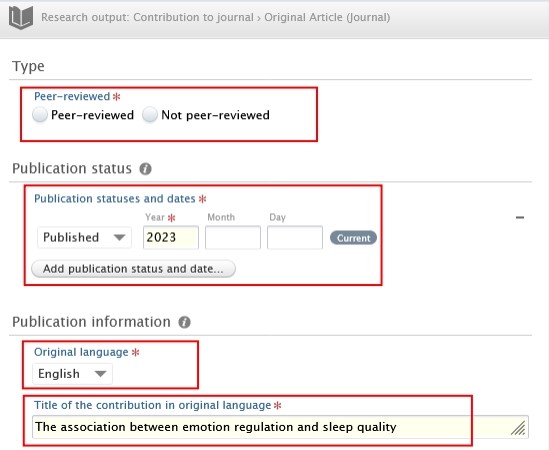
**<span lang="EN-GB" style="mso-fareast-font-family: Arial; mso-bidi-font-family: Arial; color: #232e64; mso-ansi-language: EN-GB;"><span style="mso-list: Ignore;">1.<span style="font: 7.0pt 'Times New Roman';"> </span></span></span><span lang="EN-GB" style="mso-bidi-font-family: Arial; color: #232e64; mso-ansi-language: EN-GB;">Peer-reviewed</span>**<span lang="EN-GB" style="mso-bidi-font-family: Arial; mso-ansi-language: EN-GB;">:</span>

<span lang="EN-GB" style="mso-bidi-font-family: Arial; color: black; mso-themecolor: text1; mso-ansi-language: EN-GB;">Whether the publication underwent a **peer-reviewed process** or not (peer-reviewed or not peer-reviewed):</span>

[![Bild 25.jpeg](https://wiki.pmu.ac.at/uploads/images/gallery/2025-09/scaled-1680-/bild-25.jpeg)](https://wiki.pmu.ac.at/uploads/images/gallery/2025-09/bild-25.jpeg)

<p class="callout info"><span lang="EN-GB" style="mso-bidi-font-family: Arial; color: black; mso-themecolor: text1; mso-style-textoutline-type: none; mso-style-textoutline-outlinestyle-dpiwidth: .75pt; mso-style-textoutline-outlinestyle-linecap: round; mso-style-textoutline-outlinestyle-join: bevel; mso-style-textoutline-outlinestyle-pctmiterlimit: 0%; mso-style-textoutline-outlinestyle-dash: solid; mso-style-textoutline-outlinestyle-align: center; mso-style-textoutline-outlinestyle-compound: simple; mso-ansi-language: EN-GB;">Click on *Change template* if you realise that the **subtype** of the Research output is **incorrect**. For example, if you have selected *Original article* but need to add a *Review article*, you can easily switch between template types without losing any of the data you have already filled in:</span></p>

[![Bild 26.jpeg](https://wiki.pmu.ac.at/uploads/images/gallery/2025-09/scaled-1680-/bild-26.jpeg)](https://wiki.pmu.ac.at/uploads/images/gallery/2025-09/bild-26.jpeg)

**<span lang="EN-GB" style="mso-fareast-font-family: Arial; mso-bidi-font-family: Arial; color: #232e64; mso-ansi-language: EN-GB;"><span style="mso-list: Ignore;">2.<span style="font: 7.0pt 'Times New Roman';"> </span></span></span><span lang="EN-GB" style="mso-bidi-font-family: Arial; color: #232e64; mso-ansi-language: EN-GB;">Publication statuses and dates:</span>**

<span lang="EN-GB" style="mso-bidi-font-family: Arial; mso-ansi-language: EN-GB;">Fill in the information of the publication status and dates.</span>

**<span lang="EN-GB" style="mso-fareast-font-family: Arial; mso-bidi-font-family: Arial; color: #232e64; mso-ansi-language: EN-GB;"><span style="mso-list: Ignore;">3.<span style="font: 7.0pt 'Times New Roman';"> </span></span></span><span lang="EN-GB" style="mso-bidi-font-family: Arial; color: #232e64; mso-ansi-language: EN-GB;">Original language</span>**<span lang="EN-GB" style="mso-bidi-font-family: Arial; mso-ansi-language: EN-GB;">:</span>

<span lang="EN-GB" style="mso-bidi-font-family: Arial; mso-ansi-language: EN-GB;">Choose the original language of the publication.</span>

**<span lang="EN-GB" style="mso-fareast-font-family: Arial; mso-bidi-font-family: Arial; color: #232e64; mso-ansi-language: EN-GB;"><span style="mso-list: Ignore;">4.<span style="font: 7.0pt 'Times New Roman';"> </span></span></span><span lang="EN-GB" style="mso-bidi-font-family: Arial; color: #232e64; mso-ansi-language: EN-GB;">Title of the contribution in original language</span>**<span lang="EN-GB" style="mso-bidi-font-family: Arial; mso-ansi-language: EN-GB;">:</span>

<span lang="EN-GB" style="mso-bidi-font-family: Arial; mso-ansi-language: EN-GB;">Fill in the title of the contribution in the original language.</span>

[![Bild 38.jpeg](https://wiki.pmu.ac.at/uploads/images/gallery/2025-09/scaled-1680-/bild-38.jpeg)](https://wiki.pmu.ac.at/uploads/images/gallery/2025-09/bild-38.jpeg)

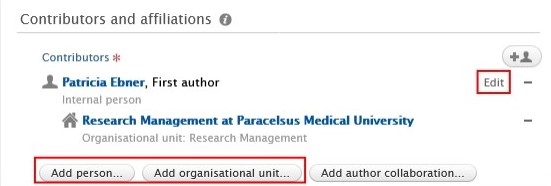
**<span lang="EN-GB" style="mso-fareast-font-family: Arial; mso-bidi-font-family: Arial; color: #232e64; mso-ansi-language: EN-GB;"><span style="mso-list: Ignore;"><span style="font: 7.0pt 'Times New Roman';"> </span></span></span><span lang="EN-GB" style="mso-bidi-font-family: Arial; color: #232e64; mso-ansi-language: EN-GB;">5. Contributors and affiliations</span>**<span lang="EN-GB" style="mso-bidi-font-family: Arial; color: black; mso-themecolor: text1; mso-ansi-language: EN-GB;">:</span>

<span lang="EN-GB" style="mso-bidi-font-family: Arial; mso-ansi-language: EN-GB;">You need to add **every contributor with their affiliations** to these fields. The **order** of the **authors** in Pure should **match** the order in the publication. You can change the order by clicking on the arrows. You can add additional contributors by clicking on the *Add person* button, and you can add internal and external organisations by clicking on the *Add Organization Unit* button. Don’t forget to add your teaching hospital to the organisations units. </span>

[![Bild 39.jpeg](https://wiki.pmu.ac.at/uploads/images/gallery/2025-09/scaled-1680-/bild-39.jpeg)](https://wiki.pmu.ac.at/uploads/images/gallery/2025-09/bild-39.jpeg)

**<span lang="EN-GB" style="mso-fareast-font-family: Arial; mso-bidi-font-family: Arial; color: #232e64; mso-ansi-language: EN-GB;"><span style="mso-list: Ignore;">6.<span style="font: 7.0pt 'Times New Roman';"> </span></span></span><span lang="EN-GB" style="mso-bidi-font-family: Arial; color: #232e64; mso-ansi-language: EN-GB;">Managing organisational unit</span>**<span lang="EN-GB" style="mso-bidi-font-family: Arial; mso-ansi-language: EN-GB;">:</span>

<span lang="EN-GB" style="mso-bidi-font-family: Arial; mso-ansi-language: EN-GB;">Select **your internal organisational unit** by clicking on the Managing organisational unit button. </span>External organisations cannot be added in this field. (In some cases, RM may assign a different internal organisation during the validation process).

**<span lang="EN-GB" style="mso-bidi-font-family: Arial; mso-ansi-language: EN-GB;"> </span>**

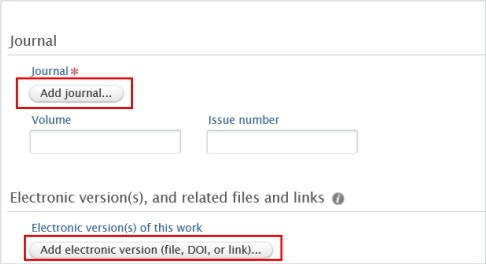
**<span lang="EN-GB" style="mso-fareast-font-family: Arial; mso-bidi-font-family: Arial; color: #232e64; mso-ansi-language: EN-GB;"><span style="mso-list: Ignore;">7.<span style="font: 7.0pt 'Times New Roman';"> </span></span></span><span lang="EN-GB" style="mso-bidi-font-family: Arial; color: #232e64; mso-ansi-language: EN-GB;">Journal</span>**<span lang="EN-GB" style="mso-bidi-font-family: Arial; mso-ansi-language: EN-GB;">:</span>

<span lang="EN-GB" style="mso-bidi-font-family: Arial; mso-ansi-language: EN-GB;">Click on *Add journal* then search for the name or the ISSN number of the journal.</span>

<span lang="EN-GB" style="mso-bidi-font-family: Arial; mso-ansi-language: EN-GB;">If you do not find the journal in the list, click on *Create new* and fill in the required information.</span>

**<span lang="EN-GB" style="mso-fareast-font-family: Arial; mso-bidi-font-family: Arial; color: #232e64; mso-ansi-language: EN-GB;"><span style="mso-list: Ignore;">8.<span style="font: 7.0pt 'Times New Roman';"> </span></span></span><span lang="EN-GB" style="mso-bidi-font-family: Arial; color: #232e64; mso-ansi-language: EN-GB;">Electronic versions of this work:</span>**

<span lang="EN-GB" style="mso-bidi-font-family: Arial; color: black; mso-themecolor: text1; mso-style-textoutline-type: none; mso-style-textoutline-outlinestyle-dpiwidth: .75pt; mso-style-textoutline-outlinestyle-linecap: round; mso-style-textoutline-outlinestyle-join: bevel; mso-style-textoutline-outlinestyle-pctmiterlimit: 0%; mso-style-textoutline-outlinestyle-dash: solid; mso-style-textoutline-outlinestyle-align: center; mso-style-textoutline-outlinestyle-compound: simple; mso-ansi-language: EN-GB;">You can register a DOI or other links to your publication, but please **refrain from uploading the original publication** into Pure. </span>

[![Bild 40.jpeg](https://wiki.pmu.ac.at/uploads/images/gallery/2025-09/scaled-1680-/bild-40.jpeg)](https://wiki.pmu.ac.at/uploads/images/gallery/2025-09/bild-40.jpeg)

**<span lang="EN-GB" style="mso-fareast-font-family: Arial; mso-bidi-font-family: Arial; color: #232e64; mso-ansi-language: EN-GB;"><span style="mso-list: Ignore;">9.<span style="font: 7.0pt 'Times New Roman';"> </span></span></span><span lang="EN-GB" style="mso-bidi-font-family: Arial; color: #232e64; mso-ansi-language: EN-GB;">Research topic:</span>**

Assign on or more research topics for the following publication from publication year **2025 onwards: Original article, review article, case report, letter to the editor, editorial, short comment/notes, book, book chapter**. For **other categories**, such as abstracts, corrections or publications in which **only PMU teaching hospitals** are involved as internal organizations, **no** topic **assignment** is required.

<span lang="EN-GB" style="mso-bidi-font-family: Arial; color: black; mso-themecolor: text1; mso-ansi-language: EN-GB;"> 5. Set the workflow status *For validation* and then click on *Save*. </span>

[![Bild 29.jpeg](https://wiki.pmu.ac.at/uploads/images/gallery/2025-09/scaled-1680-/bild-29.jpeg)](https://wiki.pmu.ac.at/uploads/images/gallery/2025-09/bild-29.jpeg)

<span lang="EN-GB" style="mso-bidi-font-family: Arial; mso-ansi-language: EN-GB;">In the next step, the imported research output undergoes **validation** by the RM.</span>

<p class="callout info"><span lang="EN-GB" style="mso-bidi-font-family: Arial; mso-ansi-language: EN-GB;"><span lang="EN-GB" style="mso-bidi-font-family: Arial; color: black; mso-themecolor: text1; mso-ansi-language: EN-GB;">Are you interested in an **automated publication search** from online sources? See section Automated search (without immediate effect).</span></span></p>