# Question 6: How can I assign research topic(s) to a publication?

<span lang="EN-GB" style="font-size: 10.0pt; line-height: 107%; font-family: 'Arial',sans-serif; mso-ansi-language: EN-GB;">The assignment is immediately possible when **creating new publications** for both researchers and Pure editors.</span><span lang="EN-GB" style="mso-ansi-language: EN-GB;"> </span><span lang="EN-GB" style="font-size: 10.0pt; line-height: 107%; font-family: 'Arial',sans-serif; mso-ansi-language: EN-GB;">In this case, just click on the **‘Add research topics’**, and select one or more suitable research topics.</span>

<p class="callout info"><span lang="EN-GB" style="font-size: 10.0pt; line-height: 107%; font-family: 'Arial',sans-serif; mso-ansi-language: EN-GB;">Please assign research topics for the **following publication from publication year 2025 onwards**: *Original article, review article, case report, letter to the editor, editorial, short comment/notes, book, book chapter.*</span></p>

<span lang="EN-GB" style="font-size: 10.0pt; line-height: 107%; font-family: 'Arial',sans-serif; mso-ansi-language: EN-GB;">For **other categories**, such as abstracts, corrections or publications in which **only** **PMU teaching hospitals** are involved as internal organizations, **no** **topic assignment** is required (though it is possible if you wish).</span>

**<span lang="EN-GB" style="font-size: 10.0pt; line-height: 107%; font-family: 'Arial',sans-serif; background: lightgrey; mso-highlight: lightgrey; mso-ansi-language: EN-GB;">For *\*\*Researchers\*\*:*</span>**

<span lang="EN-GB" style="font-size: 10.0pt; font-family: 'Arial',sans-serif; mso-fareast-font-family: Arial; mso-ansi-language: EN-GB;"><span style="mso-list: Ignore;">1.<span style="font: 7.0pt 'Times New Roman';"> </span></span></span><span lang="EN-GB" style="font-size: 10.0pt; font-family: 'Arial',sans-serif; mso-ansi-language: EN-GB;">Log in to PURE (for details see [Question 1](https://wiki.pmu.ac.at/books/pure-faqs-english/page/question-1-how-do-i-access-pure))</span><span lang="EN-GB" style="mso-ansi-language: EN-GB;">.</span>

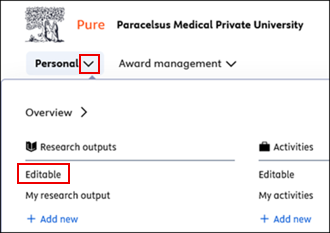
<span lang="EN-GB" style="font-size: 10.0pt; font-family: 'Arial',sans-serif; mso-fareast-font-family: Arial; mso-ansi-language: EN-GB;"><span style="mso-list: Ignore;">2.<span style="font: 7.0pt 'Times New Roman';"> </span></span></span><span lang="EN-GB" style="font-size: 10.0pt; font-family: 'Arial',sans-serif; mso-ansi-language: EN-GB;">Click on <span lang="EN-GB" style="font-size: 10.0pt; line-height: 107%; font-family: 'Arial',sans-serif; mso-fareast-font-family: Aptos; mso-fareast-theme-font: minor-latin; mso-ansi-language: EN-GB; mso-fareast-language: EN-US; mso-bidi-language: AR-SA;">the triangle icon next to ‘*Personal’*, then select ‘*Editable’* under ‘*Research outputs’*:</span>  
</span>

[![FAQ12_ENG.png](https://wiki.pmu.ac.at/uploads/images/gallery/2025-07/scaled-1680-/7GOfaq12-eng.png)](https://wiki.pmu.ac.at/uploads/images/gallery/2025-07/7GOfaq12-eng.png)

<span lang="EN-GB" style="font-size: 10.0pt; font-family: 'Arial',sans-serif; mso-fareast-font-family: Arial; mso-ansi-language: EN-GB;"><span style="mso-list: Ignore;">3.<span style="font: 7.0pt 'Times New Roman';"> </span></span></span><span lang="EN-GB" style="font-size: 10.0pt; font-family: 'Arial',sans-serif; mso-ansi-language: EN-GB;">Sort the publications in descending order by ‘*Publication year*’ so that the most recent ones (recent year: 2026) appear at the top</span>.

<span lang="EN-GB" style="font-size: 10.0pt; font-family: 'Arial',sans-serif; mso-fareast-font-family: Arial; mso-ansi-language: EN-GB;"><span style="mso-list: Ignore;">4. </span></span> <span lang="EN-GB" style="font-size: 10.0pt; font-family: 'Arial',sans-serif; mso-ansi-language: EN-GB;">Select the desired publication by clicking on it und scroll down to the ‘*Research topics*’ section.</span>

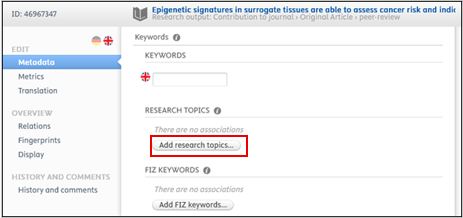
<span lang="EN-GB" style="font-size: 10.0pt; font-family: 'Arial',sans-serif; mso-ansi-language: EN-GB;"><span lang="EN-GB" style="font-size: 10.0pt; font-family: 'Arial',sans-serif; mso-fareast-font-family: Arial; mso-ansi-language: EN-GB;"><span style="mso-list: Ignore;">5. </span></span> <span lang="EN-GB" style="font-size: 10.0pt; line-height: 107%; font-family: 'Arial',sans-serif; mso-fareast-font-family: Aptos; mso-fareast-theme-font: minor-latin; mso-ansi-language: EN-GB; mso-fareast-language: EN-US; mso-bidi-language: AR-SA;">Click on ‘*Add research topics’*, and search for one or more suitable research topics, and select them: </span></span>

[![FAQ13_ENG.png](https://wiki.pmu.ac.at/uploads/images/gallery/2025-07/scaled-1680-/5bSfaq13-eng.png)](https://wiki.pmu.ac.at/uploads/images/gallery/2025-07/5bSfaq13-eng.png)

<span lang="EN-GB" style="font-size: 10.0pt; font-family: 'Arial',sans-serif; mso-fareast-font-family: Arial; mso-ansi-language: EN-GB;"><span style="mso-list: Ignore;">6.<span style="font: 7.0pt 'Times New Roman';"> </span></span></span><span lang="EN-GB" style="font-size: 10.0pt; font-family: 'Arial',sans-serif; mso-ansi-language: EN-GB;">Click on ‘*Save’*.</span>

<p class="callout info">If a change needs to be made to a publication that is **not** listed in the *"**Editable**"* category, please contact the FM at [**pure@pmu.ac.at.**](mailto:pure@pmu.ac.at)</p>

<div class="flex flex-col text-sm pb-25" id="bkmrk-further-details-on-t"><section class="text-token-text-primary w-full focus:outline-none [--shadow-height:45px] has-data-writing-block:pointer-events-none has-data-writing-block:-mt-(--shadow-height) has-data-writing-block:pt-(--shadow-height) [&:has([data-writing-block])>*]:pointer-events-auto scroll-mt-[calc(var(--header-height)+min(200px,max(70px,20svh)))]" data-scroll-anchor="true" data-testid="conversation-turn-12" data-turn="assistant" data-turn-id="request-WEB:cab8d62d-3092-4d3e-b5a0-12b7614a2c07-5" dir="auto"></section>  
</div>**<span lang="EN-GB" style="font-size: 10.0pt; font-family: 'Arial',sans-serif; background: lightgrey; mso-highlight: lightgrey; mso-ansi-language: EN-GB;">For *\**\*Pure editors\**\*:*</span>**

1. <span lang="EN-GB" style="font-size: 10.0pt; font-family: 'Arial',sans-serif; mso-ansi-language: EN-GB;"> Log in to PURE (for details see [Question 1](https://wiki.pmu.ac.at/books/pure-faqs-english/page/question-1-how-do-i-access-pure))</span><span lang="EN-GB" style="mso-ansi-language: EN-GB;">.</span>
2. <span lang="EN-GB" style="mso-ansi-language: EN-GB;">Click on ***“Editor”*** in the left sidebar and select *“Editable”* under *“Publications”* to view all entries you can edit. Sort the publications in **<span style="background-color: rgb(206, 212, 217);">descending </span>**order by “Publication ear” <span lang="EN-GB" style="font-size: 10.0pt; font-family: 'Arial',sans-serif; mso-ansi-language: EN-GB;">so that the most recent ones (recent year: 2026) appear at the top</span>.</span><span lang="EN-GB" style="mso-ansi-language: EN-GB;">Please make sure to assign one or more research topics to all publications with the workflow status ***“For Validation.”*** Publications that have already been assigned research topics have the status *“Validated.”* </span>

[![grafik.png](https://wiki.pmu.ac.at/uploads/images/gallery/2026-05/scaled-1680-/epAgrafik.png)](https://wiki.pmu.ac.at/uploads/images/gallery/2026-05/epAgrafik.png)

<p class="callout info">If a change needs to be made to a publication with the workflow status **“Validated,”** please contact the FM at **<pure@pmu.ac.at>.**</p>

**<span lang="EN-GB" style="font-size: 10.0pt; line-height: 107%; font-family: 'Arial',sans-serif; mso-ansi-language: EN-GB;">3. Assign one or more research topics to the publication:</span>**

1. <span lang="EN-GB" style="font-size: 10.0pt; line-height: 107%; font-family: 'Arial',sans-serif; mso-ansi-language: EN-GB;">Select the desired publication by clicking on it.</span>
2. <span lang="EN-GB" style="font-size: 10.0pt; line-height: 107%; font-family: 'Arial',sans-serif; mso-ansi-language: EN-GB;">Scroll down to the ‘*Research topics’* section.</span>
3. <span lang="EN-GB" style="font-size: 10.0pt; line-height: 107%; font-family: 'Arial',sans-serif; mso-ansi-language: EN-GB;">Click on ‘*Add research topics’*.</span>
4. <span lang="EN-GB" style="font-size: 10.0pt; line-height: 107%; font-family: 'Arial',sans-serif; mso-ansi-language: EN-GB;">Search for one or more suitable research topics and select them:</span>

[![grafik.png](https://wiki.pmu.ac.at/uploads/images/gallery/2026-05/scaled-1680-/kfzgrafik.png)](https://wiki.pmu.ac.at/uploads/images/gallery/2026-05/kfzgrafik.png)

<span lang="EN-GB" style="font-size: 10.0pt; line-height: 107%; font-family: 'Arial',sans-serif; mso-ansi-language: EN-GB;">For example, we have chosen the research topic *Public Health*:</span>

<span style="mso-ignore: vglayout; position: absolute; z-index: 251677696; margin-left: 169px; margin-top: 126px; width: 80px; height: 18px;">  
</span>

[![grafik.png](https://wiki.pmu.ac.at/uploads/images/gallery/2026-05/scaled-1680-/J59grafik.png)](https://wiki.pmu.ac.at/uploads/images/gallery/2026-05/J59grafik.png)

<span lang="EN-GB" style="font-size: 10.0pt; line-height: 107%; font-family: 'Arial',sans-serif; mso-ansi-language: EN-GB;">4. Click on</span>**<span lang="EN-GB" style="font-size: 10.0pt; line-height: 107%; font-family: 'Arial',sans-serif; mso-ansi-language: EN-GB;"> ‘*Save’*.</span>**

**<span lang="EN-GB" style="font-size: 10.0pt; line-height: 107%; font-family: 'Arial',sans-serif; mso-ansi-language: EN-GB;">Please ensure that the workflow status ‘*For validation’* <span style="background-color: rgb(224, 62, 45);">is not changed:</span></span>**

[![grafik.png](https://wiki.pmu.ac.at/uploads/images/gallery/2026-05/scaled-1680-/TaPgrafik.png)](https://wiki.pmu.ac.at/uploads/images/gallery/2026-05/TaPgrafik.png)

<p class="callout warning">**<span lang="EN-GB" style="font-size: 10.0pt; line-height: 107%; font-family: 'Arial',sans-serif; mso-ansi-language: EN-GB;">The validation (review) of publications is always carried out by the FM.</span>**</p>

<p class="callout success"><span lang="EN-GB" style="font-size: 10.0pt; line-height: 107%; font-family: 'Arial',sans-serif; mso-ansi-language: EN-GB;">If you don’t see your question answered here, or have suggestions for additional questions/answers, please contact pure support at </span>[<span lang="EN-GB" style="font-size: 10.0pt; line-height: 107%; font-family: 'Arial',sans-serif; mso-ansi-language: EN-GB;">pure@pmu.ac.at</span>](mailto:pure@pmu.ac.at)<span lang="EN-GB" style="font-size: 10.0pt; line-height: 107%; font-family: 'Arial',sans-serif; mso-ansi-language: EN-GB;">.</span></p>