# PURE - FAQs

In diesem Buch befinden sich die Antworten auf häufig gestellten Fragen von PURE-Nutzer\*innen.  
Falls Ihre Frage hier nicht beantwortet wird, wenden Sie sich bitte an den PURE-Support unter pure@pmu.ac.at.

# Frage 1: Wie kann ich mich in PURE einloggen?

<span style="font-size: 10.0pt; line-height: 107%; font-family: 'Arial',sans-serif;">Nutzer\*innen mit einer **@pmu.ac.at** E-Mail-Adresse können sich direkt über das Dashboard </span>[<span style="font-size: 10.0pt; line-height: 107%; font-family: 'Arial',sans-serif;">https://my.pmu.ac.at/</span>](https://my.pmu.ac.at/)<span style="font-size: 10.0pt; line-height: 107%; font-family: 'Arial',sans-serif;"> in PURE einloggen, in dem sie auf das PURE-Logo klicken.</span>

<span style="font-size: 10.0pt; line-height: 107%; font-family: 'Arial',sans-serif;">Nutzer\*innen mit anderen E-Mail-Adressen (z.B. **@salk.at, @klinikum-nuernberg.de**) können sich über den folgenden Link einloggen: </span>[<span style="font-size: 10.0pt; line-height: 107%; font-family: 'Arial',sans-serif;">https://pure.pmu.ac.at/admin/login.xhtml</span>](https://pure.pmu.ac.at/admin/login.xhtml)<span style="font-size: 10.0pt; line-height: 107%; font-family: 'Arial',sans-serif;">. </span>

<p class="callout info">*<span style="font-size: 10.0pt; line-height: 107%; font-family: 'Arial',sans-serif; mso-no-proof: yes;">![Nach rechts zeigender Finger, Handrücken Silhouette](https://wiki.pmu.ac.at/uploads/images/gallery/2025-07/embedded-image-qzn6kgjp.png)</span><span style="font-size: 10.0pt; line-height: 107%; font-family: 'Arial',sans-serif;">Tipp</span>*<span style="font-size: 10.0pt; line-height: 107%; font-family: 'Arial',sans-serif;">: Speichern Sie diesen Link für die künftige Nutzung als *Lesezeichen*.</span></p>

<span style="font-size: 10.0pt; line-height: 107%; font-family: 'Arial',sans-serif;">Sollten Sie sich nicht in PURE einloggen können, wenden Sie sich bitte an den PURE-Support unter </span>[<span style="font-size: 10.0pt; line-height: 107%; font-family: 'Arial',sans-serif;">pure@pmu.ac.at</span>](mailto:pure@pmu.ac.at)<span style="font-size: 10.0pt; line-height: 107%; font-family: 'Arial',sans-serif;">.</span>

<p class="callout success"><span style="font-size: 10.0pt; line-height: 107%; font-family: 'Arial',sans-serif;">Falls Ihre Frage hier nicht beantwortet wird, wenden Sie sich bitte an den PURE-Support unter </span>[<span style="font-size: 10.0pt; line-height: 107%; font-family: 'Arial',sans-serif;">pure@pmu.ac.at</span>](mailto:pure@pmu.ac.at)<span style="font-size: 10.0pt; line-height: 107%; font-family: 'Arial',sans-serif;">.</span></p>

# Frage 2: Wie kann ich einen Publikationsauszug mit Score-Punkten und Impact-Faktor aus PURE herunterladen?

Habilitierende können sich über das Habil-List Webtool einen Auszug Ihrer Publikationen inkl. Impact-Faktor und PMU Scorepunkten auf Basis der in Pure hinterlegten Daten erstellen. Dieser Auszug bietet die Grundlage für die Eröffnung eines Habilitationsverfahrens an der PMU.

Für die Verwendung des Webtools benötigen Sie Ihre Pure **Person UUID**, welche Sie in Ihrem Pure Profil finden. Eine Anleitung finden Sie im unten verlinkten Handbuch.

[Hier kommen Sie zum Nutzer\*innen Handbuch](https://www.pmu.ac.at/fileadmin/CONTENT/BEREICHE/Forschungsmanagement/Dokumente/03_Forschungsdokumentation_PURE/Pure_habillist_user_manual.pdf).

[Hier kommen Sie zum Habil-List Webtool.](https://habilitation.pmu.ac.at "Habil-List Webtool")

<p class="callout warning">***<span style="font-size: 10.0pt; line-height: 107%; font-family: 'Arial',sans-serif;">Wichtig</span>***<span style="font-size: 10.0pt; line-height: 107%; font-family: 'Arial',sans-serif;">: Bitte überprüfen Sie vor der Anforderung, ob **alle Ihre Publikationen** in PURE erfasst sind.</span> <span style="font-size: 10.0pt; line-height: 107%; font-family: 'Arial',sans-serif;">Weitere Informationen zur Erfassung der Publikation finden Sie im </span>[*<span style="font-size: 10.0pt; line-height: 107%; font-family: 'Arial',sans-serif;">Handbuch für Forscher\*innen.</span>*](https://wiki.pmu.ac.at/books/manual-for-researchers/chapter/2-create-your-content-research-outputs-publications)</p>

<p class="callout success"><span style="font-size: 10.0pt; line-height: 107%; font-family: 'Arial',sans-serif;">Falls Ihre Frage hier nicht beantwortet wird, wenden Sie sich bitte an den PURE-Support unter </span>[<span style="font-size: 10.0pt; line-height: 107%; font-family: 'Arial',sans-serif;">pure@pmu.ac.at</span>](mailto:pure@pmu.ac.at)<span style="font-size: 10.0pt; line-height: 107%; font-family: 'Arial',sans-serif;">.</span></p>

# Frage 3: Ich habe ein Projekt in PURE erfasst, dieses erscheint aber nicht im PURE-Portal. Was soll ich tun?

<span style="font-size: 10.0pt; line-height: 107%; font-family: 'Arial',sans-serif;">Im </span>[<span style="font-size: 10.0pt; line-height: 107%; font-family: 'Arial',sans-serif;">PURE-Portal</span>](https://pure.pmu.ac.at/de/)<span style="font-size: 10.0pt; line-height: 107%; font-family: 'Arial',sans-serif;"> erscheinen nur jene **Projekte**, die <span style="text-decoration: underline;">sowohl **öffentlich sichtbar** als auch **validiert** sind</span>.</span>

**<span style="font-size: 10.0pt; line-height: 107%; font-family: 'Arial',sans-serif; background: lightgrey; mso-highlight: lightgrey;">Für \*\**PURE-Editor\*innen*\*\*:</span>**

<p class="callout warning"><span style="font-size: 10.0pt; line-height: 107%; font-family: 'Arial',sans-serif;">Die Validierung der Projekte ist solange möglich, bis sich das Projekt in der Kategorie ***„Bearbeitbare“*** befindet. Sobald das Projekt **nicht mehr in dieser Kategorie erscheint**, ist für die Betreuung (inklusive Validierung) **eine andere PURE-Editor\*in zuständig**. Ist eine Änderung dennoch nötig, melden Sie sich bitte beim Forschungsmanagement unter [**pure@pmu.ac.at**](mailto:pure@pmu.ac.at).</span></p>

<span style="font-size: 10.0pt; line-height: 107%; font-family: 'Arial',sans-serif;">Für die Projekte aus der Kategorie *„Bearbeitbare“*:</span>

<span style="font-size: 10.0pt; font-family: 'Arial',sans-serif; mso-fareast-font-family: Arial;"><span style="mso-list: Ignore;">1.<span style="font: 7.0pt 'Times New Roman';"> </span></span></span><span style="font-size: 10.0pt; font-family: 'Arial',sans-serif;">Melden Sie sich in PURE ein (für Details und Links siehe<span style="color: rgb(0, 0, 0);"> [Frage 1](https://wiki.pmu.ac.at/books/pure-faqs/chapter/frage-1-wie-kann-ich-mich-in-pure-einloggen)</span>).</span>

<span style="font-size: 10.0pt; font-family: 'Arial',sans-serif; mso-fareast-font-family: Arial;"><span style="mso-list: Ignore;">2.<span style="font: 7.0pt 'Times New Roman';"> </span></span></span><span style="font-size: 10.0pt; font-family: 'Arial',sans-serif;">Öffnen Sie den Eintrag.</span>

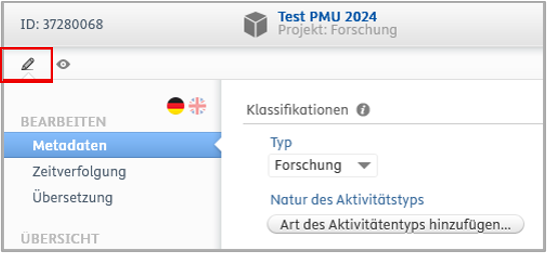
<span style="font-size: 10.0pt; font-family: 'Arial',sans-serif; mso-fareast-font-family: Arial;"><span style="mso-list: Ignore;">3.<span style="font: 7.0pt 'Times New Roman';"> </span></span></span><span style="font-size: 10.0pt; font-family: 'Arial',sans-serif;">Klicken Sie auf das **Bleistift** Icon:</span>

[![FAQ4.png](https://wiki.pmu.ac.at/uploads/images/gallery/2025-07/scaled-1680-/C09faq4.png)](https://wiki.pmu.ac.at/uploads/images/gallery/2025-07/C09faq4.png)

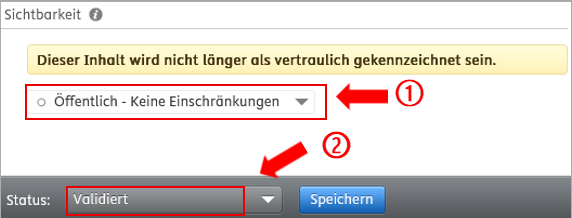
<span style="font-size: 10.0pt; font-family: 'Arial',sans-serif; mso-fareast-font-family: Arial;"><span style="mso-list: Ignore;">4. </span></span>**<span style="font-size: 10.0pt; font-family: 'Arial',sans-serif;">Überprüfen Sie den Eintrag, insbesondere im Hinblick auf Titel, projektbeteiligte Personen, Organisationen und Laufzeit, und nehmen Sie bei Bedarf Änderungen vor.</span>**<span style="font-size: 10.0pt; font-family: 'Arial',sans-serif;"> Setzen Sie die Sichtbarkeit auf „*Öffentlich*“ </span><span lang="EN-US" style="font-size: 10.0pt; mso-ascii-font-family: Arial; mso-hansi-font-family: Arial; mso-bidi-font-family: Arial;">①</span><span style="font-size: 10.0pt; font-family: 'Arial',sans-serif;">, und den Projektstatus auf „*Validiert*“ </span><span lang="EN-US" style="font-size: 10.0pt; mso-ascii-font-family: Arial; mso-hansi-font-family: Arial; mso-bidi-font-family: Arial;">②</span><span style="font-size: 10.0pt; font-family: 'Arial',sans-serif;">:</span>

[![Screenshot (36).png](https://wiki.pmu.ac.at/uploads/images/gallery/2025-07/scaled-1680-/screenshot-36.png)](https://wiki.pmu.ac.at/uploads/images/gallery/2025-07/screenshot-36.png)

<span style="font-size: 10.0pt; line-height: 107%; font-family: 'Arial',sans-serif; mso-fareast-font-family: Arial;"><span style="mso-list: Ignore;">5.<span style="font: 7.0pt 'Times New Roman';"> </span></span></span><span style="font-size: 10.0pt; line-height: 107%; font-family: 'Arial',sans-serif;">Klicken Sie auf „*Speichern“*.</span>

<p class="callout info"><span style="font-size: 10.0pt; line-height: 107%; font-family: 'Arial',sans-serif;">**Budgetinformationen** werden im [PURE Portal](https://pure.pmu.ac.at/de/) **nie angezeigt**, nur Informationen zu den Projektbeteiligten, zur Laufzeit, zu den beteiligten Organisationseinheiten sowie eine Beschreibung (Fingerprint) und eine Verlinkung zur Projektwebsite, wenn erfasst.</span></p>

<span style="font-size: 10.0pt; line-height: 107%; font-family: 'Arial',sans-serif;">Weitere Informationen zur Validierung eines Projekts finden Sie im </span>[*<span style="font-size: 10.0pt; line-height: 107%; font-family: 'Arial',sans-serif;">**Handbuch für PURE-Editor\*innen**</span>*](https://www.pmu.ac.at/forschung-innovation/forschungsservices/forschungsdokumentation-pure)<span style="font-size: 10.0pt; line-height: 107%; font-family: 'Arial',sans-serif;"> ab Seite 22.</span>

**<span style="font-size: 10.0pt; line-height: 107%; font-family: 'Arial',sans-serif; background: lightgrey; mso-highlight: lightgrey;">Für \*\**Forscher\*innen*\*\*:</span>**

**<span style="font-size: 10.0pt; font-family: 'Arial',sans-serif;">Nehmen</span>**<span style="font-size: 10.0pt; font-family: 'Arial',sans-serif;"> Sie den Kontakt mit der zuständigen **PURE-Editor\*in** **oder** dem **Forschungsmanagement** unter </span>[**<span style="font-size: 10.0pt; font-family: 'Arial',sans-serif;">pure@pmu.ac.at</span>**](mailto:pure@pmu.ac.at)<span style="font-size: 10.0pt; font-family: 'Arial',sans-serif; mso-bidi-font-weight: bold;"> auf</span><span style="font-size: 10.0pt; font-family: 'Arial',sans-serif;">, um die Änderung der Sichtbarkeit und/oder Validierung des Projekts anzufragen.</span>

<p class="callout success"><span style="font-size: 10.0pt; line-height: 107%; font-family: 'Arial',sans-serif;">Falls Ihre Frage hier nicht beantwortet wird, wenden Sie sich bitte an den PURE-Support unter </span>[<span style="font-size: 10.0pt; line-height: 107%; font-family: 'Arial',sans-serif;">pure@pmu.ac.at</span>](mailto:pure@pmu.ac.at)<span style="font-size: 10.0pt; line-height: 107%; font-family: 'Arial',sans-serif;">.</span></p>

# Frage 4: Meine persönlichen Daten (zum Beispiel akademische Titel) haben sich verändert, wie kann ich sie in PURE ändern?

**<span style="font-size: 10.0pt; line-height: 107%; font-family: 'Arial',sans-serif; background: lightgrey; mso-highlight: lightgrey;">Für \*\**Forscher\*innen\*\**:</span>**

<span style="font-size: 10.0pt; font-family: 'Arial',sans-serif; mso-fareast-font-family: Arial;"><span style="mso-list: Ignore;">1.<span style="font: 7.0pt 'Times New Roman';"> </span></span></span><span style="font-size: 10.0pt; font-family: 'Arial',sans-serif;">Melden Sie sich in PURE ein (für Details siehe [Frage 1](https://wiki.pmu.ac.at/books/pure-faqs/chapter/frage-1-wie-kann-ich-mich-in-pure-einloggen)).<span style="background: yellow; mso-highlight: yellow;"> </span></span>

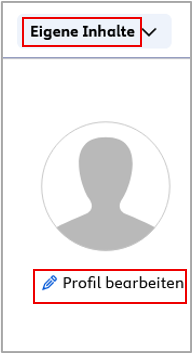
<span style="font-size: 10.0pt; font-family: 'Arial',sans-serif; mso-fareast-font-family: Arial;"><span style="mso-list: Ignore;">2.<span style="font: 7.0pt 'Times New Roman';"> </span></span></span><span style="font-size: 10.0pt; font-family: 'Arial',sans-serif;">Klicken Sie auf *„Eigene Inhalte“*, anschließend auf *„Profil bearbeiten“*:</span>

[![FAQ6.png](https://wiki.pmu.ac.at/uploads/images/gallery/2025-07/scaled-1680-/Mzofaq6.png)](https://wiki.pmu.ac.at/uploads/images/gallery/2025-07/Mzofaq6.png)

<span style="font-size: 10.0pt; font-family: 'Arial',sans-serif; mso-fareast-font-family: Arial;"><span style="mso-list: Ignore;">3.<span style="font: 7.0pt 'Times New Roman';"> </span></span></span><span style="font-size: 10.0pt; font-family: 'Arial',sans-serif;">Korrigieren Sie die gewünschten Daten in dem nächsten Dialogfenster.</span>

<span style="font-size: 10.0pt; font-family: 'Arial',sans-serif; mso-fareast-font-family: Arial;"><span style="mso-list: Ignore;">4.<span style="font: 7.0pt 'Times New Roman';"> </span></span></span><span style="font-size: 10.0pt; font-family: 'Arial',sans-serif;">Klicken Sie auf *"Speichern"*.</span>

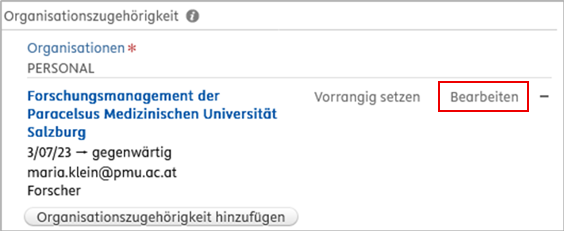
<p class="callout info"><span style="font-size: 10.0pt; line-height: 107%; font-family: 'Arial',sans-serif;">**Telefonnummer** oder **E-Mail-Adresse** lassen sich ändern, wenn Sie auf ***„Bearbeiten“*** neben der **Organisationszugehörigkeit** klicken:</span></p>

[![FAQ7.png](https://wiki.pmu.ac.at/uploads/images/gallery/2025-07/scaled-1680-/dpjfaq7.png)](https://wiki.pmu.ac.at/uploads/images/gallery/2025-07/dpjfaq7.png)

<span style="font-size: 10.0pt; line-height: 107%; font-family: 'Arial',sans-serif;">Die persönlichen Profile der Forscher\*innen der jeweiligen Organisationseinheit(en) können auch von PURE-Editor\*innen bearbeitet werden.</span>

**<span style="font-size: 10.0pt; line-height: 107%; font-family: 'Arial',sans-serif; background: lightgrey; mso-highlight: lightgrey;">Für \*\**PURE-Editor\*innen\*\**:</span>**

<span style="font-size: 10.0pt; font-family: 'Arial',sans-serif; mso-fareast-font-family: Arial;"><span style="mso-list: Ignore;">1.<span style="font: 7.0pt 'Times New Roman';"> </span></span></span><span style="font-size: 10.0pt; font-family: 'Arial',sans-serif;">Melden Sie sich in PURE ein (für Details siehe [Frage 1](https://wiki.pmu.ac.at/books/pure-faqs/chapter/frage-1-wie-kann-ich-mich-in-pure-einloggen)).</span>

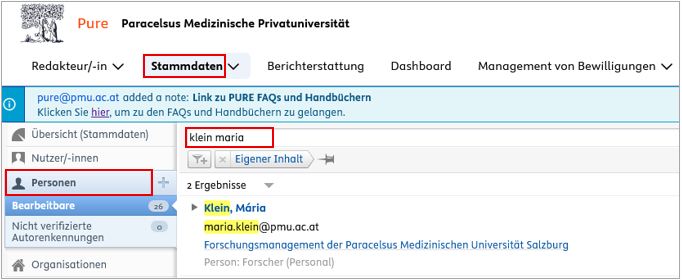
<span style="font-size: 10.0pt; font-family: 'Arial',sans-serif; mso-fareast-font-family: Arial;"><span style="mso-list: Ignore;">2.<span style="font: 7.0pt 'Times New Roman';"> </span></span></span><span style="font-size: 10.0pt; font-family: 'Arial',sans-serif;">Klicken Sie auf „*Stammdaten*“, anschließend auf „*Personen*“, und suchen Sie nach der Person, in deren Profil Sie die Daten ändern möchten:</span>

[![FAQ10.png](https://wiki.pmu.ac.at/uploads/images/gallery/2025-07/scaled-1680-/faq10.png)](https://wiki.pmu.ac.at/uploads/images/gallery/2025-07/faq10.png)

<span style="font-size: 10.0pt; font-family: 'Arial',sans-serif; mso-fareast-font-family: Arial;"><span style="mso-list: Ignore;">3.<span style="font: 7.0pt 'Times New Roman';"> </span></span></span><span style="font-size: 10.0pt; font-family: 'Arial',sans-serif;">Korrigieren Sie die gewünschten Daten im nächsten Dialogfenster.</span>

<span style="mso-bookmark: _Hlk200548544;"><span style="font-size: 10.0pt; font-family: 'Arial',sans-serif; mso-fareast-font-family: Arial;"><span style="mso-list: Ignore;">4.<span style="font: 7.0pt 'Times New Roman';"> </span></span></span><span style="font-size: 10.0pt; font-family: 'Arial',sans-serif;">Klicken Sie auf „*Speichern*“.</span></span>

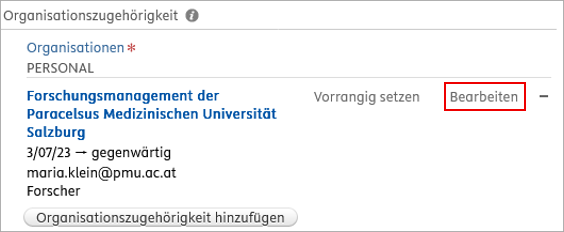
<p class="callout info"><span style="mso-bookmark: _Hlk200548544;"><span style="font-size: 10.0pt; line-height: 107%; font-family: 'Arial',sans-serif;">**Telefonnummern** oder **E-Mail-Adressen** lassen sich ändern oder entfernen, wenn Sie auf **„*Bearbeiten*“** neben der **„*Organisationszugehörigkeit“*** klicken:</span></span></p>

[![FAQ9.png](https://wiki.pmu.ac.at/uploads/images/gallery/2025-07/scaled-1680-/faq9.png)](https://wiki.pmu.ac.at/uploads/images/gallery/2025-07/faq9.png)

<p class="callout success"><span style="font-size: 10.0pt; line-height: 107%; font-family: 'Arial',sans-serif;">Falls Ihre Frage hier nicht beantwortet wird, wenden Sie sich bitte an den PURE-Support unter </span>[<span style="font-size: 10.0pt; line-height: 107%; font-family: 'Arial',sans-serif;">pure@pmu.ac.at</span>](mailto:pure@pmu.ac.at)<span style="font-size: 10.0pt; line-height: 107%; font-family: 'Arial',sans-serif;">.</span></p>

# Frage 5: Ich bin PURE-Editor*in und finde in der Kategorie „Bearbeitbare“ nicht alle Publikationen unserer Organisationseinheit(en). Wie kann ich Zugriff auf alle Publikationen erhalten?

<p class="callout info"><span style="font-size: 10.0pt; line-height: 107%; font-family: 'Arial',sans-serif;">In der Kategorie ***„Bearbeitbare“*** sehen Sie nur jene Publikationen, in denen Ihre Organisationseinheit als **betreuende Organisationseinheit** hinterlegt ist.</span></p>

<span style="font-size: 10.0pt; line-height: 107%; font-family: 'Arial',sans-serif;">Um Zugriff auf alle Publikationen Ihrer Organisationseinheit zu erhalten:</span>

<span style="font-size: 10.0pt; font-family: 'Arial',sans-serif; mso-fareast-font-family: Arial;"><span style="mso-list: Ignore;">1.<span style="font: 7.0pt 'Times New Roman';"> </span></span></span><span style="font-size: 10.0pt; font-family: 'Arial',sans-serif;">Melden Sie sich in PURE ein (für Details siehe [Frage 1](https://wiki.pmu.ac.at/books/pure-faqs/chapter/frage-1-wie-kann-ich-mich-in-pure-einloggen)). </span>

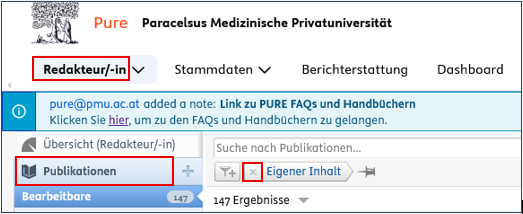
<span style="font-size: 10.0pt; font-family: 'Arial',sans-serif; mso-fareast-font-family: Arial;"><span style="mso-list: Ignore;">2.<span style="font: 7.0pt 'Times New Roman';"> </span></span></span><span style="font-size: 10.0pt; font-family: 'Arial',sans-serif;">Klicken Sie auf „*Redakteur\*in*“, anschließend auf „*Publikationen“*. Entfernen Sie dann den Filter „*Eigener Inhalt*“, indem Sie auf das rote „*x*“ klicken:</span>

[![FA1^0.png](https://wiki.pmu.ac.at/uploads/images/gallery/2025-07/scaled-1680-/fa10.png)](https://wiki.pmu.ac.at/uploads/images/gallery/2025-07/fa10.png)

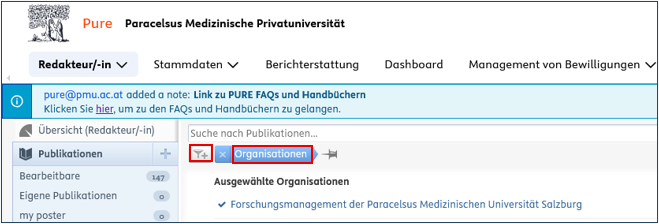
<span style="font-size: 10.0pt; font-family: 'Arial',sans-serif; mso-fareast-font-family: Arial;"><span style="mso-list: Ignore;">3.<span style="font: 7.0pt 'Times New Roman';"> </span></span></span><span style="font-size: 10.0pt; font-family: 'Arial',sans-serif;">Klicken Sie auf „*Filter hinzufügen*“ und wählen Sie den Filter „*Organisationen*“ und suchen Sie Ihre Organisationseinheit(en) aus:</span>

[![FAQ11.png](https://wiki.pmu.ac.at/uploads/images/gallery/2025-07/scaled-1680-/faq11.png)](https://wiki.pmu.ac.at/uploads/images/gallery/2025-07/faq11.png)

<span style="font-size: 10.0pt; line-height: 107%; font-family: 'Arial',sans-serif; mso-fareast-font-family: Arial;"><span style="mso-list: Ignore;">4.<span style="font: 7.0pt 'Times New Roman';"> </span></span></span><span style="font-size: 10.0pt; line-height: 107%; font-family: 'Arial',sans-serif;">Klicken Sie auf das *Pin-Symbol* <span style="mso-no-proof: yes;">![](https://wiki.pmu.ac.at/uploads/images/gallery/2025-07/embedded-image-im8gdnqr.png)</span>, um den Filter zu speichern und im linken Menü anzuheften.</span>

<span style="font-size: 10.0pt; font-family: 'Arial',sans-serif;">Ihre gespeicherten Filter erscheinen im linken Menü und werden **automatisch aktuell** gehalten.</span>

<p class="callout success"><span style="font-size: 10.0pt; line-height: 107%; font-family: 'Arial',sans-serif;">Falls Ihre Frage hier nicht beantwortet wird, wenden Sie sich bitte an den PURE-Support unter </span>[<span style="font-size: 10.0pt; line-height: 107%; font-family: 'Arial',sans-serif;">pure@pmu.ac.at</span>](mailto:pure@pmu.ac.at)<span style="font-size: 10.0pt; line-height: 107%; font-family: 'Arial',sans-serif;">.</span></p>

# Frage 6: Wie ich kann einer Publikation Forschungsthemen zuordnen?

<span style="font-size: 10.0pt; line-height: 107%; font-family: 'Arial',sans-serif;">Die Zuordnung ist beim Anlegen **neuer Publikationen** sowohl für Forscher\*innen als auch für Pure-Editor\*innen **sofort** möglich. Klicken Sie in diesem Fall einfach auf ***„Forschungsthemen hinzufügen“*** und wählen Sie ein oder mehrere passende Forschungsthemen aus.</span>

<p class="callout info"><span style="font-size: 10.0pt; line-height: 107%; font-family: 'Arial',sans-serif;">Bitte nehmen Sie die Zuordnung für **folgende Publikationstypen ab dem Erscheinungsjahr 2025** vor: *Originalarbeit, Übersichtsarbeit, Fallbericht, Letter to the Editor, Editorial, Kurzbericht / Notes, Buch, Buchkapitel*.</span></p>

<span style="font-size: 10.0pt; font-family: 'Arial',sans-serif;">Für **andere Kategorien**, wie z. B. Abstracts, Korrekturen und Author Replies, sowie für Publikationen, an denen **ausschließlich Lehrkrankenhäuser** als PMU-relevante Organisationen beteiligt sind, für Publikationen, in denen die **PMU nicht genannt** wird, ist **keine Themenzuordnung erforderlich** (jedoch möglich, wenn Sie dies wünschen).</span>

**<span style="font-size: 10.0pt; line-height: 107%; font-family: 'Arial',sans-serif; background: lightgrey; mso-highlight: lightgrey;">Für *\*\*Forscher\*innen\*\*:*</span>**

##### <span style="font-size: 10.0pt; line-height: 107%; font-family: 'Arial',sans-serif; mso-fareast-font-family: Arial;"><span style="mso-list: Ignore;">1.<span style="font: 7.0pt 'Times New Roman';"> </span></span></span><span style="font-size: 10.0pt; line-height: 107%; font-family: 'Arial',sans-serif;">Melden Sie sich in Pure ein (für Details siehe [FAQ 1](https://wiki.pmu.ac.at/books/pure-faqs/chapter/frage-1-wie-kann-ich-mich-in-pure-einloggen)). </span>

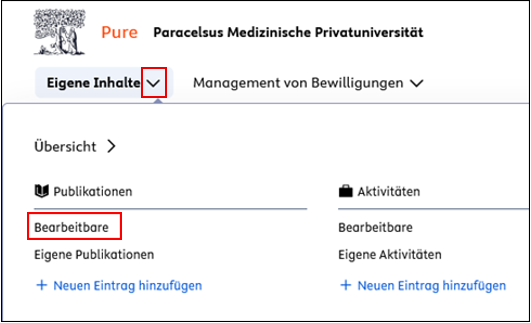
##### <span style="font-size: 10.0pt; font-family: 'Arial',sans-serif; mso-fareast-font-family: Arial;"><span style="mso-list: Ignore;">2.<span style="font: 7.0pt 'Times New Roman';"> </span></span></span><span style="font-size: 10.0pt; font-family: 'Arial',sans-serif;">Klicken Sie in der linken Seitenleiste auf das *Dreieck-Symbol* neben „*Eigene Inhalte“*, und <span style="mso-ligatures: none;">wählen Sie unter „*Publikationen“* den Punkt „*Bearbeitbare“* aus:</span></span>

[![FAQ12.png](https://wiki.pmu.ac.at/uploads/images/gallery/2025-07/scaled-1680-/7Vvfaq12.png)](https://wiki.pmu.ac.at/uploads/images/gallery/2025-07/7Vvfaq12.png)

##### <span style="font-size: 10.0pt; line-height: 107%; font-family: 'Arial',sans-serif; mso-fareast-font-family: Arial;"><span style="mso-list: Ignore;">3.<span style="font: 7.0pt 'Times New Roman';"> </span></span></span><span style="font-size: 10.0pt; line-height: 107%; font-family: 'Arial',sans-serif;">Sortieren Sie die Publikationen absteigend nach dem „*Erscheinungsjahr*“, damit die neuesten Publikationen (aktuelles Jahr: 2026) oben angezeigt werden.</span>

##### <span style="font-size: 10.0pt; font-family: 'Arial',sans-serif; mso-fareast-font-family: Arial;"><span style="mso-list: Ignore;">4.<span style="font: 7.0pt 'Times New Roman';"> </span></span></span><span style="font-size: 10.0pt; font-family: 'Arial',sans-serif;">Wählen Sie die gewünschte Publikation durch Anklicken aus, und Scrollen Sie nach unten zum Punkt „*Forschungsthemen“*.</span>

##### <span style="font-size: 10.0pt; font-family: 'Arial',sans-serif; mso-fareast-font-family: Arial;"><span style="mso-list: Ignore;">5.<span style="font: 7.0pt 'Times New Roman';"> </span></span></span><span style="font-size: 10.0pt; font-family: 'Arial',sans-serif;">Klicken Sie auf „*Forschungsthemen hinzufügen“* und </span><span style="font-size: 10.0pt; font-family: 'Arial',sans-serif; mso-fareast-font-family: 'Times New Roman';">suchen Sie ein oder mehrere passende Forschungsthemen aus und wählen Sie diese aus:</span>

[![FAQ13.png](https://wiki.pmu.ac.at/uploads/images/gallery/2025-07/scaled-1680-/rDLfaq13.png)](https://wiki.pmu.ac.at/uploads/images/gallery/2025-07/rDLfaq13.png)

<span style="font-size: 10.0pt; line-height: 107%; font-family: 'Arial',sans-serif; mso-fareast-font-family: Arial;"><span style="mso-list: Ignore;">6.<span style="font: 7.0pt 'Times New Roman';"> </span></span></span><span style="font-size: 10.0pt; line-height: 107%; font-family: 'Arial',sans-serif;">Klicken Sie auf *Speichern*.</span>

<p class="callout info"><span style="font-size: 10.0pt; line-height: 107%; font-family: 'Arial',sans-serif;">Ist eine Änderung an einer Publikation, die sicht **nicht** in der Kategorie ***"Bearbeitbare"*** findet nötig, melden Sie sich bitte beim Forschungsmanagment (FM) unter [**pure@pmu.ac.at.**](mailto:pure@pmu.ac.at)</span></p>

<span style="font-size: 10.0pt; line-height: 107%; font-family: 'Arial',sans-serif;">**<span style="font-size: 10.0pt; font-family: 'Arial',sans-serif; background: lightgrey; mso-highlight: lightgrey;">Für \*\*Pure-Editor\*innen\*\*:</span><span style="font-size: 10.0pt; line-height: 107%; font-family: 'Arial',sans-serif; mso-fareast-font-family: Arial;"><span style="mso-list: Ignore;"><span style="font-style: normal; font-variant: normal; font-stretch: normal; font-size: 7pt; line-height: normal; font-family: 'Times New Roman'; font-size-adjust: none; font-kerning: auto; font-optical-sizing: auto; font-language-override: normal; font-feature-settings: normal; font-variation-settings: normal;"> </span></span></span>**</span>

1. <span style="font-size: 10.0pt; line-height: 107%; font-family: 'Arial',sans-serif;"> Melden Sie sich in Pure ein (für Details siehe [FAQ 1](https://wiki.pmu.ac.at/books/pure-faqs-english/page/question-1-how-do-i-access-pure)).</span><span style="font-size: 10.0pt; line-height: 107%; font-family: 'Arial',sans-serif;">[](https://wiki.pmu.ac.at/books/pure-faqs/chapter/frage-1-wie-kann-ich-mich-in-pure-einloggen)</span>
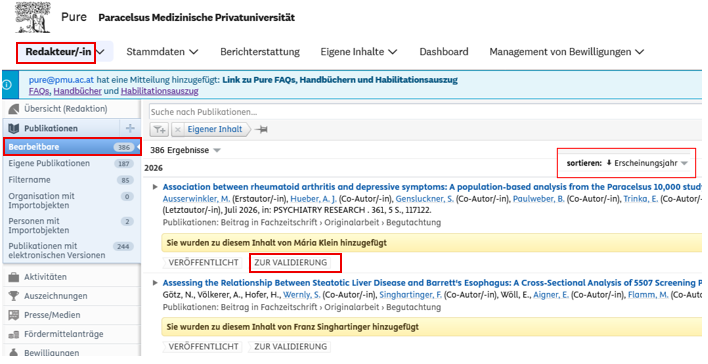
2. <span style="font-size: 10.0pt; font-family: 'Arial',sans-serif;">Klicken Sie in der linken Seitenleiste auf **„*Redakteur/-in“*** und </span><span style="font-size: 10.0pt; font-family: 'Arial',sans-serif; mso-fareast-font-family: 'Times New Roman'; mso-font-kerning: 0pt; mso-ligatures: none; mso-fareast-language: DE-AT;">wählen Sie unter **„*Publikationen“*** den Punkt **„*Bearbeitbare“*** aus, um alle von Ihnen bearbeitbaren Einträge anzuzeigen. </span><span style="font-size: 10.0pt; font-family: 'Arial',sans-serif;">Sortieren Sie die Publikationen **<span style="background: lightgrey; mso-highlight: lightgrey;">absteigend</span> nach dem „*Erscheinungsjahr“****,* damit die Publikationen <span style="background-color: rgb(241, 196, 15);">**aus dem Jahr 2026**</span> (aktuelles Jahr) oben angezeigt werden.</span> <span style="font-size: 10.0pt; font-family: 'Arial',sans-serif;">Bitte achten Sie darauf, allen Publikationen <span style="text-decoration: underline;">mit dem Workflow-Status **„Zur Validierung“**</span> ein oder mehrere Forschungsthemen zuzuordnen. Für Publikationen mit dem Workflow-Status „Validiert“ ist keine Forschungsthemenzuordnung erforderlich.</span>

[![grafik.png](https://wiki.pmu.ac.at/uploads/images/gallery/2026-05/scaled-1680-/Gwvgrafik.png)](https://wiki.pmu.ac.at/uploads/images/gallery/2026-05/Gwvgrafik.png)

<p class="callout info">Ist eine Änderung an einer Publikation mit dem Workflow-Status "**Validiert"** nötig, melden Sie sich bitte beim FM unter [**pure@pmu.ac.at.**](mailto:pure@pmu.ac.at)</p>


3.<span style="font-size: 10.0pt; font-family: 'Arial',sans-serif; mso-fareast-font-family: Arial;"><span style="mso-list: Ignore;"><span style="font: 7.0pt 'Times New Roman';"> **<span style="font-size: 10.0pt; line-height: 107%; font-family: 'Arial',sans-serif; mso-fareast-font-family: Aptos; mso-fareast-theme-font: minor-latin; mso-ansi-language: DE-AT; mso-fareast-language: EN-US; mso-bidi-language: AR-SA;">Ordnen</span>**</span></span></span>**<span style="font-size: 10.0pt; font-family: 'Arial',sans-serif;"> Sie </span>**<span style="font-size: 10.0pt; font-family: 'Arial',sans-serif;">der Publikation ein oder mehrere **Forschungsthemen zu:**</span>

<span style="font-size: 10.0pt; font-family: 'Arial',sans-serif; mso-fareast-font-family: Arial;"><span style="mso-list: Ignore;">1.<span style="font: 7.0pt 'Times New Roman';"> </span></span></span><span style="font-size: 10.0pt; font-family: 'Arial',sans-serif;">Wählen Sie die gewünschte Publikation durch Anklicken aus. </span>

<span style="font-size: 10.0pt; font-family: 'Arial',sans-serif; mso-fareast-font-family: Arial;"><span style="mso-list: Ignore;">2.<span style="font: 7.0pt 'Times New Roman';"> </span></span></span><span style="font-size: 10.0pt; font-family: 'Arial',sans-serif;">Scrollen Sie nach unten zum Abschnitt „*Forschungsthemen“*.</span>

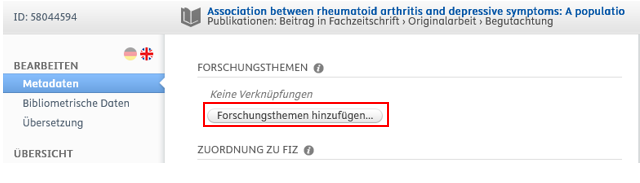
<span style="font-size: 10.0pt; font-family: 'Arial',sans-serif; mso-fareast-font-family: Arial;"><span style="mso-list: Ignore;">3.<span style="font: 7.0pt 'Times New Roman';"> </span></span></span><span style="font-size: 10.0pt; font-family: 'Arial',sans-serif;">Klicken Sie auf „*Forschungsthemen hinzufügen“.*</span>

<span style="font-size: 10.0pt; line-height: 107%; font-family: 'Arial',sans-serif; mso-fareast-font-family: Arial;"><span style="mso-list: Ignore;">4.<span style="font: 7.0pt 'Times New Roman';"> </span></span></span><span style="font-size: 10.0pt; line-height: 107%; font-family: 'Arial',sans-serif;">Suchen Sie ein oder mehrere inhaltlich passende Forschungsthemen aus und wählen Sie diese aus:</span>

[![grafik.png](https://wiki.pmu.ac.at/uploads/images/gallery/2026-05/scaled-1680-/A9Sgrafik.png)](https://wiki.pmu.ac.at/uploads/images/gallery/2026-05/A9Sgrafik.png)

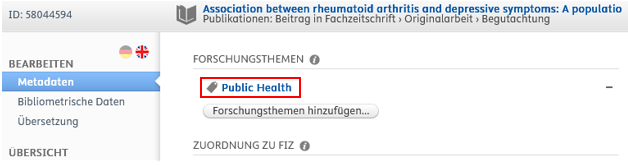
<span style="font-size: 10.0pt; line-height: 107%; font-family: 'Arial',sans-serif;">Beispielerweisen haben wir das Forschungsthema *Public <span style="mso-comment-continuation: 2;">Health</span>*<span style="mso-comment-continuation: 2;"><span class="MsoCommentReference"><span style="mso-ansi-font-size: 10.0pt; mso-bidi-font-size: 10.0pt; line-height: 107%;"></span></span></span><span class="MsoCommentReference"><span style="mso-ansi-font-size: 10.0pt; mso-bidi-font-size: 10.0pt; line-height: 107%;"></span></span> ausgewählt:</span>

<span style="mso-ignore: vglayout; position: absolute; z-index: 251669504; margin-left: 197px; margin-top: 84px; width: 102px; height: 21px;">  
</span><span style="mso-no-proof: yes;"></span>

[![grafik.png](https://wiki.pmu.ac.at/uploads/images/gallery/2026-05/scaled-1680-/mf1grafik.png)](https://wiki.pmu.ac.at/uploads/images/gallery/2026-05/mf1grafik.png)

<span style="font-size: 10.0pt; font-family: 'Arial',sans-serif; mso-fareast-font-family: Arial;"><span style="mso-list: Ignore;">4.<span style="font: 7.0pt 'Times New Roman';"> </span></span></span><span style="font-size: 10.0pt; font-family: 'Arial',sans-serif;">Klicken Sie auf **„*Speichern“*.**</span>

**<span style="font-size: 10.0pt; font-family: 'Arial',sans-serif;"> </span>**

**<span style="font-size: 10.0pt; font-family: 'Arial',sans-serif;">Achten Sie bitte darauf, dass der Workflow-Status „*Zur Validierung“* dabei <span style="background: red; mso-highlight: red;">nicht geändert wird</span><span style="background: red; mso-highlight: red;">:</span></span>**

<span style="mso-no-proof: yes;">![](https://wiki.pmu.ac.at/uploads/images/gallery/2026-05/embedded-image-cz7jjph2.png)</span>

<p class="callout warning">**<span style="font-size: 10.0pt; line-height: 107%; font-family: 'Arial',sans-serif;">Die Validierung (Prüfung) der Publikationen erfolgt immer durch das FM.</span>**</p>

<p class="callout success"><span style="font-size: 10.0pt; line-height: 107%; font-family: 'Arial',sans-serif;">Falls Ihre Frage hier nicht beantwortet wird, wenden Sie sich bitte an den Pure-Support unter </span>[<span style="font-size: 10.0pt; line-height: 107%; font-family: 'Arial',sans-serif;">pure@pmu.ac.at</span>](mailto:pure@pmu.ac.at)<span style="font-size: 10.0pt; line-height: 107%; font-family: 'Arial',sans-serif;">.</span></p>

<span style="font-size: 10.0pt; line-height: 107%; font-family: 'Arial',sans-serif;">  
</span>

# Frage 7: Wie kann ich eine Publikation einem FIZ* zuordnen?

<span lang="EN-GB" style="font-size: 10.0pt; line-height: 107%; font-family: 'Arial',sans-serif; mso-ansi-language: EN-GB;">\*FIZ steht für</span>**<span lang="EN-GB" style="font-size: 10.0pt; line-height: 107%; font-family: 'Arial',sans-serif; mso-ansi-language: EN-GB;"> </span>**<span style="font-size: 10.0pt; line-height: 107%; font-family: 'Arial',sans-serif;">Forschungs- und Innovationszentren</span>

<p class="callout info"><span style="font-size: 10.0pt; line-height: 107%; font-family: 'Arial',sans-serif;">Es ist erforderlich, einer Publikation einem FIZ zuzuordnen, sofern die Publikation im Zuge eines **konsortialen Projektes** des FIZ *Regenerative Medizin &amp; Novel Therapies (RM &amp; NT)* oder des FIZ *Public Health &amp; Versorgungsforschung (PH &amp; VF)* entstanden ist (mehr Information finden Sie auf der </span>[<span style="font-size: 10.0pt; line-height: 107%; font-family: 'Arial',sans-serif;">PMU-Website</span>](https://www.pmu.ac.at/forschung-innovation/forschungsservices/weitere-serviceleistungen/forschungs-und-innovationszentren)<span style="font-size: 10.0pt; line-height: 107%; font-family: 'Arial',sans-serif;">).</span></p>

<span style="font-size: 10.0pt; line-height: 107%; font-family: 'Arial',sans-serif;">Falls die Autor\*innen ein FIZ in der **Affiliation** in der Publikation angegeben haben, erfolgt die Zuordnung des FIZes über das Forschungsmanagement während des Validierungsprozesses.</span>

**<span style="font-size: 10.0pt; line-height: 107%; font-family: 'Arial',sans-serif; background: lightgrey; mso-highlight: lightgrey;">Für *\*\*Forscher\*innen\*\*:*</span>**

<p class="callout warning"><span style="font-size: 10.0pt; line-height: 107%; font-family: 'Arial',sans-serif;">Eine Zuordnung zu einem FIZ ist solange möglich, bis sich die Publikation in der Kategorie *„**Bearbeitbare**“* findet. Sobald die Publikation **nicht in dieser Kategorie** erscheint, können Forscher\*innen **keine Änderung mehr** an der Publikation vornehmen. In diesem Fall bitte die zuständige PURE-Editor\*in oder das Forschungsmanagement unter </span>[**<span style="font-size: 10.0pt; line-height: 107%; font-family: 'Arial',sans-serif;">pure@pmu.ac.at</span>**](mailto:pure@pmu.ac.at)<span style="font-size: 10.0pt; line-height: 107%; font-family: 'Arial',sans-serif;"> kontaktieren.</span></p>

<span style="font-size: 10.0pt; line-height: 107%; font-family: 'Arial',sans-serif;">Für Publikationen aus der Kategorie „*Bearbeitbare*“: </span>

##### <span style="font-size: 10.0pt; line-height: 107%; font-family: 'Arial',sans-serif; mso-fareast-font-family: Arial;"><span style="mso-list: Ignore;">1.<span style="font: 7.0pt 'Times New Roman';"> </span></span></span><span style="font-size: 10.0pt; line-height: 107%; font-family: 'Arial',sans-serif;">Melden Sie sich in PURE ein (für Details siehe [Frage 1](https://wiki.pmu.ac.at/books/pure-faqs/chapter/frage-1-wie-kann-ich-mich-in-pure-einloggen)). </span>

##### <span style="font-size: 10.0pt; font-family: 'Arial',sans-serif; mso-fareast-font-family: Arial;"><span style="mso-list: Ignore;">2.<span style="font: 7.0pt 'Times New Roman';"> </span></span></span><span style="font-size: 10.0pt; font-family: 'Arial',sans-serif;">Klicken Sie in der linken Seitenleiste auf das *Dreieck-Symbol* neben „*Eigene Inhalte“*, und <span style="mso-ligatures: none;">wählen Sie unter „*Publikationen“* den Punkt „*Bearbeitbare“* aus:</span></span>

[![FAQ12.png](https://wiki.pmu.ac.at/uploads/images/gallery/2025-07/scaled-1680-/7Vvfaq12.png)](https://wiki.pmu.ac.at/uploads/images/gallery/2025-07/7Vvfaq12.png)

<span style="font-size: 10.0pt; font-family: 'Arial',sans-serif; mso-fareast-font-family: Arial;"><span style="mso-list: Ignore;"> 3.<span style="font: 7.0pt 'Times New Roman';"> </span></span></span><span style="font-size: 10.0pt; font-family: 'Arial',sans-serif;">Wählen Sie die gewünschte Publikation durch Anklicken aus, und Scrollen Sie nach unten zum Punkt *„Zuordnung zu FIZ“*.</span>

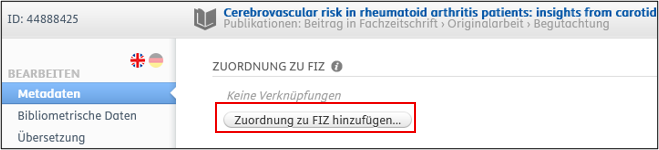
<span style="font-size: 10.0pt; font-family: 'Arial',sans-serif; mso-fareast-font-family: Arial;"><span style="mso-list: Ignore;"> 4.<span style="font: 7.0pt 'Times New Roman';"> </span></span></span><span style="font-size: 10.0pt; font-family: 'Arial',sans-serif;">Klicken Sie auf *„Zuordnung zu FIZ hinzufügen“* und wählen Sie **<span style="color: #ee0000;">eine passende Kategorie</span>**<span style="color: #ee0000;"> </span>aus der Liste aus:</span>

- - <span style="font-size: 10.0pt; font-family: 'Arial',sans-serif;">FIZ Regenerative Medizin &amp; Novel Therapies</span>
    - <span style="font-size: 10.0pt; font-family: 'Arial',sans-serif;">FIZ Public Health &amp; Versorgungsforschung</span>
    - <span style="font-size: 10.0pt; font-family: 'Arial',sans-serif;">Publikation außerhalb eines FIZ – für Publikationen, die **zu keinem FIZ** gehören </span>

[![FAQ17.png](https://wiki.pmu.ac.at/uploads/images/gallery/2025-07/scaled-1680-/faq17.png)](https://wiki.pmu.ac.at/uploads/images/gallery/2025-07/faq17.png)

<span style="font-size: 10.0pt; line-height: 107%; font-family: 'Arial',sans-serif; mso-fareast-font-family: Arial;"><span style="mso-list: Ignore;">5.<span style="font: 7.0pt 'Times New Roman';"> </span></span></span><span style="font-size: 10.0pt; line-height: 107%; font-family: 'Arial',sans-serif;">Klicken Sie auf „*Speichern“*.</span>

***<span style="font-size: 10.0pt; font-family: 'Arial',sans-serif; background: lightgrey; mso-highlight: lightgrey;">Für \*\*PURE-Editor\*innen\*\*:</span>***

<p class="callout warning"><span style="font-size: 10.0pt; line-height: 107%; font-family: 'Arial',sans-serif;">Eine Zuordnung zu einem FIZ ist solange möglich, bis sich die Publikation in der Kategorie ***„Bearbeitbare“*** befindet. Sobald die Publikation **nicht mehr in dieser Kategorie erscheint**, ist für die Betreuung (inklusive der Zuordnung zu einem FIZ) **eine andere PURE-Editor\*in zuständig**. Ist eine Änderung dennoch nötig, melden Sie sich bitte beim Forschungsmanagement unter <pure@pmu.ac.at>.</span></p>

<span style="font-size: 10.0pt; line-height: 107%; font-family: 'Arial',sans-serif;">Für Publikationen aus Kategorie *„Bearbeitbare*“:</span>

<span style="font-size: 10.0pt; line-height: 107%; font-family: 'Arial',sans-serif;"> 1. Melden Sie sich in PURE ein (für Details siehe [Frage 1](https://wiki.pmu.ac.at/books/pure-faqs/chapter/frage-1-wie-kann-ich-mich-in-pure-einloggen)). </span>

<span style="font-size: 10.0pt; font-family: 'Arial',sans-serif;"> 2. Klicken Sie in der linken Seitenleiste auf „*Redakteur/-in“* und </span><span style="font-size: 10.0pt; font-family: 'Arial',sans-serif; mso-fareast-font-family: 'Times New Roman'; mso-ligatures: none; mso-fareast-language: DE-AT;">wählen Sie unter „*Publikationen“* den Punkt „*Bearbeitbare“* aus:</span>

[![FAQ14.png](https://wiki.pmu.ac.at/uploads/images/gallery/2025-07/scaled-1680-/LlWfaq14.png)](https://wiki.pmu.ac.at/uploads/images/gallery/2025-07/LlWfaq14.png)

<span style="font-size: 10.0pt; font-family: 'Arial',sans-serif; mso-fareast-font-family: Arial;"><span style="mso-list: Ignore;"> 3.<span style="font: 7.0pt 'Times New Roman';"> </span></span></span><span style="font-size: 10.0pt; font-family: 'Arial',sans-serif;">Wählen Sie die gewünschte Publikation durch Anklicken aus, und Scrollen Sie nach unten zum Punkt *„Zuordnung zu FIZ“*.</span>

<span style="font-size: 10.0pt; font-family: 'Arial',sans-serif; mso-fareast-font-family: Arial;"><span style="mso-list: Ignore;"> 4.<span style="font: 7.0pt 'Times New Roman';"> </span></span></span><span style="font-size: 10.0pt; font-family: 'Arial',sans-serif;">Klicken Sie auf *„Zuordnung zu FIZ hinzufügen“* und wählen Sie **<span style="color: #ee0000;">eine passende Kategorie</span>**<span style="color: #ee0000;"> </span>aus der Liste aus:</span>

<span style="font-size: 10.0pt; font-family: Symbol; mso-fareast-font-family: Symbol; mso-bidi-font-family: Symbol;"><span style="mso-list: Ignore;">·<span style="font: 7.0pt 'Times New Roman';"> </span></span></span><span style="font-size: 10.0pt; font-family: 'Arial',sans-serif;">FIZ Regenerative Medizin &amp; Novel Therapies</span>

<span style="font-size: 10.0pt; font-family: Symbol; mso-fareast-font-family: Symbol; mso-bidi-font-family: Symbol;"><span style="mso-list: Ignore;">·<span style="font: 7.0pt 'Times New Roman';"> </span></span></span><span style="font-size: 10.0pt; font-family: 'Arial',sans-serif;">FIZ Public Health &amp; Versorgungsforschung</span>

<span style="font-size: 10.0pt; font-family: Symbol; mso-fareast-font-family: Symbol; mso-bidi-font-family: Symbol;"><span style="mso-list: Ignore;">·<span style="font: 7.0pt 'Times New Roman';"> </span></span></span><span style="font-size: 10.0pt; font-family: 'Arial',sans-serif;">Publikation außerhalb eines FIZ – für Publikationen, die **zu keinem FIZ** gehören </span>

[![FAQ17.png](https://wiki.pmu.ac.at/uploads/images/gallery/2025-07/scaled-1680-/faq17.png)](https://wiki.pmu.ac.at/uploads/images/gallery/2025-07/faq17.png)

<span style="font-size: 10.0pt; line-height: 107%; font-family: 'Arial',sans-serif; mso-fareast-font-family: Arial;"><span style="mso-list: Ignore;"> 5.<span style="font: 7.0pt 'Times New Roman';"> </span></span></span><span style="font-size: 10.0pt; line-height: 107%; font-family: 'Arial',sans-serif;">Klicken Sie auf „*Speichern“*.</span>

<p class="callout danger"><span style="font-size: 10pt; line-height: 107%; font-family: 'Arial', sans-serif; background-position: 0% 0%; background-repeat: repeat; background-attachment: scroll; background-image: none; background-size: auto; background-origin: padding-box; background-clip: border-box;">Achten Sie bitte darauf, dass der Workflow-Status „*Zur Validierung“* dabei **nicht geändert wird**</span><span style="font-size: 10.0pt; line-height: 107%; font-family: 'Arial',sans-serif;">. </span></p>


[![grafik.png](https://wiki.pmu.ac.at/uploads/images/gallery/2025-07/scaled-1680-/grafik.png)](https://wiki.pmu.ac.at/uploads/images/gallery/2025-07/grafik.png)

<span style="font-size: 10.0pt; font-family: 'Arial',sans-serif;">Im nächsten Schritt wird die Publikation vom Forschungsmanagement validiert (überprüft).</span>

<p class="callout success"><span style="font-size: 10.0pt; line-height: 107%; font-family: 'Arial',sans-serif;">Falls Ihre Frage hier nicht beantwortet wird, wenden Sie sich bitte an den PURE-Support unter </span>[<span style="font-size: 10.0pt; line-height: 107%; font-family: 'Arial',sans-serif;">pure@pmu.ac.at</span>](mailto:pure@pmu.ac.at)<span style="font-size: 10.0pt; line-height: 107%; font-family: 'Arial',sans-serif;">.</span></p>