# PURE Login and First Steps

This handbook is intended for all users, including researchers, PURE editors, and editors from the teaching hospitals of PMU.  
It provides guidance on accessing PURE and managing profile settings.

# 1. Login to your profile

# 1. Login to your profile

<span lang="EN-GB" style="font-family: 'Arial',sans-serif; mso-ansi-language: EN-GB;">Users with a **@pmu.ac.at** e-mail address can log in to PURE directly via </span>[<span lang="EN-GB" style="font-family: 'Arial',sans-serif; mso-ansi-language: EN-GB;">https://my.pmu.ac.at/</span>](https://my.pmu.ac.at/)<span lang="EN-GB" style="font-family: 'Arial',sans-serif; mso-ansi-language: EN-GB;"> by clicking on the PURE icon.</span>

<span lang="EN-GB" style="font-family: 'Arial',sans-serif; mso-ansi-language: EN-GB;">Users with a **@salk.at** or **@klinikum-nuernberg.de** e-mail addresses can log in via the following link: </span>[<span lang="EN-GB" style="font-family: 'Arial',sans-serif; mso-ansi-language: EN-GB;">https://pure.pmu.ac.at/admin/login.xhtml</span>](https://pure.pmu.ac.at/admin/login.xhtml)<span lang="EN-GB" style="font-family: 'Arial',sans-serif; mso-ansi-language: EN-GB;">.  
</span>

<span lang="EN-GB" style="font-family: 'Arial',sans-serif; mso-ansi-language: EN-GB;"> </span>

<span lang="EN-GB" style="font-family: 'Arial',sans-serif; mso-ansi-language: EN-GB;">After the first successful login, you will see this message:</span>

<span style="mso-no-proof: yes;">![Ein Bild, das Text, Screenshot, Schrift enthält.

KI-generierte Inhalte können fehlerhaft sein.](https://wiki.pmu.ac.at/uploads/images/gallery/2025-09/embedded-image-uko1trkw.png)</span>

<p class="callout warning">**<span lang="EN-GB" style="font-family: 'Arial',sans-serif; color: black; mso-themecolor: text1; mso-style-textoutline-type: none; mso-style-textoutline-outlinestyle-dpiwidth: .75pt; mso-style-textoutline-outlinestyle-linecap: round; mso-style-textoutline-outlinestyle-join: bevel; mso-style-textoutline-outlinestyle-pctmiterlimit: 0%; mso-style-textoutline-outlinestyle-dash: solid; mso-style-textoutline-outlinestyle-align: center; mso-style-textoutline-outlinestyle-compound: simple; mso-ansi-language: EN-GB;"> </span><span lang="EN-GB" style="font-family: 'Arial',sans-serif; color: black; mso-themecolor: text1; mso-style-textoutline-type: none; mso-style-textoutline-outlinestyle-dpiwidth: .75pt; mso-style-textoutline-outlinestyle-linecap: round; mso-style-textoutline-outlinestyle-join: bevel; mso-style-textoutline-outlinestyle-pctmiterlimit: 0%; mso-style-textoutline-outlinestyle-dash: solid; mso-style-textoutline-outlinestyle-align: center; mso-style-textoutline-outlinestyle-compound: simple; mso-ansi-language: EN-GB;">Popu</span><span style="color: rgb(0, 0, 0);"><span lang="EN-GB" style="font-family: 'Arial',sans-serif; mso-style-textoutline-type: none; mso-style-textoutline-outlinestyle-dpiwidth: .75pt; mso-style-textoutline-outlinestyle-linecap: round; mso-style-textoutline-outlinestyle-join: bevel; mso-style-textoutline-outlinestyle-pctmiterlimit: 0%; mso-style-textoutline-outlinestyle-dash: solid; mso-style-textoutline-outlinestyle-align: center; mso-style-textoutline-outlinestyle-compound: simple; mso-ansi-language: EN-GB;">p blocke</span></span><span style="color: rgb(0, 0, 0);"><span lang="EN-GB" style="font-family: 'Arial',sans-serif; mso-style-textoutline-type: none; mso-style-textoutline-outlinestyle-dpiwidth: .75pt; mso-style-textoutline-outlinestyle-linecap: round; mso-style-textoutline-outlinestyle-join: bevel; mso-style-textoutline-outlinestyle-pctmiterlimit: 0%; mso-style-textoutline-outlinestyle-dash: solid; mso-style-textoutline-outlinestyle-align: center; mso-style-textoutline-outlinestyle-compound: simple; mso-ansi-language: EN-GB;">r</span><span lang="EN-GB" style="font-family: 'Arial',sans-serif; mso-style-textoutline-type: none; mso-style-textoutline-outlinestyle-dpiwidth: .75pt; mso-style-textoutline-outlinestyle-linecap: round; mso-style-textoutline-outlinestyle-join: bevel; mso-style-textoutline-outlinestyle-pctmiterlimit: 0%; mso-style-textoutline-outlinestyle-dash: solid; mso-style-textoutline-outlinestyle-align: center; mso-style-textoutline-outlinestyle-compound: simple; mso-ansi-language: EN-GB;">s</span></span>**<span lang="EN-GB" style="font-family: 'Arial',sans-serif; mso-style-textoutline-type: none; mso-style-textoutline-outlinestyle-dpiwidth: .75pt; mso-style-textoutline-outlinestyle-linecap: round; mso-style-textoutline-outlinestyle-join: bevel; mso-style-textoutline-outlinestyle-pctmiterlimit: 0%; mso-style-textoutline-outlinestyle-dash: solid; mso-style-textoutline-outlinestyle-align: center; mso-style-textoutline-outlinestyle-compound: simple; mso-ansi-language: EN-GB;"> can block editor windows of PURE; therefore, it is recommended to **disable** your pop-up blocker</span><span lang="EN-GB" style="font-size: 12.0pt; mso-bidi-font-size: 11.0pt; line-height: 107%; font-family: 'Arial',sans-serif; mso-bidi-font-family: 'Times New Roman'; mso-bidi-theme-font: minor-bidi; mso-ansi-language: EN-GB;">.</span></p>

<span lang="EN-GB" style="font-family: 'Arial',sans-serif; mso-ansi-language: EN-GB;"> </span>

<span lang="EN-GB" style="font-family: 'Arial',sans-serif; mso-ansi-language: EN-GB;">If you cannot log in, please contact Research Management at </span>[<span lang="EN-GB" style="font-family: 'Arial',sans-serif; mso-ansi-language: EN-GB;">pure@pmu.ac.at</span>](mailto:pure@pmu.ac.at)<span style="font-family: 'Arial',sans-serif; mso-ansi-language: EN-GB;"> <span lang="EN-GB">for assistance.</span></span>

# 2. Manage your profile

<p class="callout warning">**Important for PURE-editors**    
Please do not change any notification settings for emails, notifications, and tasks connected to the workflows (in the *Editorial tasks* category) of research outputs, applications, awards, and persons.  
</p>

# FAQs

# FAQS

# 2.1.	E-Mail Settings

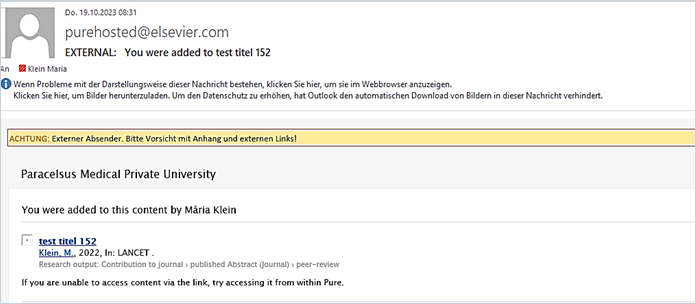
<span lang="EN-GB" style="font-family: 'Arial',sans-serif; mso-ansi-language: EN-GB;">PURE email notifications will be sent to the email address you used to log in. For example, as a researcher, you got an email when a new publication is added to your profile. </span>

<span lang="EN-GB" style="font-family: 'Arial',sans-serif; mso-ansi-language: EN-GB;">Here is an example of an email:</span>

<span style="font-family: 'Arial',sans-serif; mso-fareast-language: DE-AT; mso-no-proof: yes;">![](https://wiki.pmu.ac.at/uploads/images/gallery/2025-09/embedded-image-4lp70ymt.png)</span>

<span lang="EN-GB" style="font-family: 'Arial',sans-serif; mso-ansi-language: EN-GB;"> </span>

<u><span lang="EN-GB" style="font-family: 'Arial',sans-serif; mso-ansi-language: EN-GB;">To manage the email settings:</span></u>

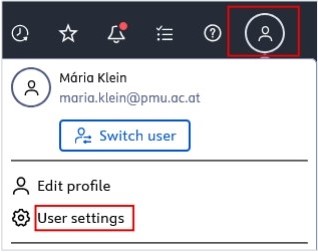
<span lang="EN-GB" style="font-family: 'Arial',sans-serif; mso-fareast-font-family: Arial; mso-ansi-language: EN-GB;"><span style="mso-list: Ignore;">1.<span style="font: 7.0pt 'Times New Roman';"> </span></span></span><span lang="EN-GB" style="font-family: 'Arial',sans-serif; mso-ansi-language: EN-GB;">Click on *Profile menu* in the header and select *User settings*:</span>

[![Bild 1.jpeg](https://wiki.pmu.ac.at/uploads/images/gallery/2025-09/scaled-1680-/bild-1.jpeg)](https://wiki.pmu.ac.at/uploads/images/gallery/2025-09/bild-1.jpeg)

<span style="mso-ignore: vglayout; position: absolute; z-index: 251709440; margin-left: 291px; margin-top: 128px; width: 92px; height: 64px;">  
</span><span style="mso-ignore: vglayout; position: absolute; z-index: 251683840; margin-left: 50px; margin-top: 377px; width: 126px; height: 34px;">  
</span><span style="mso-no-proof: yes;"></span>

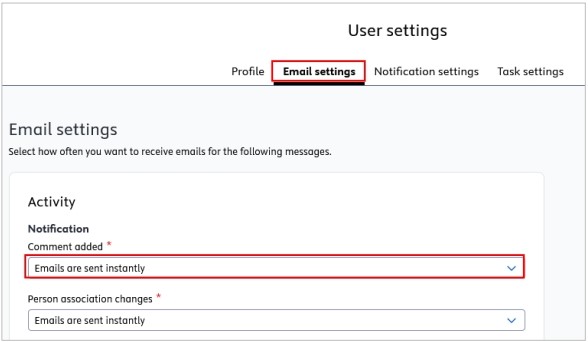
<span lang="EN-GB" style="font-family: 'Arial',sans-serif; mso-fareast-font-family: Arial; mso-ansi-language: EN-GB;"><span style="mso-list: Ignore;">2.<span style="font: 7.0pt 'Times New Roman';"> </span></span></span><span lang="EN-GB" style="font-family: 'Arial',sans-serif; mso-ansi-language: EN-GB;">Navigate to *E-mail Settings* and select the event(s) you wish to modify. </span>

<span lang="EN-GB" style="font-family: 'Arial',sans-serif; mso-fareast-font-family: Arial; mso-ansi-language: EN-GB;"><span style="mso-list: Ignore;">3.<span style="font: 7.0pt 'Times New Roman';"> </span></span></span><span lang="EN-GB" style="font-family: 'Arial',sans-serif; mso-ansi-language: EN-GB;">Select the desired frequency.</span>

[![Bild 2.jpeg](https://wiki.pmu.ac.at/uploads/images/gallery/2025-09/scaled-1680-/bild-2.jpeg)](https://wiki.pmu.ac.at/uploads/images/gallery/2025-09/bild-2.jpeg)

<span style="mso-ignore: vglayout; position: absolute; z-index: 251675648; margin-left: 40px; margin-top: 533px; width: 683px; height: 34px;">  
</span><span style="mso-ignore: vglayout; position: absolute; z-index: 251706368; margin-left: 377px; margin-top: 268px; width: 129px; height: 31px;">  
</span><span style="mso-no-proof: yes;"></span>

<span lang="EN-GB" style="font-family: 'Arial',sans-serif; mso-fareast-font-family: Arial; mso-ansi-language: EN-GB;"><span style="mso-list: Ignore;">4.<span style="font: 7.0pt 'Times New Roman';"> </span></span></span><span lang="EN-GB" style="font-family: 'Arial',sans-serif; mso-ansi-language: EN-GB;">Click *Save* to apply the changes.</span>