
Question 6: How can I assign research topic(s) to a publication?
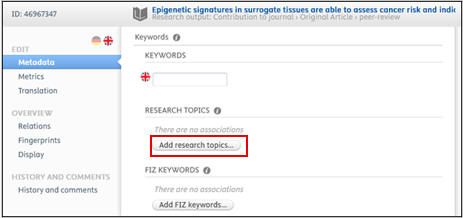
The assignment is immediately possible when creating new publications for both researchers and PURE editors. In this case, just click on the ‘Add research topics’, and select one or more suitable research topics.
Please assign research topics for the following publication from publication year 2025 onwards: Original article, review article, case report, letter to the editor, editorial, short comment/notes, book, book chapter.
For other categories, such as abstracts, corrections or publications in which only PMU teaching hospitals are involved as internal organizations, no topic assignment is required.required (though it is possible if you wish).
For **Researchers**:
Assignment to research topics is possible as long as the publication remains in the ‘Editable‘ category. Once the publication no longer appears in this category, researchers can no longer make any changes. In such cases, please contact the responsible PURE editor or the Research Management team at pure@pmu.ac.at.
For publications in the ‘Editable‘ category:
1. Log in to PURE (for details see Question 1).
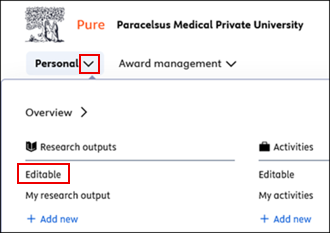
2. Click on the triangle icon next to ‘Personal’, then select ‘Editable’ under ‘Research outputs’:
3. Sort the publications in descending order by ‘Publication year’ so that the most recent ones (recent year: 2026) appear at the top.
4. Select the desired publication by clicking on it und scroll down to the ‘Research topics’ section.
5. Click on ‘Add research topics’, and search for one or more suitable research topics, and select them:
6. Click on ‘Save’.
If a change needs to be made to a publication that is not listed in the "Editable" category, please contact the FM at pure@pmu.ac.at.
Further details on the research topics are provided in the Handbook for Researchers.
For **PUREPure editors**:
Assignment
to research topics is possible as long as the publication remains in the ‘Editable‘ category. Once the publication no longer appears in this category, another PURE editor becomes responsible for its management (including assignment to research topics). Should a change still be necessary, please contact Research Management at pure@pmu.ac.at.
For publications in the ‘Editable‘ category:
1.
2.
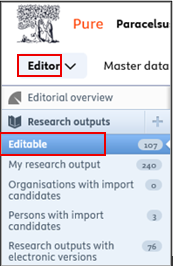
3.“Publications” to view all entries you can edit. Sort the publications in descending order by ‘“Publication year’ear” so that the most recent ones (recent year: 2026) appear at the top.Please make sure to assign one or more research topics to all publications with the workflow status “For Validation.” Publications that have already been assigned research topics have the status “Validated.”
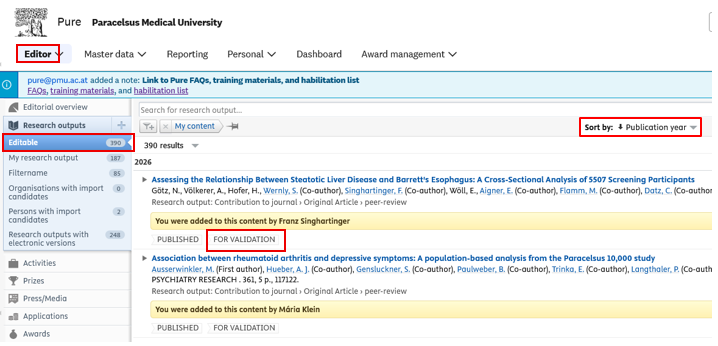
If a change needs to be made to a publication with the workflow status “Validated,” please contact the FM at pure@pmu.ac.at.
4.3. Assign one or more research topics to the publication:
- Select the desired publication by clicking on
itit. - Scroll down to the ‘Research
topicstopics’’section. - Click on ‘Add research topics’
,. - Search for one or more suitable research
topics,topics and select them:
5. and search
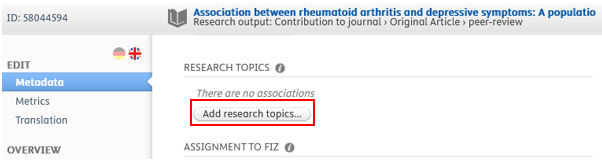
For example, we have chosen the research topic Public Health:
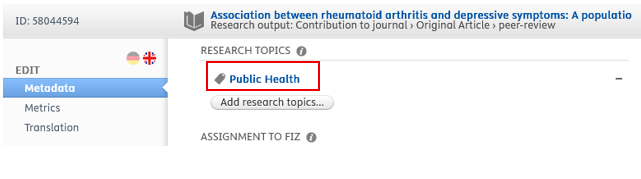
6.4. Click on ‘Save’.
Please ensure that the workflow status ‘For validation’ is not changedchanged::


InThe the next step, the publication will be validatedvalidation (checked)review) of publications is always carried out by the Research Management.FM.
If you don’t see your question answered here, or have suggestions for additional questions/answers, please contact pure support at pure@pmu.ac.at.